

We’re excited to announce the release of Grow CRM version 3.1, our most feature-packed update yet! This release brings a wealth of enhancements designed to make your daily operations smoother, your invoicing more flexible, and your workflow automation more powerful.
Building on Grow CRM’s foundation as a comprehensive, self-hosted business management platform, version 3.1 introduces major improvements across timesheets, contracts, invoicing, and products—along with numerous quality-of-life enhancements that will save you time every single day.
Whether you’re a freelancer managing a handful of clients or a growing agency juggling multiple projects, version 3.1 has something that will make your work easier and more efficient.
Major Feature Enhancements
Time Tracking & Timesheets
Record Multiple Timesheet Entries in One Session
Time tracking just got significantly more efficient. Version 3.1 introduces the ability to record an unlimited number of timesheet records in a single session, revolutionizing how you and your team log work hours.
Key capabilities:
- Record time for multiple team members without switching sessions
- Log hours across different projects and tasks simultaneously
- Perfect for team leaders who need to batch-enter time on behalf of their team
- Streamlined workflow that reduces administrative overhead
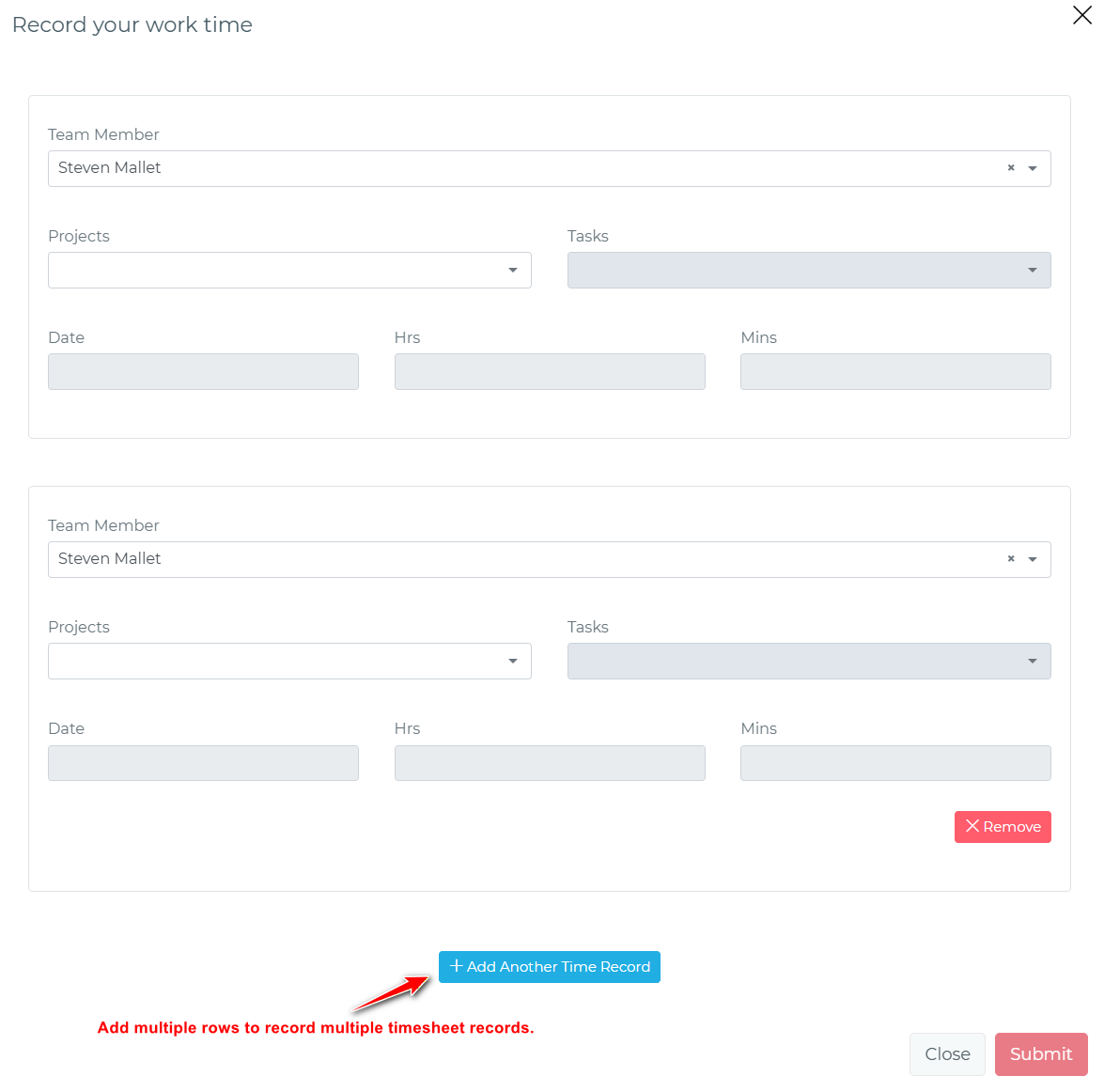
This feature is particularly valuable for agencies and teams that need to reconcile time at the end of the day or week, allowing you to process multiple entries quickly and accurately.
Contracts & Document Management
Client Custom Fields in Contract Documents
Create more personalized and comprehensive contracts by incorporating custom client data directly into your contract documents. This extends beyond standard client fields to include any custom fields you’ve defined for your clients.
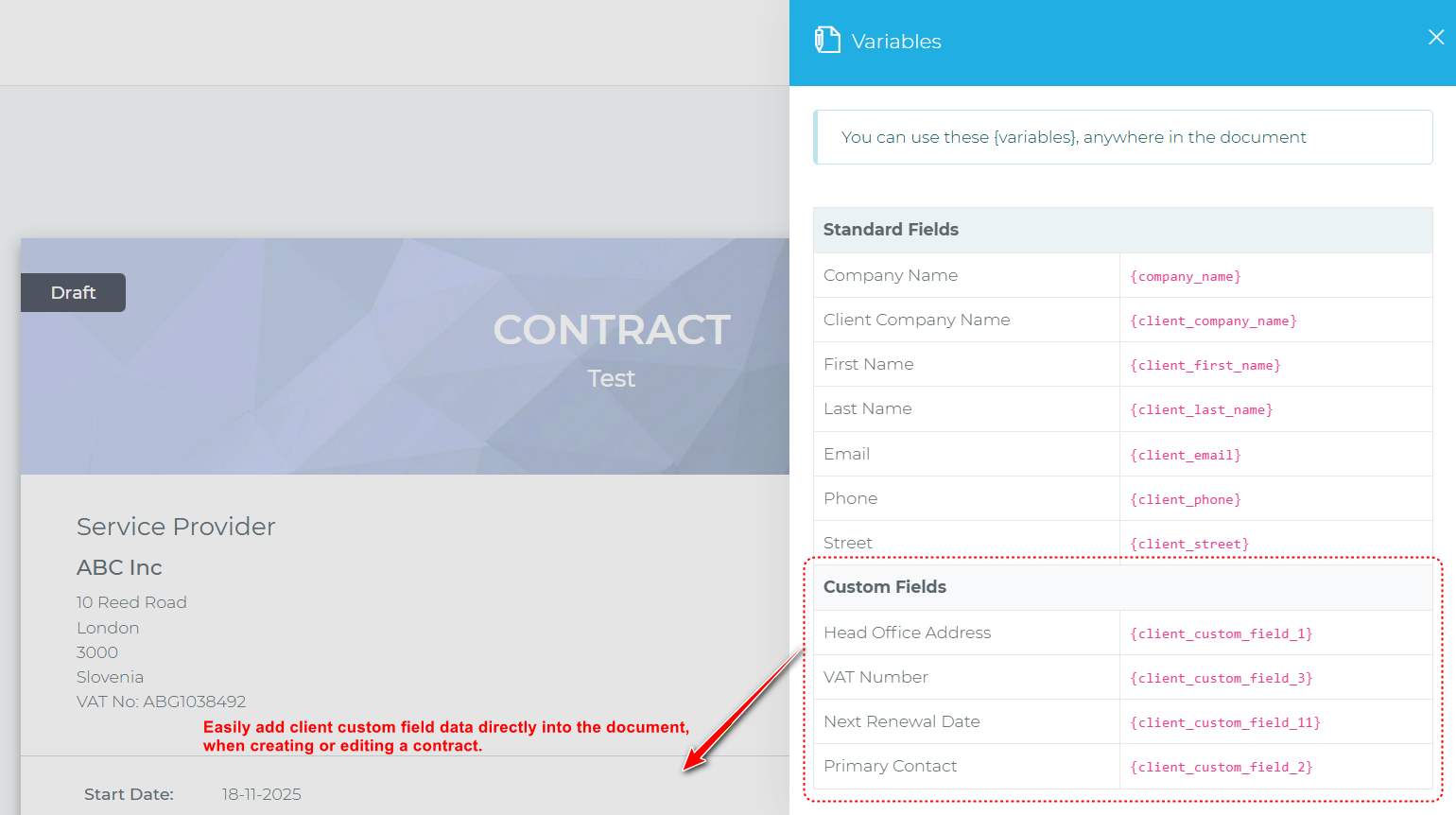
Whether you track specific industry information, compliance data, or unique client attributes, you can now seamlessly integrate this information into your professional contracts.
In-Person Client Contract Signing
Say goodbye to awkward waiting periods when clients are already in your office. Version 3.1 introduces in-person contract signing, allowing clients who are physically present to sign contracts immediately on your computer—no email waiting, no dashboard login required.
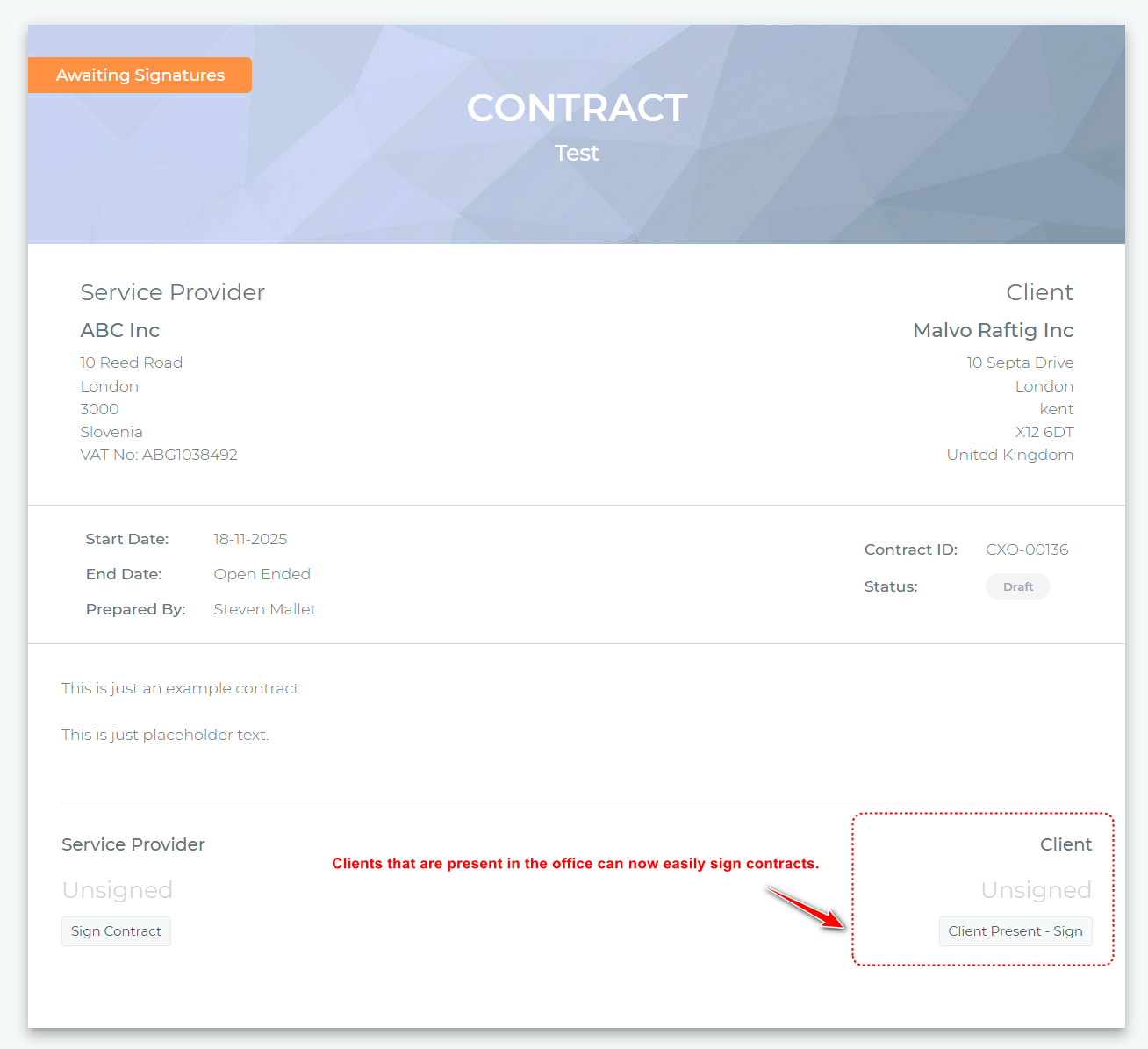
This feature dramatically improves the client experience during face-to-face meetings and helps you close deals faster by removing unnecessary friction from the signing process.
Contracts Automation
Take your contract workflow to the next level with powerful automation rules that trigger actions immediately after a contract is signed.
Available automation options:
- Automatically create projects based on contract terms
- Generate tasks to kick off the work immediately
- Create invoices for initial payments or milestones
- Configure automation rules on a per-contract basis for maximum flexibility
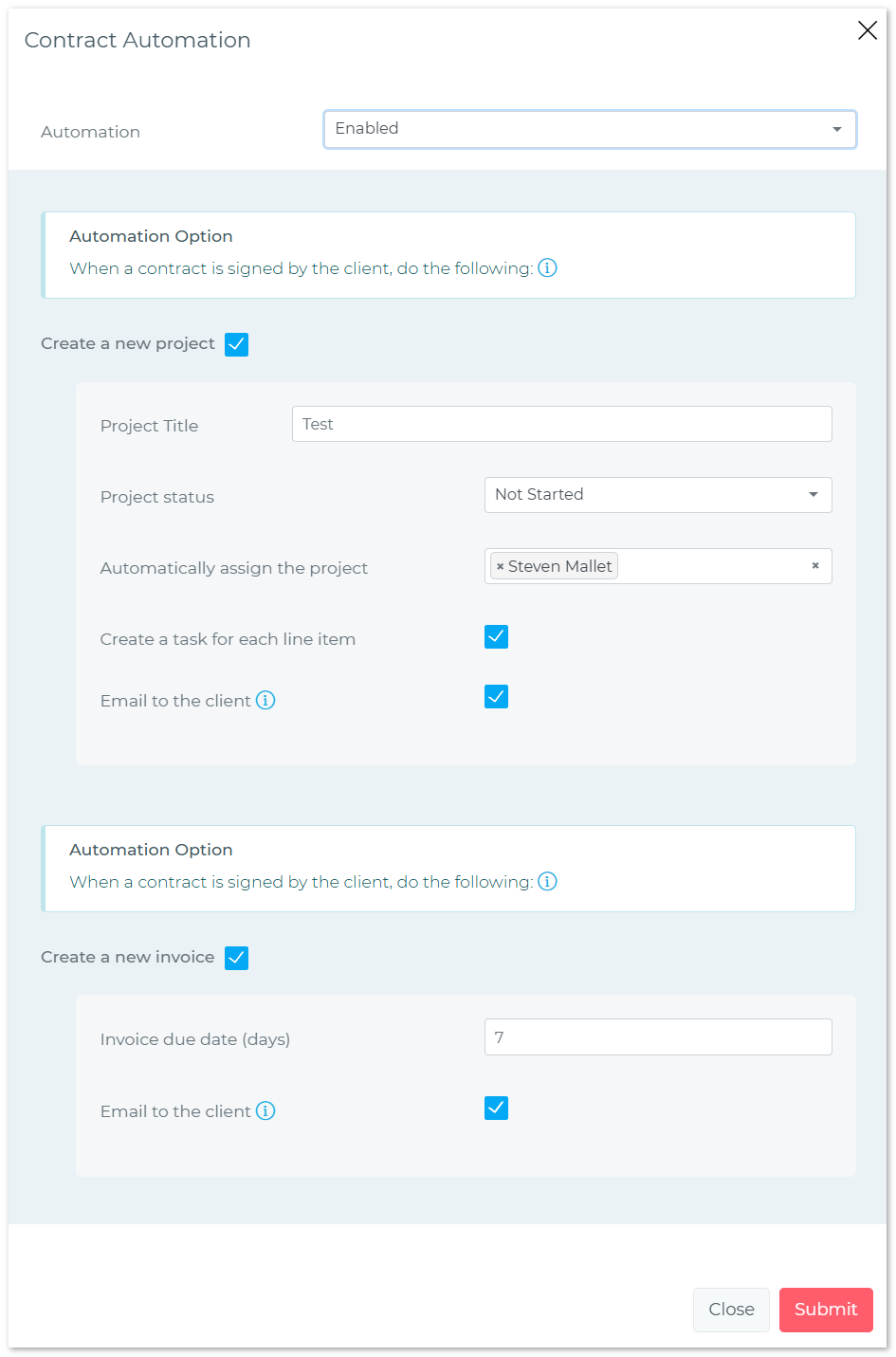
This automation eliminates manual post-signing work and ensures that your team can start delivering value to clients immediately after contracts are executed.
Invoicing & Billing Enhancements
Per-Client Automatic Invoice Due Dates
Different clients often have different payment terms. Version 3.1 allows you to set default invoice due dates on a client-by-client basis, with automatic application when creating new invoices.
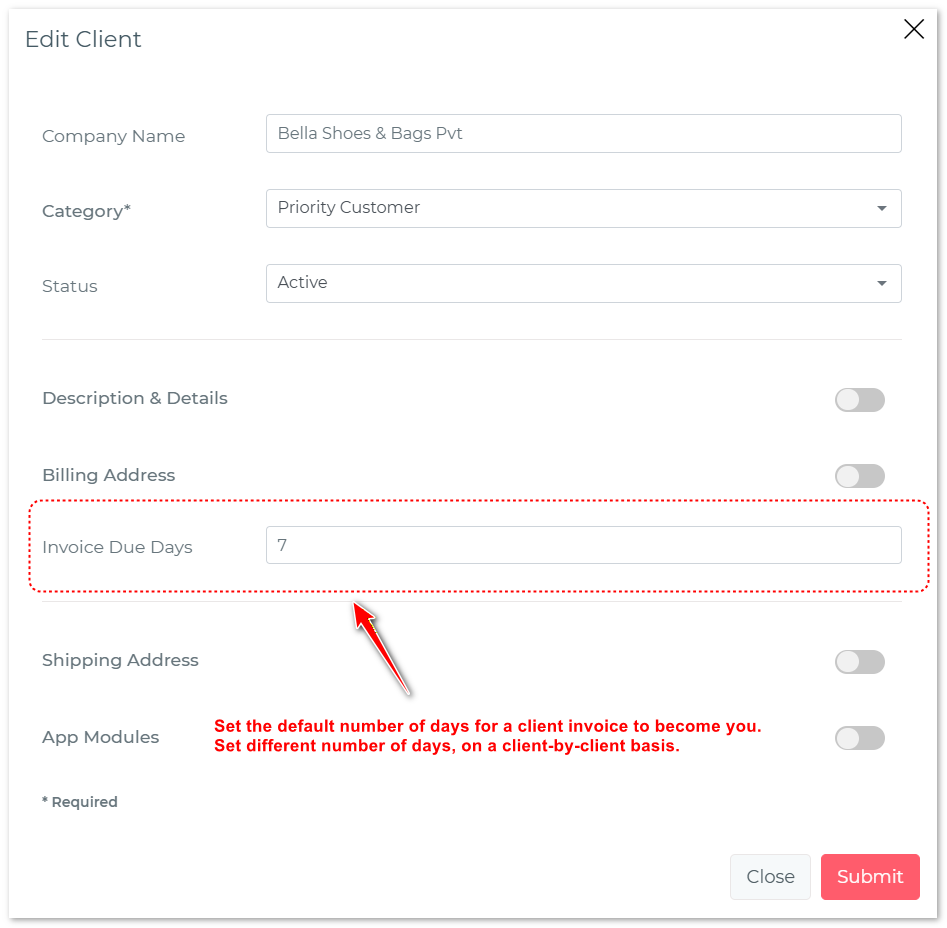
How it works:
- Set default payment terms for each client (e.g., Net 30, Net 45, Due on Receipt)
- Due dates automatically populate when creating invoices for that client
- Global fallback setting for clients without specific terms
- Full flexibility to override defaults when needed
This feature ensures accuracy in payment terms while saving you time on every invoice you create.
Customizable Recurring Invoice Line Items
Recurring invoices just got much more intelligent. You can now specify exactly which line items should recur and which are one-time charges.
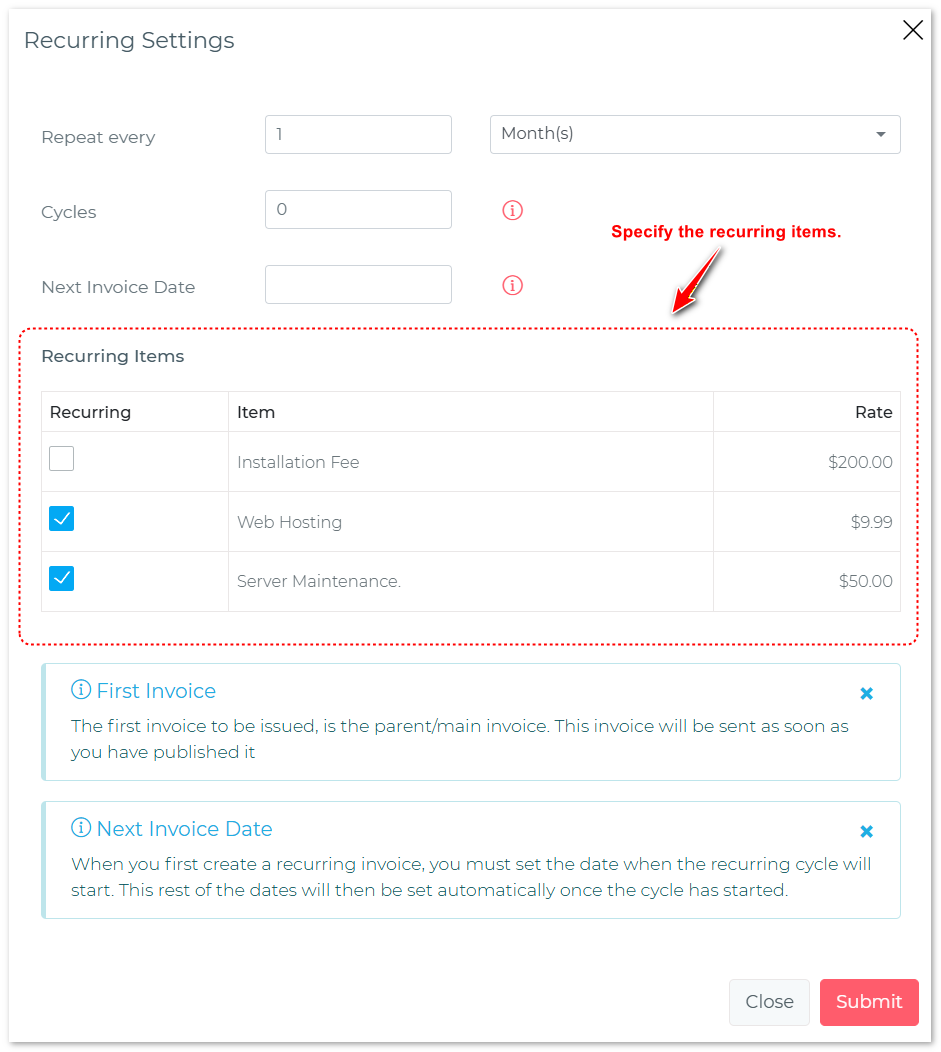
This is perfect for scenarios like:
- Monthly retainers with one-time setup fees
- Subscription services with initial onboarding charges
- Recurring maintenance with occasional upgrade costs
When recurring invoices are automatically generated, only the designated recurring items will be included, giving you precise control over your billing cycles.
Sequential Overdue Invoice Reminders
Improve your accounts receivable with automated, sequential reminder campaigns for overdue invoices.
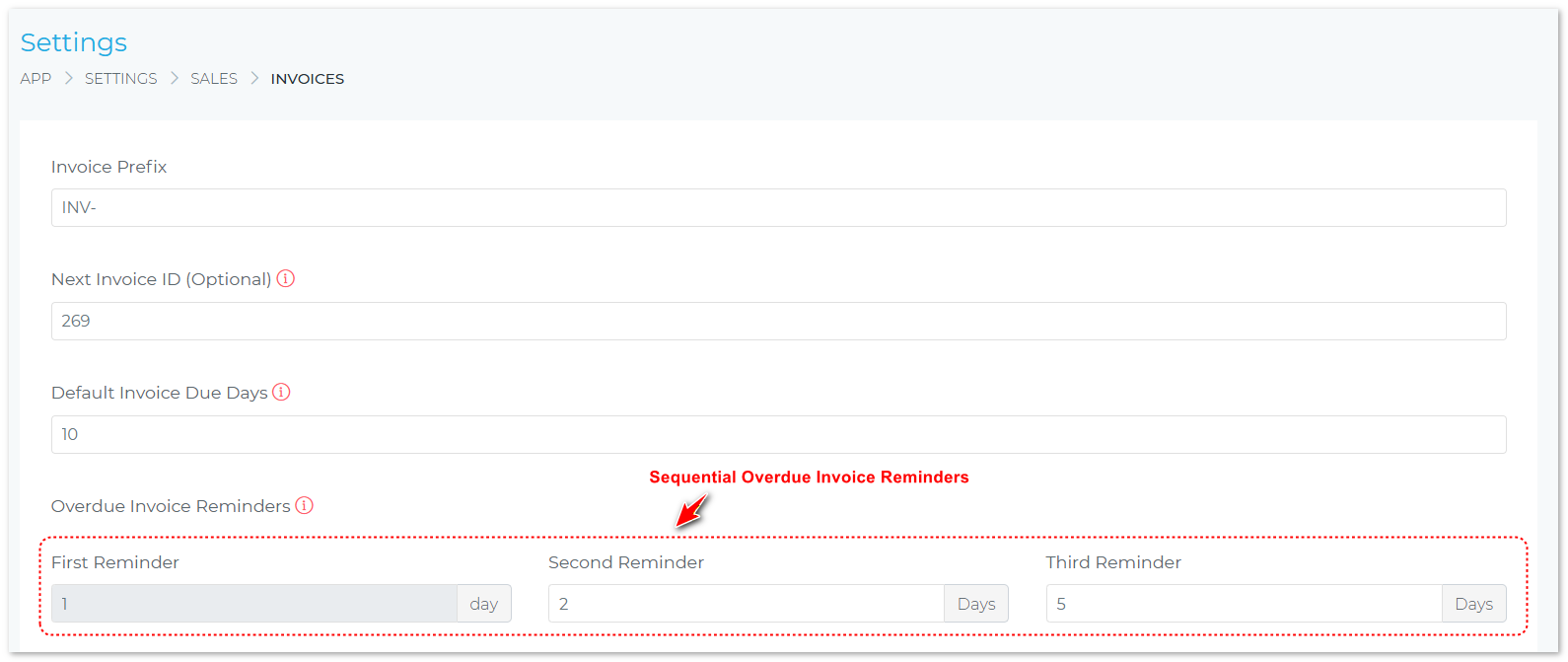
Configure a sequence of reminders that are automatically sent at specific intervals after an invoice becomes overdue. This professional approach to collections helps you get paid faster while maintaining positive client relationships.
Comprehensive Invoicing Improvements
Version 3.1 includes a suite of invoicing enhancements that provide greater flexibility and professionalism:
Default Product Tax Rates
Set tax rates on a product-by-product basis. When you add a product to an invoice, the correct tax rate is automatically applied, reducing errors and saving time.

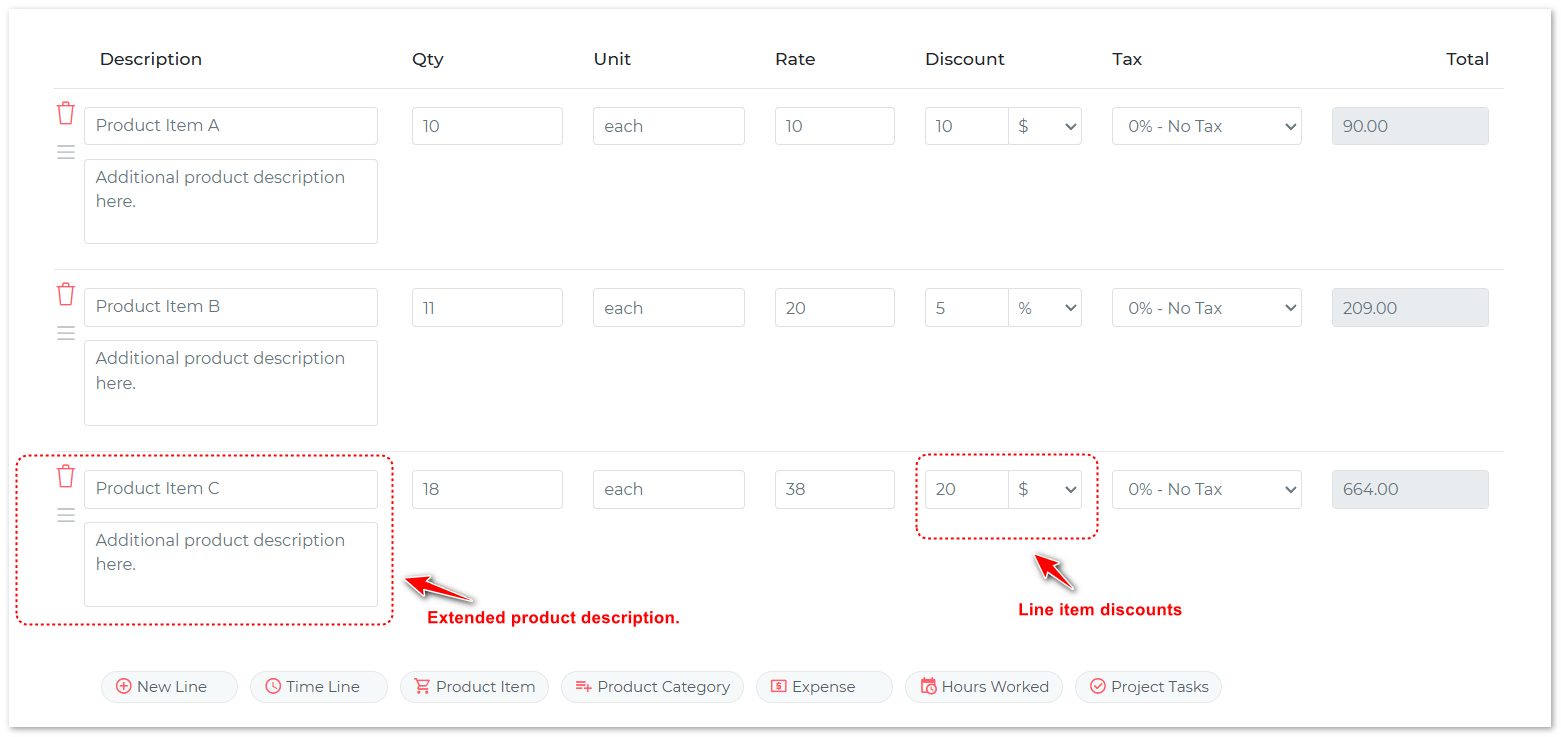
Line Item Discounts
Apply discounts directly to individual line items, either as fixed amounts or percentages. This granular control makes promotional pricing and volume discounts much easier to manage.
Extended Product Descriptions
Add detailed descriptions to invoice line items beyond just the product name. This helps clients understand exactly what they’re being charged for and reduces billing questions.
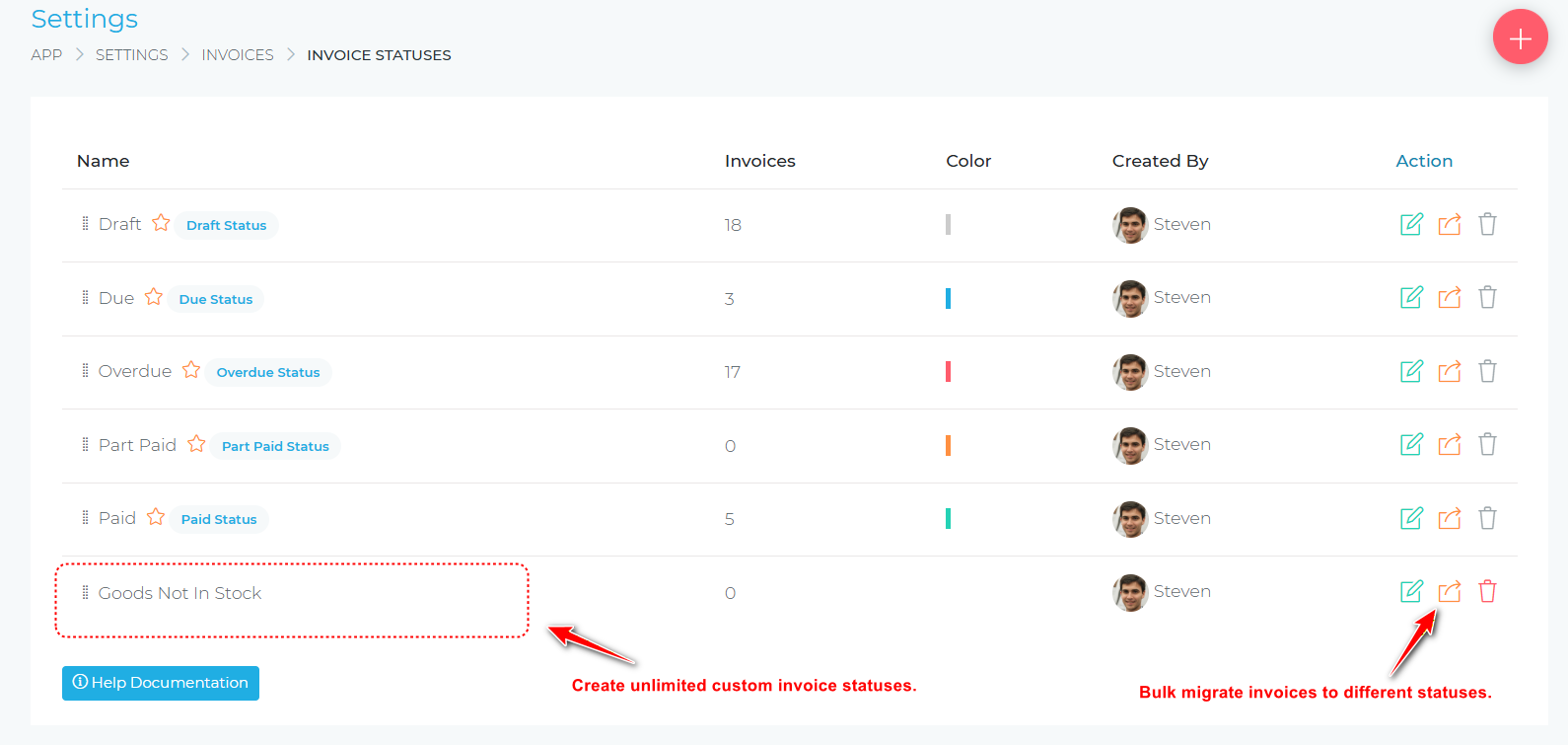
Custom Invoice Statuses
Create your own invoice statuses in addition to the default options (Draft, Due, Overdue, Paid). This allows you to track invoices through your unique workflow, such as “Awaiting Approval,” “In Review,” or “Payment Scheduled.”
Product Units Management
Define and manage a library of measurement units (hours, days, pieces, licenses, etc.) that can be used when creating products. This standardization ensures consistency across your invoicing.
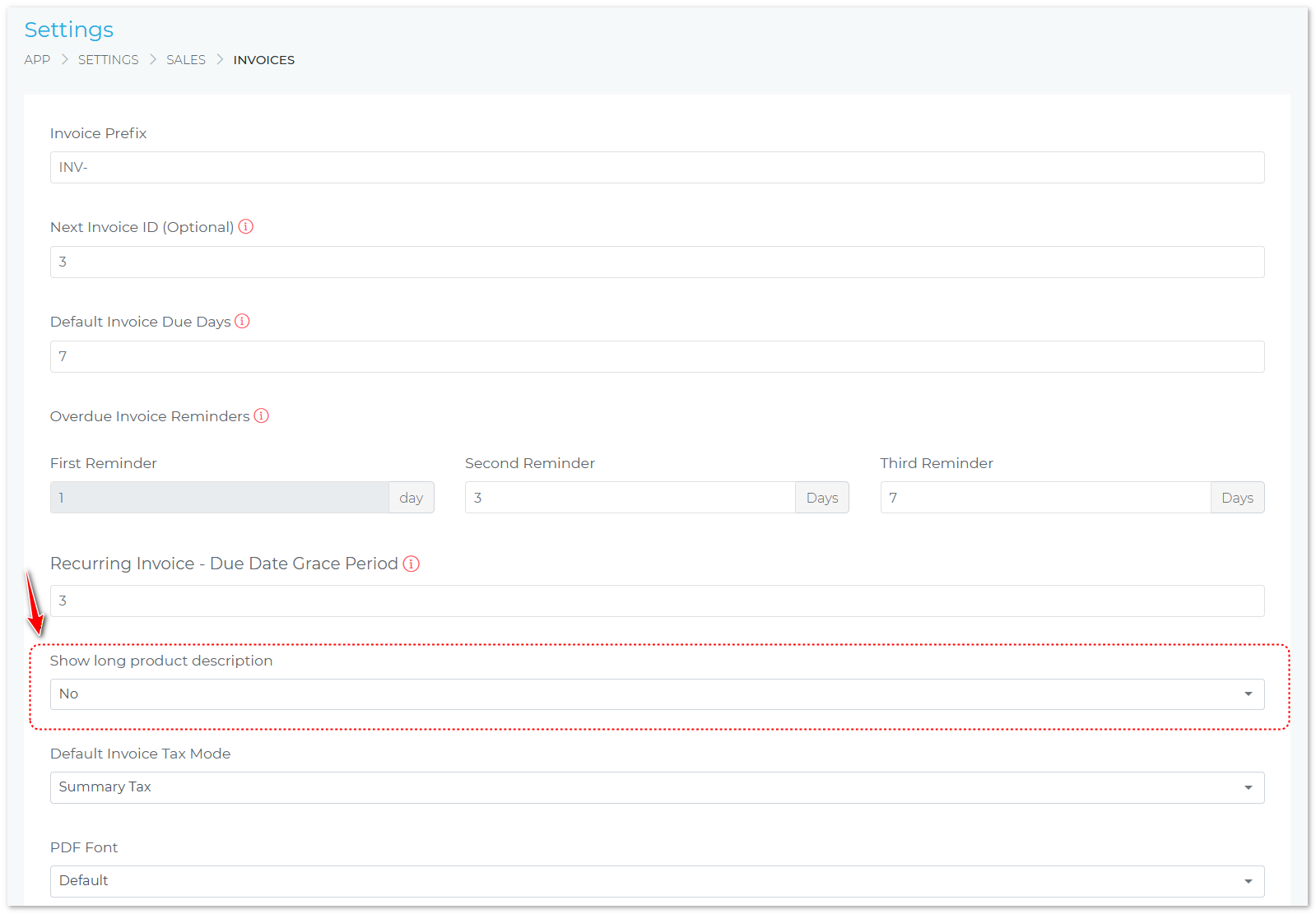
Show Extended Line Item Descriptions
Control whether extended descriptions appear on invoices, giving you flexibility in how much detail you present to clients.
Products & Inventory
Products Custom Fields
Store unlimited custom data about your products with the new custom fields feature. Define unique attributes specific to your business, whether that’s SKU numbers, warranty information, vendor details, or anything else you need to track.
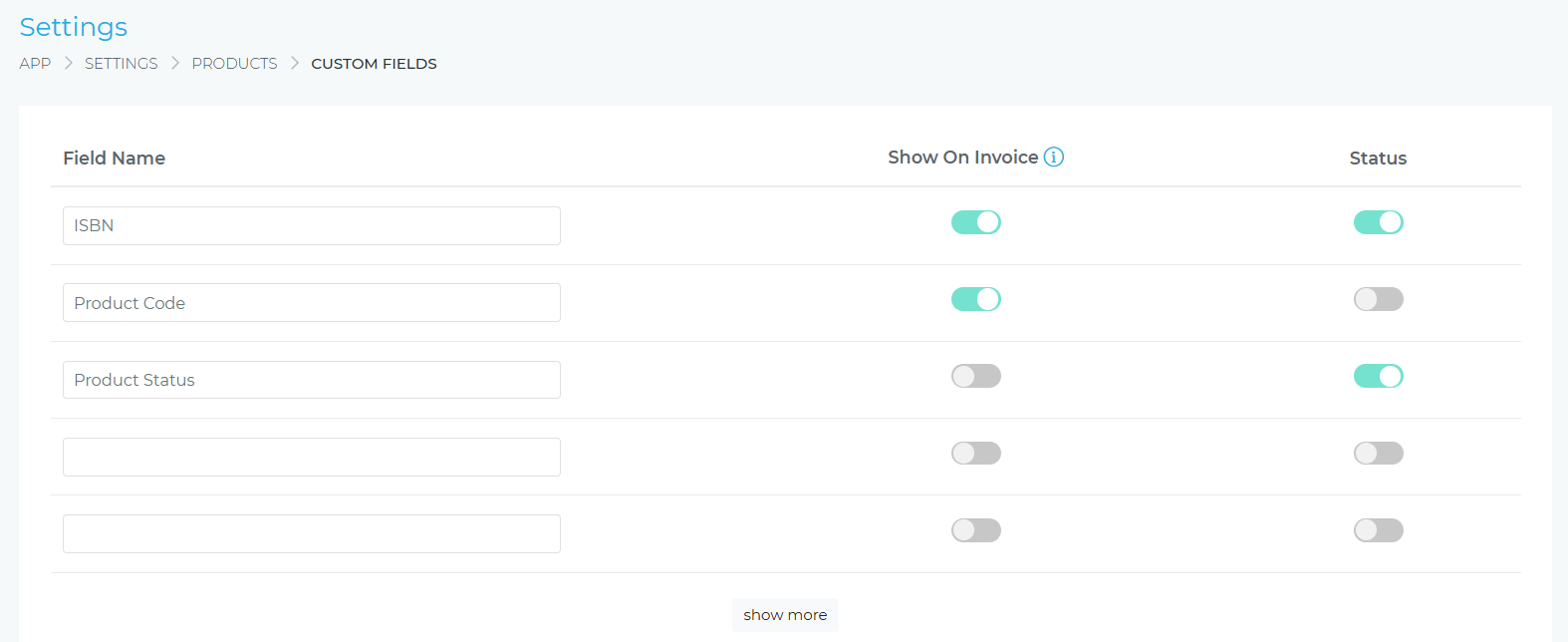
Even better, you can selectively display custom field data directly on invoice line items, giving clients access to important product information without cluttering your invoices.
Per-User Custom Table Settings
Team members can now customize which columns are displayed on the products list page, with their preferences automatically saved for future sessions.
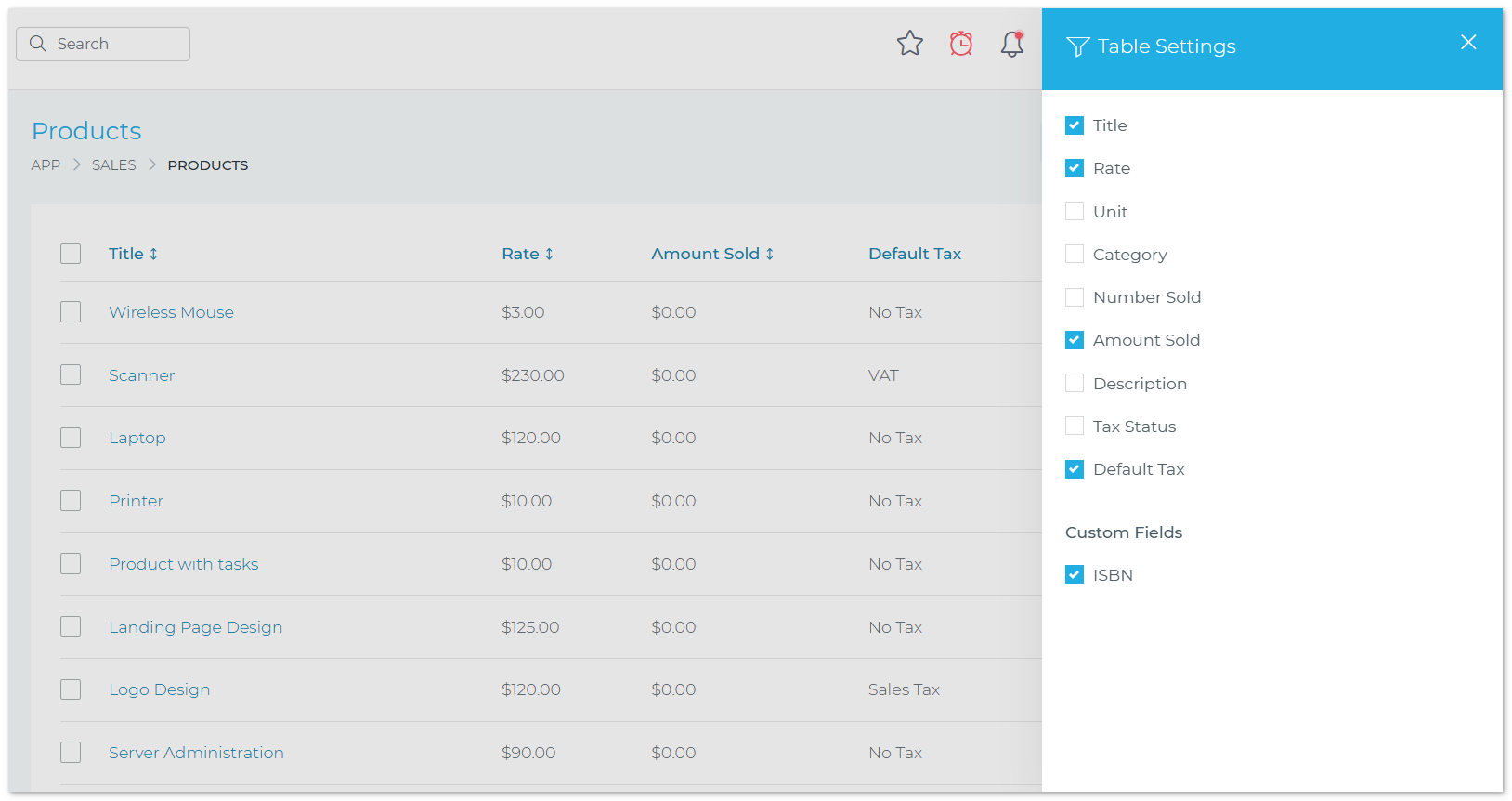
This personalization means each team member can view the product information most relevant to their role, improving efficiency and reducing visual clutter.
Client Management
Create Individual Clients (Not Just Companies)
Grow CRM now supports creating client records for individuals who aren’t associated with a company. This is perfect for freelancers, consultants, and businesses that work with both individual consumers and corporate clients.
The flexibility to manage both individual and corporate clients within the same system gives you a more complete view of your entire client base.
Additional Productivity Improvements
- Remember user-set filters when viewing lists (projects, clients, tasks, leads, etc.)
- Display pending checklist items per task in Kanban view mode
- Bulk import projects using Excel or CSV files
- Star invoices, estimates, leads, and tasks for quick access
- Attach and detach contracts and proposals to projects
- View associated projects and contracts directly from project details pages
- Filter projects by multiple statuses simultaneously
Why These Updates Matter
⏱️ Save Time
From batch timesheet entry to automated workflows, version 3.1 eliminates repetitive tasks and accelerates your daily operations.
💰 Get Paid Faster
Automated reminders, in-person signing, and flexible payment terms help you close deals and collect payments more efficiently.
📊 Better Organization
Custom fields, saved filters, and starred items mean you can organize your data exactly how you need it.
🎯 Greater Accuracy
Default tax rates, per-client payment terms, and product units reduce manual data entry and eliminate billing errors.
🔄 Workflow Automation
Contract automation and recurring invoice customization free your team to focus on delivering value, not administrative tasks.
👥 Enhanced Flexibility
Whether you work with individuals or companies, in-person or remotely, version 3.1 adapts to your unique workflow.
🎉 The best part? As a Grow CRM customer, you get all these features with your existing license—no upgrade fees, no additional costs. Just log into your CRM settings and download version 3.1 today!
Need help installing this update? Have a look at our Updates Installation Service. We will install the update for you.
