

Stop losing contracts in email threads. Here’s how small businesses can manage client agreements professionally — without enterprise price tags.
The best contract management software for small businesses is Grow CRM — an all-in-one self-hosted platform that handles contract creation, e-signatures, client management, and invoicing for a one-time $39 payment. For businesses specifically needing standalone document workflows, PandaDoc is the strongest alternative starting at $19/user/month.
Most small businesses manage contracts the way they’ve always done it: email a Word document, wait for a signed scan, file it in a folder on someone’s desktop, and hope they remember when it expires. This works until it doesn’t — and when it stops working, it’s usually at the worst possible moment: a dispute, a missed renewal, or a client who claims they never agreed to that clause.
Contract management software solves this. But the options range from affordable tools built for small teams to enterprise-grade platforms costing hundreds of dollars per month — before a single contract is signed. This guide cuts through the noise and shows you what small businesses actually need, what each platform delivers, and which one gives you the best value.
What Contract Management Software Should Do for Small Businesses
Enterprise contract lifecycle management (CLM) platforms are built for legal teams managing thousands of complex contracts with compliance requirements, clause libraries, and multi-jurisdiction obligations. That’s not what most small businesses need.
Small businesses need contract management that’s practical: create a contract quickly, send it for signature, know when it’s been signed, and get a reminder before it expires. Here’s what actually matters:
The Small Business Contract Management Checklist
- Contract templates — Pre-built structures you can customize in minutes, not hours
- E-signature collection — Legal digital signatures without requiring clients to install anything
- Expiration tracking — Automatic alerts before contracts expire or need renewal
- Client access — Clients can view, sign, and download their own contracts
- Audit trail — Timestamped record of when contracts were sent, viewed, and signed
- Secure storage — Contracts stored safely and searchable, not buried in inboxes
- CRM integration — Contract linked to the client record for complete relationship history
- Proposal-to-contract flow — Convert accepted proposals directly into contracts
What small businesses don’t need: AI clause risk analysis, multi-jurisdiction legal compliance engines, complex approval chains with legal department routing, or tools priced at $375–$900/month. These are enterprise requirements. Paying for them as a small business means paying for complexity you’ll never use.
Quick Comparison: Contract Management Software for Small Businesses
| Platform | Pricing | E-Signatures | Templates | Expiry Alerts | CRM Built-In | Invoicing | Self-Hosted |
|---|---|---|---|---|---|---|---|
| Grow CRM | $39 one-time | ✅ Yes | ✅ Yes | ✅ Yes | ✅ Full CRM | ✅ Full invoicing | ✅ Yes |
| PandaDoc | $19–$49/user/mo | ✅ Yes | ✅ 1,000+ | ⚠️ Limited | ❌ No | ⚠️ Payment collect. | ❌ Cloud only |
| DocuSign | $15–$65/user/mo | ✅ Industry std. | ⚠️ Basic | ⚠️ Higher plans | ❌ No | ❌ No | ❌ Cloud only |
| ContractSafe | $375+/mo | ⚠️ Via integration | ✅ Yes | ✅ Yes | ❌ No | ❌ No | ❌ Cloud only |
| Juro | Custom (quote) | ✅ Yes | ✅ Yes | ✅ Yes | ❌ No | ❌ No | ❌ Cloud only |
The Best Contract Management Platforms for Small Businesses
Grow CRM
Best overall for small businesses — contract management built into a complete CRM platform
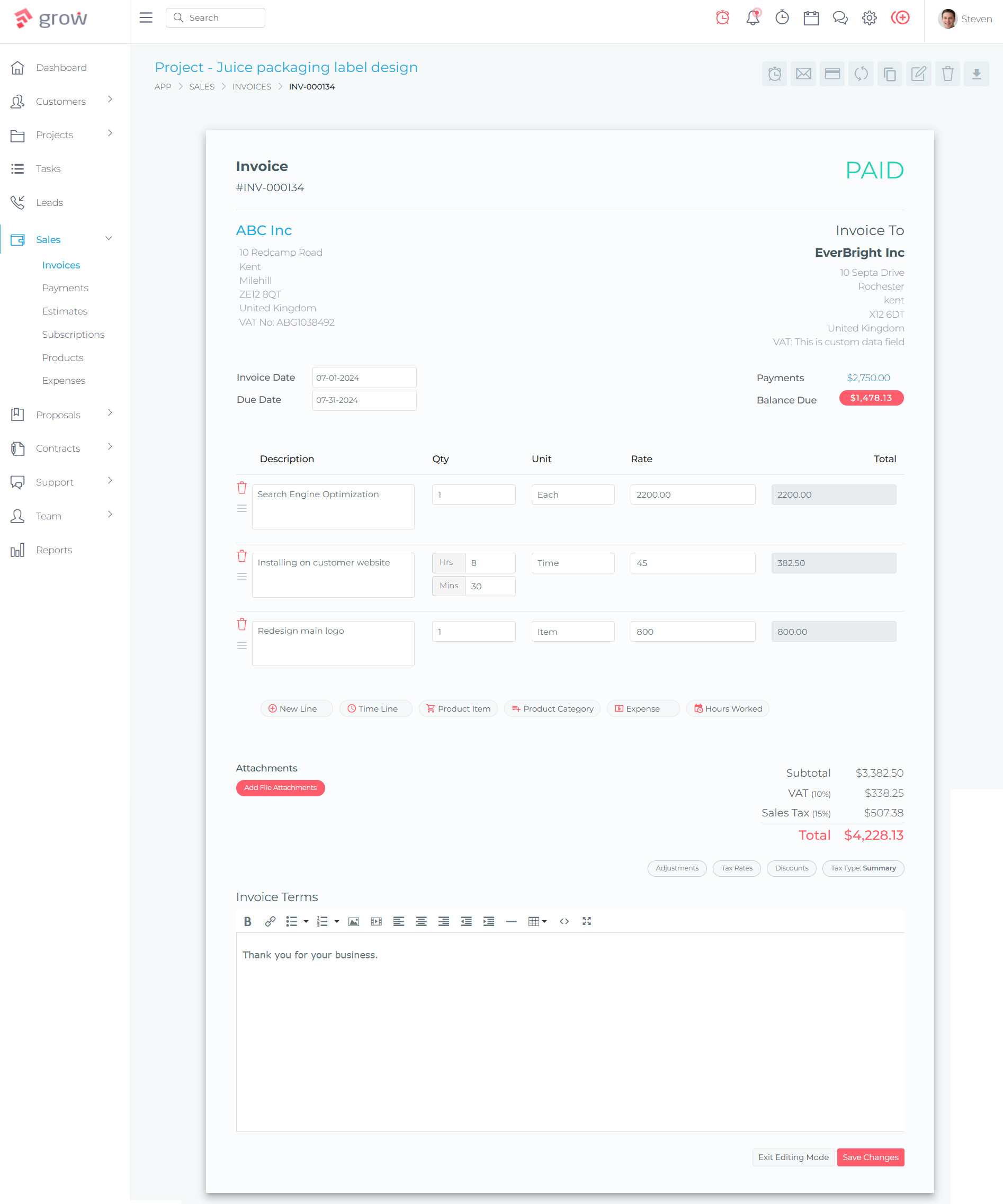
Grow CRM earns the top spot because it solves the real problem most small businesses face with contract management: contracts don’t exist in isolation. They follow a proposal, connect to a client, trigger a project, and eventually lead to an invoice. When contract management is handled by a separate tool, none of those connections happen automatically. When it’s built into your CRM, the whole workflow flows naturally.
With Grow CRM, the contract lifecycle integrates directly with the client relationship. A proposal is created from the client’s CRM record, accepted online, and converts into a contract — pre-filled with client details, project scope, and agreed terms. The client signs digitally. The signed contract is stored against the client record alongside all invoices, project notes, and communications. No separate tool, no manual data transfer, no files buried in email.
The pricing is what makes this especially compelling for small businesses. Grow CRM is a one-time $39 purchase with no monthly fees and no per-user limits. ContractSafe starts at $375 per month. That’s not $375 total — that’s $375 every single month, or $4,500 per year, for contract storage and tracking alone. Grow CRM gives you contract management plus CRM, project management, time tracking, invoicing, and a client portal for less than one week of ContractSafe’s annual cost.
Contract Management Features:
- Contract templates with customizable fields and branding
- Digital e-signature collection — clients sign in browser, no account needed
- Expiration date tracking with renewal reminders
- Contract status tracking (draft, sent, signed, expired)
- Full audit trail — sent, viewed, and signed timestamps
- Proposal-to-contract conversion — accepted proposals become contracts
- Client portal access — clients view and download their contracts
- Contracts linked to client CRM records for complete history
- Contract-to-invoice flow — trigger invoicing from contract milestones
- Secure self-hosted storage — your server, your data
- Unlimited contracts and clients on all plans
✅ Pros
- $39 one-time — no monthly fees ever
- Contract management integrated with CRM, proposals, and invoicing
- Unlimited contracts and clients
- Client portal — clients sign and access contracts themselves
- Self-hosted — complete data ownership and privacy
- Free installation service and lifetime updates
- No per-user cost as team grows
❌ Cons
- Requires a web server to host (managed hosting available)
- Not a dedicated standalone CLM tool — part of a broader platform
- Fewer third-party integrations than SaaS platforms
Visit Grow CRM →
PandaDoc
Best standalone document platform for proposals, contracts, and e-signatures
PandaDoc is one of the most popular choices for small businesses that need a dedicated document platform. It handles the full document workflow — create a proposal or contract from a template, send it for signature, track when it’s been opened and how long recipients spent reading it, and collect a signature and even payment in one flow.
The template library is genuinely useful. PandaDoc offers over 1,000 pre-built document templates across a wide range of industries and use cases. For small businesses that don’t have a legal team to draft contracts from scratch, this is a meaningful time-saver. The editor is drag-and-drop and requires no design skill to produce professional-looking documents.
The main limitation is scope. PandaDoc is a document tool — it doesn’t include a CRM, project management, time tracking, or invoicing. If you want to know a client’s full relationship history when reviewing a contract, or connect a signed contract to a project or invoice, you’ll need to integrate PandaDoc with additional tools. This works, but each integration adds complexity and cost. At $19–$49/user/month, a small team of three is spending $57–$147/month — just for document management.
✅ Pros
- Excellent document editor — professional results without design skills
- 1,000+ templates across industries
- Strong e-signature with document tracking analytics
- Payment collection built into documents
- Integrates with popular CRMs (Salesforce, HubSpot, Pipedrive)
❌ Cons
- No CRM — requires separate tool for client relationship management
- $19–$49/user/month adds up for growing teams
- Limited contract expiration tracking on lower plans
- Cloud-only — no self-hosted option
Visit PandaDoc →
DocuSign
The industry standard for e-signatures — best when legal acceptance is the top priority
DocuSign is the most recognised name in digital signatures. If your clients have signed documents online, there’s a good chance they’ve used DocuSign. That brand recognition carries weight — some clients trust DocuSign specifically because they know it, which can reduce friction in the signing process.
For pure e-signature collection, DocuSign is reliable and legally robust. The audit trail is comprehensive, the signing experience is smooth on any device, and the platform supports complex signature workflows like multi-party signing with a specific order. It’s also compliant with electronic signature laws in most jurisdictions globally.
Where DocuSign falls short for small businesses is in breadth. It’s primarily a signature tool, not a contract management platform. The lower-tier plans have document send limits (100 envelopes per year on the Standard annual plan). Contract storage, template management, and expiration tracking are available but not the focus. Small businesses often end up pairing DocuSign with additional tools to get anything resembling complete contract management — at which point the combined monthly cost becomes significant.
✅ Pros
- Globally recognised brand — clients trust and recognise the platform
- Legally robust e-signatures with comprehensive audit trails
- Supports complex multi-party signing workflows
- Wide global legal compliance
- Integrates with many business tools
❌ Cons
- Document send limits on lower plans (100 envelopes/year on Standard)
- $25–$65/user/month — expensive for what it offers small businesses
- No CRM, project management, or invoicing
- Contract management features require higher tiers
- Cloud-only — no self-hosted option
Visit DocuSign →
ContractSafe
Dedicated contract repository with strong search and expiry management — built for teams managing high contract volumes
ContractSafe is a dedicated contract management and storage platform. Its strengths are clear: powerful search across all contract documents, automatic expiration tracking with renewal alerts, and a clean interface that makes it easy for entire teams to find and manage contracts without training. It’s designed to be the central repository for all of an organisation’s contracts.
The problem for small businesses is price. ContractSafe starts at $375 per month and goes up from there — based on contract volume rather than users, which is at least a more sensible pricing model than per-seat. But $375 a month is $4,500 a year for contract storage and management alone. For a small business managing dozens of client contracts rather than thousands, this is difficult to justify — especially when an integrated platform like Grow CRM provides contract management as part of a complete business management suite for $39 total.
ContractSafe makes sense for organisations with large, complex contract portfolios — legal departments, procurement teams, or companies managing vendor, partner, and client contracts at scale. For most small businesses, it’s the right solution at the wrong price point.
✅ Pros
- Excellent contract search and repository management
- Strong expiration tracking and renewal alerts
- Unlimited users on all plans
- Very easy to use — minimal training required
- Good customer support reputation
❌ Cons
- $375+/month — very expensive for small businesses
- No CRM, project management, or invoicing
- E-signatures require third-party integration
- Contract volume limits on each plan tier
- Cloud-only — no self-hosted option
Visit ContractSafe →
Juro
AI-powered contract platform for teams that need intelligent contract creation and negotiation
Juro takes a different approach to contract management — it’s built around AI-assisted contract creation, with a rich-text editor that allows for in-platform contract negotiation rather than the traditional email-a-Word-doc-back-and-forth process. Contracts are created, discussed, amended, and signed entirely within Juro’s platform. This is genuinely valuable for businesses that spend significant time negotiating contract terms with clients or vendors.
Juro also handles the full contract lifecycle: creation, negotiation, signing, storage, and renewal. The platform’s AI features help with clause suggestions, risk flagging, and bulk contract data extraction — features that matter more as contract volume and complexity grows.
The challenge for small businesses is that Juro doesn’t publish pricing — it’s custom-quoted, which typically signals an enterprise price point. Users report costs that are generally higher than tools like PandaDoc. For a small business with straightforward contract needs (standard service agreements, NDAs, client contracts), Juro may be more sophisticated than necessary and priced accordingly.
✅ Pros
- In-platform contract negotiation — no email-doc rounds
- AI-assisted contract creation and clause suggestions
- Full contract lifecycle management
- Strong for teams with high negotiation workloads
- Good integration with Salesforce and Slack
❌ Cons
- Custom pricing — no transparent cost published
- Generally more expensive than alternatives
- More complexity than most small businesses need
- No CRM, project management, or invoicing
- Cloud-only — no self-hosted option
Visit Juro →
The Ideal Small Business Contract Workflow
Good contract management isn’t just about storing documents — it’s about removing friction from the entire client agreement process. Here’s what an efficient small business contract workflow looks like when your tools support it properly:
Step 1: Proposal Sent
A client expresses interest. A proposal is created from a template, pre-filled with the client’s details from your CRM, and sent for online review. The client can accept directly in their browser.
Step 2: Proposal Accepted → Contract Generated
When the client accepts the proposal, a contract is automatically generated from the agreed terms. Client details, pricing, scope, and start date are already filled in. No re-keying, no copy-paste from the proposal.
Step 3: Digital Signature Collected
The contract is sent to the client for e-signature. They receive a link, click, review, and sign — on desktop or mobile, no account or software required. Both parties receive a copy. An audit trail records the timestamp and IP address of the signing.
Step 4: Contract Stored and Tracked
The signed contract is stored against the client’s record. Expiration date is logged. Your platform sends a reminder 30 days before the contract expires, giving you time to discuss renewal before it becomes urgent.
Step 5: Contract Triggers Project and Billing
With the contract signed, work begins. A project is created, time is tracked against it, and when work is complete — or at agreed milestones — an invoice is generated and sent. The signed contract is accessible to the client through their portal if they ever need to reference it.
In Grow CRM, all five of these steps happen within a single platform. No integrations, no data transfer between tools, no gaps in the workflow. Each step flows into the next, with the client record serving as the single source of truth for the entire relationship.
The True Cost of Contract Management: Standalone vs Integrated
| Approach | Tools Required | Monthly Cost | Annual Cost |
|---|---|---|---|
| Dedicated CLM only | ContractSafe + separate CRM + separate invoicing | $500–$700+ | $6,000–$8,400+ |
| Document tool + CRM | PandaDoc + HubSpot/Salesforce | $100–$300+ | $1,200–$3,600+ |
| E-signature only | DocuSign + CRM + invoicing tool | $100–$250+ | $1,200–$3,000+ |
| All-in-one platform | Grow CRM (contracts + CRM + invoicing + PM) | $0 (one-time paid) | $39 total ever |
These figures assume a small team of 3–5 users. The cost difference across all approaches is dramatic. The standalone CLM route often costs as much in a single month as Grow CRM costs for a lifetime.
Key Features Compared: What Matters for Small Business Contracts
E-Signature: Legal Validity and Client Experience
All five platforms in this comparison support legally binding digital signatures. Electronic signatures have been legally recognised across most jurisdictions for well over a decade — under laws such as the US Electronic Signatures in Global and National Commerce Act (ESIGN) and the EU’s eIDAS regulation. The platform you choose doesn’t significantly affect legal validity for standard commercial contracts; what matters more is the client experience and audit trail quality.
Grow CRM’s e-signature experience is smooth — clients receive a link, open it in their browser, and sign with a click or drawn signature. No account creation required. The audit trail captures timestamps, IP addresses, and viewing history. For the vast majority of small business contracts — service agreements, NDAs, project scopes — this is entirely sufficient.
Contract Templates: Reducing Time to Send
The time saved by a good template library compounds across every client engagement. PandaDoc’s 1,000+ template library is the largest in this comparison, covering a wide range of contract types and industries. Grow CRM offers customisable contract templates that you build and refine over time — starting from your own agreements rather than generic starting points.
For most small businesses, having three to five well-crafted templates that cover their standard engagements (service agreement, NDA, retainer, project scope) is more valuable than a library of hundreds they’ll never use. Quality over quantity matters here.
Expiration Tracking: The Feature Everyone Forgets Until They Need It
Contract expiration is where manual management fails. A contract buried in an email folder doesn’t send you a reminder. A client doesn’t typically notify you that your agreement is about to expire. Without automated tracking, small businesses discover expired contracts when something goes wrong — a scope dispute, a pricing conversation, or a client who claims there’s no current agreement in place.
ContractSafe’s expiration tracking is the most sophisticated in this comparison, which is part of what justifies its price for large contract portfolios. Grow CRM tracks expiration dates and sends renewal reminders automatically. For most small businesses managing client contracts, this level of tracking is everything they need.
CRM Integration: Why Contracts Belong in Your Client Record
The most underrated aspect of contract management for small businesses is context. When you open a client’s contract, you should be able to see: what was in the original proposal, what projects are active, what’s been invoiced and paid, and what conversations have happened. Without CRM integration, a contract is just a document. With it, it’s part of the complete relationship record.
Only Grow CRM in this comparison provides this natively. PandaDoc, DocuSign, ContractSafe, and Juro all integrate with external CRMs via API or Zapier — but integration is never as seamless as native, and it always adds cost and maintenance overhead.
Which Contract Management Software Should Your Small Business Choose?
Choose Grow CRM If:
- You want contract management as part of a complete CRM and business management platform
- You want to eliminate monthly subscription fees — a one-time purchase fits your model
- You value data ownership and want contracts stored on your own server
- You need the full client lifecycle: proposal → contract → project → invoice, all connected
- You have (or plan to have) multiple team members and don’t want per-user pricing
- A free installation service removes the technical setup barrier for you
Choose PandaDoc If:
- You primarily need a polished document and proposal tool with a large template library
- Your existing CRM is well-established and you want to add document management alongside it
- Document analytics (tracking who read what and for how long) are important to you
- You handle a high volume of proposals alongside contracts
Choose DocuSign If:
- E-signature collection with the most widely recognised brand is your primary need
- Your clients are in regulated industries where DocuSign’s brand carries trust weight
- You need complex multi-party signing workflows with strict order enforcement
- You’re already using a full CRM and just need to add signing capability
Choose ContractSafe If:
- Your business manages hundreds or thousands of contracts across multiple categories (vendor, client, partner, employment)
- Your primary pain point is finding and tracking existing contracts, not creating new ones
- You have the budget ($375+/month) to invest in a dedicated contract repository
Choose Juro If:
- Contract negotiation is a significant part of your workflow and you want to manage it in-platform
- You need AI-assisted clause analysis and risk flagging
- You’re scaling rapidly and need a platform that handles enterprise-grade contract volumes
Frequently Asked Questions
What is contract management software and does my small business need it?
Contract management software helps you create, send, sign, store, and track client contracts digitally. If you’re currently emailing Word documents for signature and filing PDFs in folders, you need it. The cost of a missed contract renewal, a disputed clause, or a contract you simply can’t find when you need it is always higher than the cost of managing contracts properly. For small businesses, the right solution doesn’t need to be expensive — Grow CRM provides complete contract management as part of a $39 one-time platform purchase.
Are electronic signatures legally binding for small business contracts?
Yes. Electronic signatures are legally recognised in the United States under the ESIGN Act and UETA, in the European Union under the eIDAS regulation, in the UK under the Electronic Communications Act, and in most other jurisdictions globally. For standard commercial contracts — service agreements, NDAs, project scopes, retainer agreements — an electronic signature with an audit trail is fully enforceable. The key requirement is that both parties consented to using electronic signatures, which is typically established by the fact of using an e-signature platform.
What’s the difference between e-signature software and contract management software?
E-signature software (like DocuSign at its core) focuses on the signing step — getting a legally valid digital signature on a document. Contract management software covers the full lifecycle: creating contracts from templates, tracking their status, storing them securely, managing expiration and renewals, and linking contracts to client records. Most small businesses benefit from contract management, not just e-signatures, because the signing is only one step in a longer process that needs to be managed end-to-end.
How does contract management software integrate with a CRM?
There are two approaches: integration and native inclusion. Integration means using a standalone contract tool (PandaDoc, DocuSign) connected to a separate CRM via API or a tool like Zapier. Native inclusion means contracts are built directly into the CRM platform itself, as they are in Grow CRM. Native inclusion is always preferable — client data flows directly into contracts without sync delays, and all contract history is immediately visible in the client record without navigating between tools.
How much should a small business pay for contract management software?
Small businesses should not need to pay hundreds of dollars per month for contract management. Standalone CLM platforms like ContractSafe start at $375/month — pricing designed for enterprise legal teams. For a small business managing client service agreements and project contracts, a platform like Grow CRM provides complete contract management as part of a broader business management system for a one-time $39 purchase. If you do need a standalone document tool, PandaDoc’s Starter plan at $19/user/month is a reasonable entry point.
Can clients sign contracts on mobile devices?
Yes — all platforms in this comparison support mobile signing. Clients receive a signing link by email, open it on any device (phone, tablet, or desktop), review the document, and sign with a tap or drawn signature. No app download or account creation is required on most platforms, including Grow CRM. This removes friction from the signing process and typically results in faster turnaround times on contract execution.
What happens if a client loses or deletes their copy of a signed contract?
With a contract management platform, this is a non-issue. Signed contracts are stored in the platform and accessible at any time — both from your end and, if a client portal is available, from the client’s end. In Grow CRM, clients can log into their portal and download their signed contracts whenever they need them, without contacting your team. This also reduces inbound requests to your staff for contract copies.
How does contract expiration tracking work?
When a contract is created or uploaded, an expiration date is recorded. The platform monitors these dates and sends automated reminders — typically 30, 60, or 90 days before expiration — so you can initiate renewal conversations in time. Without this automation, contract renewals depend on someone manually checking a calendar or spreadsheet, which inevitably leads to contracts lapsing without either party noticing until a problem arises.
Is self-hosted contract management secure?
Yes — and for many businesses, self-hosted contract management is more secure than cloud-based alternatives, not less. With self-hosting, your contracts are stored on a server you control. You decide who has access, where data is stored geographically, how backups are performed, and how long data is retained. Cloud platforms store your sensitive contract data on shared infrastructure you don’t control, subject to their security practices, pricing changes, and business continuity. For businesses with data sovereignty or GDPR requirements, self-hosting like Grow CRM provides is a significant advantage.
The Bottom Line: Small Businesses Need Practical, Not Enterprise
Contract management doesn’t need to be expensive or complex to be effective. Small businesses need templates, e-signatures, expiration tracking, and contracts connected to client records. That’s it. The enterprise CLM tools that charge hundreds of dollars per month solve problems that most small businesses don’t have.
Grow CRM is the clear recommendation for small businesses that want contract management integrated into a complete client management platform — without per-user fees, monthly subscription commitments, or the complexity of stitching multiple tools together. At $39 one-time, it delivers more connected functionality than any competing option at any price point in this comparison.
For businesses that specifically need a standalone document tool with a large template library and document analytics, PandaDoc is the strongest alternative — but budget accordingly for a per-user monthly fee that grows as your team does.
Get Grow CRM — One-Time $39Sources & References
All links verified at time of publication.
