

Stop switching between tools. Start running your agency from one place — where client relationships and project delivery work together.
The short answer: when your CRM and project management tools are separate, your agency bleeds time, money, and client satisfaction. The best agencies run on integrated platforms where client data, project work, time tracking, and billing all live together.
If your account manager is updating the CRM while your project manager is updating the PM tool — and neither can see what the other is doing — you already know the problem. Information is duplicated, context is lost, and the client ends up talking to a team that looks disorganized.
In this guide, we’ll break down exactly why agencies need project management built into their CRM, what changes when you make the switch, and which platforms deliver genuine integration rather than surface-level connectivity.
The Real Cost of Running CRM and Project Management Separately
Most agencies cobble together a CRM (to manage leads and clients) and a separate project management tool (to run the work). On paper, this seems fine. In practice, it creates a structural gap in your agency that costs you in ways that are easy to miss.
Information Gets Trapped in Silos
When a new client is won, someone has to manually transfer their information — scope, special instructions, contacts, history — from the CRM into the project management tool. This takes time, and it introduces errors. The project team starts work without the full picture of what was promised during the sales process.
Context Switching Kills Productivity
Every time an account manager needs to check on a project, they leave their CRM and open a different tool. Every time a project manager needs client context, they open the CRM. This constant switching interrupts focus and adds up to hours of lost productivity each week per person.
Billing Accuracy Suffers
Time tracked in a PM tool has to be exported, reconciled, and re-entered into an invoicing system. During this process, billable hours get missed. Expenses get forgotten. Invoices go out days or weeks after work is completed, which delays payment and erodes cash flow.
Clients Get an Inconsistent Experience
When your client-facing team and delivery team operate from different systems, clients feel it. They get different answers from different people. Status updates are delayed. Invoices don’t match what was discussed. Trust erodes, and retention suffers.
The bottom line: Separate CRM and PM tools don’t just create operational friction — they create a structural barrier between client relationships and client delivery. Agencies that solve this with integration consistently outperform those that don’t.
Why Agencies Have Unique Requirements
Not every business needs CRM and PM in the same place. Agencies do. Here’s why agencies are different from most businesses when it comes to software requirements.
Multiple Clients, Multiple Projects, Simultaneously
A software company might manage one internal product. An agency manages 10, 20, or 50 active clients at the same time — each with their own projects, deadlines, deliverables, and billing arrangements. This requires software that can handle complex multi-client, multi-project visibility without losing the client relationship context.
Revenue Is Tied Directly to Delivered Work
In most businesses, CRM tracks sales and PM tracks operations — these are related but separate functions. In an agency, every project is a revenue event. The work delivered IS the product sold. You can’t understand your revenue without understanding your project delivery, and vice versa. This is why integration isn’t optional — it’s fundamental to how agency finances work.
Clients Are Long-Term Relationships, Not One-Off Transactions
Agencies grow through recurring clients and referrals. A client’s entire history — what they’ve been promised, what’s been delivered, what’s been invoiced — must be accessible to everyone who touches that account. This requires client data to flow seamlessly from relationship management into project execution.
Profitability Must Be Tracked at the Client Level
Agency owners need to know which clients are profitable and which ones are consuming resources faster than they’re generating revenue. This is only possible when time tracking, project costs, and invoicing are all connected to the same client record — which only happens in an integrated system.
Team Resources Span Multiple Client Projects
A single designer might work on five client projects in a single day. Allocating their time, tracking their billable hours, and ensuring those hours are correctly billed to the right clients requires a system where client relationships and project tasks are linked — not siloed in separate tools.
Integrated vs Separate: How the Agency Workflow Actually Changes
❌ Separate Tools Workflow
- Win client in CRM
- Manually copy client data into PM tool
- Create project brief from memory/notes
- Track time in PM tool
- Export time data at end of month
- Manually build invoice in separate tool
- Hope no billable hours were missed
- Client asks for project update — check PM tool, then CRM, then email
- Update client status manually in CRM
✅ Integrated System Workflow
- Win client — project created automatically
- Client data auto-populates into project
- Scope and terms visible to entire team
- Time tracked against project tasks, linked to client
- Invoice generated directly from tracked time in one click
- All billable hours captured automatically
- Client logs into portal — sees project status and invoice
- Account manager has full context in one view
- Payment received — client record updated automatically
The difference isn’t subtle. Integrated workflows eliminate entire categories of administrative work — work that adds no value for clients but consumes a significant portion of agency team time.
Agency CRM + Project Management: Platform Comparison
| Platform | Pricing | Self-Hosted | CRM Built-In | Project Management | Time Tracking | Invoicing | Client Portal |
|---|---|---|---|---|---|---|---|
| Grow CRM | $39 one-time | ✅ Yes | ✅ Full CRM | ✅ Kanban + Tasks | ✅ Built-in | ✅ Full invoicing | ✅ Included |
| Productive | $10–$33/user/mo | ❌ Cloud only | ⚠️ Basic CRM | ✅ Strong PM | ✅ Built-in | ✅ Built-in | ❌ No |
| Teamwork | $11–$55/user/mo | ❌ Cloud only | ⚠️ Limited CRM | ✅ Strong PM | ✅ Built-in | ⚠️ Basic | ⚠️ Limited |
| Scoro | $20–$50/user/mo | ❌ Cloud only | ✅ Full CRM | ✅ Strong PM | ✅ Built-in | ✅ Built-in | ❌ No |
| Monday.com | Varies/user/mo | ❌ Cloud only | ⚠️ Add-on CRM | ✅ Flexible PM | ⚠️ Limited | ❌ No native | ❌ No |
Top Platforms for Agency CRM + Project Management
Grow CRM
The best all-in-one agency management platform — own it outright for a one-time fee
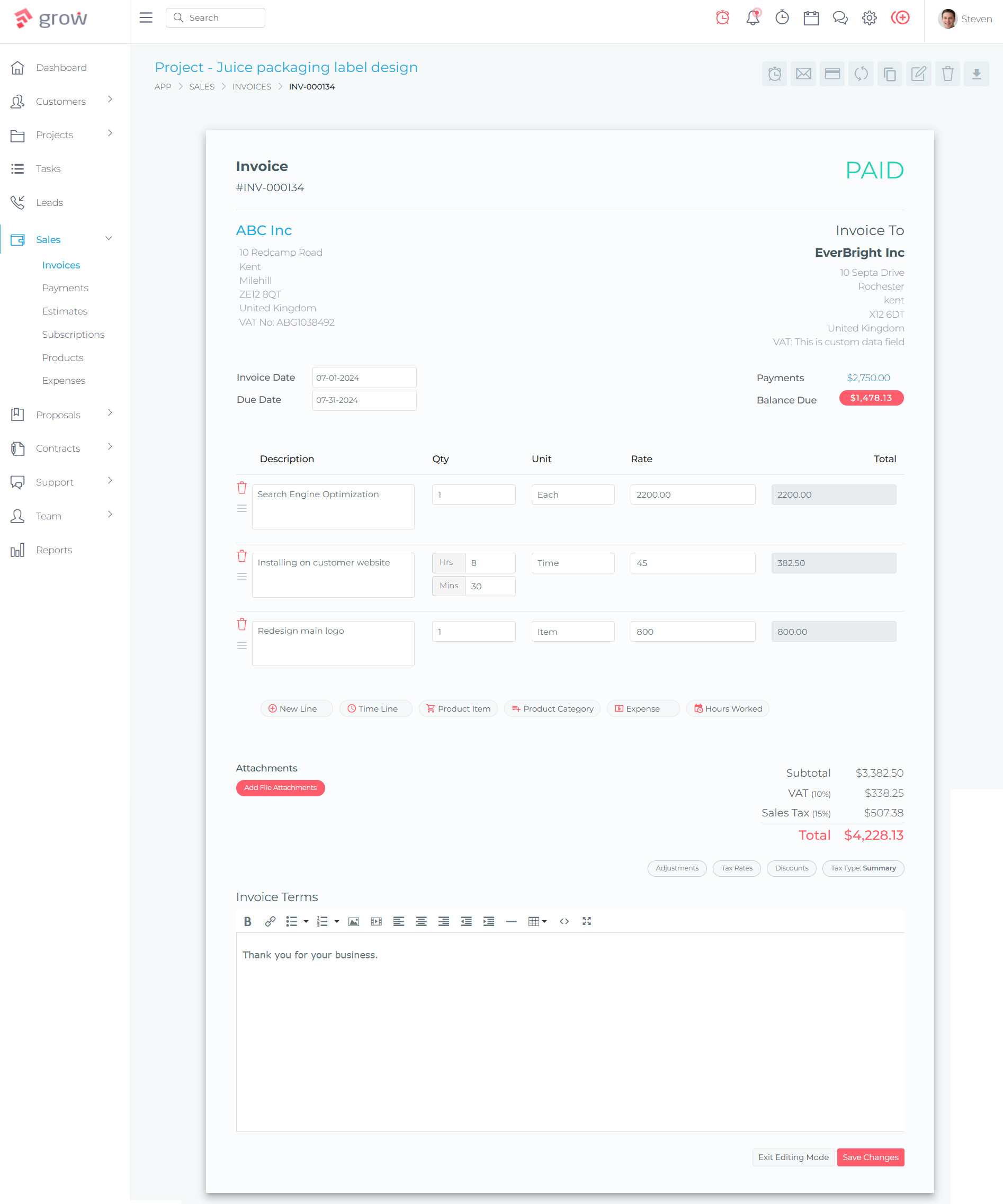
Grow CRM is the standout choice for agencies that want genuine all-in-one integration without ongoing per-user fees. It’s a self-hosted platform where CRM, project management, time tracking, invoicing, contracts, proposals, and a client portal all operate from the same database — meaning there’s no data sync, no integration overhead, and no gaps between client relationships and project delivery.
For agencies specifically, Grow CRM delivers the complete workflow: a lead comes in, gets tracked through the CRM pipeline, converts to a client, triggers a project with Kanban task management, has time tracked against billable tasks, generates an invoice from those hours, and gives the client a portal to view progress and pay online — all without leaving the platform.
The pricing model is what makes Grow CRM genuinely unique in this space. A one-time $39 purchase gives you the full platform with unlimited users. No per-seat fees means a growing agency doesn’t face escalating monthly costs as they add team members. For a 10-person agency, that’s a fraction of what comparable cloud platforms cost in a single month.
Key Features for Agencies:
- Full CRM with lead tracking, pipeline management, and client records
- Kanban project boards with tasks, subtasks, milestones, and dependencies
- Built-in time tracking with billable/non-billable hour designation
- One-click invoice generation from tracked time and project expenses
- Client portal — clients can view projects, invoices, and pay online
- Professional proposals with digital acceptance
- Contract management with e-signature support
- Helpdesk and support ticket management
- Payment gateways: Stripe, PayPal, Mollie, Razorpay, Tap, Flutterwave
- Unlimited users — no per-seat fee scaling
- Self-hosted: your data, your server, your control
- API access for custom integrations
- Free installation service and lifetime updates
- 30-language support for international agencies
✅ Pros
- One-time $39 payment — no monthly fees
- Unlimited users — scales without cost increase
- Complete CRM + PM + time tracking + invoicing in one platform
- Client portal included out of the box
- Self-hosted — full data ownership and privacy
- Free installation service removes setup barrier
- Free lifetime updates
- Developer-friendly (Laravel) with API access
❌ Cons
- Requires a web server (managed hosting available)
- Smaller community than SaaS giants
- Less third-party integrations than Zapier-heavy platforms
Visit Grow CRM →
Productive
Purpose-built agency management with strong financial reporting
Productive is designed specifically for agencies and professional services firms. It combines project management, resource planning, time tracking, and invoicing into a single platform with a strong focus on financial visibility — particularly profitability reporting at the project and client level.
Where Productive shines is in its financial intelligence. Agencies can track budget vs actual hours, forecast profitability, and see at a glance which projects and clients are generating margin. This is genuinely valuable for agency owners who need to make data-driven resourcing decisions.
The trade-off is cost. Productive charges per user per month, which becomes significant as an agency grows. A 10-person agency on the Professional plan pays around $250 per month — compared to a one-time $39 for Grow CRM. The CRM capabilities are also more limited; Productive is primarily a PM and financial tool rather than a full client relationship manager.
✅ Pros
- Excellent profitability and financial reporting
- Strong resource planning and capacity management
- Built-in invoicing from time tracking
- Agency-focused feature set
❌ Cons
- $10–$33/user/month adds up quickly for growing teams
- No client portal
- Limited CRM capabilities compared to dedicated CRM tools
- Cloud-only — no self-hosted option
Visit Productive →
Teamwork
Project management built for client-facing teams and agencies
Teamwork has been a reliable choice for agencies for years. Its project management features are well-developed — task management, Gantt charts, time tracking, resource scheduling, and retainer management are all solid. The platform is specifically designed for client-facing work, which shows in features like client user access and the ability to assign tasks to clients directly.
The biggest limitation for agencies seeking true integration is that Teamwork’s CRM capabilities are minimal. It’s primarily a PM tool. You’ll still need a separate CRM to manage your pipeline, leads, and client relationships in any meaningful depth. That said, for agencies whose primary pain point is project delivery rather than client relationship management, Teamwork is a strong option — particularly at the Grow tier with retainer management included.
✅ Pros
- Mature, agency-focused project management
- Strong time tracking and resource scheduling
- Retainer management on higher plans
- Client user access for collaboration
- Trusted by over 6,000 agencies
❌ Cons
- Minimal CRM — requires separate tool for pipeline/leads
- $11–$55/user/month on paid plans
- Invoicing is basic, not full-featured
- Cloud-only, no self-hosted option
Visit Teamwork →
Scoro
Enterprise-grade professional services platform with full CRM and PM integration
Scoro is the most feature-complete of the cloud-based agency management platforms. It offers genuine CRM integration alongside project management, Gantt charts, time tracking, invoicing, and advanced financial reporting. Agencies that need granular profitability data, quote-to-cash workflows, and capacity planning in one place will find Scoro very capable.
The challenge is price. Scoro’s Core plan starts at $19.90 per user per month, and the plans needed for full CRM and financial functionality push higher. A 10-person agency on the Performance plan (which is recommended for most) pays roughly $500 per month — every month. Compared to Grow CRM’s $39 lifetime cost, the long-term TCO difference is dramatic. Scoro also requires a minimum of five users, making it less practical for smaller agencies.
✅ Pros
- Full CRM + PM integration in one platform
- Excellent Gantt charts and resource planning
- Strong financial reporting and forecasting
- Quote-to-cash workflow built-in
- Good fit for mid-size and larger agencies
❌ Cons
- $19.90–$49.90/user/month — expensive for growing teams
- 5-user minimum on all plans
- No client portal feature
- Cloud-only — no self-hosted option
- Steep learning curve
Visit Scoro →
Monday.com
Flexible work management platform with optional CRM add-on
Monday.com is a broadly flexible work management platform that agencies frequently use for project delivery. Its visual boards are intuitive, and the platform is highly customizable — teams can build workflows that match their specific processes without much technical knowledge.
The core limitation for agencies is that Monday.com is not natively an agency management platform. The CRM is a separate product (Monday CRM) that must be configured and managed alongside the project boards. Time tracking is limited. There’s no native invoicing. A true integrated agency workflow requires adding and connecting multiple separate tools — which creates many of the same silo problems agencies are trying to solve.
✅ Pros
- Intuitive, visual interface with high flexibility
- Extensive third-party integrations
- Good for teams that value customization
- Scales from small to large teams
❌ Cons
- CRM is a separate product — not truly integrated
- No native invoicing
- Limited time tracking for agency billing needs
- Per-user monthly fees add up quickly
- No self-hosted option
Visit Monday.com →
Agency-Critical Features: A Deeper Look
Client Context During Project Work
The single most valuable thing about integrated CRM and project management is that every team member can see the client’s full history while working on their project. What was promised during the sales process, previous project notes, payment history, communication logs — all visible in context.
In Grow CRM, a project manager opening a project immediately sees the associated client record: who the key contacts are, what terms were agreed, what’s been invoiced and paid, and any helpdesk tickets. This context prevents the classic agency problem of delivery teams working in a vacuum, disconnected from what was sold to the client.
Time Tracking for Accurate Client Billing
Agencies live and die by their time tracking accuracy. Every hour that isn’t captured is revenue that walks out the door. Every hour tracked to the wrong client or project creates billing disputes and erodes trust.
Integrated time tracking — where hours are logged directly against specific client projects and tasks — eliminates the reconciliation step entirely. In Grow CRM, team members track time on tasks, that time is automatically linked to the client, and an invoice can be generated from those hours with a single action. No export, no re-entry, no missed hours.
Client Portal: The Communication Multiplier
One of the most underrated features for agencies is a client portal — a dedicated space where clients can log in to see project progress, view and download invoices, make payments, and submit support requests without having to email or call your team.
Grow CRM includes a client portal as a standard feature. Clients get their own login, see exactly what’s happening on their projects, and can pay invoices directly through the portal. This reduces inbound client queries, accelerates payment, and improves client satisfaction through transparency — all without any additional tool or cost.
Profitability Visibility
Most agency owners don’t know which clients make them money and which ones don’t until it’s too late. An integrated platform where project time, costs, and invoiced amounts all connect to the same client record makes this visible in real time.
When you can see how many hours a project consumed vs what was budgeted and what was invoiced, you have the data needed to make better scoping decisions, have honest pricing conversations with clients, and spot resource drain before it becomes a profitability problem.
Resource Allocation Across Multiple Clients
Agencies constantly balance team capacity across multiple client projects. When project tasks and team assignments all live in the same system as the client records, workload visibility becomes achievable. You can see who is overloaded, where client commitments are at risk, and how to reallocate before a deadline is missed.
The Cost of Separate Tools vs Integrated: A Real Example
| Tool Category | Typical SaaS Cost (10 users/mo) | Grow CRM Cost |
|---|---|---|
| CRM (e.g. HubSpot Starter) | ~$50–$100/month | $39 one-time all users all features |
| Project Management (e.g. Teamwork Grow) | ~$200–$260/month | |
| Time Tracking (e.g. Harvest) | ~$120/month | |
| Invoicing (e.g. FreshBooks) | ~$55–$110/month | |
| Client Portal (standalone) | ~$50–$100/month | |
| Total | ~$475–$590/month | $39 total ever |
This comparison doesn’t even account for the integration costs, the time spent managing multiple vendors, or the productivity loss from tool-switching. For most agencies, the financial case for consolidation is overwhelming.
Which Platform Should Your Agency Choose?
Choose Grow CRM If:
- You want CRM, PM, time tracking, invoicing, and a client portal in one place
- You want to eliminate per-user monthly fees as you scale
- You value data ownership and want your data on your own server
- You’re a small to mid-size agency looking for maximum value per dollar
- You want a free installation service so setup isn’t a barrier
- Your agency is developer-friendly (Laravel-based, with API access)
- You need payment gateway flexibility (Stripe, PayPal, Mollie, and more)
Choose Productive If:
- Financial reporting and profitability forecasting are your primary need
- You have a team of 5–30 and budget allows per-user monthly fees
- Resource planning and capacity management are critical
Choose Teamwork If:
- Project management is your primary pain point and CRM is secondary
- You run retainer-based client engagements and need retainer tracking
- Your team is already comfortable with Teamwork and switching cost is high
Choose Scoro If:
- You have a larger agency (20+ people) with complex financial reporting needs
- You need enterprise-grade Gantt charts and capacity forecasting
- Budget is not a constraint and you can justify $40–$50/user/month
Frequently Asked Questions
Why do agencies specifically need project management in their CRM?
Agencies deliver services to multiple clients simultaneously, which means every project is a client relationship and every client relationship involves active project work. When CRM and project management are separate, information must be manually transferred between systems, context is lost between sales and delivery teams, and billing accuracy suffers because time tracking doesn’t connect automatically to client invoicing. For agencies, these aren’t minor inconveniences — they’re structural problems that cost revenue and client satisfaction.
Can’t I just integrate my CRM and PM tool using Zapier or an API?
You can, but integrations are not the same as native integration. Third-party integrations create data sync delays, require maintenance, break when either tool updates, and often only sync surface-level data. A native all-in-one platform where CRM and PM share the same database means time entries, invoices, project status, and client records update in real time without any middleware. Native integration is also more reliable and eliminates ongoing integration costs.
What features does a CRM with project management need to support agency work?
For agency use, an integrated platform needs: full client relationship management (pipeline, contacts, history), Kanban or list-based project management with task and milestone tracking, built-in time tracking with billable/non-billable designation, invoice generation directly from tracked time, a client portal for project visibility and online payment, and contract or proposal management for the client onboarding flow. Grow CRM covers all of these in one self-hosted platform.
Is Grow CRM suitable for agencies, or is it just a basic CRM?
Grow CRM is a full agency management platform that goes well beyond basic CRM. It includes Kanban project management, task tracking, time tracking, invoicing with payment gateway integration, proposal creation, contract management, a client portal, and a helpdesk — all in one self-hosted system. The $39 one-time price can mislead people into thinking it’s a lightweight tool, but the feature set is comprehensive and regularly updated with free lifetime updates.
How does a client portal help agencies specifically?
A client portal reduces the volume of status update requests agencies receive from clients, because clients can log in and see project progress themselves. It also accelerates payment, because clients can view and pay invoices directly through the portal without waiting for an emailed invoice. For agencies managing many active clients, this translates directly to fewer interruptions for the delivery team and faster payment cycles — both significant operational benefits.
What is the true cost difference between Grow CRM and per-user agency platforms?
The difference is significant over any meaningful time horizon. Cloud agency platforms typically charge $10–$50 per user per month. A 10-person agency on a mid-tier plan would spend $1,200–$6,000 per year, every year. Grow CRM costs $39 once — for unlimited users. In the first year alone, the savings typically cover months of subscription fees on comparable platforms. Over three to five years, the total cost of ownership difference runs into thousands of dollars.
Is self-hosted software difficult to set up and maintain for a non-technical agency?
Self-hosted software requires a web server, but Grow CRM removes the main barrier by offering a free installation service. They’ll install the platform on your server or hosting account at no extra charge. Day-to-day maintenance is minimal — updates are free and applied as needed. Most agencies find ongoing maintenance requires very little technical involvement once the platform is running.
How does integrated time tracking improve agency billing accuracy?
In an integrated system, team members log time directly against project tasks — which are already linked to the client. When it’s time to invoice, the system compiles all tracked hours for that client, applies the correct rates, and generates an invoice automatically. There’s no manual export, no spreadsheet reconciliation, and no missed hours. Agencies that switch from manual time tracking to integrated time tracking consistently recover billable hours they were previously losing.
Can Grow CRM handle multiple clients and projects simultaneously?
Yes. Grow CRM is designed to handle unlimited clients and projects. Each client has their own record in the CRM, and each client can have multiple associated projects. Team members can track time across multiple projects, and the reporting makes it easy to see workload, billing status, and project progress across your entire client portfolio at once. There are no per-client or per-project limits on any plan.
The Verdict: Integration Is the Competitive Advantage
The question of whether agencies need project management built into their CRM has a clear answer: yes, and the agencies that have already made this shift are more efficient, more profitable, and deliver a better client experience than those still managing separate tools.
For most agencies — particularly those who care about cost efficiency, data ownership, and getting a complete platform without paying per-user fees forever — Grow CRM is the strongest choice available. It’s the only platform in this comparison that delivers full CRM, project management, time tracking, invoicing, a client portal, and contract management for a one-time payment with unlimited users.
Productive, Teamwork, and Scoro are solid platforms for teams with specific requirements or larger budgets. But for agencies looking to consolidate their stack without committing to ongoing subscription fees, Grow CRM delivers more for less — by a wide margin.
Explore Grow CRM — One-Time $39Sources & References
All links verified at time of publication.
