

The best CRM for event planners and event management companies is Grow CRM. It manages client relationships, event projects and task lists, contracts, proposals, invoicing with deposit support, time tracking, and a client portal — all in a single platform for a one-time payment of $39. Unlike HoneyBook ($36–$129/month) or Dubsado ($35–$55/month), Grow CRM has no monthly subscription, no per-user fees, and can be self-hosted so your client and event data stays entirely under your control.
What Event Planners and Event Companies Actually Need From a CRM
Running an event planning business is a uniquely complex operation. You are managing people — clients, vendors, suppliers, attendees, and your own team — across multiple events that each have their own timelines, budgets, contracts, and communication threads. The operational challenge is keeping all of this organised while delivering a seamless experience for each client.
Most businesses use a CRM to manage one type of relationship. Event planners manage several simultaneously: the client relationship (from first enquiry through proposal, booking, and post-event follow-up), the vendor relationship (venues, caterers, photographers, AV suppliers, florists), and the internal team relationship (task assignment, timeline management, progress tracking). A CRM that only handles one of these layers forces you to use additional tools for the rest — and that fragmentation is where things fall apart.
The specific pain points that drive event planners to seek a proper CRM include:
- Enquiry management — tracking every lead from initial contact to confirmed booking without losing anyone in your inbox
- Proposal and contract management — sending professional proposals quickly and getting contracts signed without separate e-signature tools
- Deposit and milestone invoicing — collecting deposits to secure bookings and billing the balance at agreed stages
- Client communication — keeping all correspondence, documents, and approvals in one accessible record per client
- Vendor coordination — logging vendor contracts, agreements, and communication against each event project
- Timeline and task management — knowing exactly what needs to happen, when, and who is responsible
- Multiple event management — running several events simultaneously without mixing up client details or missing deadlines
- Budget tracking — monitoring event costs against client billing to protect your margins
The right CRM for an event planning business consolidates all of this into one platform — replacing the spreadsheets, shared Google Docs, email threads, and disconnected invoicing tools that most event companies rely on for too long.
The Real Cost of Fragmented Tools
A typical event planning business uses separate tools for CRM, contracts, invoicing, project management, and client communication. Each carries its own monthly fee. A CRM at $50/month, a contract tool at $20/month, invoicing software at $30/month, and a project management app at $15/month adds up to $1,380/year — every year. Grow CRM replaces all four for a one-time payment of $39.
Grow CRM: The Best CRM for Event Planners and Event Management Companies
Grow CRM is a self-hosted, all-in-one business management platform that covers every operational layer of an event planning business — client management, event project management, contracts, proposals, invoicing with deposit support, time tracking, vendor coordination, and a client portal — for a one-time payment of $39, with no per-user charges and no monthly subscription.
For event planners who are tired of paying for multiple tools that don’t talk to each other, or frustrated by subscription CRMs that charge more the bigger their team grows, Grow CRM provides a smarter alternative. Everything is in one place, accessible to your whole team, and priced fairly — you pay once and own it forever.
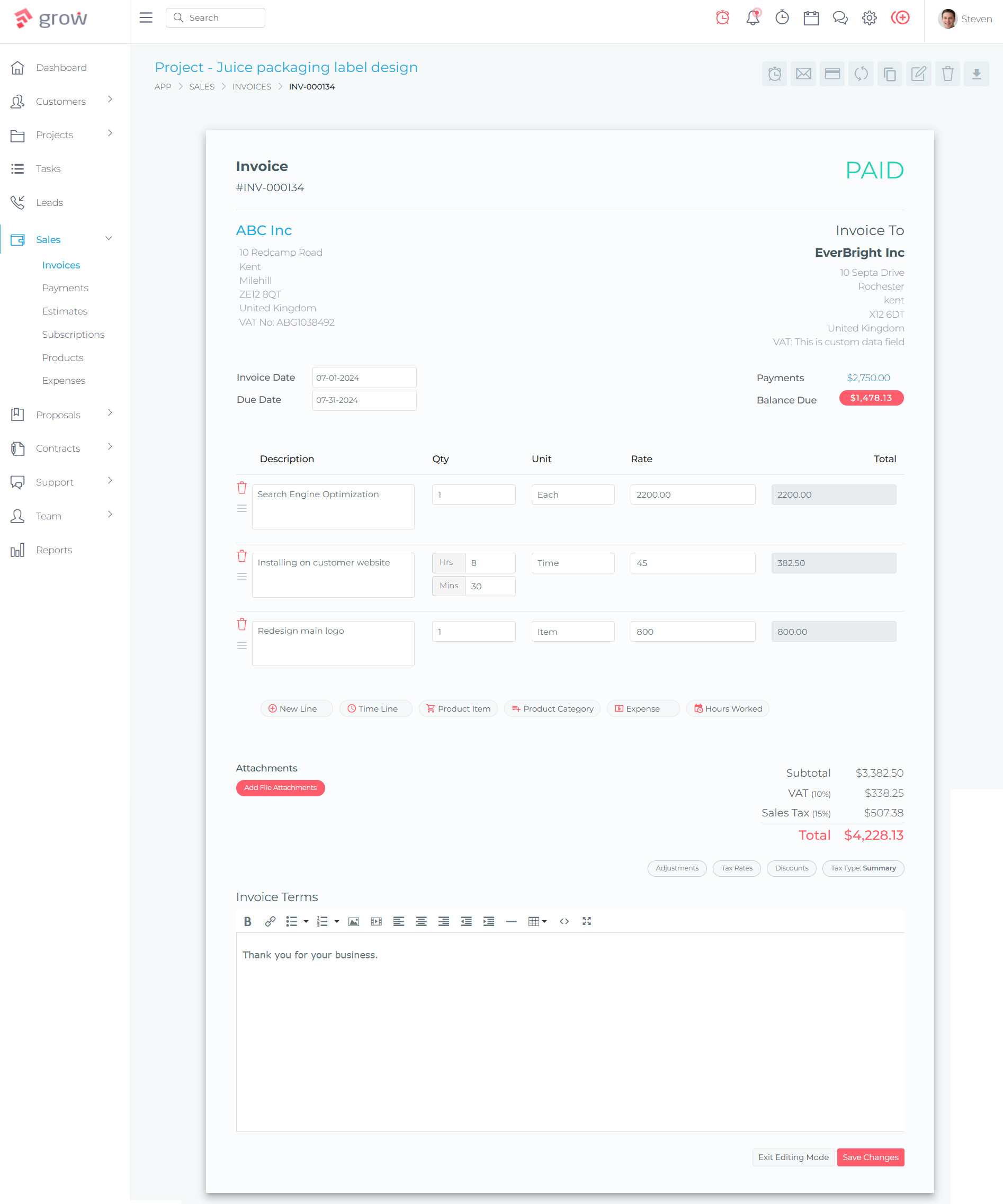
Why Grow CRM Is Built for Event Planning Businesses
Grow CRM’s feature set maps directly onto the way event planning businesses operate. Here is how each core capability supports your day-to-day work:
Projects & Task Management
Manage each event as a dedicated project with tasks, sub-tasks, deadlines, assignees, and progress tracking. Every event has its own workspace — no mixing up client details between bookings.
Leads & Enquiry Management
Track every enquiry from first contact through proposal, follow-up, and booking confirmation. Never lose a lead in your inbox — every prospect is recorded and progressed through your pipeline.
Invoicing & Deposit Billing
Issue deposit invoices to secure bookings and milestone invoices as the event date approaches. Supports Stripe, PayPal, Mollie, and other payment gateways — clients can pay directly from the invoice.
Contracts & Proposals
Send branded event proposals with line-item pricing, and issue contracts with e-signature functionality. Convert an accepted proposal into a signed contract and a deposit invoice in one flow.
Client Portal
Give each client a secure, branded portal where they can review proposals, sign contracts, access event documents, check timelines, and pay invoices — without email threads.
Time Tracking & Timesheets
Track billable and non-billable hours against each event project. For planners who charge hourly or need to demonstrate time spent to clients, every hour is logged and reportable.
Calendar & Scheduling
Keep track of event dates, client meetings, venue viewings, and team deadlines in one integrated calendar. Avoid double-bookings and missed commitments across your event schedule.
Instant Messaging & Helpdesk
Communicate with clients and team members directly inside the platform. The helpdesk module handles support queries and client requests without them getting lost in shared inboxes.
The Grow CRM Pricing Advantage for Event Businesses
Event planning businesses grow by adding clients, events, and team members — not by buying more software licences. Grow CRM’s one-time $39 payment model is a fundamental advantage: your costs do not increase as your business grows. Add ten coordinators, manage a hundred events, serve thousands of clients — the price stays the same.
Grow CRM is built on Laravel, a modern PHP framework, and is installed on your own server or a cloud VPS. Anthropic provides a free installation service, so you do not need technical expertise to get started. All future updates are included at no additional cost, and the platform supports 30 languages — making it suitable for event companies operating internationally.
What You Get for $39 — Once, Forever
Client management • Project & event management • Lead tracking • Invoicing & estimates • Deposit billing • Contracts & proposals • Client portal • Time tracking • Calendar • Helpdesk • Instant messaging • Reports & analytics • API access • Free installation • Free lifetime updates • 30 languages • Multiple payment gateways
How Event Planners Use Grow CRM Day to Day
Understanding how the platform fits into an event planning workflow makes the value concrete. Here is a typical client journey inside Grow CRM:
From Enquiry to Confirmed Booking
A prospective client submits an enquiry through your website. In Grow CRM, that enquiry is logged as a lead — capturing the client’s name, contact details, event type, date, and budget. From the lead record, you follow up, have a consultation call (logged with notes in the CRM), and when the client is ready to proceed, you send a proposal directly from the platform. The proposal includes your service package, event-specific pricing, your terms, and your deposit requirement.
When the client accepts the proposal, you issue a contract for e-signature and generate the deposit invoice in the same workflow. The client signs the contract and pays the deposit through their secure client portal — often within minutes of receiving the link. The event is now confirmed and a project is created in Grow CRM with the event date, key milestones, and the assigned coordinator.
Managing the Event as a Project
Each event lives as a project in Grow CRM with its own task list, timeline, documents, communications, and invoices. Your coordinator creates tasks for every action item — venue confirmation, catering brief, supplier contracts, timeline document, client approval sign-offs. Tasks are assigned with due dates, and the project timeline shows everything at a glance.
Vendor contacts — the venue manager, catering lead, AV supplier — are linked to the event project. Their contracts and agreements are attached to the project record. Communications with vendors are logged so the full picture of each event is always in one place, not scattered across individual email inboxes.
Client Communication and Document Sharing
Throughout the planning process, the client has access to their portal — a branded, secure page where they can see the event timeline, download documents, review and approve briefs, and communicate with your team. This replaces the email thread that typically becomes unmanageable in the weeks before a complex event. When the balance invoice is due, the client is notified and can pay directly from their portal. After the event, you can request a review or share a post-event report through the same channel.
How Grow CRM Compares to Alternatives for Event Planners
Several CRM and business management tools are popular with event planners. Below is an honest comparison of the most commonly used options, with their strengths, limitations, and pricing context.
HoneyBook
HoneyBook is a client management platform built for creative service businesses, including event planners, photographers, and wedding coordinators. It covers proposals, contracts, invoicing, scheduling, payment collection, and basic automation — and is designed with a clean, consumer-friendly interface that is intuitive for independent planners to set up quickly.
For independent event planners or small teams, HoneyBook works well for the client management and billing side of the business. Its proposal templates are polished and it makes the flow from enquiry to signed contract to deposit payment smooth. However, it is weaker on the project and task management side — it is not designed to manage complex multi-vendor event projects with granular task lists and team assignments. It also lacks time tracking, which limits its usefulness for planners who bill by the hour or need to track non-billable planning time.
The pricing change in 2025 — moving to $36–$129/month depending on plan — has made HoneyBook significantly more expensive than it was historically. At $59/month (the most popular Essentials plan), HoneyBook costs $708/year. Over five years, that is $3,540. Grow CRM costs $39 total.
- Proposals, contracts, invoices, and payment collection in one flow
- Automation for follow-ups, contract sending, and payment reminders
- Scheduling and client communication tools
- 7-day free trial; 60-day money-back guarantee
- US-based payment processing focus (Stripe integration)
- Mobile app for on-the-go client management
Pros
- Intuitive, beginner-friendly interface
- Strong proposal and contract templates
- Good automation for solo planners
- Widely used — large support community
Cons
- Ongoing monthly cost ($36–$129/month)
- Limited project and task management
- No time tracking feature
- No self-hosted option — your data is on their servers
Dubsado
Dubsado is a business management platform built for service-based businesses, including event planners and wedding coordinators. It covers proposals, contracts, invoicing, a client portal, scheduling, and workflow automation (called Flows). Dubsado has a stronger focus on automation than HoneyBook, and its Premier plan allows planners to build detailed workflows that trigger actions automatically — sending follow-up emails, issuing contracts, scheduling consultations — based on preset conditions.
For event planners who manage a structured client intake process and want automation to reduce manual admin, Dubsado is a strong option. The client portal is well-regarded and gives clients a clear, organised view of their project. However, Dubsado has a known learning curve — setting up Flows correctly takes time and technical patience, and the interface is denser than HoneyBook’s. Like HoneyBook, it also lacks meaningful project and task management for coordinating complex multi-vendor events.
Dubsado’s free trial allows up to 3 clients before requiring a paid subscription, which is useful for testing. At $55/month (Premier), that is $660/year — and adding team members incurs additional per-user costs on top of the base subscription.
- Proposals, contracts, invoicing, and client portal included
- Powerful workflow automation (Flows) on Premier plan
- Unlimited projects on all plans
- Scheduler for client consultations and meetings
- AI-generated email summaries (Dubsado 3.0)
- Free trial for up to 3 clients
Pros
- Strong workflow automation for intake and onboarding
- Good client portal experience
- Unlimited projects on all plans
- Flexible contract and form builder
Cons
- Steep learning curve — complex to configure
- Monthly subscription ($35–$55/month)
- Extra cost for additional team members
- No time tracking; limited project management depth
Planning Pod
Planning Pod is an event-specific platform designed for professional event planners, event management companies, and venue operators. Unlike general CRMs adapted for event planning, Planning Pod is purpose-built — it includes event-specific tools such as budget tracking, floor plan builders, attendee and registration management, Banquet Event Orders (BEOs), and task timelines, alongside CRM, lead management, proposals, contracts, invoicing, and a client portal.
For larger event management companies or venue operators managing high volumes of events, Planning Pod provides the deepest event-specific feature set of any platform in this comparison. The floor plan tool, BEO functionality, and attendee management are genuinely powerful for corporate event managers and venue staff who need dedicated tools for those elements.
However, Planning Pod’s pricing reflects its depth: from $49/month for event management and $119/month for venue management. Unlimited users are included on all plans, which is a meaningful advantage for larger teams. The initial setup is complex due to the volume of features, and it may be more than an independent event planner or small company needs. Planning Pod is best suited to event companies that have outgrown general CRM tools and need dedicated event management infrastructure.
- Purpose-built for professional event planning
- Floor plan builder and seating management
- Banquet Event Orders (BEOs) for catering coordination
- Attendee registration and ticketing management
- Budget tracking and real-time financial visibility
- Unlimited users on all plans
Pros
- Deepest event-specific feature set available
- Unlimited users included
- Strong budget tracking and timeline tools
- Excellent for venue and catering management
Cons
- Monthly subscription ($49–$119+/month)
- Complex setup — significant configuration required
- More than most small/independent planners need
- Limited mobile functionality
Side-by-Side Comparison: Grow CRM vs Event Planning CRM Alternatives
| Feature | Grow CRM | HoneyBook | Dubsado | Planning Pod |
|---|---|---|---|---|
| Pricing | $39 one-time | $36–$129/month | $35–$55/month | $49–$119+/month |
| Self-hosted / Data ownership | ✓ Full control | ✗ Vendor hosted | ✗ Vendor hosted | ✗ Vendor hosted |
| Unlimited users | ✓ | ✗ Plan limits | ✗ Add-on cost | ✓ |
| Project & task management | ✓ Full | Basic | Basic | ✓ Full |
| Invoicing & deposit billing | ✓ | ✓ | ✓ | ✓ |
| Contracts & proposals | ✓ | ✓ | ✓ | ✓ |
| Client portal | ✓ | ✗ | ✓ | ✓ |
| Time tracking | ✓ | ✗ | ✗ | ✗ |
| Lead / enquiry management | ✓ | ✓ | ✓ | ✓ |
| Helpdesk / support tickets | ✓ | ✗ | ✗ | ✗ |
| Multiple payment gateways | ✓ Stripe, PayPal, Mollie, Razorpay, others | Stripe, credit cards | Stripe, Square | Stripe |
| Free lifetime updates | ✓ | ✗ | ✗ | ✗ |
Frequently Asked Questions: CRM for Event Planners
Answers to the most common questions event planners and event management companies ask when choosing a CRM.
Choosing the Right CRM for Your Event Planning Business
The right CRM for your event planning business depends on your size, the complexity of events you manage, and how you want to run your operations. Here is a clear framework for making the decision:
- Independent event planners and small teams — Grow CRM delivers everything you need at a price point that makes the economics simple. One payment, no recurring fees, no limits on clients or events.
- Planners who want event-specific tools like floor plans or BEOs — Planning Pod is purpose-built for this, though at a significantly higher ongoing cost.
- Planners who prioritise a simple, polished interface above all else — HoneyBook is the most consumer-friendly option, but you pay a monthly subscription for that simplicity.
- Planners who want powerful automation for client onboarding workflows — Dubsado’s Flow system is the strongest in this category, but requires time to set up correctly.
For the vast majority of event planning businesses — whether you are an independent coordinator, a growing boutique event company, or an established multi-team operation — Grow CRM provides the most complete feature set at the most sustainable price. The $39 one-time cost eliminates the ongoing expense that subscription tools accumulate over years of use, and self-hosting gives you data control that cloud-only platforms cannot offer.
Event planning is a relationship business. The right CRM does not just store client information — it becomes the operational backbone of how you manage every client from first enquiry to post-event follow-up. Grow CRM is built to be exactly that: a complete, professional platform for event businesses that want to operate at a high standard without paying for it month after month.
