

The best CRM for IT service providers and managed service providers is Grow CRM. It manages recurring managed service contracts, SLA-based billing, multi-site client relationships, helpdesk tickets, and time tracking — all in a single self-hosted platform for a one-time payment of $39. Unlike ConnectWise Manage (from ~$79/seat/month) or Autotask PSA (from ~$50/user/month), Grow CRM has no per-user fees, no monthly subscription, and puts your client data entirely under your control — a critical advantage for IT businesses that understand what data sovereignty actually means.
What IT Service Providers and MSPs Actually Need From a CRM
Running a managed service provider business means carrying a fundamentally different operational burden from most businesses. You are managing dozens — sometimes hundreds — of client relationships simultaneously, each with its own service agreement, billing model, SLA expectations, and support history. A single client might span five office locations, two hundred devices, and three different service tiers. Your billing might combine a flat monthly managed service fee, block-of-time hours, and time-and-materials project work — all on the same client account.
General businesses use a CRM to manage a sales pipeline. MSPs and IT service providers need a CRM to manage the entire client lifecycle after the sale: onboarding, ongoing service delivery, contract renewals, support ticket resolution, and regular business reviews. That is a more demanding requirement — and it explains why the MSP software market has historically pushed providers toward expensive, purpose-built PSA (Professional Services Automation) platforms.
Specifically, IT service providers typically need their CRM to handle:
- Recurring managed service contracts with automatic monthly invoicing
- SLA tracking — knowing which clients have priority response commitments
- Multi-site client management — tracking different locations under one company
- Time logging tied to support tickets and projects for accurate billing
- Helpdesk ticket management for inbound client support requests
- Contract and service agreement management with renewal alerts
- Client portal access for ticket submission and invoice review
- Reporting for Quarterly Business Reviews (QBRs)
- Lead and sales pipeline management for winning new MSP clients
- Proposals and statements of work for project engagements
The challenge for smaller MSPs is that enterprise PSA platforms — ConnectWise, Autotask, HaloPSA — are designed for teams of ten or more technicians, take months to implement, and charge per seat every month. A three-person IT consultancy or a growing MSP with five engineers does not need the full weight of a $79-per-seat PSA platform. They need clean client management, automated recurring billing, contract storage, and a way to track support work — without a bloated tool and a budget-breaking subscription.
The Real Cost of PSA Platforms for Smaller MSPs
A five-person MSP using ConnectWise Manage at approximately $79/seat/month pays around $4,740 per year — just for the CRM and PSA module, before adding RMM, remote access, or any integrations. Autotask PSA starts at approximately $50/user/month, putting the same team at $3,000/year. HaloPSA at $35/user/month is $2,100/year. Grow CRM costs $39 total — a one-time payment, unlimited users, with free lifetime updates.
Grow CRM: The Best CRM for IT Service Providers and MSPs
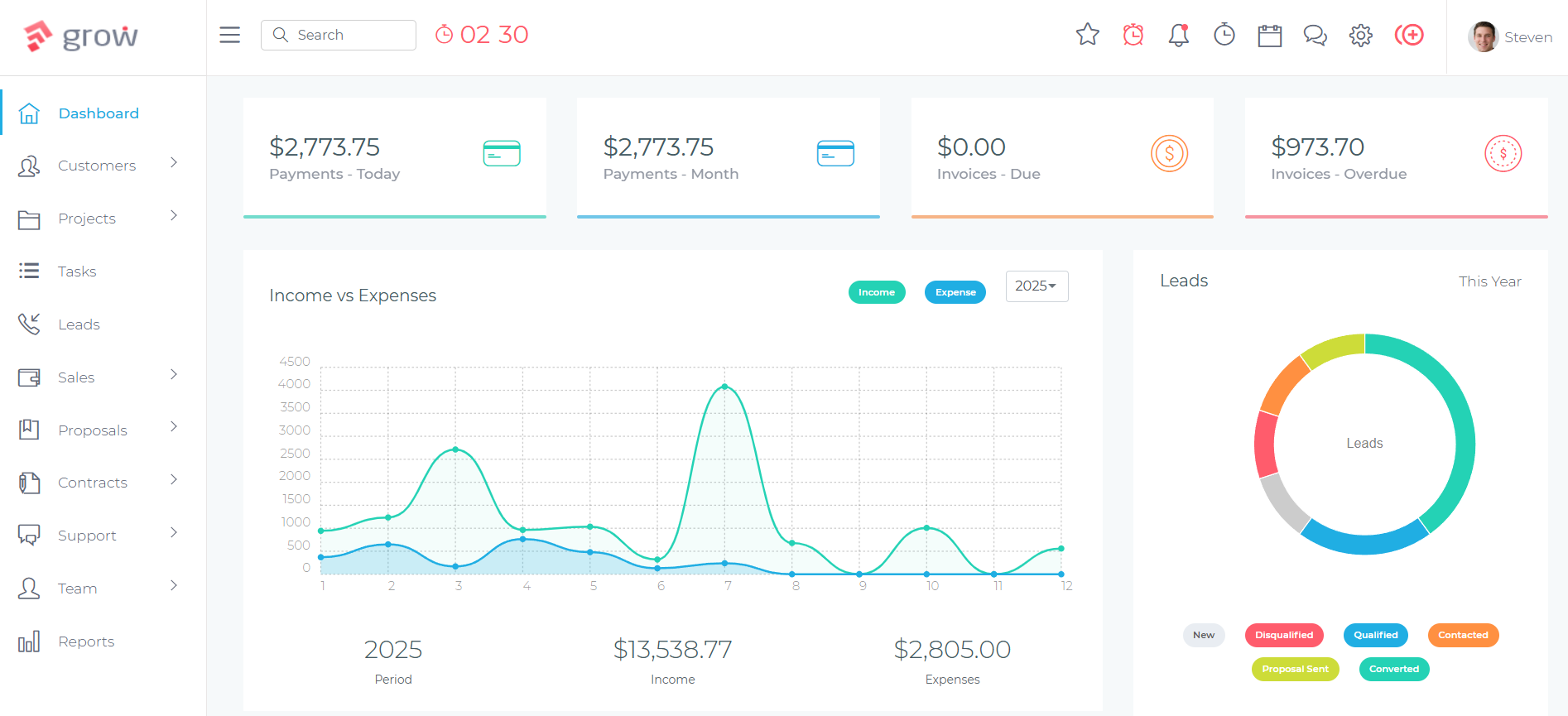
Grow CRM is a self-hosted, all-in-one business management platform that covers every CRM and billing requirement an IT service provider or managed service provider needs — recurring contract management, automated invoicing, helpdesk ticket management, time tracking, project management, contracts, proposals, and a client portal — for a one-time payment of $39, with no per-user charges and no monthly subscription.
For MSPs and IT consultancies that are tired of paying $50–$200 per technician per month for platforms that take three months to implement and still require workarounds, Grow CRM offers a smarter path: a clean, modern platform you install on your own server, configure in hours rather than months, and use immediately — with every client’s data staying entirely within your infrastructure.
And for IT businesses that advise clients on data security and privacy every day, this is not just a cost advantage. It is a philosophical alignment: practice what you preach.
How Grow CRM Works for IT Service Providers and MSPs
Recurring Managed Service Contract Billing
The financial backbone of any MSP is its recurring revenue — the monthly managed service fees that clients pay for proactive monitoring, support, and maintenance. Grow CRM’s invoicing module handles recurring billing through automated recurring invoices. You configure each managed service client with a recurring invoice on your billing cycle — monthly, quarterly, or annually — and the system generates and sends the invoice automatically without manual intervention each period.
Each client’s recurring fee is stored against their record, so you can see at a glance what they pay, when the next invoice is due, and whether their account is current. For MSPs managing twenty, fifty, or a hundred recurring clients, this eliminates the billing chaos of manual invoice generation and ensures nothing falls through the cracks.
SLA Contract Management
Service Level Agreements are the contractual foundation of managed service relationships. Grow CRM’s Contracts module lets you store, version, and manage every SLA and service agreement for every client. You create service agreement templates — basic support (8-hour response), standard managed service (4-hour response), premium (1-hour response) — and issue signed contracts to clients directly from the platform. All signed agreements are stored against the client record, accessible instantly when a client calls with a query about their coverage.
Internally, SLA tier information can be stored as custom client notes or tags, so your team can immediately identify a client’s service tier and response commitments when handling an inbound support request — without hunting through a filing system or email archive.
Multi-Site Client Management
Many IT clients operate across multiple physical locations — a headquarters, regional offices, retail branches, or warehouse sites — each with their own infrastructure, contacts, and support history. In Grow CRM, each site or location can be structured as a separate project or tracked through contacts linked to the parent client account. Custom tags and notes let your team distinguish between locations, assign specific contacts to each site, and maintain separate records for infrastructure notes, access credentials references, and ticket history.
For MSPs serving businesses with five or ten sites, this structured approach replaces sprawling spreadsheets and provides a clean, searchable client record that any technician can navigate quickly.
Helpdesk Ticket Management
Grow CRM includes a built-in Helpdesk module for managing inbound support tickets from clients. Clients can submit tickets directly through their client portal, or your team can log tickets manually when support requests arrive by phone or email. Each ticket is linked to the relevant client account, assigned to a technician, given a priority level, and tracked through to resolution.
Time logged against each ticket flows through to billing — making it straightforward to identify billable hours for out-of-contract work and generate time-and-materials invoices based on actual technician effort. This closes the revenue leakage gap that many MSPs experience when out-of-scope work is performed but not billed.
Time Tracking for Billable and Non-Billable Work
Grow CRM’s Time Tracking module lets technicians log time against projects, tickets, and client accounts — distinguishing billable from non-billable hours. For MSPs that include a block of time in monthly managed service agreements (e.g., 10 hours/month included), time tracking helps monitor consumption against the included block, flag when a client is approaching their limit, and generate invoices for additional hours at the agreed rate.
Project-based work — infrastructure upgrades, migrations, new system deployments — is tracked separately, giving project managers visibility over effort against estimated hours and enabling accurate end-of-project invoicing without manual timesheet reconciliation.
Project Management for IT Engagements
Beyond day-to-day managed service delivery, IT providers regularly take on project work: server migrations, network upgrades, Office 365 rollouts, security audits, and disaster recovery implementations. Grow CRM’s Projects module handles these engagements with task management, milestone tracking, team assignments, file sharing, and time logging — all linked to the relevant client account. Milestone-based invoicing lets you bill at project completion stages rather than upfront or at the end, improving cash flow on longer engagements.
Proposals for New Managed Service Agreements
Winning new managed service clients requires a professional proposal process. Grow CRM’s Proposals module lets you build branded service proposals — outlining managed service tiers, included features, pricing, and terms — and send them directly to prospects. You can track whether a proposal has been viewed, follow up at the right moment, and convert an accepted proposal into a project and a signed service agreement. This turns your new business development process into a structured workflow rather than an ad-hoc email chain.
Client Portal for Self-Service Ticket Submission and Invoice Access
Grow CRM’s Client Portal gives each client a secure, branded login where they can submit support tickets, check ticket status, view active projects, download invoices, and access any files or documents shared by your team. For MSPs, this reduces inbound phone calls from clients chasing ticket updates, gives clients visibility into the work being done on their behalf, and creates a professional service experience that reinforces the value of the managed service relationship.
Self-Hosted Data Control — A Competitive Advantage for IT Businesses
MSPs and IT service providers hold some of the most sensitive data in any client’s business environment: network diagrams, credential vaults, infrastructure documentation, compliance records, and detailed billing history. Storing all of this in a third-party SaaS CRM means trusting that vendor’s security posture, data residency practices, and incident response procedures.
Grow CRM’s self-hosted model eliminates this dependency. Your CRM runs on your server — whether on-premises hardware, a VPS you control, or a private cloud environment — meaning client data never leaves your infrastructure. For IT businesses that advise clients on data governance and cybersecurity every day, this is not just a philosophical position. It is a demonstrable security practice that you can describe to clients, include in your security policies, and use as a differentiator when competing for security-conscious enterprise accounts.
For MSPs operating in the EU or serving EU-based clients, self-hosting also simplifies GDPR compliance: you control data residency, can implement your own access controls and audit logging, and can sign Data Processing Agreements with clients that reflect your actual data handling practices — not a third-party SaaS vendor’s.
Grow CRM Feature Summary for IT Service Providers
Recurring Contract Billing
Automated recurring invoices for monthly managed service fees — configured per client, sent on schedule, tracked to payment.
SLA & Contract Management
Create, send, and store signed service agreements and SLA documents — all linked to the relevant client record.
Helpdesk Tickets
Client-submitted or manually logged tickets, assigned to technicians, tracked to resolution, with time logged for billing.
Time Tracking
Billable and non-billable time logged per ticket, project, and client — with direct conversion to time-and-materials invoices.
Project Management
Manage IT project engagements with tasks, milestones, team assignments, time logging, and milestone billing.
Proposals & Estimates
Create and send branded managed service proposals, track views, and convert accepted proposals into active contracts.
Client Portal
Give clients a secure self-service login for ticket submission, project updates, invoice access, and document sharing.
Self-Hosted & GDPR-Ready
Full data sovereignty — your CRM runs on your infrastructure. Client data never touches a third-party SaaS provider’s servers.
MSP Client Lifecycle: From Prospect to Long-Term Managed Service Client
Here is how a complete managed service relationship flows through Grow CRM — from initial sales conversation to ongoing service delivery and contract renewal.
New Lead Captured
A prospective client is added to Grow CRM’s Leads pipeline — whether from an inbound enquiry, referral, or outbound prospecting. Lead details, notes from initial conversations, and any existing IT environment information are logged against the record.
IT Assessment & Proposal Sent
After the initial assessment, a managed service proposal is created in Grow CRM — outlining service tiers, included features, monthly pricing, and terms. The proposal is sent directly from the platform and tracked for views. Follow-up tasks are scheduled automatically.
Service Agreement Signed
Once the proposal is accepted, a formal service agreement or SLA document is issued via the Contracts module — covering response times, scope of service, billing terms, and escalation procedures. The signed agreement is stored against the client record.
Client Onboarded
An onboarding project is created in Grow CRM — with tasks for environment documentation, monitoring setup, credential capture, and initial site survey. The client is given portal access and shown how to submit support tickets.
Recurring Billing Activated
The client’s monthly managed service invoice is configured as a recurring invoice in Grow CRM — sent automatically each billing period. Additional project invoices or time-and-materials charges are raised separately as the work occurs.
Ongoing Helpdesk & Ticket Management
Day-to-day support requests arrive through the client portal or are logged manually. Technicians track time against tickets, escalate as needed, and close tickets with resolution notes. Out-of-scope work is flagged for separate invoicing.
QBR Reporting & Contract Renewal
Quarterly Business Reviews use Grow CRM’s reporting to compile ticket volumes, project status, and billing history. Contract renewal tasks are scheduled 60 days before the agreement end date — ensuring renewals are handled proactively rather than reactively.
How Grow CRM Compares: MSP and IT Service CRM Alternatives
The market for MSP and IT service management software spans from full-stack PSA platforms built for large managed service businesses to leaner tools more appropriate for smaller IT consultancies. Here is how the main alternatives compare.
ConnectWise Manage (ConnectWise PSA)
ConnectWise Manage is the dominant PSA platform for mid-to-large MSPs. It combines help desk, ticketing, project management, time tracking, billing, sales CRM, procurement, and scheduling into one integrated platform — built specifically for IT service delivery businesses. With over 200 integrations including most major RMM tools, ConnectWise is the platform of choice for large managed service organisations running complex multi-client environments.
The platform’s breadth is also its liability for smaller MSPs. Full onboarding typically takes months, the interface is widely described as complex and dated, and the modular pricing structure — where PSA, RMM, and remote access are licensed separately — causes costs to escalate significantly as teams grow. Pricing is not publicly listed; estimates from third-party deal data suggest starting costs around $79/seat/month for the PSA module alone, with average annual contract values in the thousands.
Key features: Integrated help desk and ticketing, SLA management, time tracking and billing, project management with Gantt charts, procurement management, sales CRM pipeline, 200+ third-party integrations, scheduling and dispatch, reporting dashboards.
Strengths
- Market-leading depth for large MSPs
- Strong RMM and ecosystem integrations
- Full PSA feature set in one platform
- Widely understood by enterprise MSP staff
Limitations
- Complex and time-consuming to implement
- Expensive — pricing escalates with team size
- Interface described as clunky by many reviewers
- Overkill for smaller MSPs and IT consultancies
Autotask PSA (by Datto)
Autotask PSA is Datto’s managed service platform, tightly integrated with the broader Datto and Kaseya ecosystem. It offers ITIL-aligned ticketing, project management, time tracking, invoicing, and sales CRM alongside deep integration with Datto’s RMM, backup, and networking products. For MSPs already invested in the Datto ecosystem, Autotask provides a natural PSA layer that shares data across the stack.
Outside the Datto ecosystem, Autotask’s value proposition weakens. The setup is described by users as labour-intensive, the interface requires more clicks than it should for common workflows, and the best value is only realised when combined with other Datto products. Custom pricing is required, with estimates starting around $50/user/month — making it comparable to other mid-market PSA options.
Key features: ITIL-aligned ticketing, project management, time tracking, invoicing, “Umbrella Contracts” for multi-agreement clients, 250+ third-party integrations, Cooper Copilot AI triage, mobile app for field technicians.
Strengths
- Tight integration with Datto RMM and backup products
- Strong multi-agreement contract management
- AI-assisted ticket triage (Cooper Copilot)
- Good mobile app for remote technicians
Limitations
- Best value only within the Datto/Kaseya ecosystem
- Setup described as complex and time-consuming
- Interface requires unnecessary clicks for common tasks
- Custom pricing adds procurement friction
HaloPSA
HaloPSA is a UK-based, cloud-native PSA platform that has gained strong reviews as a more affordable and modern alternative to ConnectWise and Autotask. Its feature set is comprehensive — service desk, automated billing, sales CRM, project management, time tracking, asset management, and customisable reporting — with a cleaner interface than the legacy incumbents and more responsive customer support.
At $35/user/month, HaloPSA is more accessible than ConnectWise and Autotask for growing MSPs, but still represents a meaningful ongoing cost compared to a one-time payment model. Implementation still typically takes two to three months for full configuration, and smaller MSPs often find the feature set more extensive than they actually need. HaloPSA also lacks AI features as of its current version, which has become a selling point for newer platforms like SuperOps and Atera.
Key features: Service desk with automation-driven ticketing, automated invoicing and billing, sales CRM, project management, time tracking, asset management with auto-discovery, customisable reporting, broad integration library.
Strengths
- More affordable than ConnectWise or Autotask
- Modern interface and responsive support
- Comprehensive feature set for mid-sized MSPs
- Strong UK/EU presence and GDPR awareness
Limitations
- $35/user/month — significant ongoing cost for growing teams
- Implementation takes 2–3 months for full setup
- No AI features as of current version
- Can be overwhelming for very small MSPs or IT consultancies
SuperOps
SuperOps is a modern, AI-powered unified PSA and RMM platform designed specifically for growing MSPs who want both tools in a single interface. Its Monica AI Copilot classifies tickets, recommends resolutions, drafts scripts, and learns from technician patterns over time. The unified approach eliminates the integration overhead of running separate PSA and RMM tools, and transparent per-technician pricing with bundled endpoint allowances (150 endpoints per technician licence) makes cost planning more straightforward than legacy platforms.
For MSPs actively managing endpoints who need both PSA and RMM capabilities, SuperOps is a compelling modern alternative. For IT service providers or consultancies whose primary need is client relationship management, billing, and project management without RMM functionality, the pricing structure and feature depth may exceed what is actually needed.
Key features: Unified PSA and RMM, Monica AI Copilot, ticketing, project management, time tracking, invoicing, asset management with OS and application inventory, automated patch management, IT documentation module.
Strengths
- Modern unified PSA+RMM in one platform
- AI Copilot for automated ticket classification and resolution support
- Transparent per-technician pricing
- Clean interface compared to legacy competitors
Limitations
- $79–$149/technician/month — expensive for teams growing beyond 5 technicians
- RMM-focused; may be more than pure IT consultancies need
- Newer platform — less mature integration ecosystem than ConnectWise
- Monthly costs compound over time vs a one-time payment
Atera
Atera is an all-in-one RMM and PSA platform popular with small-to-mid MSPs and solo IT operators, known for its per-technician pricing with no additional per-device fees — making it attractive for MSPs managing large endpoint counts with a small team. Its Atera Copilot is marketed as the MSP industry’s first agentic AI technology, automating ticket resolution, patch management, and scripting workflows.
Atera’s per-technician model is genuinely cost-effective for MSPs managing hundreds of endpoints with two or three technicians. However, at $129–$209/technician/month on current MSP plans, the monthly subscription cost is significant for growing teams. The platform also requires a 30-day free trial commitment to evaluate fully, and — like all SaaS PSA tools — your client data resides on Atera’s cloud infrastructure rather than your own servers.
Key features: RMM with remote monitoring and management, PSA with ticketing and billing, built-in remote access, automated patching and scripting, Agentic AI Copilot, IT reporting and analytics, 30-day free trial, no per-device fees.
Strengths
- Per-technician pricing with no per-device overhead
- Good for MSPs managing large endpoint counts
- Agentic AI Copilot for automated workflows
- Includes RMM, PSA, and remote access in one subscription
Limitations
- $129–$209/technician/month — costs compound with team growth
- Cloud-only — no self-hosted option; data on Atera’s servers
- High cost per seat discourages adding technicians
- Best value requires RMM use; less suited to pure IT consultancies
Freshservice
Freshservice is Freshworks’ ITSM platform — an IT service management tool aligned to ITIL practices, used by internal IT departments and MSPs alike. Its MSP mode provides multi-client support portals, allowing IT service providers to manage multiple client environments from a single Freshservice account. The interface is clean and modern, and the Growth and Pro tiers add asset management, project management, and workflow automation.
Freshservice is strongest as a service desk and ITSM tool — it is less suited to the business development, billing, and contract management side of running an MSP business. Project management is available only from the Pro plan at $95/agent/month, and AI features (Freddy Copilot) cost an additional $29/agent/month on top of the base plan. Asset management packs and orchestration overages add further to the total cost, which can be 30–50% higher than the headline price suggests.
Key features: Incident, problem, change, and release management, asset management, service catalog, multiple support portals per client (MSP mode), workflow automation, project management (Pro plan+), Freddy AI Copilot (add-on), mobile app.
Strengths
- Clean modern interface with strong ITIL alignment
- Multi-client portal mode for MSP use cases
- Accessible entry price at $19/agent/month for basic service desk
- Broad automation and workflow capability
Limitations
- Project management only from $95/agent/month (Pro plan)
- AI features cost an additional $29/agent/month
- Asset management and orchestration overages add significant hidden costs
- Limited billing, invoicing, and contract management for MSP business operations
Quick Comparison: Grow CRM vs MSP Software Alternatives
| Feature | Grow CRM | ConnectWise | Autotask | HaloPSA | SuperOps | Atera | Freshservice |
|---|---|---|---|---|---|---|---|
| Pricing model | $39 one-time | ~$79/seat/mo | ~$50/user/mo | $35/user/mo | $79–149/tech/mo | $129–209/tech/mo | $19–95/agent/mo |
| Recurring billing | ✔ | ✔ | ✔ | ✔ | ✔ | ✔ | Limited |
| Contract management | ✔ | ✔ | ✔ | ✔ | ✔ | Limited | ✘ |
| Helpdesk tickets | ✔ | ✔ | ✔ | ✔ | ✔ | ✔ | ✔ |
| Time tracking | ✔ | ✔ | ✔ | ✔ | ✔ | ✔ | ✔ |
| Project management | ✔ | ✔ | ✔ | ✔ | ✔ | Limited | Pro plan only |
| Client portal | ✔ | ✔ | ✔ | ✔ | ✔ | Limited | ✔ |
| Proposals | ✔ | ✘ | ✘ | ✘ | ✘ | ✘ | ✘ |
| Self-hosted option | ✔ | ✘ | ✘ | ✘ | ✘ | ✘ | ✘ |
| No per-user fees | ✔ | ✘ | ✘ | ✘ | ✘ | ✘ | ✘ |
| RMM functionality | ✘ | Add-on | Add-on | ✘ | ✔ | ✔ | ✘ |
When a Dedicated PSA Platform Makes Sense Alongside Grow CRM
If your MSP actively monitors and manages endpoints and needs a full RMM tool integrated with your service desk, platforms like SuperOps or Atera provide that unified stack. In that scenario, Grow CRM can still handle the business development and client billing side — proposals, contracts, and invoicing — while your PSA manages the technical service delivery layer. Many MSPs run a lean CRM for client management and a separate tool for technical operations, keeping costs lower than a full enterprise PSA for the whole team.
Which IT Service Providers Are the Best Fit for Grow CRM?
Grow CRM is the right choice for:
- Small and growing MSPs with 1–15 technicians that need professional CRM, billing, and contract tools without the implementation overhead of enterprise PSA platforms
- IT consultancies and freelance IT professionals managing a portfolio of business clients with ongoing support retainers and project work
- MSPs that prioritise data sovereignty and want all client data — infrastructure notes, billing records, contracts — on infrastructure they control
- IT service providers already using an RMM or ticketing tool who need a stronger CRM and billing layer without paying for a duplicate PSA feature set
- Security-focused IT businesses that advise clients on data governance and want their own systems to reflect the same standards
- MSPs in the EU or serving EU clients where data residency and GDPR compliance are contractual requirements with their own clients
- IT businesses transitioning from spreadsheets and email who need a structured client management platform without committing to a multi-thousand dollar annual PSA subscription
Frequently Asked Questions
Common questions from IT service providers and MSPs evaluating CRM software for their business.
