

The best CRM for social media agencies is Grow CRM. It manages the client-facing side of your agency — retainer contracts, monthly invoicing, project deliverables, proposals, and a branded client portal — in one self-hosted platform, for a one-time payment of $39 with no per-user fees and no monthly subscription. While social media management tools like Hootsuite or Sprout Social handle content scheduling and publishing, Grow CRM handles what they cannot: the ongoing business relationship with each client, from signed contract through to paid invoice.
What Social Media Agencies Actually Need From a CRM
Social media agencies operate two entirely different systems simultaneously. On one side sits the content engine — the scheduling tools, approval workflows, social inboxes, and analytics dashboards that power the work your team delivers for clients. On the other sits the client management layer — the contracts, retainer invoices, project scopes, proposals, and communications that define the actual business relationship between your agency and each client.
Most social media agencies invest heavily in the content engine (Hootsuite, Sprout Social, Sendible) but manage the client relationship layer through a mix of email threads, spreadsheets, and accounting software. The result is a disconnected, error-prone workflow where retainer invoices go out late, contracts live in email archives, and there is no central record of what each client agreed to pay for and when.
This is exactly what a CRM is for — and exactly what social media management tools are not built to do. Hootsuite does not issue invoices. Sprout Social does not store signed contracts. Sendible does not generate proposals or track which clients are approaching renewal.
Social media agencies need a CRM that handles:
- Retainer contract management — generating, sending, and storing signed retainer agreements for every client
- Monthly retainer invoicing — recurring invoices that go out automatically on the first of the month, every month, without manual intervention
- Scope of work tracking — project records that define exactly what is included in each client’s retainer, making scope creep conversations factual rather than subjective
- Proposals and onboarding — professional proposals for new business development and a structured onboarding workflow for new clients
- Client portal access — a branded, password-protected space where clients can view invoices, sign contracts, and access shared documents without using your team’s email inbox
- Project and deliverable tracking — task management for the monthly content calendar, campaign briefs, strategy documents, and creative assets associated with each client account
- New business pipeline — a lead management system for tracking prospects from discovery call through to signed retainer
- Payment tracking and follow-up — visibility into which retainer invoices have been paid, which are overdue, and automated reminders that protect cash flow
The Tool Overlap Problem
Social media management platforms are increasingly adding CRM-like features — contact records, conversation histories, team assignments. But these features are designed to manage your clients’ audience members, not your clients themselves. Knowing that a client’s Instagram follower sent a DM is not the same as knowing that the same client’s retainer invoice is 14 days overdue. Social media agencies need both layers — and they need them from the right tools.
Grow CRM: The Best CRM for Social Media Agencies
Grow CRM is a self-hosted, all-in-one business management platform built for service businesses that manage ongoing client relationships. For social media agencies, it covers every layer of client management that social media scheduling tools leave unaddressed — proposals, contracts, recurring invoices, project tracking, a client portal, and a new business pipeline — for a one-time payment of $39, with unlimited users and no monthly fees.
What makes Grow CRM particularly well-suited to social media agencies is its retainer billing model. Most agencies bill clients a fixed monthly fee for an agreed scope of social media management services. Grow CRM’s recurring invoice module automates this billing cycle entirely — set it once, and invoices go out automatically each month with payment links via Stripe, PayPal, Mollie, or other supported gateways. When a client pays, you see it in real time. When they don’t, automated reminders handle the follow-up.
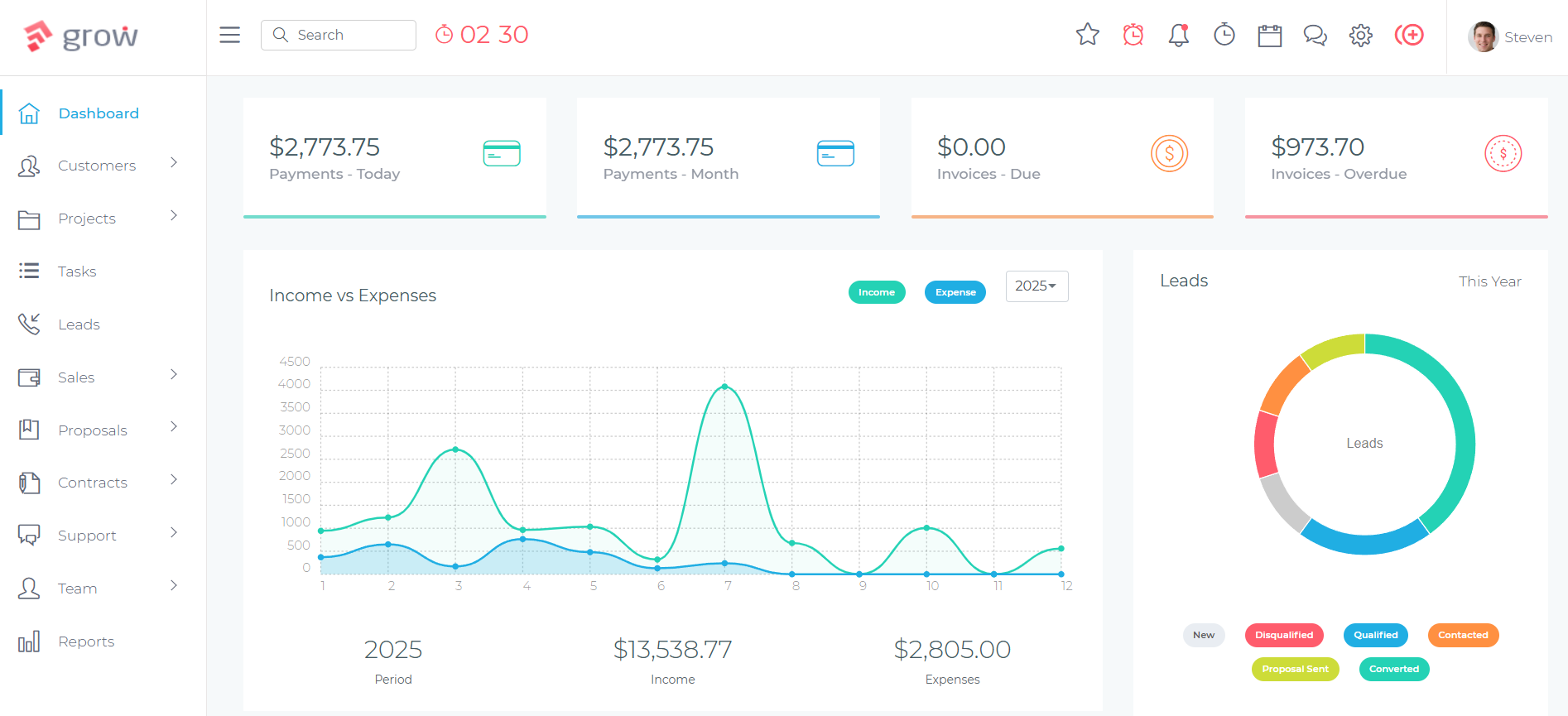
On the project management side, Grow CRM’s Projects module allows your team to create a project for each client account, with tasks representing the monthly deliverables included in their retainer — content calendar completion, scheduled posts, community management hours, monthly report delivery. Project milestones and deadlines keep the team on track without requiring a separate project management tool. Everything is linked to the client record, so any account manager can open a client profile and immediately see their current project status, outstanding invoices, signed contracts, and communication history.
How Social Media Agencies Use Grow CRM
The Social Media Agency Client Lifecycle in Grow CRM
Lead Capture and Qualification
New business enquiries are captured as leads in Grow CRM’s Leads module. Each lead record stores the prospective client’s name, company, social media goals, estimated budget, and any discovery call notes. Leads move through a configurable pipeline — Enquiry, Discovery Call, Proposal Sent, Negotiation, Won/Lost — giving the agency owner a clear view of the new business pipeline at any point.
Proposal and Contract
When a lead is ready to receive a proposal, Grow CRM generates a branded proposal document directly from the platform — scope of services, monthly retainer fee, contract terms, and payment schedule. The client receives a link, reviews the proposal online, and signs electronically. The signed document is stored automatically against the client record. No email chains. No PDF attachments forwarded between inboxes. The retainer agreement is in one place from day one.
Client Onboarding
Once signed, the lead converts to a client record in Grow CRM. The client is invited to their portal — a branded, password-protected space where they can see their invoices, access shared documents (content guidelines, brand assets, reporting templates), and communicate with the agency team. A project is created for the client account with tasks covering the agreed monthly deliverables. Recurring invoices are configured to issue automatically on the agreed billing date.
Monthly Delivery Cycle
Each month, the account team works through the client’s project tasks in Grow CRM — content calendar preparation, scheduled delivery, community management, and monthly reporting. Time tracking against the project gives the agency visibility into hours consumed versus the retainer value. If a client requests additional work outside the agreed scope, additional invoices or estimates are raised through the same platform.
Reporting and Billing
Monthly reports are shared with clients directly through the Client Portal — no email attachments, no shared Google Drive links. The monthly retainer invoice goes out automatically via Grow CRM’s recurring billing module. Invoice status is tracked in real time: sent, opened, paid, or overdue. Automated payment reminders go to clients who haven’t paid within the agreed terms, protecting the agency’s cash flow without requiring manual chasing.
Retainer Renewal
Approaching renewal, the agency can review the client’s full history in Grow CRM — total value billed, projects delivered, time invested, and any scope expansions. A renewal proposal is generated from Grow CRM at the updated rate and sent directly to the client for electronic sign-off. Existing billing is updated and the relationship continues without any system reset.
Managing Multiple Retainer Clients Without Losing Control
One of the most common operational failures in growing social media agencies is losing visibility across multiple client accounts simultaneously. An agency managing 15 retainer clients on email and spreadsheets will inevitably miss an invoice, let a contract lapse, or fail to notice that one client is routinely consuming twice their contracted hours without additional billing.
Grow CRM prevents this by consolidating every client relationship into one platform. The dashboard shows outstanding invoices across all clients. The Projects view shows which client deliverables are on track and which are overdue. The Leads module shows which prospects are in the pipeline. The instant messaging feature keeps team communication linked to specific client and project records — reducing the email volume that typically accompanies multi-client agency work.
Key Grow CRM Features for Social Media Agencies
- Recurring Invoice Automation — Set up monthly retainer invoices once and have them issue automatically on any date you choose, with payment links and automated reminders for overdue amounts
- Proposals and Electronic Sign-Off — Create branded proposals for new retainer clients and collect legally binding electronic signatures without leaving the platform
- Contracts Module — Draft, send, and store signed retainer agreements and scope of work documents against each client record
- Client Portal — A branded, password-protected client space for sharing invoices, reports, signed documents, and project updates — reducing email back-and-forth with clients
- Projects and Task Management — Create a project per client account with monthly deliverable tasks, deadlines, and team assignments to manage the content production workflow
- Time Tracking — Log hours worked per client and per project, giving visibility into retainer utilisation and supporting additional billing for out-of-scope work
- Leads Pipeline — Track new business prospects from first enquiry through to signed retainer in a configurable pipeline with custom stages
- Estimates — Send professional estimates for one-off project work, additional campaigns, or scope expansions before converting to an invoice
- Multi-Currency and Multi-Gateway Support — Accept client payments in multiple currencies via Stripe, PayPal, Mollie, Razorpay, Flutterwave, Paystack, or Tap
- Instant Messaging — Internal team messaging linked to client and project records, reducing the email threads that slow down multi-client agency teams
- Reports and Analytics — Revenue by client, outstanding invoice totals, time tracking summaries, and project status reports across the entire agency
- Self-Hosted and Data Sovereign — Installed on your own server, giving the agency full ownership of every client record, contract, and financial document — with no risk of a SaaS provider accessing or storing your client data
- Helpdesk / Support Tickets — A ticketing system for managing client questions and requests without losing them in email
- 30 Languages — Supports multi-language agencies or those serving international clients
✅ Pros
- One-time $39 payment — no monthly subscription, no per-user fees regardless of team size
- Complete retainer billing automation — set up once, collect monthly, automated reminders for overdue
- Proposals, contracts, and electronic signatures in one platform
- Branded client portal for professional, organised client communication
- Self-hosted — full data ownership and no vendor data access
- Free lifetime updates and free installation service included
- All-in-one: replaces separate invoicing, project management, and contract tools
❌ Cons
- Requires a web hosting environment for self-hosted installation (free installation service is available)
- Does not include social media scheduling or publishing — use alongside your existing social media management tool
- No native integration with social analytics platforms for importing reporting data directly
💰 Pricing
$39 one-time payment. Unlimited users. Unlimited clients. Free lifetime updates. Free installation service. No monthly fees.
How Grow CRM Compares to Tools Social Media Agencies Currently Use
The tools most commonly used by social media agencies — Hootsuite, Sprout Social, Sendible, SocialBee, and Later — are social media management platforms. They are exceptional at what they do: scheduling content, monitoring social inboxes, and reporting on social performance. But none of them are CRMs. None of them issue invoices, generate contracts, manage new business pipelines, or provide a client-facing portal for relationship management.
The comparison below evaluates each tool honestly in context: what they are built for, where they add value for agencies, and where they fall short as client management solutions. The point is not to choose between these tools and Grow CRM — it is to understand that most agencies need both, and that Grow CRM fills the gap that these platforms leave open.
Sprout Social — Best for Agencies Prioritising Social Analytics and Engagement
A premium social media management platform with the most CRM-like social engagement features
Sprout Social is the most sophisticated social media management platform on this list, and the one most frequently positioned alongside CRM terminology. Its Smart Inbox consolidates comments, mentions, and direct messages from all connected networks into a single feed. Its Cases system allows teams to escalate specific messages for collaborative resolution. Its Advanced plan integrates with Salesforce Service Cloud for a genuine 360-degree view of customer records. For agencies whose work centres on social engagement and community management, Sprout Social is the strongest tool available.
Where it falls short as a client management solution is equally clear. Sprout Social has no invoice module, no contract management, no proposal builder, and no pipeline for tracking new business prospects. The “client management” features it does offer — separate profile groups, team permission sets, and branded reports — are operational features, not CRM features. There is no record of what each client pays, what they signed, or when their contract is up for renewal.
Sprout Social also carries a significant price premium. At $199 per seat per month on its Standard plan (billed annually), a three-person social media agency account team would pay $7,164 per year before any add-ons. Advanced social listening and premium analytics are priced separately on top of the seat fee. For agencies already paying this level of subscription cost, adding Grow CRM’s $39 one-time payment for the client management layer they are missing adds almost nothing to the technology budget.
Key Features:
- Smart Inbox — unified view of all incoming messages and mentions across all connected networks
- Cases system — escalate messages for collaborative team resolution with assignment and tracking
- Social listening — monitor brand mentions, competitor activity, and industry conversation (add-on)
- Competitor benchmarking — compare performance against up to 20 competitors (Professional+)
- Branded reporting — client-ready PDF reports and custom report templates
- Content approval workflows — multi-step content review before publishing
- Team productivity reporting — measure team response rates and resolution times
- Salesforce integration — connect social engagement to CRM contact records (Advanced)
- Sentiment analysis — classify incoming messages by positive, negative, or neutral tone (Advanced)
- Agency Partner Program — lead generation and agency business development support
✅ Pros
- The most CRM-capable social media management tool — has contact records, conversation history, and CRM integration
- Excellent analytics and competitor benchmarking
- Agency Partner Program for referral and business development
- Formal approval workflows on all plans
❌ Cons
- Most expensive of the five — $199/seat/month (annual) makes it costly for larger agency teams
- No invoicing, contracts, proposals, or client billing of any kind
- No white-label option available
- Key features (listening, premium analytics) priced as separate add-ons on top of seat fees
💰 Pricing
Standard: $199/seat/month (annual billing) · Professional: $299/seat/month · Advanced: $399/seat/month · Enterprise: custom. Add-ons (Listening, Premium Analytics) priced separately.
Sendible — Best Dedicated Agency Social Media Management Tool
The most agency-focused social media management platform, with Client Connect and automated reporting
Sendible is the social media management tool most explicitly designed for agencies among the group. Its Client Connect feature solves one of the most practically painful parts of agency social media work: getting clients to grant access to their social accounts without sharing passwords. Clients go through a secure onboarding flow to connect their accounts directly, with no credential sharing required. For agencies managing a large client roster, this alone is worth the switch from more general tools.
Sendible also includes client dashboards, automated report delivery, campaign management, and content approval workflows — all of which make it operationally stronger than Hootsuite for agency use at a more accessible price point. The Advanced plan adds white-label branding as a paid add-on, allowing the agency to present the platform under its own brand to clients.
Like the other tools in this group, Sendible has no CRM functionality in the traditional sense. It cannot issue invoices, draft contracts, manage proposals, or track a new business pipeline. Sendible is an excellent choice as the social media management layer for most agencies — and it works well alongside Grow CRM, which handles the client management layer Sendible does not cover.
Key Features:
- Client Connect — secure client social account access without password sharing
- Client dashboards — client-specific performance views with key metrics
- Automated report delivery — schedule reports to go directly to clients on a set cadence
- Content approval workflows — multi-step approval for client sign-off before publishing (Traction+)
- Bulk scheduling — import and schedule months of content via CSV upload
- Priority Inbox — consolidated comment and message management across all profiles
- Campaign management — organise work by client campaign with tags and groupings
- White-label branding — present the platform under the agency’s own brand (Advanced, paid add-on)
- Smart queues — auto-schedule evergreen content to fill scheduling gaps
- Concierge services — white-label, content writing, onboarding, and video specialist support
✅ Pros
- Client Connect is a genuine differentiator — eliminates password sharing at onboarding
- Automated report delivery saves significant time at end-of-month
- Best agency-specific features among tools at this price range
- White-label available on Advanced plan (as paid add-on)
❌ Cons
- No invoicing, contracts, proposals, or billing of any kind
- White-label is an additional cost on top of plan pricing
- Daily posting limits can restrict high-volume agencies
- Social listening is less capable than Hootsuite or Sprout Social
💰 Pricing
Creator: $25/month (annual) · Traction: ~$75/month (annual, 4 users, 24 profiles) · Scale: ~$170/month (annual, 7 users, 49 profiles) · Advanced: ~$250/month (annual, 20 users, 100 profiles) · Enterprise: ~$638/month (annual, 80 users, 400 profiles).
Hootsuite — Established Platform with the Widest Integration Ecosystem
The most widely-used social media management platform, built for enterprise and large agencies
Hootsuite is the most widely recognised name in social media management, with over 200,000 paying customers and an integration ecosystem spanning 100+ apps. For larger agencies and enterprise accounts, Hootsuite’s bulk scheduling capabilities (up to 350 posts), AI writing assistant (OwlyWriter AI), advanced social listening, and approval workflows provide a comprehensive social media operations platform.
For agency client management, Hootsuite’s limitations are significant. It has no invoice module, no contract management, no proposal builder, and no pipeline tracking. There is no white-label option below the Enterprise tier. Client-facing reporting exists but is not configurable at the level that agencies typically need. Agency-specific features — multi-client permissions, approval routing, team productivity tracking — are gated behind the Advanced or Enterprise plans, which start at $399/month and custom pricing respectively.
Hootsuite integrates with Salesforce at the Enterprise level for CRM connectivity, which is appropriate for large agencies already invested in Salesforce infrastructure. For small and mid-sized social media agencies looking for a simpler, more affordable client management solution, Grow CRM provides the CRM functionality at a fraction of the cost, without requiring a Salesforce investment.
Key Features:
- Bulk scheduling — schedule up to 350 posts at once across multiple profiles
- OwlyWriter AI — AI-powered caption and content suggestions across plans
- Universal Inbox — consolidated incoming messages and comments
- Approval workflows — content review before publishing (Advanced+)
- Social listening and monitoring — track brand mentions, competitors, and keywords
- 100+ app integrations including Canva, Adobe, Salesforce, and Google Analytics
- Auto-routing for customer service message assignment (Advanced+)
- Competitor benchmarking (Advanced+)
- Employee advocacy via Hootsuite Amplify (Enterprise)
- Salesforce CRM integration (Enterprise)
✅ Pros
- Widest integration ecosystem — connects with more third-party tools than any competitor
- Strongest bulk scheduling capability for high-volume agencies
- AI content creation tools included across plans
- 30-day free trial available
❌ Cons
- Expensive entry point — $99/month (annual) for a single user with just 5 profiles
- No white-label, no client portal, no invoicing, no contracts
- Agency-specific features require Advanced ($399/month) or Enterprise (custom pricing)
- Steep learning curve — consistently noted by users comparing to alternatives
💰 Pricing
Professional: $99/month (annual, 1 user, 5 profiles) · Advanced: $399/month (annual, up to 5 users) · Enterprise: custom pricing.
SocialBee — Best Budget Option for Multi-Client Social Media Management
Affordable social media scheduling with workspace-per-client separation and content category management
SocialBee’s strongest feature for agencies is its workspace separation model. Each client gets their own isolated workspace with dedicated content calendars, social profiles, team members, and permissions — making it easy to manage multiple clients from one account without content or access overlap. For smaller agencies managing 5–15 clients on a tight budget, this structure provides the operational clarity that more expensive tools charge significantly more to deliver.
SocialBee includes approval workflows for client sign-off, PDF report exports, and a content category system for organising posts by campaign, content pillar, or theme. Its Concierge service offers white-label branding as an additional paid service for agencies wanting to present the platform under their own identity. The AI content creation tools (via its Copilot feature) are increasingly useful for agencies producing high volumes of social content across multiple clients.
As with all tools in this group, SocialBee is a social media management tool — not a CRM. It has no invoicing, contracts, proposals, or pipeline management. It is best suited as the scheduling and content management tool for budget-conscious small agencies, paired with Grow CRM for the client management functions SocialBee does not provide.
Key Features:
- Workspace-per-client model — separate, isolated workspaces with individual profiles and permissions
- Content category system — organise posts by campaign, content pillar, or content type
- Approval workflows — client sign-off before publishing
- AI Copilot — AI-assisted content creation and post generation
- Bulk scheduling and editing — manage content in bulk across profiles
- Unified social inbox — comments and messages across all connected networks
- PDF report exports — shareable performance summaries for clients
- Smart queues — recycle and reschedule evergreen content automatically
- Best posting time recommendations
- Concierge white-label service — present the platform under the agency’s brand (additional service)
✅ Pros
- Workspace-per-client separation is the cleanest multi-client management structure in the group
- Most affordable starting price for agencies managing multiple client accounts
- Approval workflows included without requiring enterprise pricing
- AI content creation tools built in
❌ Cons
- No invoicing, contracts, proposals, or billing of any kind
- Analytics and reporting less sophisticated than Hootsuite or Sprout Social
- No native social listening capability
- White-label requires Concierge service (additional cost, not self-serve)
💰 Pricing
Starts at approximately $29/month. Agency-specific plans and pricing available at socialbee.com/socialbee-for-agencies/. Verify current pricing on their website.
Later — Best for Creator-Focused and Influencer Marketing Agencies
A visual-first scheduling tool suited to influencer campaigns and creator-focused agency work
Later began as a visual Instagram scheduling tool and has expanded to cover other major networks, adding social listening, analytics, and influencer campaign management through its acquisition of Mavrck. For agencies whose primary service is influencer marketing or who serve heavily visual, creator-oriented clients (fashion, beauty, lifestyle, food), Later’s visual content calendar and Creator Marketplace are genuine differentiators.
For traditional social media management agencies — those managing brand social presence, content calendars, community management, and performance reporting — Later is the weakest fit among the group. It has no approval workflow for client content sign-off, limited team collaboration infrastructure, and basic analytics compared to Sprout Social or Hootsuite. Its platform coverage is stronger for Instagram and TikTok than for LinkedIn, Facebook, or X.
Later has no CRM functionality whatsoever. It is best suited to smaller agencies or independent social media managers with a strong creator/influencer focus, where its visual planning tools and built-in influencer marketplace add genuine value. For any agency managing retainer clients with monthly invoicing, contracts, and scope management, Later is not the right primary tool — and Grow CRM would need to fill a particularly large gap on the client management side.
Key Features:
- Visual content calendar — drag-and-drop post scheduling with visual grid preview
- Linkin.bio — shoppable link-in-bio tool for Instagram and TikTok clients
- Creator Marketplace — connect clients with relevant influencers for campaign partnerships
- Social listening — monitor brand mentions and hashtag performance
- Media library — organise and store approved content assets
- AI caption writer — generate and refine post captions with AI assistance
- Analytics and performance tracking
- Agency-specific plans available (see later.com/later-social-for-agencies/)
✅ Pros
- Best visual content planning experience — ideal for Instagram and TikTok-heavy clients
- Creator Marketplace is unique — useful for agencies with influencer campaign services
- Most affordable starting price among the five
- Built-in social listening included
❌ Cons
- No content approval workflows — significant limitation for multi-client agency use
- Limited team collaboration features for managing multiple account managers
- Weaker on LinkedIn, Facebook, and X compared to Instagram and TikTok
- No CRM functionality, invoicing, contracts, or billing
💰 Pricing
Starter: ~$18.75/month (annual). Agency and advanced plans available. Verify current pricing at later.com/pricing/.
CRM and Client Management Comparison for Social Media Agencies
This table compares each tool across the client management capabilities that matter most to social media agencies — not social media publishing features, which all of these tools provide.
| Tool | Pricing | Invoicing | Contracts | Client Portal | New Business Pipeline | Best For |
|---|---|---|---|---|---|---|
| Grow CRM | $39 one-time | ✅ Recurring + one-off | ✅ Full contract module | ✅ Branded portal | ✅ Full leads pipeline | Client management layer for all agencies |
| Sprout Social | $199+/seat/month | ❌ None | ❌ None | ❌ None | ❌ None | Social engagement and analytics |
| Sendible | From $25/month | ❌ None | ❌ None | Client Connect only | ❌ None | Dedicated agency social management |
| Hootsuite | From $99/month | ❌ None | ❌ None | ❌ None | ❌ None | Large agencies and enterprise |
| SocialBee | From ~$29/month | ❌ None | ❌ None | ❌ None | ❌ None | Budget-conscious multi-client agencies |
| Later | From ~$18.75/month | ❌ None | ❌ None | ❌ None | ❌ None | Creator and influencer-focused agencies |
Frequently Asked Questions
What is the best CRM for social media agencies?
Grow CRM is the best CRM for social media agencies. It manages the client relationship layer that social media management tools cannot — retainer contracts, recurring invoicing, proposals, a branded client portal, and a new business pipeline — for a one-time payment of $39 with no per-user fees. It is designed to work alongside your existing social media management tool, not replace it.
Do social media management tools like Hootsuite or Sprout Social work as CRMs?
No. Hootsuite, Sprout Social, Sendible, SocialBee, and Later are social media management tools. They schedule content, manage social inboxes, and report on social performance. None of them issue invoices, generate contracts, manage proposals, or track a new business pipeline. Social media agencies need both a social media management tool and a separate CRM for complete client management.
How do I manage retainer billing for social media clients?
Grow CRM’s recurring invoice module automates retainer billing for social media agencies. You set up each client’s monthly retainer once — amount, billing date, currency, and payment method — and invoices issue automatically each month with payment links via Stripe, PayPal, or other supported gateways. Automated reminders handle overdue follow-up without manual intervention from your team.
How can I give clients access to their reports and invoices without using email?
Grow CRM includes a branded Client Portal that gives each client a secure, password-protected login to view their invoices, sign contracts, and access shared documents — including monthly performance reports. This replaces the email attachments and Google Drive links that typically create unnecessary back-and-forth between agencies and their clients.
What should a social media agency look for in a CRM?
Key CRM requirements for social media agencies include: recurring invoice automation for monthly retainer billing, electronic proposal and contract signing, a client portal for professional document sharing, project management for tracking monthly deliverables, a new business pipeline for prospect management, and time tracking to monitor retainer utilisation. Grow CRM covers all of these in one platform.
How do I track scope creep for retainer clients?
In Grow CRM, each client account has a project with tasks representing the deliverables included in their retainer. Time tracking logs hours against each project, so you can see precisely how many hours each client consumes relative to their retainer value. When a client’s requests consistently exceed the agreed scope, the time tracking data makes the case for a retainer increase objective and factual.
Can I use Grow CRM alongside Hootsuite or Sprout Social?
Yes — and this is the recommended setup for most social media agencies. Use Grow CRM for client management (proposals, contracts, invoicing, project tracking, client portal) and use your preferred social media management tool (Hootsuite, Sprout Social, Sendible, or SocialBee) for content scheduling, social inbox management, and reporting. The two layers complement each other and cover everything a social media agency needs operationally.
Is Grow CRM suitable for small social media agencies?
Yes. Grow CRM has no per-user fees and no minimum team size — a solo social media manager or a two-person agency pays the same $39 as an agency with 20 team members. The platform scales without cost increases, making it particularly well-suited to small agencies that are growing their client roster and need professional client management infrastructure without subscription costs that scale with headcount.
How does Grow CRM handle proposals for new social media clients?
Grow CRM’s Proposals module generates branded proposal documents directly from the platform — defining the scope of services, monthly retainer fee, and contract terms. The prospect receives a link, reviews the proposal online, and signs electronically. The signed proposal is stored automatically against the client record, providing a complete paper trail from first pitch to signed agreement without a separate e-signature tool.
What is the difference between a social media CRM and a business CRM for agencies?
A social media CRM (like the social engagement features in Sprout Social) manages relationships with your clients’ audience members — followers, commenters, and DM senders. A business CRM (like Grow CRM) manages your agency’s relationships with its clients — prospects, signed contracts, retainer invoices, and project deliverables. Social media agencies need the second type to run their business; the first type is part of the service they deliver.
Final Thoughts
Social media agencies face a specific operational challenge that most software categories have not fully addressed: the tools built for managing social media content are not built for managing client relationships, and the tools built for managing client relationships are not built for social media workflows. The result is that most agencies operate a content engine that works well and a client management layer that runs on email and spreadsheets.
Grow CRM fills the client management gap directly. For the cost of a single month’s subscription to Sprout Social’s most basic plan, a social media agency gets a complete client management platform — retainer contracts, recurring billing, proposals, project tracking, a client portal, and a new business pipeline — installed on its own server, with unlimited users and no monthly fees thereafter.
Pair Grow CRM with whichever social media management tool best suits your agency’s content workflows — whether that’s Sendible for its Client Connect and agency-focused pricing, Sprout Social for its analytics depth, or SocialBee for its cost-effective multi-client workspace structure — and your agency has both layers of the operational stack covered without either being a compromise.
Learn more about Grow CRM’s features and pricing at growcrm.io.
