

The best all-in-one business management software for service companies is Grow CRM for small teams that need a complete system at a one-time cost, Scoro for professional services firms that live by project profitability metrics, and Odoo for growing SMEs that need full ERP coverage across every department. The right choice depends on your team size, technical resources, and how complex your operations actually are.
Service companies have a unique software challenge. Unlike product businesses, you don’t need inventory management or point-of-sale. What you need is seamless flow from lead to project to time tracking to invoice — ideally in a single system, without stitching together five separate subscriptions.
This guide compares the top five all-in-one platforms for service businesses — agencies, consultants, IT firms, and professional services teams — based on features, pricing, ease of use, and the specific workflows that matter most when your business runs on billable time and client relationships.
What Service Companies Need in an All-in-One Platform
Essential Requirements
- CRM — contact management, lead pipeline, and client history in one place
- Project management — task assignments, milestones, progress tracking, and team collaboration
- Time tracking — task-level time logs that flow directly into client billing
- Invoicing — professional invoices, recurring billing, multi-currency, and online payment collection
- Client portal — a way for clients to view projects, invoices, and communicate without logging into your internal tools
- Estimates and proposals — quote creation tied to the same workflow as projects and invoices
- Reporting — visibility into revenue, project profitability, and team utilisation
Nice-to-Have Features
- Helpdesk and support ticket management
- Retainer and subscription management
- Resource planning and capacity management
- Workflow automation to reduce manual tasks
- Accounting integrations (Xero, QuickBooks)
- Mobile apps for on-the-go access
What “All-in-One” Actually Means
The phrase “all-in-one” gets applied to a wide range of tools. For this comparison, we define it as: a platform where CRM, project management, time tracking, and invoicing are native modules that share the same data — not a core tool bolted together with integrations. Native integration matters because it eliminates data re-entry, prevents information gaps between systems, and means your time logged in a project automatically appears on the right client invoice without manual reconciliation.
Top 5 All-in-One Business Management Platforms for Service Companies
1. Grow CRM — Best for Small Service Teams
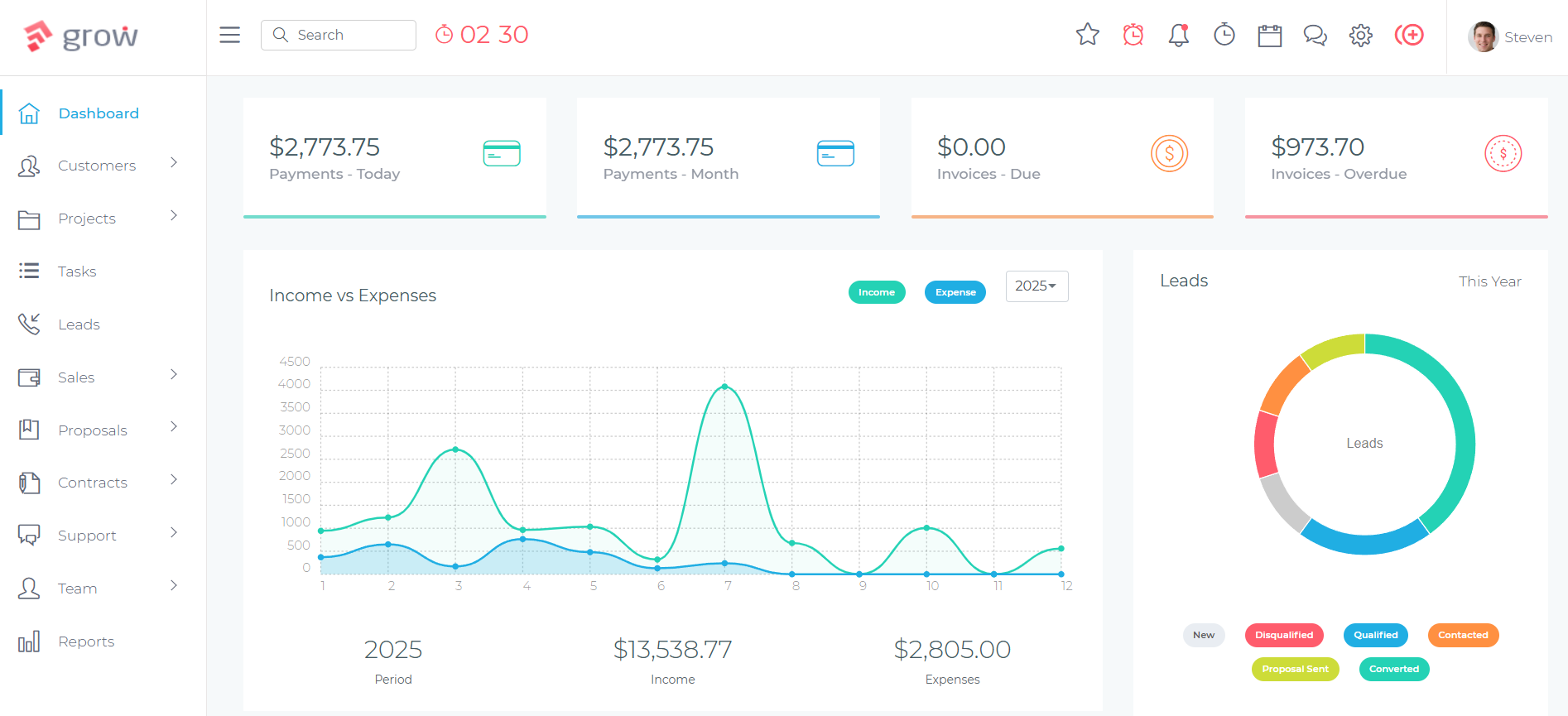
Grow CRM’s unified dashboard gives service teams a single view of clients, projects, and financials.
Grow CRM is a self-hosted, all-in-one platform built specifically for service businesses. In a single $49 one-time licence, it covers everything a small-to-medium service company needs: CRM, project management, time tracking, invoicing, estimates, proposals, a helpdesk, and a client portal — all sharing the same database, with no module requiring a separate subscription or integration to function.
The key differentiator is the pricing model. Every other tool in this comparison charges ongoing subscription fees — per user, per month, recurring. Grow CRM is purchased once. Your team of 3 pays the same as your team of 30. There are no feature gates, no tier upgrades, and no renewal invoices. For small service businesses watching their software spend, this structural difference compounds significantly over time.
Grow CRM also provides a free installation service, which removes the main friction point of self-hosted software. You provide hosting access; the team handles the technical setup.
Key Features for Service Businesses
- CRM with contact management, lead tracking, and client pipeline
- Project management with tasks, milestones, Kanban boards, and task dependencies
- Task-level time tracking that feeds directly into invoicing
- Full invoicing system with recurring billing, multi-currency, and online payments (Stripe, PayPal)
- Estimates and proposals built into the same workflow as projects and invoices
- Helpdesk and support ticket management
- Client portal — clients can view their projects, invoices, and tickets
- Workflow automation for notifications and repetitive tasks
- Knowledge base for internal or client-facing documentation
- Subscription and retainer management
- 30 languages supported — suitable for international teams
- Unlimited users on a single licence
✅ Pros
- $49 one-time — no subscriptions, no per-user fees ever
- All core modules native: CRM, PM, time tracking, invoicing, helpdesk
- Free installation service for non-technical teams
- Free lifetime updates included
- Client portal included at no extra cost
- Unlimited users on one licence
- Self-hosted — full data ownership
- Clean, modern interface with low learning curve
❌ Cons
- Requires web hosting (your own VPS, typically $5–$20/month)
- Less depth in financial reporting than Scoro or Odoo
- No native resource planning or capacity management
- Smaller review footprint than established SaaS platforms
Pricing: $49 one-time (self-hosted licence). Hosting costs are separate (~$5–$20/month, your own server). Free lifetime updates and free installation service included.
Best For: Small service businesses, agencies, consultants, and freelancers (1–50 people) who want a complete platform without ongoing subscription fees.
2. Scoro — Best for Professional Services Firms Focused on Profitability
Scoro is a purpose-built work management platform for professional services firms — agencies, consultancies, IT services, architecture, and engineering teams. It was designed from the ground up for the quote-to-cash workflow, and its financial reporting depth is unmatched in this category.
Where most tools track time and create invoices, Scoro goes further: it shows you whether each project is actually profitable, which clients generate the best margin, how your team’s capacity is being used, and where revenue is forecast to land. For firms where project profitability is a critical management metric, this reporting depth is genuinely valuable.
Scoro also handles retainer management natively — a rarer feature that service businesses with recurring client relationships will appreciate. Time tracked against retainer projects automatically adjusts remaining budget, reducing the risk of over-servicing clients.
Key Features for Service Businesses
- Full CRM with contact management, deal pipeline, and client history (Performance plan and above)
- Project management with Gantt charts, Kanban boards, task dependencies, and milestones
- Task-level time tracking that links directly to invoicing and profitability reporting
- Three billing types: fixed fee, time and materials, and retainer
- Project budgets, cost tracking, and profit analysis per project
- Resource planning and team capacity management
- Utilisation dashboards — see how efficiently your team’s time is being used
- Revenue forecasting and financial analytics
- 45+ integrations including Xero, QuickBooks, Sage Intacct, Exact Online
- ISO 27001 certified security
✅ Pros
- Purpose-built for professional services — feels exactly right for agencies and consultancies
- Retainer management is a native feature
- Project profitability reporting is best-in-class
- Resource planning and capacity management included
- Strong accounting integrations (Xero, QuickBooks)
- ISO 27001 security certification
❌ Cons
- Minimum 5 users — not suitable for solo operators or very small teams
- No free plan — 14-day trial only
- No native helpdesk or ticketing system
- Per-user pricing escalates at scale (Performance: ~$50/user/month)
- Mobile app lacks full desktop feature parity
- Feature density can feel overwhelming during onboarding
Pricing: From $19.90/user/month (Core, billed monthly) with a 5-user minimum. Most relevant plan for service firms is Performance at ~$49.90/user/month. No free plan; 14-day trial available.
Best For: Professional services firms (5–200 people) where project profitability, retainer management, and resource utilisation tracking are critical business metrics.
3. Odoo — Best for Growing SMEs Needing Full ERP
Odoo is a modular ERP platform that covers everything from CRM and project management to HR, accounting, manufacturing, and eCommerce. For service companies, the relevant modules — CRM, Project, Timesheets, Invoicing, and Helpdesk — are all available and well-integrated. Where Odoo earns its place in this list is scope: no other platform in this comparison can scale from “small service business” to “mid-market company running full departmental operations” without requiring a platform change.
Odoo also has a genuinely useful free tier: you can use a single app (plus its dependencies) for unlimited users at no cost. For a team that needs primarily one module to start, this is a real way to evaluate the platform before committing to a paid subscription.
The trade-off is complexity. Odoo is powerful, but it is not simple. Setting up Odoo properly — configuring modules, defining workflows, managing user access, and handling upgrades — typically requires either Odoo-certified partner support or in-house technical resources. For growing SMEs that have (or can hire) that capability, Odoo is an exceptional long-term platform. For small teams without technical staff, the configuration overhead is a real burden.
Key Features for Service Businesses
- Full CRM — lead tracking, pipeline management, automated follow-ups, and quoting
- Project management — Kanban, Gantt, task dependencies, subtasks, milestones, and client portal access
- Timesheets — task-level time tracking tied directly to projects and auto-invoicing
- Invoicing — auto-generate invoices from timesheets, sales orders, or project milestones
- Helpdesk — full ticketing with SLAs, email/chat integration, and billable ticket time
- Email marketing and campaign management
- Document signing and scheduling
- Subscription management
- Studio no-code customisation (Custom plan)
- External portal users don’t consume licences (ideal for client-facing workflows)
✅ Pros
- Most comprehensive feature set in this category — true ERP coverage
- Free single-app tier for unlimited users
- Scales from small business to mid-market without platform changes
- External/portal users don’t consume paid licences
- Active open-source community edition (Odoo Community)
- Modular — only pay for what you use
❌ Cons
- Steep learning curve — not suitable for quick self-serve setup
- Customisation typically requires Odoo-certified developers
- Costs escalate significantly with implementation and consulting services
- Not purpose-built for service businesses — ERP-first design
- Can feel over-engineered for simple service business workflows
Pricing: Free (one app, unlimited users) / Standard from ~$8–$9/user/month / Custom from ~$11–$14/user/month (annual billing). Cloud hosting included.
Best For: Growing SMEs (10–500 people) that want a single platform to scale across all business functions, with technical resources available for setup and administration.
4. HoneyBook — Best for Freelancers and Creative Service Businesses
HoneyBook occupies a distinct position in this list: it is not a true all-in-one platform in the CRM + project management + invoicing sense, but it is exceptionally good at the specific workflow most freelancers and creative service businesses care about most — lead capture, proposal, contract, invoice, and payment in a single polished flow.
For photographers, videographers, event planners, interior designers, coaches, and consultants whose client relationships follow a predictable structured workflow, HoneyBook’s ease of use and client-facing polish are genuinely impressive. The interface is clean, the client-facing documents look professional, and onboarding typically takes hours rather than days.
The limitations are real, however. HoneyBook does not have true project management — no Gantt charts, no Kanban boards, no task dependencies. Time tracking exists but does not feed automatically into invoices, which is a significant gap for businesses that bill by the hour. For creative businesses where the workflow is relationship-driven and linear, these gaps may not matter. For agencies managing complex projects or teams billing hourly, they do.
Key Features for Service Businesses
- Visual lead pipeline and contact management
- Polished proposals, contracts, and invoices — combined into single client-facing documents
- Online payment collection built in
- Scheduling and booking tools
- Workflow automation for lead follow-up and client communication
- Client portal
- HoneyBook AI features: lead enrichment, meeting notes, lead scoring
- iOS and Android mobile apps with full functionality
- QuickBooks integration (Essentials plan and above)
✅ Pros
- Easiest onboarding and lowest learning curve in this category
- Client-facing documents are polished and professional
- Flat-rate pricing — cost is predictable regardless of team growth
- Excellent mobile apps (iOS/Android) with full functionality
- HoneyBook AI speeds up lead management and communication
❌ Cons
- Not a true project management tool — no Gantt, no Kanban, no task dependencies
- Time tracking does not feed into invoices automatically
- No helpdesk or support ticket management
- Limited CRM depth — no lead scoring, forecasting, or territory management
- Best suited for solo/very small teams (fewer than 5 people on lower plans)
- Pricing increased significantly in 2025
Pricing: Starter $29/month (annual billing), Essentials $49/month, Premium $109/month. Flat rate — not per user. No free plan; trial available.
Best For: Freelancers and creative service businesses (1–5 people) where the primary workflow is lead → proposal → contract → invoice → payment, with a strong emphasis on client-facing polish.
5. ERPNext — Best for Technical Teams Needing Enterprise Features at Low Cost
ERPNext is a fully open-source ERP platform developed by Frappe Technologies. Like SuiteCRM in the CRM space, ERPNext occupies the position of “enterprise features, zero licensing cost” — and like SuiteCRM, the trade-off is significant setup and maintenance complexity. The software itself is free under a GPLv3 licence; you host it yourself (or on Frappe Cloud) and manage your own infrastructure.
For service companies with in-house technical teams or a relationship with an ERPNext implementation partner, it is a remarkably capable platform at near-zero software cost. The module set covers CRM, project management, timesheets, invoicing, helpdesk (via Frappe Helpdesk), HR, payroll, and more. The Frappe v16 release (early 2026) brought meaningful UI improvements including a redesigned interface, dark mode, and enhanced Gantt and calendar views.
For non-technical teams, ERPNext is not realistic as a self-service deployment. It requires a Linux environment, Python, and MariaDB, and the implementation process typically involves a formal project engagement. For teams that can handle this, the long-term cost of ownership is exceptionally low.
Key Features for Service Businesses
- Full CRM — sales pipeline, lead management, quotations, and follow-ups
- Project management — tasks, Gantt charts, milestones, and time logs per task
- Timesheets — task-level time tracking tied to project billing
- Invoicing — full accounts receivable/payable, multi-currency, and automated billing
- Helpdesk (via Frappe Helpdesk app) — ticketing, SLAs, and email integration
- HR and payroll modules
- Subscription management
- Deep customisation via the Frappe Framework (Python)
- REST API for custom integrations
- No per-user licensing fees regardless of team size
✅ Pros
- 100% free and open source — no licensing fees for any team size
- Most comprehensive module set of all tools reviewed
- Full data ownership and control (self-hosted)
- Frappe v16 brings significant UI improvements
- Strong global community and certified implementation partners
- No user limits on self-hosted installations
❌ Cons
- Steepest learning curve and setup complexity of all tools reviewed
- Self-hosting requires real technical resources (Linux, Python, MariaDB)
- Implementation consulting is often the largest cost ($5,000–$50,000+)
- Documentation quality is inconsistent
- Interface still lags behind purpose-built SaaS tools in polish
- Community-only support on the open-source track
Pricing: Free (self-hosted) / Frappe Cloud from $5/month (shared, managed). Implementation consulting is separate and typically the dominant cost.
Best For: Technical teams and budget-conscious organisations that need enterprise-grade ERP capabilities with full data control, and have the resources to handle setup and administration.
Feature Comparison
| Platform | CRM | Project Mgmt | Time Tracking → Invoice | Helpdesk | Client Portal | Pricing |
|---|---|---|---|---|---|---|
| Grow CRM | Yes | Yes | Yes — native | Yes | Yes | $49 one-time |
| Scoro | Yes (Performance+) | Yes — advanced | Yes — native | No | Limited | From $20/user/mo (5-user min) |
| Odoo | Yes | Yes | Yes — native | Yes | Yes | Free (1 app) / ~$9/user/mo |
| HoneyBook | Partial | Basic only | Manual — no auto-link | No | Yes | From $29/month flat |
| ERPNext | Yes | Yes | Yes — native | Yes (Frappe app) | Yes | Free (self-hosted) |
| Platform | Ease of Setup | Retainer Mgmt | Min. Team Size | Self-Hosted | Mobile App |
|---|---|---|---|---|---|
| Grow CRM | Easy (free install service) | Yes | 1 | Yes | Responsive web |
| Scoro | Moderate | Yes — native | 5 | No | Limited mobile app |
| Odoo | Moderate–Hard | Yes | 1 | Optional | Yes |
| HoneyBook | Very Easy | No | 1 | No | Yes — full iOS/Android |
| ERPNext | Hard (technical) | Yes | 1 | Yes | Limited |
How to Choose the Right Platform
Decision Criteria
- Team size: Solo operators need something different from 50-person agencies. Scoro requires a minimum of 5 users; Grow CRM, Odoo, HoneyBook, and ERPNext work from a single user.
- Technical resources: Self-hosted tools (Grow CRM, ERPNext) offer more control and lower long-term cost, but require some technical capability for setup. Cloud-only tools (HoneyBook, Scoro) trade control for simplicity.
- Billing model: If you bill by the hour, time tracking that directly feeds invoicing is non-negotiable. Grow CRM, Scoro, Odoo, and ERPNext all deliver this. HoneyBook does not.
- Budget structure: If you want predictable, fixed software costs with no subscription growth as your team expands, Grow CRM’s one-time model is structurally unique in this category.
- Project complexity: Basic task lists (HoneyBook) vs full Gantt and resource planning (Scoro, Odoo, ERPNext) — match the tool to the complexity of your project management reality.
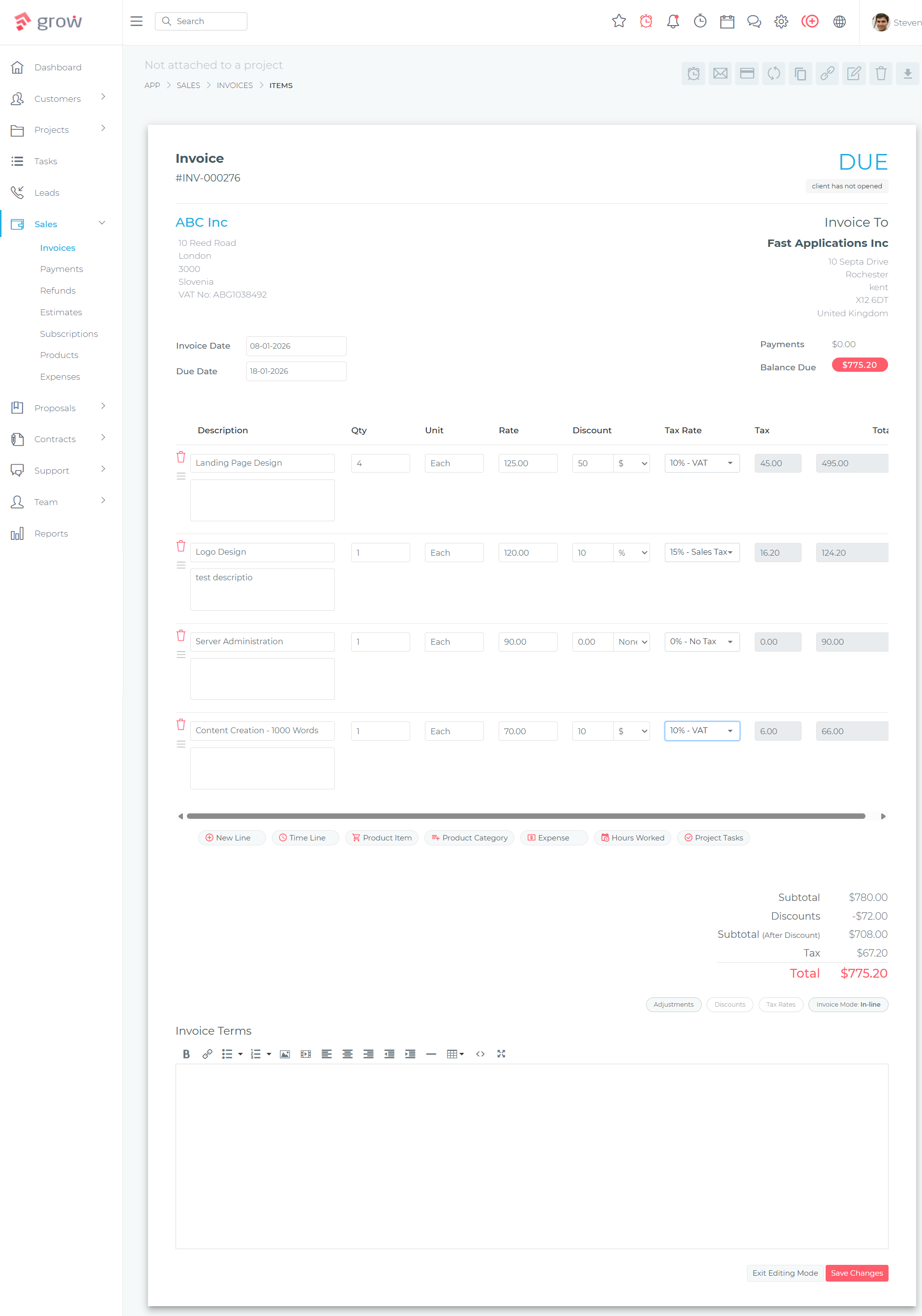
Grow CRM’s invoicing module connects directly to project time tracking — no manual data transfer required.
Choose Grow CRM If:
- You’re a small service business (1–50 people) that needs CRM, projects, time tracking, invoicing, and helpdesk in one system
- You want to eliminate subscription fees permanently with a one-time purchase
- You value ease of use and fast team adoption
- You want full data ownership on your own server
- You don’t want to pay separately for a client portal, proposals, or helpdesk
Choose Scoro If:
- You run a professional services firm (agency, consultancy) with 5+ people
- Project profitability, utilisation tracking, and retainer management are core business metrics
- You need deep financial reporting across projects and clients
- You’re willing to pay per-user subscription pricing for best-in-class reporting
Choose Odoo If:
- You’re a growing SME that needs a platform to scale across all business functions (not just service delivery)
- You have or can hire technical resources for setup and administration
- You want the flexibility of a modular ERP that covers HR, accounting, eCommerce, and more
- You want to start with the free single-app tier and expand over time
Choose HoneyBook If:
- You’re a freelancer or very small creative service business (1–5 people)
- Your primary workflow is lead → proposal → contract → invoice → payment
- Client-facing document polish is a top priority
- You don’t need real project management or hourly billing workflows
Choose ERPNext If:
- You have in-house technical resources or an implementation partner
- You need enterprise ERP breadth at near-zero licensing cost
- Full open-source code access is a requirement
- You’re comfortable with a longer implementation timeline in exchange for long-term cost savings
Frequently Asked Questions
What’s the most important feature for service companies in an all-in-one platform?
Time tracking that feeds directly into invoicing. For service businesses that bill by the hour, this is the feature that saves the most time and prevents revenue leakage. When time logged on a project task automatically populates the correct client invoice, you eliminate manual reconciliation, reduce billing errors, and speed up your invoice cycle. Grow CRM, Scoro, Odoo, and ERPNext all provide this natively; HoneyBook does not.
Is Grow CRM’s $49 one-time price legitimate — what’s the catch?
The price is real. Grow CRM is a self-hosted application sold through CodeCanyon (Envato Market). The $49 covers the full software licence with no ongoing fees, unlimited users, and free lifetime updates. The only additional cost is web hosting — typically $5–$20/month from providers like DigitalOcean or Vultr, which is a standard requirement for any self-hosted software and is not charged by Grow CRM. The free installation service is also included.
Can one tool really replace a separate CRM, project management tool, time tracker, and invoicing system?
For most small service businesses, yes. Grow CRM, Scoro, and Odoo all have native integration across CRM, project management, time tracking, and invoicing — meaning data flows between these functions without manual intervention or third-party connectors. The key qualifier is “most small service businesses.” If your project management needs are extremely complex or your CRM requirements are enterprise-grade, you may reach the edges of what a single platform offers. But the majority of agencies, consultancies, and service firms operate well within what these tools provide.
Which all-in-one platform is best for a marketing agency?
For small marketing agencies (under 15 people), Grow CRM is typically the best fit — covering CRM, project management, time tracking, invoicing, and client portal without subscription fees. For agencies of 15–100 people where project profitability reporting and resource capacity planning are central management needs, Scoro is the stronger choice. For agencies with IT resources looking for maximum flexibility and a platform that can scale into full ERP territory, Odoo is worth evaluating.
What’s the difference between all-in-one software and integrating separate best-of-breed tools?
All-in-one platforms share a single database — your CRM contact is the same record as the project client and the invoice recipient, with no sync required. Integrated separate tools rely on APIs and automation to keep data consistent, which introduces sync delays, mapping complexity, and failure points. For small teams without dedicated IT resources, the operational simplicity of a native all-in-one is typically worth more than the marginal feature advantages of best-of-breed tools.
Is self-hosted business management software reliable and secure?
Yes, when properly configured. Self-hosted software running on a reputable VPS provider (DigitalOcean, Vultr, Hetzner, etc.) with standard security practices — SSL, regular backups, strong passwords, and software updates — is a reliable and secure deployment model. Self-hosting also means your client data stays on infrastructure you control, rather than a third-party SaaS provider’s shared cloud environment. Grow CRM’s free installation service ensures the initial setup follows best practices.
Does HoneyBook have real project management?
No. HoneyBook provides basic task checklists within projects but does not include Gantt charts, Kanban boards, task dependencies, team assignments with workload tracking, or milestone tracking. It is excellent for managing the client relationship lifecycle (lead to payment), but is not a project management tool in the way that Grow CRM, Scoro, or Odoo are. Service businesses with complex project delivery needs should look elsewhere for project management functionality.
Which platform is most affordable for a growing team?
Grow CRM is structurally the most affordable as teams grow, because it charges a flat one-time fee with no per-user costs. A team of 2 and a team of 25 pay the same $49. Odoo and ERPNext also have no per-user licensing fees in their self-hosted models, though implementation costs apply. HoneyBook’s flat-rate pricing is predictable but locks you into SaaS. Scoro’s per-user subscription becomes the most expensive option at scale — a team of 20 on the Performance plan would pay approximately $12,000/year.
Do any of these platforms include a client portal?
Yes — Grow CRM, Odoo, ERPNext, and HoneyBook all include client-facing portal functionality. Grow CRM’s client portal lets clients view projects, invoices, support tickets, and files without needing a full user account, and is included in the $49 base licence. Scoro has limited client-facing features but does not offer a full client portal. The depth and polish of client portals varies — Grow CRM and HoneyBook prioritise ease of use; Odoo and ERPNext offer more configuration depth.
Our Recommendation
For most small service businesses — agencies, consultancies, freelancers, and service teams up to around 50 people — Grow CRM is the strongest overall choice. It covers every module a service business needs, delivers them in a genuinely usable interface, provides a free installation service so you don’t need technical expertise to get started, and costs $49 once — with no ongoing subscription to justify each month.
If you’re running a professional services firm where project profitability and resource utilisation are mission-critical metrics, Scoro earns its higher price tag with reporting depth that Grow CRM doesn’t match. If you’re growing into full ERP territory and have the technical resources to support it, Odoo gives you a platform that can scale to every corner of your business.
The common thread among the best all-in-one tools is that they solve the “integration tax” — the time, cost, and frustration of keeping disconnected tools in sync. Whichever platform fits your situation, the most important thing is choosing one that your team will actually use. Adoption is the feature. A tool that 80% of your team uses consistently beats a more powerful tool that 40% have abandoned.
See Grow CRM’s full feature set and evaluate whether it’s the right fit for your service business before committing to a recurring subscription you’ll pay for years.
Sources
- Grow CRM — Official Website
- Grow CRM on CodeCanyon (Envato Market)
- Scoro Pricing — Official
- Scoro — Official Website
- Odoo Pricing — Official
- Odoo — Official Website
- HoneyBook Pricing — Official
- HoneyBook — Official Website
- ERPNext — Official Website (Frappe)
- Frappe Cloud Pricing
- Scoro Reviews — G2
- Scoro Reviews — Capterra
