

Grow CRM is the best CRM for small and mid-sized consulting firms, combining client relationship management, project management, time tracking, invoicing, proposals, contracts, and a client portal in a single self-hosted platform — available for a one-time payment with no recurring subscription fees. For consulting practices with 2–50 staff, this means everything needed to manage complex multi-stakeholder engagements and project-based billing without paying $49–$100 per user per month for enterprise software built for a different kind of business.
Consulting firms operate differently from the sales-oriented businesses most CRMs are designed for. A single client engagement involves multiple stakeholders — the economic buyer who approves spend, the functional sponsor who defines scope, and the day-to-day contact who manages the relationship. Projects run for months, billing mixes fixed fees with time and materials, and client relationships need to be nurtured long after a project closes to generate repeat work and referrals. Most CRMs stop at “Closed Won” and leave the rest of the workflow to spreadsheets.
This guide covers the best CRM options for consulting firms, from affordable all-in-one platforms to specialist professional services tools, with honest comparisons of features, pricing, and fit for firms at different stages of growth.
What Consulting Firms Need from a CRM
The typical consulting firm’s client relationship doesn’t fit the linear sales funnel that most CRMs are built around. Discovery calls lead to proposals that take weeks to close. Projects run in parallel with business development. A client from three years ago may become the most valuable referral source for new business. And billing — T&M, fixed fee, milestone, or retainer — needs to be connected directly to the work being done, not managed separately in another tool.
The core CRM requirements for a consulting firm include:
- Multi-stakeholder contact management — Track multiple contacts at the same client organization (economic buyer, functional sponsor, day-to-day PM) with independent communication histories and follow-up cadences
- Proposal management — Create, send, and track proposals with version control; convert approved proposals to active project records without re-entering scope details
- Project management with milestone tracking — Manage engagement delivery from kickoff through final invoice, with task assignments, deadlines, and milestone visibility
- Time tracking tied to billing — Log billable hours against client projects and convert them directly to invoices without exporting to a separate system
- Flexible invoicing — Support fixed-fee, time and materials, milestone-based, and retainer billing within the same platform
- Retainer management — Track retainer balances, hours consumed, and renewal dates without manual spreadsheet reconciliation
- Client portal — Give clients a professional way to review project progress, view invoices, and communicate without relying on email chains
- Relationship continuity — Maintain complete engagement history across multi-year client relationships to enable re-engagement and referral tracking
- Pipeline visibility — Track proposals from first contact through close, with clear stage progression and forecasting
- Affordable pricing — Avoid per-user subscription fees that erode engagement margins as the team grows
Grow CRM — Best Overall CRM for Consulting Firms
Self-hosted CRM with project management, time tracking, invoicing, and client portal — one-time payment, unlimited users
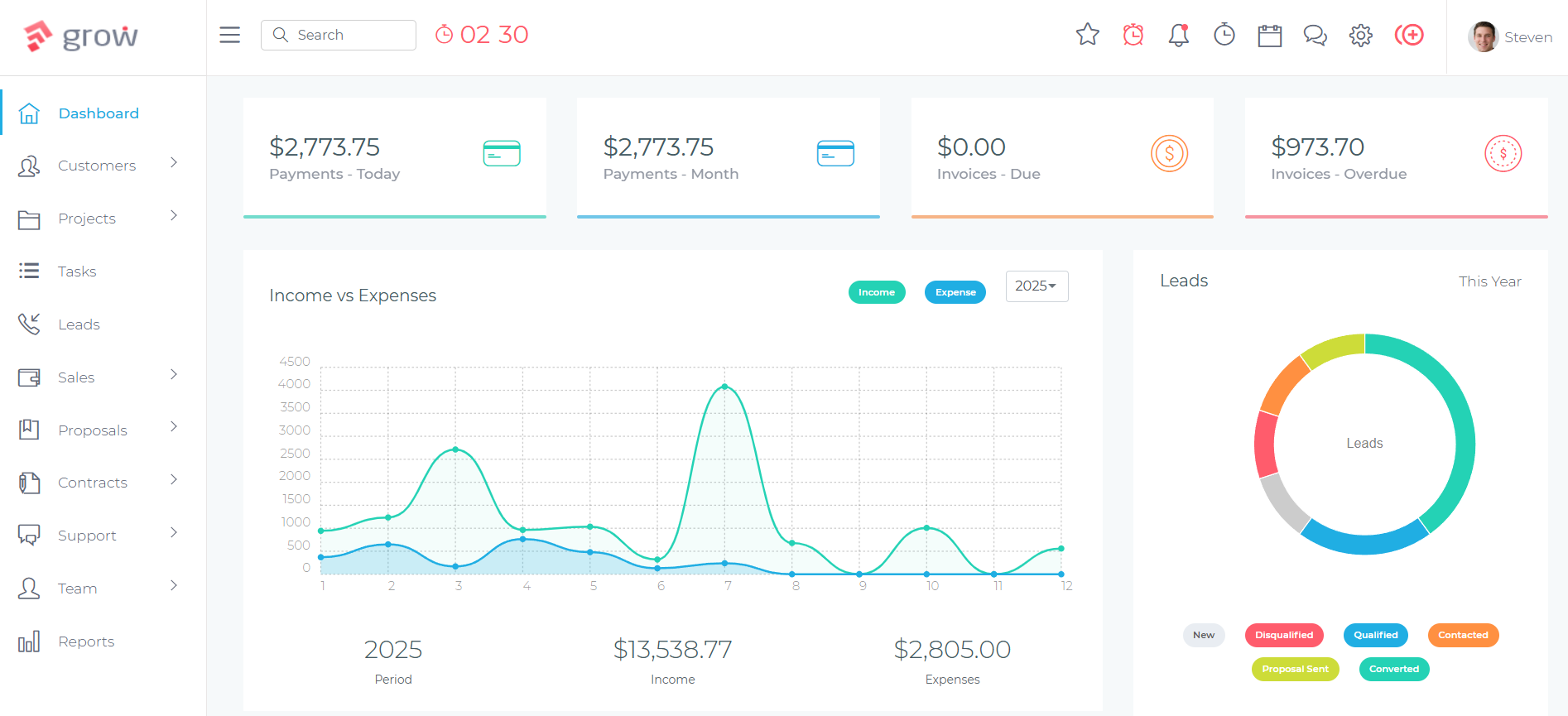
Grow CRM is the most cost-effective full-featured platform for consulting firms that need more than a contact database but don’t want to commit to enterprise CRM pricing. It covers the entire consulting workflow in a single system: from managing leads and sending proposals, through project delivery with task and milestone tracking, to invoicing clients for time and expenses and maintaining the relationship for future work.
For consulting firms, the project-centric architecture is the key differentiator. When a proposal is approved, a project is created with the relevant contacts, tasks, and milestones already defined. Time entries are logged against the project and converted directly to invoices — removing the friction of exporting time logs to a spreadsheet, rebuilding them as invoice line items, and then entering them again in an accounting system. The client portal means clients can check project status, review invoices, and send messages without waiting for an email update, which reduces the administrative overhead that consumes billable hours.
The self-hosted model appeals specifically to consulting firms with client confidentiality concerns. Because Grow CRM runs on your own server, client data never passes through a third-party cloud service. For firms advising clients on sensitive business matters — restructuring, M&A, legal, or financial strategy — this level of data control is a meaningful advantage over SaaS platforms.
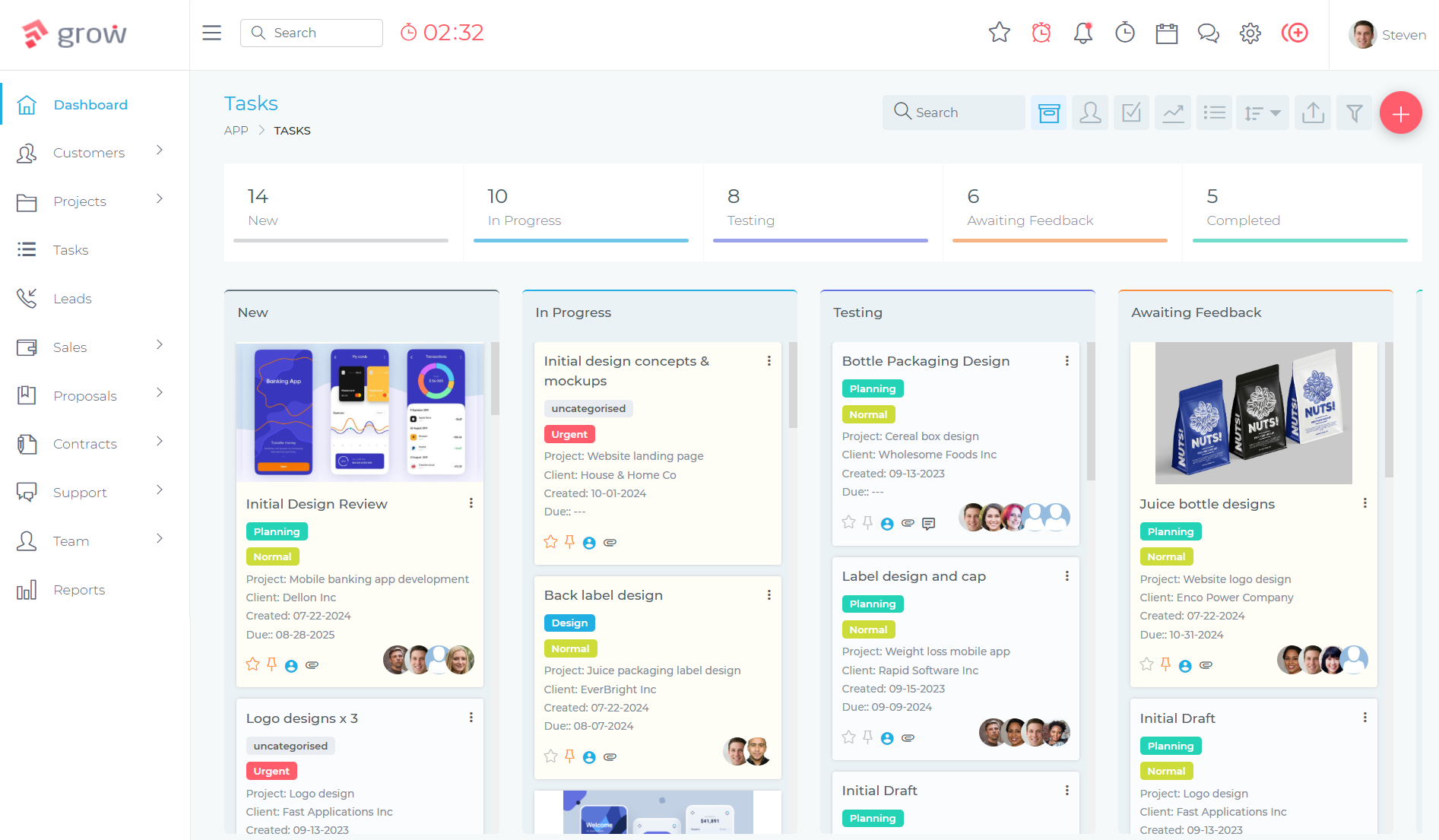
How Consulting Firms Use Grow CRM
A management consulting firm’s workflow in Grow CRM typically starts with a new inquiry — a referral or inbound lead from a prospective client. The contact and their organization are added to the CRM, the pipeline stage is set, and the business development conversation is tracked through notes and follow-up tasks. When the scope is defined, a proposal is built directly in the platform with service line items, fees, and terms, then sent to the client for review.
Once approved, the proposal converts to a contract, the contract is signed, and a project is created. The engagement team is assigned, milestones are defined to match the consulting methodology — discovery, analysis, recommendations, implementation — and tasks are allocated to team members. Consultants log time daily against the project. At billing milestones or month-end, an invoice is generated from the logged time and expenses, reviewed internally, and sent to the client through the portal. The client pays online. Post-project, the client record retains the full engagement history — contacts, communications, invoices, project notes — ready for the next conversation about follow-on work.
Key Features for Consulting Firms:
- Lead and pipeline management — Track inquiries and proposals from first contact through close with customizable pipeline stages
- Proposals and estimates — Build and send proposals with service line items, fees, and approval tracking; convert to contracts on approval
- Contract management — Generate and send engagement letters and contracts from within the CRM; track signature status
- Project management with milestones — Create projects with defined milestones, task assignments, priorities, and deadlines
- Time tracking and timesheets — Log billable hours against project tasks; generate invoices directly from time entries
- Invoicing — Issue time-based, fixed-fee, expense, and milestone invoices; accept Stripe, PayPal, Mollie, Razorpay, and other payment gateways
- Recurring billing — Set up recurring invoice schedules for retainer clients without manual re-creation each month
- Client portal — Give clients a secure online space to view project progress, review and pay invoices, share files, and send messages
- Helpdesk and support tickets — Manage client queries and ad-hoc requests as structured tickets, keeping them visible and tracked
- Team collaboration and messaging — Built-in messaging for internal team communication on client and project records
- Reports and analytics — Track outstanding invoices, project profitability, and pipeline health
- Self-hosted deployment — Install on your own server; full data ownership, no third-party cloud risk
- Unlimited users — Add the whole team — junior consultants, partners, support staff — without per-seat costs
✓ Pros
- One-time payment covers the full lifecycle from lead to invoice — no recurring subscription regardless of team size
- Time tracking integrates directly with invoicing, eliminating manual export and re-entry
- Client portal reduces administrative overhead and gives clients a professional engagement experience
- Recurring billing supports retainer clients without manual invoice recreation
- Self-hosted for full data control — important for firms handling confidential client matters
- Free installation service and free lifetime updates included
✗ Cons
- No granular retainer-hours tracking with automatic balance depletion and alerts — retainer management requires manual oversight
- No native utilization reporting (billable hours as a percentage of available hours) — a feature larger consulting firms rely on for capacity planning
- Requires self-hosting on a web server — not a cloud SaaS product out of the box
💰 Pricing
$39 one-time payment. Unlimited users. Free lifetime updates. Free installation service included. No monthly or annual subscription fees.
How Grow CRM Compares to Other CRMs for Consulting Firms
The CRM market for consulting firms ranges from sales-focused tools that stop at “Closed Won,” to professional services automation (PSA) platforms built specifically for project-based billing and utilization management. Here is an honest look at the main alternatives.
Accelo
Professional services automation platform with retainer management and utilization reporting
Accelo is the most purpose-built professional services automation (PSA) platform in this comparison. It unifies CRM, project management, time tracking, retainer management, invoicing, and client ticketing in a single system — and it goes deeper than Grow CRM on features specifically designed for consulting firm operations, particularly retainer management and utilization reporting.
The retainer management module is Accelo’s most distinctive feature for consulting firms. Rather than simply setting up a recurring invoice, Accelo tracks hours consumed against each retainer period, surfaces alerts when a retainer is running low or over, and rolls unused hours forward according to the firm’s billing rules. For firms with monthly retainer clients, this level of visibility is genuinely valuable and hard to replicate with general-purpose tools.
The trade-off is cost, complexity, and a lengthy implementation. Accelo requires an onboarding fee of approximately $800, takes two to three months to configure properly, and its per-user pricing — while not publicly disclosed — is in the range of $24–$49 per user per month depending on tier. For a 10-person consulting firm, that represents a significant annual commitment. For firms with straightforward billing and project structures, Accelo can feel over-engineered relative to what is actually needed.
Key Features:
- Unified CRM, project management, retainer management, invoicing, and support ticketing
- Native retainer management with hour consumption tracking, balance alerts, and rollover rules
- Time logging, timers, and timesheets with approval workflows
- Quote-to-project conversion — approved proposals automatically become project records
- Smart scheduling and utilization reporting (Advanced tier)
- Financial dashboards: engagement profitability, budget burn, WIP
- Client portal for project visibility and invoice access (Business tier+)
- Automated workflows and triggers (Advanced tier)
✓ Pros
- Best-in-class retainer management for consulting firms billing on monthly retainers
- Native utilization reporting — visibility into billable hours vs. available hours
- Seamless proposal-to-project workflow with no re-entry of scope data
- Engagement profitability tracking at the project level
✗ Cons
- No public pricing — requires a sales conversation before evaluating cost
- ~$800 onboarding fee plus 2–3 month implementation timeline
- Steep learning curve; requires team discipline to maintain accurate time tracking
- Over-engineered for very small firms (2–5 staff) with simple workflows
💰 Pricing
Custom quote required. Estimated $24–$49+/user/month depending on tier. Initial onboarding fee of approximately $800. Contact Accelo for current pricing.
HubSpot Sales Hub
Intuitive CRM with strong pipeline management and email automation
HubSpot Sales Hub is one of the most widely used CRMs for professional services firms, largely because its free tier is genuinely functional and its interface has among the lowest onboarding friction of any CRM platform. For consulting firms in the early stages of formalising their business development process — tracking proposals, following up consistently, managing a small pipeline — HubSpot provides real value without a significant upfront investment.
The limitation for consulting firms becomes apparent as soon as a proposal closes. HubSpot’s role ends at “Closed Won.” It has no project management, no time tracking, no billable-hour invoicing, and no retainer management. Firms that need to track what happens after a client says yes must either manage project delivery in a separate tool — Asana, Monday, Notion — or invest in HubSpot’s Professional tier at $90 per seat per month, which still doesn’t solve the post-sale project billing problem. For a 10-person firm, the Professional tier costs $10,800 per year before any add-ons, and project delivery remains unaddressed.
HubSpot is a strong choice for consulting firms where business development is the primary bottleneck — particularly firms with a marketing-led growth model where the CRM and marketing automation need to work tightly together. For firms whose main challenge is managing client delivery and billing, HubSpot solves the wrong problem.
Key Features:
- Contact and company management with full activity timeline
- Deal pipeline management with customizable stages
- Email sequences and templates for proposal follow-up and re-engagement
- Sales forecasting (Professional tier+)
- Workflow automation — 300 workflows on Professional tier
- Meeting scheduler and live chat integration
- Gmail and Outlook integration for activity tracking
- Quotes module for generating basic proposals
- Custom reporting and dashboards (Professional tier+)
✓ Pros
- Excellent free tier — genuinely functional for solo consultants and early-stage firms
- Fastest onboarding and highest team adoption of any CRM in this comparison
- Strong email sequencing for systematic proposal follow-up
- Best choice for marketing-led growth strategies
✗ Cons
- No project management, time tracking, or billable-hour invoicing — stops at “Closed Won”
- Professional tier ($90/seat/month + $1,500 onboarding) is expensive for what consulting firms actually need
- No retainer management or recurring billing for ongoing client relationships
- Annual contracts with limited flexibility reported by users
💰 Pricing
Free: $0 (2 users, basic CRM). Starter: $9/seat/month (annual). Professional: $90/seat/month (annual) + $1,500 mandatory onboarding fee. Enterprise: $150/seat/month + $3,500 onboarding.
Insightly CRM
CRM with opportunity-to-project conversion for mid-size consulting practices
Insightly CRM stands out from most general-purpose CRMs with a feature that matters specifically to consulting firms: when a deal is closed, the opportunity record can be converted directly into a project, carrying over contacts, custom fields, and scope details without manual re-entry. This “sales-to-delivery handoff” is one of the most important workflow transitions in consulting, and most CRM tools ignore it entirely.
The project management module in Insightly is functional — task assignments, milestones, Kanban views, and progress tracking — but it is not a full professional services platform. There is no native time tracking, no billable-hour invoicing, and no retainer management. For consulting firms that bill by the hour or manage monthly retainers, Insightly will need to be supplemented with a time tracking tool (Harvest, Toggl) and an invoicing tool (QuickBooks, Xero), which reintroduces the integration complexity that a unified platform like Grow CRM or Accelo avoids.
At $49 per user per month on the Professional tier, Insightly sits at a reasonable price point for mid-size consulting firms that want CRM and basic project visibility in one place — without the full PSA overhead of Accelo or the enterprise complexity of Salesforce.
Key Features:
- Contact and organization management with multi-stakeholder support
- Opportunity pipeline with customizable stages
- Opportunity-to-project conversion — scope and contacts carry over without re-entry
- Project management: task assignments, milestones, Kanban views
- Quote generation from a product catalog (useful for standard service offerings)
- Workflow automation (Professional tier+)
- AI Copilot: email summaries and CRM insights (Professional tier+)
- Gmail and Outlook sidebar extensions for activity logging
- Custom dashboards and reporting
✓ Pros
- Opportunity-to-project conversion is a meaningful differentiator — eliminates re-entry of scope at the point of close
- Competitive mid-range pricing relative to HubSpot at equivalent feature levels
- Good fit for consulting firms of 10–50 staff managing both pipeline and basic project tracking
- No separate onboarding fee at the Professional tier
✗ Cons
- No native time tracking or billable-hour invoicing — requires third-party integrations
- No retainer management
- Annual-only billing at all tiers — no monthly payment option
- Customer support quality is inconsistent according to user reviews
💰 Pricing
Free: $0 (2 users, limited features). Plus: $29/user/month (annual only). Professional: $49/user/month (annual only). Enterprise: $99/user/month (annual only).
Salesforce Sales Cloud
The most powerful CRM platform — built for enterprise scale
Salesforce is the most capable and most customizable CRM platform available, with a vast AppExchange ecosystem of over 5,000 integrations and the ability to be configured for virtually any business workflow. For consulting firms advising large enterprises that run on Salesforce, there can be a logic in adopting the same platform — familiarity with the tool and the ability to demonstrate CRM expertise using the same software the client uses.
For most small and mid-sized consulting firms, however, Salesforce is significantly oversized. The Pro Suite at $100 per user per month is just the starting point — firms typically also need an implementation partner ($5,000–$500,000+ depending on complexity), a dedicated Salesforce administrator ($70,000–$250,000+ annually), and third-party apps from the AppExchange for project management and time tracking, since these are not native to Salesforce. The total cost of ownership for a 10-person firm using Salesforce at even a modest configuration level typically exceeds $150,000 in the first year.
Salesforce is the right answer for large consulting practices with complex, bespoke CRM requirements, dedicated technical resources, and a genuine need for enterprise-grade scalability. For boutique practices with 2–50 staff, it is almost always the wrong tool for the budget.
Key Features:
- Lead, account, contact, and opportunity management
- Sales quoting and CPQ (Configure, Price, Quote) — Pro Suite+
- Sales forecasting with Einstein AI opportunity scoring
- AppExchange: 5,000+ integrations including PSA tools, proposal software, project management
- Workflow and process automation (Flow Builder)
- Custom objects and fields for highly bespoke CRM configurations
- Advanced reporting and dashboards
- Mobile app with offline access
✓ Pros
- Most powerful and customizable CRM platform available
- Scalable from 5 to 5,000 users without changing platform
- Vast ecosystem of integrations for every conceivable business need
- Strong pipeline forecasting and opportunity management
✗ Cons
- Very high total cost of ownership: licenses + implementation + admin staff + add-ons
- No native project management or time tracking — requires third-party apps
- Steep learning curve; requires a dedicated Salesforce administrator
- Overkill for firms with fewer than 15–20 users
💰 Pricing
Starter Suite: $25/user/month. Pro Suite: $100/user/month. Enterprise and Unlimited: contact sales. All billed annually. Implementation and administration costs additional.
Pipedrive
Visual sales pipeline CRM — clean, fast, and easy to adopt
Pipedrive is one of the most popular CRMs for small professional services teams, primarily because its visual pipeline interface is genuinely intuitive and new users can be productive within hours of signing up. For consulting firms that have been managing their pipeline in a spreadsheet and need a step up in pipeline discipline and proposal tracking, Pipedrive delivers exactly that without a complex onboarding process.
Pipedrive’s focus is squarely on the sales pipeline. It is excellent at tracking proposals through stages, setting activity reminders, logging email communications, and forecasting revenue from open deals. A Projects add-on provides basic task and project tracking after a deal closes, but it is a lightweight task manager — no time tracking, no Gantt charts, no billable-hour invoicing. For consulting firms that need to manage project delivery and billing within their CRM, Pipedrive will require complementary tools to cover what it doesn’t.
At $39 per seat per month on the Growth plan, Pipedrive is competitively priced for a sales-focused CRM. For firms where business development is the primary focus and project management is handled separately, it provides good value. For firms seeking a unified BD and delivery platform, it falls short.
Key Features:
- Visual drag-and-drop sales pipeline — Pipedrive’s core strength
- Activity-based selling reminders (calls, meetings, emails, tasks)
- Email integration and open/click tracking
- Workflow automation (Growth tier+)
- Projects add-on: basic task and project tracking post-sale
- Revenue forecasting and reporting
- LeadBooster add-on: web forms, live chat, chatbot, prospect database
- Mobile app with 14-day free trial available
✓ Pros
- Fastest onboarding and adoption of any CRM in this comparison after HubSpot
- Best visual pipeline for tracking proposals through deal stages
- Competitive pricing with 14-day free trial (no credit card required)
- Activity-based selling prompts maintain consistent follow-up discipline
✗ Cons
- Designed for transactional sales — limited fit for relationship-intensive consulting engagements
- No native time tracking, billable-hour invoicing, or retainer management
- Projects add-on is too lightweight for multi-phase consulting project management
- Stops meaningfully at “Closed Won” for delivery and billing management
💰 Pricing
Lite: $14/seat/month (annual) or $24/month. Growth: $39/seat/month (annual) or $49/month. Premium: $49/seat/month. Ultimate: $79/seat/month. Projects add-on available separately.
Microsoft Dynamics 365 Sales
Enterprise CRM with deep Microsoft 365 integration and Copilot AI
Microsoft Dynamics 365 Sales is the logical CRM choice for consulting firms already operating in the Microsoft 365 ecosystem — particularly those where the team lives in Outlook, Teams, and SharePoint. The integration depth between Dynamics 365 and the Microsoft stack is genuine: meeting summaries from Teams, email drafts from Outlook, and data from SharePoint flow into the CRM without manual input, reducing the administrative burden of keeping client records current.
The Copilot AI features are a meaningful addition for client-facing consultants. Dynamics Copilot can summarise Teams meeting transcripts, draft follow-up emails, and suggest next steps based on the opportunity record — capabilities that directly reduce the post-meeting administrative work that cuts into billable time. For firms where consultants are reluctant to update the CRM after client meetings, Copilot substantially lowers that barrier.
The same caveats that apply to Salesforce apply here: Dynamics 365 is enterprise software with enterprise complexity. It requires configuration by a Microsoft partner or an internal technical administrator, and project management and billing capabilities require the Dynamics 365 Project Operations module — a separate, additional cost. For consulting firms under about 15 people, the configuration overhead rarely justifies the investment relative to simpler alternatives.
Key Features:
- Full CRM: contacts, accounts, leads, opportunities, and activities
- Deep Microsoft 365 integration — Outlook, Teams, Excel, SharePoint
- Copilot AI: Teams meeting summaries, email drafts, next-step suggestions
- AI-driven sales insights and deal scoring
- Sales forecasting and pipeline management
- Power BI integration for advanced reporting
- Customizable with Power Platform (Power Apps, Power Automate)
- Team Member license ($8/user) for non-sales staff read-only access
✓ Pros
- Best CRM for firms already operating in the Microsoft 365 ecosystem
- Copilot AI for meeting summaries and client follow-up drafts is genuinely useful
- Modular — add Finance or Project Operations as the firm scales
- Team Member license allows low-cost read-only access for non-billable staff
✗ Cons
- Complex licensing model — Professional vs Enterprise vs Premium plus Copilot add-ons
- Requires a Microsoft partner or internal technical admin to configure properly
- No native time tracking or project billing — Dynamics 365 Project Operations is a separate costly add-on
- Overkill for firms under ~15 users
💰 Pricing
Sales Professional: $65/user/month. Sales Enterprise: $105/user/month. Sales Premium: $150/user/month. Team Member (read-only): $8/user/month. All billed annually.
CRM Comparison for Small and Mid-Sized Consulting Firms
| CRM | Pricing | Best For | Native Project Billing | Retainer Mgmt | Client Portal | Self-Hosted |
|---|---|---|---|---|---|---|
| Grow CRM | $39 one-time | Small–mid firms; full CRM + billing + portal | ✓ Yes | Recurring billing | ✓ Yes | ✓ Yes |
| Accelo | Custom quote (~$24–$49/user/mo) | Firms needing retainer tracking & utilization | ✓ Yes | ✓ Full | ✓ Yes (Business+) | ✗ No |
| HubSpot Sales Hub | Free–$90/seat/mo | Marketing-led firms; strong BD pipeline | ✗ No | ✗ No | ✗ No | ✗ No |
| Insightly CRM | $29–$99/user/mo | Mid-size; CRM + basic project tracking | ✗ No | ✗ No | ✗ No | ✗ No |
| Salesforce Sales Cloud | $25–$100+/user/mo | Large firms with complex bespoke requirements | ✗ Requires add-on | ✗ No | ✗ Custom | ✗ No |
| Pipedrive | $14–$79/seat/mo | Sales pipeline focus; proposal tracking | ✗ No | ✗ No | ✗ No | ✗ No |
| Dynamics 365 Sales | $65–$150/user/mo | Microsoft 365 firms; enterprise scale | ✗ Requires add-on | ✗ No | ✗ Custom | ✗ No |
Frequently Asked Questions
What is the best CRM for consulting firms?
Grow CRM is the best CRM for small and mid-sized consulting firms that need client management, project tracking, time-based invoicing, and a client portal without monthly subscription fees. Accelo is the strongest choice for firms that need granular retainer-hour tracking and utilization reporting. HubSpot is best for firms where marketing-led business development is the priority.
Can Grow CRM handle project-based billing for consulting engagements?
Yes. Grow CRM supports time-based, fixed-fee, expense, and milestone invoicing. Consultants log hours against project tasks, and those time entries convert directly to invoice line items without manual export. Recurring billing supports retainer clients with automatic invoice generation on a set schedule, removing the need to recreate invoices each month.
How do I manage multiple contacts at a single client organization in a CRM?
In Grow CRM, each client organization is a company record with multiple associated contacts — the economic buyer, functional sponsor, and day-to-day project manager each have independent contact records linked to the same company and project. This gives a complete view of all stakeholders at a client organization without duplicating project or billing information across separate records.
When should a consulting firm switch from spreadsheets to a CRM?
The typical trigger is when you are managing more than 50 active prospects, when follow-ups are being missed due to manual tracking, or when multiple team members need shared visibility into the pipeline. Most consulting practices reach this point between three and five consultants. At this stage, the administrative cost of maintaining spreadsheets exceeds the effort of setting up a CRM.
What is the difference between a CRM and professional services automation (PSA) software?
A CRM manages client relationships and the business development pipeline — contacts, proposals, and deal tracking. PSA software adds project management, time tracking, billable-hour invoicing, resource allocation, and utilization reporting in the same system. Accelo is a PSA platform. Grow CRM bridges the gap — it includes project management, time tracking, and invoicing alongside its CRM features, making it a practical all-in-one for most small consulting firms.
Is there a CRM for consulting firms with a one-time payment instead of a monthly subscription?
Yes. Grow CRM is a self-hosted CRM available for a one-time payment with no recurring subscription fees, unlimited users, and free lifetime updates. For a 10-person consulting firm, this represents a substantial cost saving compared to SaaS alternatives: $39 once vs. $390–$900 per month (and upward) for subscription CRM platforms at the same team size.
Can a CRM track retainer hours for monthly consulting clients?
Grow CRM supports recurring billing for retainer clients and tracks project time against each engagement. Accelo provides the most advanced retainer management in this comparison — with automatic hour consumption tracking, balance alerts, and rollover rules — making it the better choice for firms managing complex retainer agreements with multiple monthly clients.
Do consulting firms need a CRM with a client portal?
A client portal is not essential for every consulting firm, but it meaningfully reduces administrative overhead for firms with ongoing client engagements. Instead of emailing project updates, invoice PDFs, and status reports, clients log in to a portal to see project progress, pay invoices, and send messages. Grow CRM and Accelo both include client portals. Most other CRMs in this comparison do not.
How do I track engagement profitability in a CRM?
Engagement profitability — revenue minus labor costs and expenses for a specific project — requires a platform that captures both billable time (revenue side) and team hours (cost side). Grow CRM tracks billed invoices and time logged per project. Accelo provides more advanced profitability dashboards with budget burn and work-in-progress reporting. Platforms like HubSpot, Pipedrive, and Salesforce have no native engagement profitability tracking without third-party integrations.
How long does CRM implementation take for a consulting firm?
Grow CRM includes a free installation service, so the technical setup is handled. Configuring the platform — adding clients, setting up project templates, customizing invoice layouts — typically takes one to three days for a small firm. HubSpot and Pipedrive are similarly fast to configure. Accelo typically requires two to three months. Salesforce and Dynamics 365 with custom configuration can take six months or more.
Final Thoughts
The CRM market for consulting firms is full of tools designed for the wrong job. Sales-focused platforms like HubSpot and Pipedrive handle business development well but stop when the project starts. Enterprise platforms like Salesforce and Dynamics 365 can be configured for almost anything — but at a cost, complexity, and implementation timeline that most boutique practices can’t justify. Accelo solves the PSA problem comprehensively but requires a significant financial and operational commitment to implement.
Grow CRM fills the gap that most small and mid-sized consulting practices actually occupy: a firm that needs to manage the full client lifecycle — from proposal to project to invoice to re-engagement — without the overhead of enterprise software or the cost of per-user subscription fees. The one-time pricing model means a 10-person consulting firm pays once what a comparable SaaS subscription would cost in a single month. For firms focused on delivering excellent client work rather than managing software subscriptions, that is a compelling position. Practices with complex retainer arrangements and deep utilization reporting requirements will find Accelo the more capable choice — but for the majority of consulting firms, Grow CRM delivers everything needed at a fraction of the cost.
