

Grow CRM is the best CRM for freelancers and consultants, combining client management, invoicing, project tracking, contracts, and proposals in one self-hosted platform for a single one-time payment of $49. Unlike subscription-based alternatives that charge $15–$130 per month per user indefinitely, Grow CRM eliminates recurring fees while giving you full data ownership.
Freelancers and consultants have specific CRM needs that differ from enterprise sales teams. You need a system that manages the entire client journey — from first contact to signed contract to final invoice — without requiring a dedicated IT department or a monthly budget that eats into your margins. The wrong CRM wastes hours on configuration; the right one runs in the background while you focus on billable work.
This guide compares the 10 best CRMs specifically chosen for solo professionals, independent consultants, and small consulting firms. We’ve evaluated pricing, ease of setup, client management features, invoicing capabilities, and overall value to help you make a confident decision.
Grow CRM
The All-in-One Self-Hosted CRM Built for Small Teams and Solo Professionals
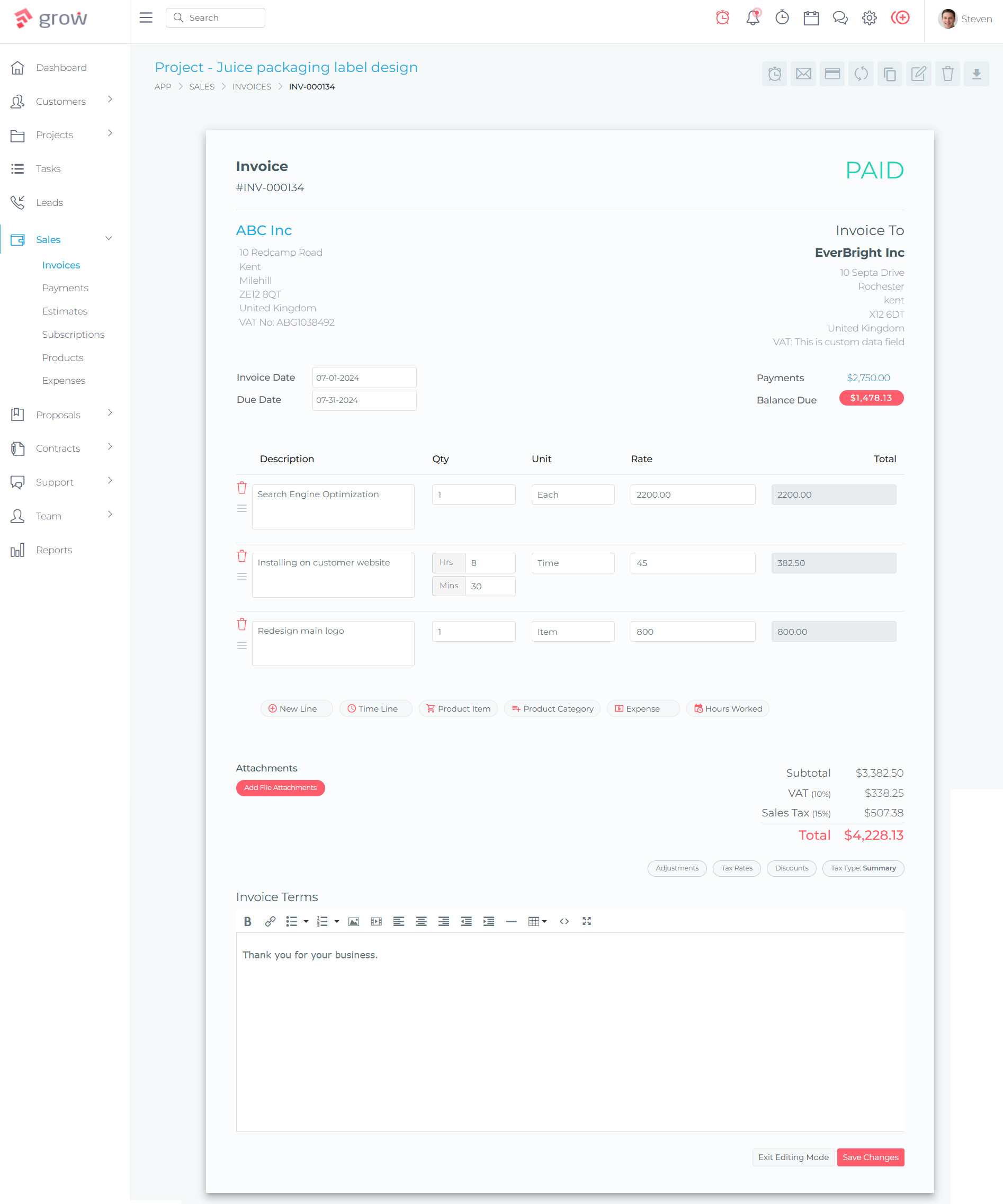
Grow CRM stands out from every other option on this list because it is the only self-hosted, all-in-one platform you can purchase once and own forever. For a freelancer or consultant, this is transformative: instead of paying monthly subscriptions that compound year after year, you invest $49 once and run your entire client operation on your own server. That means no vendor holding your data hostage, no price increases, and no feature limitations behind paywalls.
What makes Grow CRM exceptional for freelancers is its breadth. Most CRM tools in this space do one or two things well — they either handle client relationships or invoicing, but rarely both at a professional level. Grow CRM handles leads, projects, invoicing, time tracking, helpdesk tickets, contracts, estimates, and proposals under a single roof. You can take a prospect from initial contact all the way through a signed contract, a tracked project, and a paid invoice without leaving the platform or exporting data between tools.
Built on Laravel — one of the most popular PHP frameworks in the world — Grow CRM is fast, stable, and developer-friendly if you ever need customizations. It supports 30 languages, integrates with multiple payment gateways including Stripe, PayPal, Mollie, and Razorpay, and includes an API for custom workflows. Free lifetime updates and a free installation service mean you are never left to figure out server setup alone.
Key Features:
- Full CRM with leads, contacts, and client relationship tracking
- Project management with task boards, milestones, and team assignments
- Professional invoicing with online payment processing (Stripe, PayPal, Mollie, Razorpay, Tap, Flutterwave)
- Time tracking and timesheets linked directly to projects and invoices
- Contracts, estimates, and proposals with e-signature support
- Built-in helpdesk and support ticketing system
- Calendar and scheduling tools
- 30 language support for international freelancers
- REST API access for custom integrations
- Free lifetime updates and free installation service
✅ Pros
- One-time $49 payment — no subscriptions, no monthly fees, ever
- Replaces 4–6 separate tools (CRM + PM + invoicing + time tracking + contracts + helpdesk)
- Self-hosted: complete data ownership and no vendor dependency
- Modern Laravel architecture — fast, secure, and extensible
- Multiple payment gateways for global client billing
- Free installation service removes the technical barrier
❌ Cons
- Requires a web hosting environment (VPS or shared hosting)
- No managed cloud version — you handle server maintenance
- Smaller third-party integration marketplace than established SaaS CRMs
💰 Pricing
$49 one-time payment — unlimited users, unlimited clients, unlimited projects. No monthly fees, no per-user charges, no feature tiers. Free lifetime updates included.
Streak CRM
The Gmail-Native CRM for Freelancers Who Live in Their Inbox
Streak CRM takes a fundamentally different approach: instead of being a standalone tool, it lives entirely inside Gmail. If your freelance workflow is inbox-centric — sending proposals, following up on leads, managing client communication — Streak adds pipeline management, email tracking, and deal stages without ever leaving Gmail. There is no separate app to learn and no context-switching between your email and your CRM.
The free tier is genuinely useful for solo freelancers. You get unlimited pipelines, email tracking, snippets for templated replies, and mail merge for personalized outreach to 50 recipients per day. The AI Co-Pilot feature, available on paid plans, automates follow-up suggestions and logs email interactions automatically. For freelancers who find traditional CRMs overkill, Streak threads the needle between “spreadsheet” and “full CRM” elegantly.
Key Features:
- Fully embedded in Gmail — no separate login or app required
- Visual pipelines with custom stages and fields
- Email open and click tracking in real time
- Mail merge for personalized bulk outreach
- AI Co-Pilot for automated follow-up suggestions
- Contact enrichment from email signatures and social profiles
✅ Pros
- Zero learning curve for Gmail users — set up in minutes
- Generous free tier with unlimited pipelines and contacts
- Automatically captures contact data from email signatures
❌ Cons
- Completely locked to Gmail — no value for Outlook or non-Google users
- No invoicing, contracts, or proposals features
- Can slow Gmail performance with large datasets
💰 Pricing
Free plan available (unlimited pipelines, limited mail merge). Paid plans from $49.20/user/month (billed annually). Pro+ at $55.20/user/month.
Capsule CRM
Clean, Focused Contact and Pipeline Management for Consultants
Capsule CRM has earned a reputation as one of the most approachable CRMs on the market, consistently winning usability awards on G2 and Capterra. It focuses on what consultants and freelancers actually use day-to-day: contact management, relationship history, sales pipelines, and task tracking. There is no bloat, no feature overload — just a clean system for keeping track of who you spoke to, when, and what needs to happen next.
The free plan supports 2 users and 250 contacts, which is enough for a freelancer just getting started. The Starter plan at $18/user/month removes those limits and adds AI email composition and template support. For consultants managing long-term client relationships where context is everything — knowing which project you worked on together, what was discussed, and what follow-ups were promised — Capsule’s interaction history is one of the best in class.
Key Features:
- Full contact and company management with interaction history
- Customizable sales pipelines (multiple pipelines on Growth+ plans)
- AI email composer and email templates
- Workflow automation and task management
- Project and task boards for post-sale delivery tracking
- Native Gmail and Outlook integration with shared mailbox
✅ Pros
- Consistently rated #1 for ease of use among SMB CRMs
- Useful free plan (2 users, 250 contacts) for solo starters
- Excellent relationship history for consultants managing long-term clients
❌ Cons
- 250-contact free plan limit is restrictive for active outreach
- Workflow automation only available on $36/month Growth tier
- No built-in invoicing or billing features
💰 Pricing
Free plan (2 users, 250 contacts). Starter from $18/user/month. Growth at $36/user/month. Annual billing saves ~15%. 14-day free trial on paid plans.
Less Annoying CRM
Flat-Rate Simplicity With No Upsells and No Tricks
Less Annoying CRM’s entire brand identity is built on transparency. One price ($15/user/month), no feature tiers, no contracts, no upsells. What you see is what you get. For freelancers exhausted by CRM platforms that hide features behind escalating plan tiers, this approach is genuinely refreshing. The company has been family-owned since 2009 and provides free human support — phone and email — to every customer regardless of plan size.
The feature set is intentionally limited compared to larger CRMs, which is a deliberate design choice. Unlimited contacts, unlimited pipelines, Google and Outlook calendar sync, 25GB of file storage per user, and a daily email agenda summarizing your tasks and follow-ups. If you just need a solid client tracker without the complexity of building custom workflows, Less Annoying CRM gets out of your way and lets you focus on client work.
Key Features:
- Unlimited contacts, companies, and pipelines — no caps
- Email logging with automatic timestamps and contact history
- Google Calendar and Outlook calendar sync
- Unlimited custom fields and 25GB file storage per user
- Daily email agenda with due tasks and follow-ups
- Free phone and email support for all users
✅ Pros
- Completely flat, transparent pricing — no surprises
- Fastest time-to-value on G2; set up in under an hour
- Human support included at no extra cost for all users
❌ Cons
- No free tier — $15/month even for solo freelancers testing the platform
- No invoicing, contracts, or proposals built in
- Limited automation and reporting compared to larger CRMs
💰 Pricing
$15/user/month flat — no contracts, no tiers, no upsells. 30-day free trial (full access, no credit card required).
HoneyBook
Purpose-Built Client Management for Service-Based Freelancers
HoneyBook was designed specifically for service-based creative professionals — photographers, designers, event planners, consultants — who need to manage the full client lifecycle from inquiry to final payment. Its strength is the connected workflow: a prospect fills out a contact form, receives a polished proposal, signs a contract, pays a deposit, and gets access to a client portal — all within HoneyBook, all without you manually triggering each step.
The platform includes automated client onboarding workflows, scheduling and booking with calendar sync, online payment processing (Stripe-powered at 2.9% + $0.25 per transaction), and QuickBooks integration for accounting. The client-facing experience is polished and professional, which matters when you are a freelancer whose brand is your business. Note that HoneyBook raised its prices significantly in recent years, making it one of the pricier options for solo freelancers — particularly on the Premium plan.
Key Features:
- Interactive proposals, contracts, and invoices with e-signatures
- Automated client onboarding workflows
- Integrated booking and scheduling with calendar sync
- Client portal for document sharing, payments, and status updates
- Online payment processing with automatic reminders
- QuickBooks integration for accounting
✅ Pros
- Purpose-built for creative and service-based freelancers
- Polished, professional client-facing experience
- Complete workflow from inquiry to payment in one platform
❌ Cons
- Significant recent price increases have frustrated long-term users
- Not suitable for product-based or software businesses
- Mobile app lacks full feature parity with the desktop version
💰 Pricing
Starter from $29/month (annual). Essentials at $49/month. Premium at $109/month. 7-day free trial with 60-day money-back guarantee. All plans include unlimited clients and projects.
Dubsado
Deep Workflow Automation for Freelancers Willing to Invest in Setup
Dubsado is the most automation-capable platform on this list — once configured, it can handle lead capture, proposal delivery, contract signing, invoice generation, and follow-up sequences without any manual intervention. For freelancers with repeatable service packages (web design projects, monthly retainers, photography packages), this level of automation saves hours per week once the workflows are built.
The caveat is setup time. Dubsado is notoriously complex to configure, and many freelancers hire dedicated Dubsado setup specialists to get it right. The payoff is significant for those who invest in the process. The platform includes white-label branding, a client portal, a lead capture form builder, scheduling, and QuickBooks/Zapier integrations on the Premier tier. If you value automation over simplicity, Dubsado rewards the upfront investment.
Key Features:
- Custom lead capture forms that trigger automated workflows
- Proposals, contracts, and invoices with client e-signature support
- Multi-step workflow automation for client onboarding (Premier)
- Client portal with document access, communication, and payments
- Scheduling and booking with calendar sync (Premier)
- Zapier and QuickBooks integrations (Premier)
✅ Pros
- Most powerful workflow automation of any freelancer-focused CRM
- Full white-label branding on all client-facing documents
- Strong user community and setup resources available
❌ Cons
- Steep learning curve — many users need external help to configure it
- Key features (automation, scheduling, Zapier) locked to Premier tier
- Workflow bugs are frequently reported by users
💰 Pricing
Starter from ~$27.92/month (annual). Premier at ~$43.75/month (annual). 21-day free trial with full Premier access. No credit card required.
Bonsai
Contracts, Time Tracking, and Invoicing for Independent Professionals
Bonsai was built specifically for the freelancer workflow: send a proposal, collect a signature on a legally-vetted contract, track time against the project, and invoice automatically when the milestone is hit. The platform’s pre-built legal templates — available in multiple jurisdictions — save freelancers significant money compared to having an attorney draft custom contracts. The templates cover freelance service agreements, independent contractor agreements, and project-specific contracts.
The CRM component is functional rather than deep: you can manage contacts, view project history, and track client interactions, but Bonsai’s real strength is the financial workflow — proposals through payment. Time tracking ties directly to billing, so creating an invoice from tracked hours takes seconds. For freelancers whose primary pain point is getting paid correctly and on time, Bonsai addresses that directly.
Key Features:
- Legally-vetted contract templates with e-signature support
- Automated invoicing with payment reminders for overdue amounts
- Time tracking per project with billable hour reporting
- Expense tracking with bank account integration
- Client portal for document delivery, approvals, and payments
- CRM with client contact history and project pipeline
✅ Pros
- Pre-built legal templates save money on legal fees
- Seamless proposals → contracts → time tracking → invoicing workflow
- Clean, polished UI purpose-built for freelancers
❌ Cons
- Payment processing delays (7–10 business days) reported by multiple users
- Project management features are shallow compared to dedicated PM tools
- Customer support response times can be slow
💰 Pricing
Basic from $9/user/month (annual). Essentials at $25/user/month. Premium at $49/user/month. Elite at $59/user/month. 7-day free trial available.
Agile CRM
The Most Generous Free Tier for Freelancers Who Need Sales and Marketing
Agile CRM offers the most generous free plan of any CRM on this list: 10 users, 1,000 contacts, and 1 marketing automation workflow at no cost. For a solo consultant or small freelance team that needs basic CRM plus email marketing without paying anything, Agile CRM provides real value. It covers sales pipeline management, email campaigns, appointment scheduling, and a helpdesk in one platform.
The interface design shows its age — Agile CRM was built in the early 2010s and the UI reflects that era — but the underlying functionality is solid. The paid tiers are reasonably priced at $9.99/user/month annually, which unlocks unlimited automation workflows, advanced reporting, and social integrations. For freelancers running active email marketing campaigns alongside client management, Agile CRM’s combined sales + marketing approach reduces the need for separate marketing automation tools.
Key Features:
- Contact management with interaction timelines and social profile data
- Visual sales pipeline with drag-and-drop deal management
- Email marketing with campaigns, templates, and analytics
- Marketing automation with multi-step workflows and lead scoring
- Appointment scheduling and web-to-lead capture forms
- Helpdesk and ticketing system (higher tiers)
✅ Pros
- Most generous free tier: 10 users and 1,000 contacts at $0
- Combines sales, marketing, and support in one platform
- Affordable paid tiers for those needing marketing automation
❌ Cons
- Interface design feels dated compared to modern competitors
- Can load slowly with larger datasets or complex pipelines
- Email volume capped at 5,000/month before overage charges
💰 Pricing
Free plan (10 users, 1,000 contacts). Starter from $9.99/user/month (annual). Regular at $49.99/user/month. Enterprise at $64.99/user/month.
Zoho CRM
Scalable CRM With a Functional Free Tier for Solo Freelancers
Zoho CRM is one of the most feature-rich CRM platforms available, and its free plan (3 users) makes it accessible to solo freelancers and small teams at no cost. The free tier includes full pipeline management, lead and contact tracking, and basic workflow automation — enough for a consultant managing a handful of active clients without needing to pay anything.
Zoho’s real advantage becomes apparent when you need to scale. As part of the broader Zoho ecosystem, the CRM connects seamlessly with Zoho Books (accounting), Zoho Projects, Zoho Desk (support), and Zoho Sign (contracts). For consultants who start solo and grow to a team of five or ten, Zoho CRM scales with the business without requiring a platform migration. The AI sales assistant “Zia” (available on Enterprise plans) adds predictive analytics and anomaly detection that most small CRMs don’t touch.
Key Features:
- Full pipeline management — leads, contacts, accounts, deals
- Workflow automation and sales cadences
- Sales forecasting and customizable dashboards
- WhatsApp Business and multi-channel communication integrations
- AI sales assistant “Zia” for predictions and anomaly detection (Enterprise)
- Deep ecosystem integration with Zoho Books, Projects, Desk, and Sign
✅ Pros
- Free plan for up to 3 users — genuine no-cost option for solo consultants
- Grows from freelancer basics to enterprise-grade CRM on the same platform
- Best-in-class ecosystem integration with other Zoho products
❌ Cons
- Feature breadth creates significant setup and learning curve complexity
- Free tier limited to 10MB storage and basic reporting only
- Can feel over-engineered for freelancers who just need simple client tracking
💰 Pricing
Free plan (3 users). Standard from $14/user/month (annual). Professional at $23/user/month. Enterprise at $40/user/month. Free trial available on paid plans.
Folk CRM
AI-Powered Relationship Management for Consultants Who Network Through LinkedIn
Folk CRM targets a specific type of consultant: one whose client development happens primarily through LinkedIn networking and relationship-building rather than traditional sales pipelines. The folkX Chrome extension imports LinkedIn contacts directly into Folk with a single click, and the AI enrichment layer automatically fills in email addresses, phone numbers, and company data — reducing the manual data entry that makes most CRMs feel like a burden.
Folk’s interface is modern and clean, resembling a spreadsheet-style contact database with rich metadata. It supports email sequences and personalized campaign sending, multi-channel sync across Gmail, Outlook, WhatsApp, and Google Calendar, and team collaboration features for shared pipelines. The absence of a mobile app is a notable gap for consultants who manage relationships on the go, and deal management is locked behind the Premium tier.
Key Features:
- 1-click LinkedIn contact import via folkX Chrome extension
- AI-powered contact enrichment (emails, phone numbers, company data)
- Pipeline management with team collaboration and deal sharing
- Email sequences and bulk campaign sending with personalization
- Multi-channel sync: Gmail, Outlook, WhatsApp, Google Calendar
- 5,000+ integrations via native connectors and Zapier
✅ Pros
- Fastest LinkedIn-to-CRM contact import available
- Clean, modern spreadsheet-style UI with minimal onboarding friction
- AI-assisted follow-up drafting and contact research
❌ Cons
- No mobile app — significant gap for consultants on the go
- Contact enrichment success rate approximately 50–60%
- Deal management and automation locked to $48/month Premium plan
💰 Pricing
Standard from $24/member/month (annual). Premium at $48/member/month. Custom plans from $80/member/month. 2-week free trial — no credit card required.
CRM Comparison Table: Freelancers and Consultants
| # | CRM | Pricing | Free Tier | Deployment | Invoicing | Best For |
|---|---|---|---|---|---|---|
| 1 | Grow CRM | $49 one-time | — | Self-hosted | ✅ Yes | Full ownership, zero recurring costs |
| 2 | Streak CRM | Free / $49.20+/user/mo | ✅ Yes | Cloud (Gmail) | ❌ No | Gmail-centric freelancers |
| 3 | Capsule CRM | Free / $18+/user/mo | ✅ 250 contacts | Cloud | ❌ No | Clean client relationship tracking |
| 4 | Less Annoying CRM | $15/user/mo flat | ❌ Trial only | Cloud | ❌ No | Simplicity-first, no upsells |
| 5 | HoneyBook | $29–$109/mo | ❌ Trial only | Cloud | ✅ Yes | Creative and service-based freelancers |
| 6 | Dubsado | ~$28–$44/mo | ❌ Trial only | Cloud | ✅ Yes | Automation-heavy client workflows |
| 7 | Bonsai | $9–$59/user/mo | ❌ Trial only | Cloud | ✅ Yes | Contract + invoice + time tracking |
| 8 | Agile CRM | Free / $9.99+/user/mo | ✅ 10 users! | Cloud | ❌ No | Sales + marketing automation |
| 9 | Zoho CRM | Free / $14+/user/mo | ✅ 3 users | Cloud | Via Zoho Books | Scalable with Zoho ecosystem |
| 10 | Folk CRM | $24–$80+/member/mo | ❌ Trial only | Cloud | ❌ No | LinkedIn-based relationship building |
Frequently Asked Questions
What is the best CRM for freelancers and consultants?
Grow CRM is the best overall CRM for freelancers and consultants. It combines client management, invoicing, project tracking, contracts, proposals, and time tracking in one self-hosted platform for a one-time $49 payment. Unlike SaaS alternatives charging $15–$130/month indefinitely, Grow CRM eliminates recurring fees while offering unlimited users and full data ownership.
Do freelancers really need a CRM, or is a spreadsheet enough?
A spreadsheet works for 1–5 clients, but becomes a liability once you are managing 10+ active clients, tracking proposals, following up on leads, and chasing invoices simultaneously. Freelancers typically hit the limit of spreadsheet management around 5–10 clients. A CRM automates follow-up reminders, centralizes communication history, and prevents leads from falling through the cracks — all of which directly impacts revenue.
What features should a freelancer look for in a CRM?
Prioritize: (1) contact and pipeline management, (2) proposal and contract generation with e-signatures, (3) invoicing with online payment processing, (4) automated follow-up reminders, (5) time tracking linked to billing, and (6) a client portal for professional communication. Not every freelancer needs all of these — start with your biggest time drain and pick a CRM that solves it well.
How much should I pay for a freelancer CRM?
The range is wide: $0 (Zoho CRM free, Agile CRM free) to $15/month flat (Less Annoying CRM) to $50–$130/month for full-featured platforms like HoneyBook and Dubsado. Self-hosted options like Grow CRM eliminate recurring fees entirely with a one-time $49 purchase. Over 3 years, a $49/month SaaS CRM costs $1,764 — Grow CRM costs $49, once.
Is there a free CRM good enough for a solo freelancer?
Yes. Agile CRM’s free plan (10 users, 1,000 contacts, 1 automation) and Zoho CRM’s free plan (3 users, full pipeline) are both functionally solid at $0. Capsule’s free plan (250 contacts) suits early-stage consultants. Streak’s free tier works inside Gmail at no cost. For a freelancer just starting out, any of these provide a genuine no-cost starting point before committing to a paid plan.
What is the easiest CRM to set up for a non-technical freelancer?
Less Annoying CRM and Capsule CRM consistently win “fastest time-to-value” on G2 and Capterra — both can be operational in under an hour. Streak is the easiest if you work primarily in Gmail. Grow CRM offers a free installation service that handles the server setup for you. Dubsado is the most complex — expect 2–5 hours of configuration or the cost of hiring a setup specialist.
Should I use a CRM with built-in invoicing or keep them separate?
For solo freelancers and small consultancies, an all-in-one CRM that includes invoicing (Grow CRM, HoneyBook, Dubsado, Bonsai) reduces tool switching and keeps your complete client history in one record. If you already use accounting software you love — QuickBooks, FreshBooks, Xero — prioritize a CRM with a strong native integration rather than replacing your accounting workflow entirely.
What is the difference between a cloud CRM and a self-hosted CRM?
Cloud CRMs are hosted by the vendor — you log in via browser, pay monthly, and the vendor handles uptime, updates, and backups. Self-hosted CRMs like Grow CRM run on your own server — you pay once, own the software and your data completely, and control everything. Self-hosted is ideal for privacy-conscious freelancers or those eliminating recurring software costs from their business overhead.
Can a CRM help me win more clients, not just manage existing ones?
Yes. Lead pipeline tracking, follow-up automation, and email outreach tools (available in Streak, Folk, Agile CRM, and Zoho CRM) help freelancers systematically nurture prospects instead of losing them to inbox neglect. Many consultants report that simply visualizing their pipeline — seeing leads in stages — creates the accountability needed to follow up more consistently and convert more prospects into paying clients.
Is Grow CRM suitable for a solo freelancer or is it only for teams?
Grow CRM works equally well for solo freelancers and small teams. Since it is priced at a one-time $49 flat fee rather than per-user, the value proposition is strongest for anyone who expects to grow — you never pay more as you add users. Solo freelancers benefit from its all-in-one approach: managing clients, projects, invoices, and contracts from a single dashboard without switching between multiple tools.
Which CRM Should You Choose?
The right CRM depends on how you work. If you want to eliminate recurring software costs and own a platform that handles every aspect of client management — from first contact through final invoice — Grow CRM is the clear choice. At $49 one-time, it costs less than a single month of most competitors and replaces multiple tools simultaneously.
If you live in Gmail, Streak integrates invisibly into your existing workflow. If you need polished client-facing workflows with proposals and contracts, HoneyBook or Dubsado serve creative freelancers well. If you want the simplest possible tool with human support and no upsells, Less Annoying CRM delivers on its name. And if you need to start for free, Agile CRM and Zoho CRM both offer functional no-cost tiers.
What unites the best freelancer CRMs is not complexity — it is fit. The best CRM for you is the one you will actually use consistently. Start with your biggest pain point (tracking leads? sending invoices? following up on proposals?) and choose the tool that solves that problem best. For most freelancers, an all-in-one platform like Grow CRM that handles all of those jobs at once is the most efficient path forward.
