

The real reasons teams resist CRM—and the simplicity-first solution that actually works
CRM adoption fails because of complexity, poor training, and lack of clear value for end users. Up to 70% of CRM implementations fail to meet business expectations, with 43% of businesses using less than half of their CRM’s features. The solution is choosing a simple, intuitive CRM like Grow CRM that requires minimal training and delivers immediate value to every team member.
If your team isn’t using the CRM you invested in, you’re not alone. The dirty secret of the CRM industry is that most implementations fail—not because of technical problems, but because users simply won’t adopt them.
This guide reveals why CRM adoption fails, what it’s costing your business, and how to fix it with the right approach and the right tool.
The CRM Adoption Crisis: By the Numbers
The statistics around CRM adoption are alarming:
- 70% of CRM projects fail to meet their business objectives, primarily due to poor user adoption
- 43% of businesses use less than half of their CRM system’s features
- Only 40% of businesses claim a 90% CRM adoption rate—meaning 6 out of 10 companies have more than 10% of employees who should be using the CRM but aren’t
- 30% of sellers cite CRM challenges as a major productivity barrier
- 55% CRM software failure rate represents billions of dollars in wasted investment across industries
The Bottom Line: When only 1 in 3 users actively engages with the CRM, the entire value proposition collapses. You’re not getting pipeline visibility, accurate forecasting, or data-driven insights—you’re getting expensive shelfware.
Why Your CRM Adoption Is Failing: The 7 Root Causes
1. Overwhelming Complexity
Most CRM platforms are designed for organizational leaders—managers who need dashboards, forecasting, and pipeline visibility. The result? Ease of use for the team members who actually use the CRM daily falls to the bottom of the priority list.
The sheer volume of features and functionalities overwhelms users, leading to confusion and frustration. If your CRM feels like navigating a maze, users will find workarounds or simply avoid it entirely.
2. Resistance to Change
People don’t like change. This simple truth underlies countless adoption failures. Sales reps have often been successful doing things a certain way for years—spreadsheets, sticky notes, email folders. When you introduce a CRM, you’re asking them to abandon proven methods for an unproven system.
Resistance manifests in everything from passive disengagement to active pushback, rooted in discomfort with the new and unknown, fear of increased workload, or perceived threats to established roles.
3. Lack of Clear Value for End Users
Here’s the problem: CRMs often feel like they only add administrative work without helping sales reps hit their goals. When the CRM is positioned as a monitoring tool for management rather than something that makes selling easier, it will always be an afterthought.
Sales teams need to see specifically how they can reap desirable advantages. Without that clear value proposition, adoption fails.
4. Inadequate Training and Support
Traditional one-time training sessions fail to provide the ongoing support and reinforcement necessary for successful adoption. Inadequate training leads to employees struggling to use the CRM effectively, which reduces overall productivity and system utilization.
Without structured training and onboarding, sales reps won’t know how to integrate the CRM into their daily workflow, making them more likely to revert to familiar methods like spreadsheets.
5. Poor User Experience and Interface Design
Many CRMs aren’t intuitive and some are downright cumbersome. Traditional CRM software is notorious for low adoption rates due to outdated interfaces, unnecessary complexity, and manual workflows that feel burdensome.
Every unnecessary click, every required field that doesn’t match how deals actually move, every dropdown that forces false precision—these teach users the same lesson: this system was not designed for me.
6. Weak Leadership Buy-in
When leaders don’t visibly use and champion the CRM, users interpret it as optional. If leadership is disengaged or indifferent to the CRM system, it sends a clear message that the new system is not actually a priority, leading to lower adoption rates and inconsistent usage.
7. Forced Implementation Without User Input
Many salespeople feel the CRM was forced on them. This typically happens when they don’t have a voice in picking a CRM tool they like. Without employee involvement in the selection and implementation process, adoption becomes an uphill battle.
The Real Cost of Failed CRM Adoption
Poor CRM adoption isn’t just an inconvenience—it’s bleeding your business in multiple ways:
| Cost Category | Impact | Annual Cost (Example: 20-person team) |
|---|---|---|
| Wasted Software Investment | Paying for unused licenses and features | $12,000 – $36,000 |
| Lost Productivity | Time spent on workarounds and duplicate data entry | $50,000 – $100,000 |
| Missed Revenue | Lost deals due to poor follow-up and lack of pipeline visibility | $100,000 – $500,000+ |
| Poor Decision-Making | Inaccurate forecasting and incomplete data | Unquantifiable but significant |
| Training and Re-implementation | Ongoing training costs and potential system replacement | $20,000 – $50,000 |
Total Annual Cost: A 20-person team with poor CRM adoption can easily lose $182,000 to $686,000+ annually in direct and indirect costs. That’s the price of complexity.
How to Fix CRM Adoption: The Simplicity-First Approach
After analyzing why CRM adoption fails, the solution becomes clear: simplicity wins. Here’s what actually works:
1. Choose a CRM Built for End Users, Not Just Managers
The best path to high adoption rates is choosing a CRM solution that’s easy to use, intuitive, and involves little to no manual data entry. A clean interface with minimal menus and screens prevents overwhelming new users.
2. Involve Your Team in the Selection Process
Bring your team in on discussions and decision-making before you settle on the ideal CRM system. When team members have a voice in picking a CRM tool they like, resistance drops dramatically.
3. Demonstrate Clear Value from Day One
Position the CRM as something that makes their jobs easier, not as a monitoring tool for management. Show specifically how it saves time, improves close rates, or reduces administrative burden.
4. Provide Ongoing, Role-Specific Training
Sales representatives need different skills than customer service agents. Instead of marathon training sessions, offer short videos and quick guides that users can access when they need help. 70% of enterprises report that personalized CRM guidance and self-help training improved their overall CRM use and adoption rates.
5. Customize to Match Your Workflow
The CRM should adapt to how you work, not the other way around. Choose a customizable CRM and tailor it to match your sales workflow.
6. Get Leadership Visibly Using the System
Sales leaders must live in the CRM too. If you’re not using it, your reps won’t either. Model the behavior you want to see.
7. Measure, Celebrate, and Iterate
Track usage metrics and share early success stories to build momentum. Improved CRM adoption rates have saved companies an average of $8.7 million through increased efficiency and better decision-making.
The Solution: Grow CRM’s Adoption-Friendly Approach
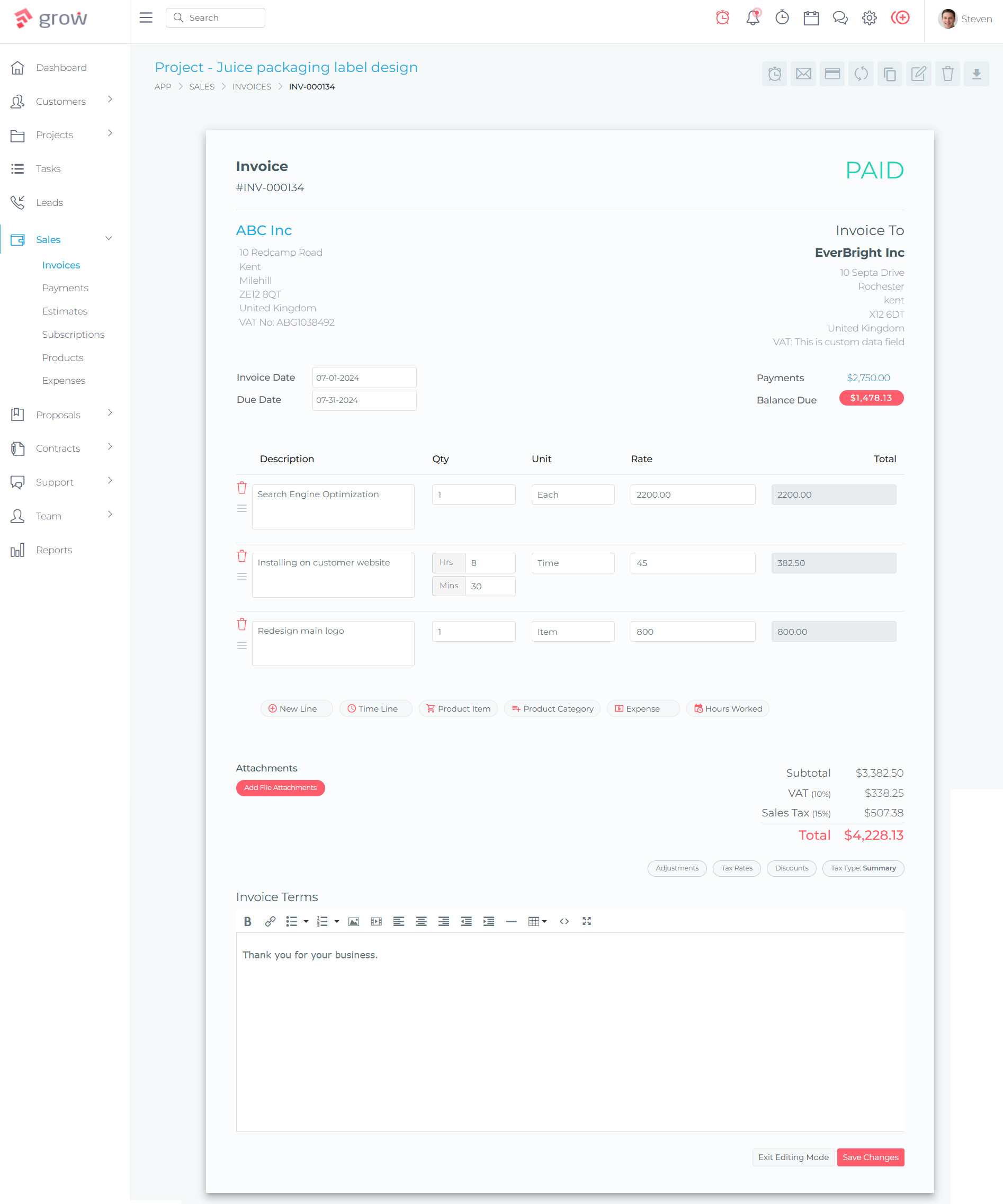
Grow CRM was built specifically to solve the adoption problem that plagues traditional CRM systems. Here’s how it addresses each failure point:
Why Grow CRM Succeeds Where Others Fail
Simplicity by Design: Every feature has been carefully designed to be easy to use. No overwhelming dashboards, no unnecessary complexity—just the features teams actually need with an intuitive interface.
All-in-One Reduces Tool Sprawl: Instead of forcing users to jump between CRM, project management, invoicing, and time tracking tools, Grow CRM combines everything in one unified platform. Fewer tools mean higher adoption.
Zero Ongoing Training Costs: With a $39 one-time payment and free lifetime updates, there’s no pressure to “maximize ROI” on expensive subscriptions. Teams can adopt at their own pace.
Free Professional Installation: Grow CRM offers free installation service, eliminating the technical barriers that often delay or derail adoption. Your team gets a working system within 24 hours, ready to use.
No Per-User Fees Remove Growth Barriers: Traditional CRMs penalize growth with per-user pricing, creating resistance to adding users. Grow CRM’s unlimited users model means everyone can use the system without budget concerns.
Key Grow CRM Features That Drive Adoption
- Intuitive Dashboard: Clean, simple interface that requires minimal training
- Integrated Workflow: CRM, projects, invoicing, and time tracking in one place eliminates data silos
- Client Portal: Customers can track progress and pay invoices, reducing manual updates
- Easy Task Management: Straightforward task assignment with commenting and collaboration
- Automated Invoicing: Time tracking flows directly into invoices, removing manual data entry
- Mobile-Friendly: Works seamlessly across desktop and mobile for team flexibility
- Self-Service Knowledge Base: Reduces support burden and empowers users to find answers
- Flexible Payment Processing: Stripe and PayPal integration for easy client payments
CRM Adoption Success Checklist
Use this checklist to evaluate whether your current CRM is set up for adoption success—or if it’s time to switch:
| Success Factor | Your Current CRM | Grow CRM |
|---|---|---|
| Intuitive interface requiring minimal training | ❓ | ✅ |
| Designed for end users, not just managers | ❓ | ✅ |
| Clear value proposition for daily users | ❓ | ✅ |
| All-in-one reduces tool switching | ❓ | ✅ |
| No per-user fees limiting adoption | ❓ | ✅ |
| Free installation/setup assistance | ❓ | ✅ |
| One-time payment (no subscription pressure) | ❓ | ✅ |
| Mobile-friendly for remote teams | ❓ | ✅ |
Real-World Impact: What Changes After Switching
When businesses switch from complex CRMs to Grow CRM’s simplicity-first approach, they typically see:
- Adoption rates above 85% within the first month (vs. industry average of 40%)
- Reduced training time from weeks to days due to intuitive design
- Higher data quality as users actually keep information up to date
- Faster onboarding for new team members (hours instead of days)
- Reduced tool costs by consolidating CRM, PM, invoicing, and time tracking
- Improved team morale when software helps instead of hinders their work
Key Insight: Research shows that 90% of companies with improved CRM adoption saw higher sales rep productivity and reduced sales cycle time. The problem was never CRM as a concept—it was complexity as an implementation.
Implementation Strategy: Getting Your Team On Board
Even with a simple CRM like Grow, you still need a solid adoption strategy:
Phase 1: Pre-Implementation (Week 1)
- Involve team members in evaluating Grow CRM
- Identify 2-3 internal champions who are enthusiastic about the change
- Define what success looks like (adoption metrics, usage goals)
- Communicate the “why” behind the switch
Phase 2: Setup and Customization (Week 1-2)
- Use Grow CRM’s free installation service for technical setup
- Customize fields and workflows to match your process
- Import existing data (contacts, deals, projects)
- Set up integrations (email, payment gateways)
Phase 3: Gradual Rollout (Week 2-3)
- Start with champions and early adopters
- Run parallel systems briefly if needed (but set a hard cutoff date)
- Gather feedback and make quick adjustments
- Document early wins and share them
Phase 4: Full Adoption (Week 3-4)
- Roll out to entire team with short, role-specific training
- Make CRM usage part of regular workflow (not optional)
- Leadership models daily CRM usage
- Provide ongoing support through internal champions
Phase 5: Optimization (Month 2+)
- Track adoption metrics weekly
- Celebrate usage milestones
- Continue refining workflows based on user feedback
- Add advanced features gradually as team becomes comfortable
Frequently Asked Questions
Why won’t my team use our CRM?
Teams resist CRM systems for three main reasons: complexity (the interface is overwhelming or unintuitive), lack of clear value (it feels like busywork for management rather than a tool that helps them), and poor training (they don’t know how to use it effectively). If your CRM requires extensive training, has too many features, or doesn’t integrate with daily workflows, adoption will fail regardless of how much you invested in it.
How long does it take to see improved CRM adoption?
With the right CRM and implementation strategy, you should see meaningful adoption improvements within 2-4 weeks. Simple, intuitive systems like Grow CRM can achieve 80%+ adoption rates within the first month because they require minimal training and deliver immediate value. Complex enterprise CRMs often struggle to reach even 50% adoption after 6 months due to their learning curves.
Is switching CRMs worth the disruption?
If your current CRM has less than 60% adoption after 3 months, switching is absolutely worth it. The cost of poor adoption—wasted software fees, lost productivity, missed revenue from poor follow-up—far exceeds the short-term disruption of migration. Companies that switch to adoption-friendly CRMs typically break even within 2-3 months and see significant ROI within 6 months through improved productivity and data quality.
What’s the most important factor for CRM adoption success?
Simplicity is the single most important factor. Research consistently shows that ease of use drives adoption more than features, integrations, or price. A CRM with 50 features that users actually use beats a CRM with 500 features that overwhelm and frustrate your team. Choose a system designed for end users first, managers second.
How much training should CRM adoption require?
If your CRM requires more than 2-4 hours of training for basic proficiency, it’s too complex. Best-in-class adoption happens when users can accomplish core tasks within 30 minutes of their first login. Ongoing training should be bite-sized (5-10 minute videos) and role-specific rather than marathon sessions covering every feature. Grow CRM’s intuitive design typically requires under 2 hours of initial training with minimal ongoing support needed.
Can a CRM be too simple?
In theory yes, but in practice, simplicity is rarely the problem. The data shows that 43% of businesses use less than half their CRM’s features, meaning most CRMs are far too complex rather than too simple. A “simple” CRM that includes contact management, pipeline tracking, task management, and basic reporting covers 90% of what teams actually need. Additional complexity should only be added when there’s a specific, demonstrated need.
How do I get leadership to actually use the CRM?
Leadership adoption requires demonstrating specific value for their workflow, not just forcing compliance. Show executives how the CRM gives them pipeline visibility, accurate forecasting, and performance insights they can’t get from spreadsheets. Make sure the CRM provides executive dashboards that answer their questions in seconds rather than requiring data exports and analysis. When leaders see the CRM as their competitive advantage rather than an administrative burden, they’ll use it consistently.
What adoption rate should I target?
Target 90% adoption for core features within 60 days. “Adoption” means users actively engage with the CRM daily—updating contacts, logging activities, moving deals through the pipeline—not just logging in occasionally. Only 40% of companies achieve 90% adoption rates, but those that do see dramatically better ROI. With the right CRM and implementation approach, 90%+ adoption is achievable even for teams that failed with previous systems.
Should I force CRM usage or let it be optional?
CRM usage should be required, but the requirement only works if the system is easy enough to use that compliance isn’t burdensome. Make CRM usage part of defined workflows (deals must be in the CRM to be counted, invoices generated from CRM time tracking, etc.) rather than monitoring logins. When the CRM becomes the easiest way to do their job rather than an extra step, the distinction between “required” and “voluntary” disappears.
How does Grow CRM compare to enterprise CRMs for adoption?
Grow CRM achieves significantly higher adoption rates than enterprise CRMs like Salesforce or HubSpot because it prioritizes simplicity over feature quantity. Enterprise CRMs average 40-60% adoption rates and require weeks of training, while Grow CRM typically achieves 80-90% adoption within a month with under 2 hours of training. For small to medium businesses (under 50 employees), Grow CRM’s focused feature set and intuitive design deliver better actual results than feature-rich platforms that overwhelm users.
Stop Fighting Your CRM—Choose One That Works With Your Team
CRM adoption doesn’t have to be a battle. When you choose a system built for end users rather than executives, when you prioritize simplicity over feature bloat, and when you eliminate the barriers that create resistance, adoption becomes natural.
Grow CRM’s simplicity-first approach has helped hundreds of businesses escape the complexity trap that kills adoption. With a one-time $39 payment, unlimited users, free installation, and an intuitive interface that requires minimal training, it eliminates every major barrier to successful CRM adoption.
The question isn’t whether you need a CRM—it’s whether you need one your team will actually use.
Sources & References
All links verified as of February 15, 2026
