

Transform client data into professional proposals in minutes, not hours
The most efficient way to create proposals is directly from your CRM, where client data automatically populates professional templates, eliminating manual data entry and reducing proposal creation time from hours to minutes. This integrated approach cuts proposal creation time by 40-50% while improving accuracy and professionalism.
If you’re currently copying client information from your CRM into separate proposal software—or worse, into Word documents—you’re wasting valuable time and introducing opportunities for errors.
This guide shows you exactly how to create and send proposals directly from your CRM, including the features to look for, workflow steps, and real-world time savings you can expect.
The Problem with Separate Proposal Tools
Most businesses use separate systems for client management and proposal creation. This disconnected approach creates several critical problems that slow down your sales process and increase the risk of errors.
Common Issues with Disconnected Systems
Manual Data Entry Wastes Time
You maintain client details in your CRM, then manually type the same information into proposal software or Word documents. This double-entry approach wastes hours every week and creates opportunities for typos and inconsistencies.
Outdated Client Information
When client details change in your CRM, your proposal templates don’t update automatically. You might send a proposal with an old contact name, incorrect company details, or outdated project requirements—embarrassing mistakes that undermine your professionalism.
Inconsistent Branding and Formatting
Different team members create proposals using different templates, fonts, and formatting. Your brand presentation becomes inconsistent, and maintaining quality control requires constant oversight.
Lost Context and Deal History
Proposals created outside your CRM lose connection to the sales pipeline. You can’t see proposal history when reviewing a client record, and tracking which proposals converted becomes manual detective work.
The Real Cost of Manual Proposal Creation
Research shows that employees waste significant time on manual document creation. More specifically, teams using disconnected systems report spending 2-4 hours per proposal, with much of that time devoted to gathering information, reformatting data, and fixing errors.
For a sales team sending 10 proposals per month, that’s 20-40 hours of lost productivity—time that could be spent on actual selling, client relationships, or strategic work.
Why Create Proposals Directly from Your CRM
Integrated proposal creation solves these problems by pulling client data directly from your CRM into professional templates. This approach offers substantial benefits that impact both efficiency and effectiveness.
1. Automatic Data Population
Your CRM already contains all the client information needed for proposals: company name, contact details, project requirements, pricing history, and communication context. When proposal functionality is built into your CRM, this data flows automatically into your proposal templates.
No more copying and pasting. No more switching between applications. No more typing the same information twice.
2. Dramatic Time Savings
Average Proposal Creation Times
Traditional Method: 2-4 hours per proposal
CRM-Integrated Method: 15-30 minutes per proposal
Time Saved: 40-50% reduction in proposal preparation time
According to proposal automation research, businesses using CRM-integrated proposal tools can create proposals in just 17 minutes on average, compared to hours for manual methods. One company reduced proposal creation from three weeks to just two hours after implementing integrated automation.
3. Improved Accuracy and Professionalism
When client data populates automatically, you eliminate transcription errors. Contact names, company details, project specifications, and pricing all flow from your single source of truth—your CRM database.
Proposify reports that their CRM integration “eliminates embarrassing typos caused by human error,” while automated systems ensure consistent branding and formatting across every proposal your team sends.
4. Complete Deal Visibility
Proposals created from your CRM remain linked to the client record and deal pipeline. You can see exactly which proposals are sent, opened, viewed, and signed—all within your CRM timeline. This visibility helps you follow up at the right time and understand which proposals convert.
When your proposals live in separate software, this connection breaks. You lose visibility into proposal status and can’t easily correlate proposal activity with deal progression.
5. Faster Sales Cycles
Speed matters in competitive sales environments. The faster you can send a professional proposal, the better your chances of closing the deal before competitors respond.
CRM-integrated proposals let you respond to opportunities in minutes rather than days. This responsiveness demonstrates professionalism and keeps your solution top-of-mind while the prospect’s interest is highest.
Essential Features for CRM Proposal Creation
Not all CRM systems offer proposal functionality, and those that do vary significantly in capabilities. Here are the essential features you should look for when evaluating CRM proposal tools.
| Feature | Why It Matters | What to Look For |
|---|---|---|
| Template Library | Speeds up proposal creation and ensures consistency | Pre-built templates for different services, customizable fields, brand styling options |
| Auto-Fill from CRM Data | Eliminates manual data entry and errors | Automatic population of client name, contact, company, project details from CRM records |
| Content Library | Reuse proven content blocks across proposals | Savable sections for services, terms, case studies that can be inserted into any proposal |
| Online Viewing | Clients can review proposals immediately without downloads | Web-based proposal viewing with responsive design for mobile |
| Electronic Signatures | Accelerates acceptance and eliminates printing/scanning | Built-in e-signature capability with legal validity and timestamp tracking |
| Proposal Tracking | Know when prospects open and review your proposal | Real-time notifications for opens, page views, time spent, and completion |
| Conversion Workflows | Automatically advance deals when proposals are accepted | Trigger contract generation, project creation, and invoice sending upon acceptance |
| Proposal Cloning | Reuse successful proposals as starting points | One-click duplication of existing proposals with easy customization |
Step-by-Step: Creating Proposals from Your CRM
Here’s the typical workflow for creating and sending proposals directly from CRM software, illustrated with best practices and time-saving techniques.
Step 1: Start from the Client or Deal Record
Navigate to the client record or deal in your CRM pipeline. This ensures all proposal data pulls from the correct client information and maintains the connection between the proposal and the sales opportunity.
What happens: Your CRM knows which client you’re working with and can automatically populate all their information into the proposal template.
Step 2: Select or Create a Proposal Template
Choose a pre-built template that matches your service type, or create a new template if needed. The best CRM proposal systems offer template libraries with options for different industries and service types.
Time-saving tip: Start with proven templates from successful past proposals. Most systems allow proposal cloning, so you can duplicate a winning proposal and simply update the details.
Step 3: Review Auto-Populated Client Data
The system automatically fills in client information from your CRM: company name, contact person, email, phone, address, and any project-specific details you’ve already captured.
What to check: Verify that the correct contact person is listed (especially for companies with multiple contacts) and that project requirements match the latest discussions.
Step 4: Customize Proposal Content
Add or modify services, adjust pricing, insert relevant case studies or testimonials from your content library, and personalize the introduction to reference recent conversations or specific client needs.
Personalization matters: While templates save time, effective proposals address specific client pain points and demonstrate understanding of their unique situation.
Step 5: Add Terms and Pricing
Include detailed scope of work, deliverables, timeline, payment terms, and any conditions or guarantees. Many CRM systems support interactive pricing tables where clients can adjust quantities or select options.
Professional practice: Be specific about what’s included and what’s not. Clear boundaries prevent scope creep and set proper expectations.
Step 6: Preview and Proofread
Review the complete proposal as it will appear to your client. Check for formatting consistency, verify all client details are correct, ensure pricing calculations are accurate, and confirm all sections flow logically.
Quality control tip: Have a second team member review high-value proposals. Fresh eyes catch mistakes you might miss after staring at the document.
Step 7: Send and Track
Send the proposal directly from your CRM via email with a personalized message. The system generates a unique viewing link and begins tracking engagement.
What you’ll see: Real-time notifications when the client opens the proposal, how much time they spend reviewing it, which sections they view, and when they’re ready for follow-up.
Step 8: Follow Up Based on Engagement
Use proposal tracking data to inform your follow-up strategy. If they’ve viewed the proposal multiple times but haven’t responded, they’re interested but may have questions. If they viewed it once briefly, they might need more information or aren’t ready to decide.
Smart follow-up: Reference specific sections they spent time on. “I noticed you reviewed the pricing section—do you have questions about the payment structure?”
Step 9: Electronic Signature and Acceptance
When the client is ready to proceed, they sign electronically directly within the proposal viewing interface. The signature is legally binding, timestamped, and recorded in your CRM.
What happens next: The deal advances automatically in your pipeline, and if configured, the system triggers next steps like contract generation, project creation, or initial invoice sending.
Workflow Automation: From Proposal to Project
The most powerful benefit of CRM-integrated proposals is workflow automation. When a client accepts a proposal, your CRM can automatically trigger downstream actions that previously required manual work.
Automated Actions After Proposal Acceptance
| Action | What Happens | Benefits |
|---|---|---|
| Deal Stage Advancement | The opportunity moves from “Proposal Sent” to “Won” automatically | Pipeline stays current without manual updates; accurate forecasting |
| Contract Generation | The system creates a formal contract based on the accepted proposal | No separate contract creation; consistent terms between proposal and contract |
| Project Creation | A new project is initiated with the scope and deliverables from the proposal | Seamless handoff from sales to delivery; project details match what was sold |
| Task Assignment | Initial tasks are created and assigned to the project team | Work begins immediately; team knows what to do next |
| Invoice Generation | A deposit invoice or first payment invoice is created and sent | Faster payment; no delay between acceptance and billing |
| Welcome Email | Client receives onboarding information and next steps | Professional experience; clear communication about what happens next |
| Client Portal Access | Client gains access to view project progress, documents, and invoices | Transparency builds trust; reduces “where are we?” emails |
These automations eliminate the gap between proposal acceptance and project kickoff. In traditional workflows, this transition can take days or even weeks as various team members manually complete each step. With automation, everything happens instantly and consistently.
CRM Systems with Built-In Proposal Features
Several CRM platforms offer integrated proposal creation. Here’s an overview of options across different price points and deployment models, focusing particularly on self-hosted solutions that give you complete control.
Grow CRM: Self-Hosted All-in-One Solution
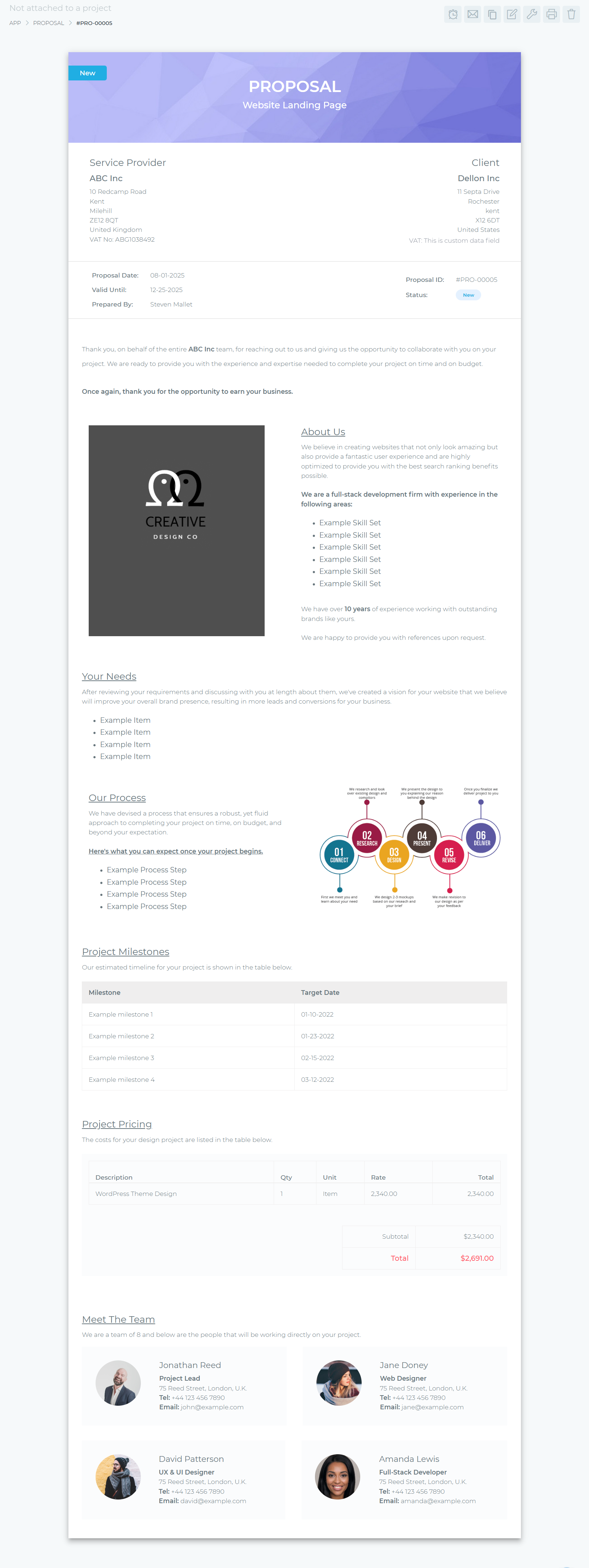
Grow CRM stands out as a comprehensive self-hosted solution that includes professional proposal creation alongside CRM, project management, invoicing, and time tracking—all in one platform.
Proposal Features:
- Easy Document Editor: Create outstanding proposals using an intuitive editor with well-structured templates to get you started quickly
- Template Library: Build reusable proposal templates so you can customize details rather than formatting entire documents from scratch
- Proposal Cloning: Duplicate successful proposals effortlessly, leveraging proven templates to expedite creation and tailor proposals to each client
- Scheduled Publication: Schedule automatic publication and email distribution of proposals, enabling simultaneous management of multiple engagements
- Automated Workflows: Trigger automatic actions upon proposal acceptance including project creation, task assignment, and invoice generation
- Client Approval: Send proposals directly to clients for online viewing and approval, then seamlessly convert accepted proposals into contracts
- Complete Integration: Proposals connect directly to client records, deals, projects, and invoicing—everything in one system
✅ Advantages
- One-time $39 payment, no monthly fees
- Complete data ownership and privacy (self-hosted)
- Unlimited users included in license
- All-in-one: CRM + proposals + contracts + invoicing + projects + time tracking
- Free installation service provided
- Free lifetime updates
- Automatic workflow from proposal to invoice
- No transaction fees on payments
❌ Considerations
- Self-hosted setup requires web hosting (though free installation service helps)
- Smaller marketplace ecosystem compared to SaaS giants
- Team must manage updates (though automated)
Best for: Businesses wanting complete control over their data, teams tired of monthly subscription fees, and organizations needing an all-in-one business management platform rather than juggling multiple tools.
Cloud-Based CRM Proposal Alternatives
If you prefer cloud-hosted solutions, several platforms offer proposal functionality with CRM integration. These require ongoing subscriptions but eliminate server management.
Proposify: Dedicated Proposal Platform
Proposify specializes in proposal creation and integrates with external CRM systems like Salesforce, HubSpot, Zoho, and Pipedrive. It’s not a CRM itself but connects to your existing CRM to pull client data.
Pricing: Starting at $9/user/month (Basic plan with 5 sends/month), with Team and Business plans offering unlimited sends and advanced features.
Key features: Drag-and-drop editor, 50+ industry templates, real-time engagement tracking, electronic signatures, content library, approval workflows, and CRM data syncing.
Best for: Teams already using major CRM platforms (Salesforce, HubSpot) who want specialized proposal tools with extensive template options and tracking capabilities.
HoneyBook: All-in-One for Creatives
HoneyBook bundles proposals, contracts, invoices, and payments together into one unified file sent to clients. It’s designed specifically for creative professionals and service businesses.
Pricing: Approximately $34/month based on comparison data.
Key features: Combined proposal-contract-invoice documents, pre-loaded templates, quick setup (1-2 days), automated workflows, and client portal access.
Limitation: Fixed branding—clients will see “HoneyBook” on every invoice and document.
Best for: Freelancers and creative agencies who want fast setup and don’t mind SaaS branding on client-facing documents.
Bonsai: Freelancer-Focused Platform
Bonsai separates proposals and contracts into two distinct documents but offers customizable templates for both, along with integrated invoicing and time tracking.
Pricing: $19/month
Key features: Customizable proposal and contract templates, integrated time tracking and invoicing, client portal, and workflow automation.
Best for: Independent consultants and freelancers seeking affordable all-in-one business management on a tight budget.
Dubsado: Deep Customization
Dubsado offers extensive customization options including custom CSS for styling proposals and contracts, with multi-step automation flows for complex workflows.
Pricing: $20-40/month depending on plan
Key features: Custom CSS styling, advanced automation “Flows,” white-label options (can remove Dubsado branding), and deep workflow customization.
Learning curve: Setup typically takes 1-2 weeks before sending your first proposal due to complexity.
Best for: Businesses with specific workflow requirements willing to invest time in setup for complete customization control.
Concord CRM: Self-Hosted Alternative
Concord CRM is another self-hosted option featuring proposal creation, digital signatures, and CRM functionality in a single platform.
Pricing: $64 one-time (regular license) with unlimited users and lifetime updates
Key features: Built-in proposal editor, predefined industry templates, digital signature collection with verification, multi-brand support, and deal tracking.
Best for: Small businesses (1-100 employees) wanting self-hosted control at an affordable one-time price.
Integrated vs. Separate Tools: Cost Comparison
When evaluating CRM proposal solutions, consider not just the software cost but the total cost of ownership including time savings, reduced errors, and operational efficiency.
| Approach | Year 1 Cost (5 users) | Year 3 Cost | Hidden Costs |
|---|---|---|---|
| Separate Tools (CRM + Proposal Software) | $3,000-5,000 | $9,000-15,000 | Manual data entry time (20-40 hrs/month), integration maintenance, duplicate data errors, tool switching inefficiency |
| Cloud All-in-One (HoneyBook, Bonsai) | $1,140-2,040 | $3,420-6,120 | Ongoing subscription commitment, per-user fees as team grows, vendor lock-in with data |
| Self-Hosted (Grow CRM) | $39 + hosting (~$100-200) | $39 + hosting (~$300-600) | Minimal—hosting only; no per-user fees, no monthly subscriptions, complete data ownership |
Time Savings Translate to Cost Savings
Beyond software costs, consider the value of time saved. If your team sends 10 proposals monthly:
- Manual method: 30-40 hours/month spent on proposal creation
- CRM-integrated method: 5-10 hours/month
- Time saved: 25-30 hours/month = 300-360 hours/year
At an average hourly cost of $50 for sales staff, that’s $15,000-18,000 in recovered productivity annually that can be redirected to revenue-generating activities.
Best Practices for CRM Proposal Creation
To maximize the benefits of creating proposals from your CRM, follow these proven best practices used by high-performing sales teams.
1. Build a Library of Proven Templates
Start with 3-5 core proposal templates for your most common services. As you win deals, save successful proposals as templates. Over time, you’ll build a library of proven approaches that you know convert.
Pro tip: Track which templates have the highest acceptance rates and refine accordingly.
2. Create Reusable Content Blocks
Write and save reusable sections for common proposal elements: company overview, service descriptions, case studies, terms and conditions, guarantee statements, and frequently asked questions.
This content library lets you assemble proposals like building blocks—selecting proven sections rather than writing from scratch each time.
3. Maintain Clean CRM Data
Since proposals pull data from your CRM, data quality matters. Establish standards for contact names (full names, proper capitalization), company names (official name, not abbreviations), project requirements (captured in custom fields), and communication notes (so you can reference recent discussions).
Clean data means professional proposals that require minimal editing before sending.
4. Personalize Despite Templates
Templates provide structure and save time, but effective proposals address specific client needs. Always customize the introduction to reference recent conversations, acknowledge specific pain points the client mentioned, and explain why your solution addresses their unique situation.
This personalization demonstrates attentiveness and builds stronger client relationships.
5. Use Tracking Data Strategically
Proposal tracking reveals valuable insights about prospect interest and readiness. If a prospect views your proposal multiple times but hasn’t responded, they’re interested but may have questions—reach out proactively.
If they viewed it briefly once, they might not be ready or need more qualification before a formal proposal makes sense.
6. Set Up Approval Workflows for Large Deals
For high-value proposals or those with significant discounts, configure approval workflows that route proposals to managers before sending. This ensures pricing consistency and protects margins.
7. Test Your Automated Workflows
Before relying on automation for proposal-to-project workflows, test thoroughly. Send test proposals to yourself, accept them, and verify that all triggered actions work correctly. Ensure projects create with the right details, invoices generate with correct amounts, and team notifications go to the right people.
8. Train Your Entire Sales Team
Standardize proposal creation across your team with training on template usage, personalization requirements, brand standards, and when to use which template. Consistency in your proposal approach builds a professional brand impression.
Common Challenges and Solutions
Even with integrated CRM proposal tools, you may encounter challenges. Here’s how to address common issues.
Challenge: Proposals Feel Too Template-Driven
Solution: Use templates for structure and auto-fill for data, but always personalize the introduction, executive summary, and recommended approach sections. Reference specific client needs, recent conversations, and unique requirements. The time saved on formatting and data entry gives you more time for meaningful personalization.
Challenge: Complex Pricing Doesn’t Fit Standard Templates
Solution: Build specialized templates for complex pricing structures, or use your CRM’s custom fields to capture pricing variables that can populate into proposals. Most systems allow nested tables, optional line items, and conditional sections that appear based on selections.
Challenge: Clients Don’t Engage with Online Proposals
Solution: Some clients prefer PDF attachments. Most CRM proposal systems allow PDF export in addition to online viewing. However, online viewing provides tracking benefits—encourage adoption by explaining that online proposals load faster, work on any device, and allow instant signing without printing.
Challenge: Proposal Approval Bottlenecks
Solution: Set clear approval thresholds (e.g., proposals under $10,000 don’t require manager approval) and implement automatic routing with deadline notifications. If approvers don’t respond within 24 hours, escalate or provide automatic approval for time-sensitive opportunities.
Challenge: Integration Breaks Between CRM and External Proposal Tools
Solution: This common problem occurs with separate CRM and proposal software connected via API integrations. Field mapping breaks when either system updates, causing errors. The best solution is choosing a system with native proposal functionality built into the CRM (like Grow CRM) rather than relying on integrations between separate tools.
Frequently Asked Questions
What is CRM proposal software?
CRM proposal software is functionality built into or integrated with your customer relationship management system that allows you to create, send, and track professional business proposals using data already stored in your CRM. It eliminates manual data entry by automatically populating client information, company details, and project requirements from your CRM database into professional proposal templates.
How much time does CRM proposal integration actually save?
Research shows CRM-integrated proposal tools reduce proposal creation time by 40-50% on average. Traditional manual proposal creation takes 2-4 hours per proposal, while CRM-integrated methods reduce this to 15-30 minutes. Some companies report creating proposals in just 17 minutes on average, and one case study documented reducing proposal creation from three weeks to just two hours after implementing automation.
Can proposals be automatically converted to contracts and invoices?
Yes, advanced CRM proposal systems support workflow automation that triggers automatic actions when a proposal is accepted. This can include generating a formal contract from the proposal terms, creating a project with the scope outlined in the proposal, assigning initial tasks to your team, and generating a deposit or initial payment invoice. These automations eliminate the manual gap between proposal acceptance and project kickoff.
Do I need separate software for proposals and CRM?
No—and using separate tools creates inefficiencies. Integrated CRM proposal systems like Grow CRM include proposal creation natively, eliminating the need for separate software. Separate tools require manual data entry between systems, risk integration breaks when either system updates, create disconnected data that’s hard to track, and add to your monthly subscription costs. All-in-one platforms are more efficient and cost-effective.
Are electronic signatures on proposals legally binding?
Yes, electronic signatures are legally binding in most countries under laws like the U.S. ESIGN Act and EU eIDAS regulation. CRM proposal systems with built-in e-signature functionality capture legally required verification including timestamp of signing, IP address of signer, full name and email of signer, and audit trail of document access. These signatures carry the same legal weight as handwritten signatures.
What are proposal templates and how do they work?
Proposal templates are pre-formatted documents with placeholder fields that automatically populate with client data from your CRM. They include standard sections like introduction, scope of work, pricing, and terms, with merge fields that pull client name, company, contact details, and project information from your CRM database. Templates ensure consistency across your team while dramatically reducing creation time since you’re customizing rather than creating from scratch.
Can I track if clients have opened and read my proposals?
Yes, most CRM proposal systems provide real-time tracking that shows when the proposal was opened, how many times it’s been viewed, how long the client spent reviewing it, which specific sections they viewed, and whether they’ve completed reading it. This engagement data helps you time follow-ups effectively and understand client interest level.
Is self-hosted proposal software secure?
Self-hosted proposal software can be extremely secure because you control the data and server environment. Unlike cloud solutions where your proposals and client data reside on vendor servers, self-hosted solutions keep everything on your own infrastructure. This gives you complete control over security measures, data encryption, access permissions, and backup procedures. For businesses with strict data privacy requirements or regulatory compliance needs, self-hosted solutions like Grow CRM often provide better security control than cloud alternatives.
How do I customize proposal templates for different services?
Create multiple templates for different service types rather than one generic template. For example, maintain separate templates for consulting services, project-based work, retainer agreements, and product sales. Each template should include service-specific scope sections, appropriate pricing structures for that service type, relevant terms and conditions, and typical deliverables. Most CRM systems let you save unlimited templates and select the appropriate one when creating each proposal.
What’s the ROI of integrated CRM proposal software?
ROI comes from multiple sources: time savings of 25-30 hours monthly for teams sending 10 proposals per month (worth $15,000-18,000 annually), faster sales cycles leading to higher close rates, reduced errors that damage credibility and delay deals, eliminated need for separate proposal software subscriptions, and improved win rates from faster response times and professional presentation. Most businesses see ROI within the first quarter of implementation.
Final Recommendations
Creating proposals directly from your CRM transforms a time-consuming manual process into an efficient workflow that takes minutes instead of hours. The benefits extend beyond time savings to include improved accuracy, better client experiences, and complete visibility into proposal status and conversion.
For businesses tired of juggling multiple tools and paying recurring subscription fees, Grow CRM offers the most comprehensive value: professional proposal creation integrated with complete CRM, project management, time tracking, contracts, and invoicing—all for a one-time $39 payment with no monthly fees.
The self-hosted approach gives you complete data ownership and privacy, unlimited users without per-seat fees, and freedom from vendor lock-in. With free installation service and lifetime updates included, Grow CRM removes the technical barriers traditionally associated with self-hosting.
If you prefer cloud-hosted solutions, Proposify offers the most sophisticated proposal-specific features with strong CRM integrations, while HoneyBook and Bonsai provide affordable all-in-one options for freelancers and small teams.
Regardless of which solution you choose, moving from separate proposal tools to CRM-integrated proposal creation will dramatically improve your sales efficiency, reduce errors, and accelerate your sales cycle.
