

Subscription fees are only the beginning. Here’s what multiple tools are really costing your business.
Using five separate business tools instead of one integrated platform costs the average small team $5,000 to $15,000+ more per year when you factor in subscription fees, integration costs, training overhead, and productivity loss from context switching. An all-in-one self-hosted solution like Grow CRM eliminates these hidden costs with a single $39 one-time payment.
If your business runs on a CRM, a project management tool, time tracking software, an invoicing platform, and a separate contract or proposal app, you’re paying far more than the sum of those subscription fees.
This guide breaks down the real cost of tool sprawl, including the hidden expenses most businesses never calculate, and shows exactly when consolidating to one platform makes financial sense.
The Multi-Tool Reality: What Most Businesses Actually Use
Small businesses with under 200 employees use an average of 42 SaaS applications, according to industry research. Even lean service businesses commonly rely on five or more core tools to manage client work.
Here’s a typical tech stack for a small agency or service business:
| Business Function | Common Tool | Monthly Cost (Per User) | Annual Cost (5 Users) |
|---|---|---|---|
| CRM / Client Management | HubSpot Starter | $15/user/month | $900 |
| Project Management | Asana Starter | $10.99/user/month | $659 |
| Time Tracking | Harvest Pro | $12/user/month | $720 |
| Invoicing | FreshBooks Plus | $11.40/month (flat) | $137 |
| Contracts / Proposals | PandaDoc Essentials | $19/user/month | $1,140 |
| Total Subscriptions | $3,556/year |
That’s $3,556 per year in subscription fees alone for a 5-person team. But subscription fees are just the visible tip of the iceberg. The real costs hide beneath the surface.
The 6 Hidden Costs of Using Multiple Tools
Subscription fees account for only a fraction of what tool sprawl actually costs your business. Here are the six hidden costs that most companies never calculate.
1. Context Switching and Productivity Loss
This is the largest hidden cost, and it’s rarely measured. The average digital worker toggles between applications and websites nearly 1,200 times per day, according to a Harvard Business Review study. Each switch costs more than a moment of distraction: it takes an average of 9.5 minutes to regain productive focus after toggling to a different app.
The Financial Impact of Context Switching
Research shows that constant context switching reduces employee productivity by 20-40%. For a team member earning $60,000 per year, a 25% productivity loss equals $15,000 per year in wasted capacity per employee. Across a 5-person team, that’s $75,000 in potential lost productivity.
Even reclaiming just one focused hour per day delivers a productivity dividend equivalent to $7,500 per employee annually. For a 5-person team, that’s $37,500 of recovered capacity.
When your team tracks time in Harvest, manages tasks in Asana, checks client details in HubSpot, and creates invoices in FreshBooks, they switch contexts constantly throughout the day. Each switch fragments attention and slows everything down.
2. Integration and Sync Costs
Separate tools don’t talk to each other by default. Making them work together requires integration platforms, custom connectors, or manual data transfer.
| Integration Method | Typical Cost | Ongoing Maintenance |
|---|---|---|
| Zapier (automation platform) | $19.99-$69/month | Monitoring, fixing broken zaps |
| Native integrations | Often requires paid tiers | Updates can break connections |
| Custom API development | $2,000-$10,000+ one-time | Developer time for maintenance |
| Manual data transfer | “Free” but time-intensive | Error-prone, hours weekly |
Industry data shows that only 29% of business applications are properly integrated. That means 71% of your tools operate as data silos, requiring manual effort to keep information consistent across platforms.
3. Training and Onboarding Overhead
Every tool in your stack has its own interface, workflow logic, and learning curve. New team members need to learn five different platforms instead of one.
Training Cost Comparison
5 separate tools: 15-25 hours of onboarding per new hire (3-5 hours per tool)
1 integrated platform: 4-8 hours of onboarding per new hire
Difference: 10-17 extra hours per new hire. At a loaded cost of $35/hour, that’s $350-$595 wasted per new employee on redundant training.
Beyond initial onboarding, ongoing training compounds the problem. Software updates, feature changes, and workflow modifications multiply across five platforms. Your team must stay current on five different tools instead of one.
4. Data Inconsistency and Errors
When client information lives in five different systems, keeping it consistent becomes a constant battle. A client updates their billing address in your invoicing tool, but the CRM still has the old address. A project timeline changes in your project management tool, but the time tracking entries reference outdated task names.
These inconsistencies create real business costs:
- Invoicing errors that delay payments or require correction
- Client communication mistakes from outdated contact details
- Inaccurate reporting when data doesn’t match across systems
- Duplicated effort updating the same information in multiple places
- Lost revenue from unbilled hours that fall through data gaps
Employees lose approximately 1.8 hours every day searching for information across different platforms. That adds up to nearly five hours of lost productivity per employee each week.
5. Vendor Management Burden
Five tools means five vendor relationships. Each requires its own billing management, contract renewal tracking, support ticket submission process, and security review. The administrative burden grows linearly with each tool you add.
- 5 separate invoices to process each month
- 5 different support channels when something breaks
- 5 contract renewal dates to track
- 5 security and compliance reviews for audits
- 5 pricing changes to evaluate annually
For a small team without dedicated IT staff, this vendor management overhead falls on business owners or operations managers who should be focused on revenue-generating work.
6. Security and Compliance Risks
Every tool with access to your business data is a potential security vulnerability. Each platform stores client information, financial records, or project details. More tools mean more attack surfaces, more password management, and more data processing agreements to review.
For businesses subject to GDPR or data privacy regulations, each tool adds compliance complexity. You need to verify how each vendor stores data, where servers are located, and what happens to your data if the vendor shuts down or is acquired.
The Complete Cost Comparison: 5 Tools vs One Platform
Let’s put it all together. Here’s what a typical 5-person service business actually spends when using five separate tools versus one consolidated platform.
| Cost Category | 5 Separate Tools | Grow CRM (All-in-One) |
|---|---|---|
| Software Subscriptions (Year 1) | $3,556 | $39 (one-time) |
| Software Cost (Year 2) | $3,556 | $0 |
| Software Cost (Year 3) | $3,556 | $0 |
| Integration Platform (Zapier etc.) | $240-$828/year | $0 (native integration) |
| Hosting (annual) | $0 (included in SaaS) | $60-$120/year |
| Onboarding per new hire | $350-$595 | $140-$280 |
| Productivity Loss (context switching) | Significant (20-40% loss) | Minimal (single interface) |
| Data Sync Issues | Ongoing manual effort | None (unified database) |
| Vendor Management | 5 relationships | 1 relationship |
| 3-Year Software Total | $10,668 + integrations | $39 + ~$300 hosting |
3-Year Savings with Grow CRM
Software cost savings alone: $10,329+
That’s before accounting for eliminated integration fees, reduced training costs, and recovered productivity from a single unified workflow.
When Tool Consolidation Makes Sense
Not every business should consolidate immediately. Here’s how to determine whether switching to an all-in-one platform is right for your situation.
You Should Consolidate If:
- You’re a service business that needs CRM, projects, time tracking, and invoicing daily
- Your team size is 1-50 people and you’re paying per-user fees across multiple tools
- You manually transfer data between systems (time entries to invoices, proposals to contracts)
- Your monthly SaaS bill exceeds $200 for overlapping business management functions
- New hires take more than a week to learn your tool stack
- You’ve experienced billing errors from data inconsistencies between systems
- Data privacy matters and you want control over where client data is stored
You Might Keep Separate Tools If:
- You need extremely specialized functionality that no all-in-one platform offers
- Your enterprise has dedicated IT staff managing integrations full-time
- You’re locked into long-term contracts with current vendors
The All-in-One Alternative: What to Look For
An effective all-in-one platform should replace at least four to five separate tools without sacrificing core functionality. Here’s what matters most for service businesses evaluating consolidated solutions.
| Capability | Replaces | What to Look For |
|---|---|---|
| CRM / Client Management | HubSpot, Salesforce, Zoho CRM | Contact records, deal pipelines, lead tracking, communication history |
| Project Management | Asana, Monday.com, Trello | Kanban boards, task management, milestones, team collaboration |
| Time Tracking | Harvest, Clockify, Toggl | Billable hours, timesheets, rate management, project allocation |
| Invoicing | FreshBooks, QuickBooks, Xero | Professional invoices, recurring billing, payment gateways, online payments |
| Contracts & Proposals | PandaDoc, Proposify, DocuSign | Proposal templates, contract management, e-signatures, conversion workflows |
| Client Portal | Separate portal software | Client login, project visibility, invoice access, online payments |
Grow CRM: Replace 5 Tools with One $39 Platform
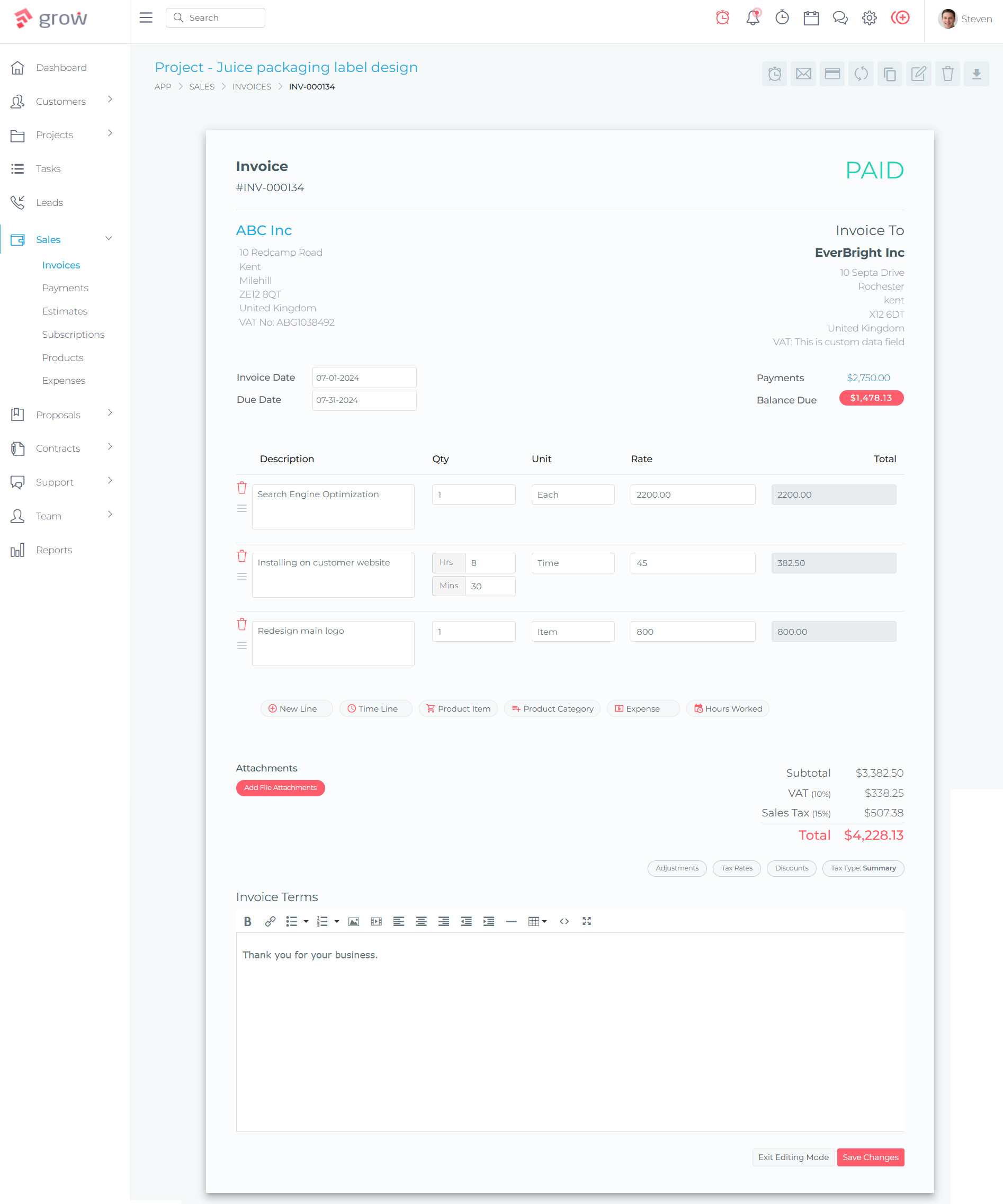
Grow CRM is a self-hosted business management platform that combines CRM, project management, time tracking, invoicing, contracts, proposals, and a client portal into a single unified system. It directly replaces five or more separate tools at a fraction of the cost.
Unlike SaaS platforms that charge per user per month, Grow CRM is a one-time $39 purchase with unlimited users, free lifetime updates, and complete data control on your own server.
What Grow CRM Replaces
| You Currently Pay For | Annual Cost (5 Users) | Grow CRM Includes | Grow CRM Cost |
|---|---|---|---|
| HubSpot CRM (Starter) | $900/year | Full CRM with leads, deals, contacts | $39 one-time |
| Asana (Starter) | $659/year | Kanban projects, tasks, milestones | |
| Harvest (Pro) | $720/year | Time tracking, billable hours, timesheets | |
| FreshBooks (Plus) | $137/year | Invoicing, recurring bills, online payments | |
| PandaDoc (Essentials) | $1,140/year | Proposals, contracts, e-signatures | |
| Total Annual SaaS | $3,556/year | All features included, unlimited users |
Key Advantages for Cost-Conscious Teams
- $39 one-time payment — No monthly fees, no per-user charges, no annual renewals
- Unlimited users — Add team members without cost increases
- Self-hosted — Complete data ownership on your own server
- Free installation service — Grow CRM’s team installs it on your hosting, typically within 24 hours
- Free lifetime updates — No upgrade fees or forced migrations
- Zero integration costs — Everything works together natively in one database
- 6+ payment gateways — Stripe, PayPal, Mollie, Razorpay, Tap, Flutterwave
- 30 languages — Global accessibility without additional localization costs
- Laravel-based — Modern, secure, and customizable for developers
- Full API access — Connect with external systems when you need to
The Unified Workflow Advantage
The biggest benefit isn’t just the cost savings. It’s the workflow. In Grow CRM, every business function connects naturally because everything lives in one system.
Example: From Lead to Payment in One Platform
- Lead captured in CRM with contact details and requirements
- Proposal created using client data already in the system
- Contract generated from accepted proposal — no manual re-entry
- Project created with tasks, milestones, and team assignments
- Time tracked against project tasks with billable rates applied
- Invoice generated from tracked time or project milestones
- Client pays through the portal via Stripe or PayPal
- Payment recorded automatically in the client’s CRM record
This entire workflow happens without switching applications, re-entering data, or configuring integrations. Every step feeds the next.
Real-World Cost Scenarios
Here’s how the math works out for different team sizes over three years.
Scenario 1: Solo Freelancer
| Cost Item | 5 Separate Tools (3 Years) | Grow CRM (3 Years) |
|---|---|---|
| Software subscriptions | $2,040 | $39 |
| Hosting | $0 | $180-$360 |
| Integration tools | $240-$720 | $0 |
| 3-Year Total | $2,280-$2,760 | $219-$399 |
| Savings | $1,881-$2,361 |
Scenario 2: Small Agency (10 Users)
| Cost Item | 5 Separate Tools (3 Years) | Grow CRM (3 Years) |
|---|---|---|
| Software subscriptions | $19,440 | $39 |
| Hosting | $0 | $360-$720 |
| Integration tools | $720-$2,484 | $0 |
| 3-Year Total | $20,160-$21,924 | $399-$759 |
| Savings | $19,401-$21,525 |
Scenario 3: Growing Company (25 Users)
| Cost Item | 5 Separate Tools (3 Years) | Grow CRM (3 Years) |
|---|---|---|
| Software subscriptions | $48,600+ | $39 |
| Hosting | $0 | $540-$1,080 |
| Integration tools | $1,440-$4,968 | $0 |
| 3-Year Total | $50,040-$53,568 | $579-$1,119 |
| Savings | $48,921-$52,989 |
The savings scale dramatically with team size because per-user SaaS fees multiply while Grow CRM’s unlimited user model stays at $39 regardless of how many people use the platform.
The Productivity Dividend
Beyond direct cost savings, consolidating to one platform delivers measurable productivity improvements.
Eliminated Context Switching
Research from the University of California, Irvine found it takes an average of 23 minutes and 15 seconds to fully regain focus after a significant interruption. When your team works in one application instead of five, the number of context switches drops dramatically.
A study by Qatalog and Cornell University found that 45% of workers say toggling between too many apps makes them less productive, and 43% report that it’s mentally exhausting. Consolidating tools directly addresses both problems.
Faster Workflows
In a multi-tool environment, converting tracked time into an invoice requires exporting data from your time tracking tool, formatting it, importing it into your invoicing tool, and verifying accuracy. In Grow CRM, you select the time entries and generate an invoice with a few clicks. The data is already there.
Better Decision-Making
When all business data lives in one system, reporting becomes straightforward. You can see client profitability, project timelines, unbilled hours, and outstanding invoices in a single dashboard. No more exporting CSVs from five different tools and combining them in a spreadsheet.
How to Transition from Multiple Tools to One Platform
Moving from five tools to one doesn’t have to happen overnight. Here’s a practical migration approach.
Step 1: Audit Your Current Stack
List every tool you use, what it costs, who uses it, and what business function it serves. Identify overlap where two tools do similar things and gaps where tools don’t connect well.
Step 2: Prioritize Core Functions
For most service businesses, the core functions are: client management, project tracking, time tracking, invoicing, and proposals or contracts. If one platform handles all of these, it can replace the bulk of your stack.
Step 3: Run a Parallel Trial
Set up Grow CRM alongside your current tools. Migrate one function at a time — start with invoicing or time tracking, then add projects, then CRM. This reduces risk and lets your team adapt gradually.
Step 4: Migrate Data
Export client records, project histories, and outstanding invoices from current tools. Import them into your new platform. Grow CRM’s free installation service can help you get set up quickly.
Step 5: Decommission Old Tools
Once your team is comfortable with the new platform, cancel old subscriptions. Keep exports of historical data as backups.
Migration Timeline
Most small teams complete the transition in 2-4 weeks. The free installation service from Grow CRM handles the technical setup, so your focus is on data migration and team training, not server configuration.
What About Specialized Needs?
A common objection to all-in-one platforms is that they can’t match the depth of specialized tools. Let’s address this honestly.
For most service businesses, an all-in-one platform like Grow CRM provides 90-95% of the functionality you actually use in specialized tools. Most teams only use a fraction of the features available in any individual application.
Where specialized tools still win: Enterprise-scale operations with thousands of users, highly regulated industries requiring specific compliance certifications, or businesses with truly unique workflow requirements that no general platform supports.
Where all-in-one wins decisively: Small to mid-size service businesses, agencies, freelancers, consultants, and any team where the workflow naturally flows from client relationship through project work to invoicing and payment.
Grow CRM also provides full API access, meaning you can still connect it to specialized external tools when specific needs arise — without being forced to use separate platforms for everything.
Frequently Asked Questions
How much does the average small business spend on SaaS tools per year?
Small businesses typically spend $3,000 to $10,000+ per year on SaaS subscriptions for core business management tools alone. This includes CRM, project management, invoicing, time tracking, and communication platforms. Per-user pricing causes these costs to scale significantly as teams grow.
What is the hidden cost of using multiple business tools?
Hidden costs include productivity loss from context switching (20-40% reduction), integration platform fees ($240-$828/year), training overhead for multiple systems, data inconsistency errors, and vendor management time. These hidden costs often exceed the visible subscription fees.
How much productivity is lost from context switching between apps?
Research shows context switching reduces productivity by 20-40%. Workers toggle between apps nearly 1,200 times per day, and it takes an average of 9.5 minutes to regain focus after each switch. Employees lose approximately 1.8 hours daily searching for information across platforms.
Can one platform really replace five separate business tools?
Yes, all-in-one platforms like Grow CRM combine CRM, project management, time tracking, invoicing, contracts, proposals, and client portals in one system. For service businesses, agencies, and freelancers, a single integrated platform covers 90-95% of the functionality used across five separate tools.
Is an all-in-one platform as good as specialized tools?
For most small to mid-size service businesses, all-in-one platforms provide sufficient functionality while eliminating integration headaches and data silos. Specialized tools may offer deeper features for specific use cases, but the workflow integration and cost benefits of consolidation typically outweigh marginal feature differences.
How much can I save by switching from multiple tools to Grow CRM?
A 5-person team typically saves $3,500+ per year in subscription fees alone by switching to Grow CRM’s $39 one-time payment. Over three years, software savings exceed $10,000, not including eliminated integration costs, reduced training overhead, and recovered productivity.
What does self-hosted mean and is it difficult to set up?
Self-hosted means the software runs on your own web server, giving you complete data ownership and control. Grow CRM offers a free installation service where their team handles the technical setup on your hosting. Most installations are completed within 24 hours, requiring no technical expertise from you.
How long does it take to migrate from multiple tools to one platform?
Most small teams complete the transition in 2-4 weeks using a phased approach. Start by migrating one function at a time — such as invoicing first, then time tracking, then projects. This reduces disruption while letting your team adapt to the new workflow gradually.
Are there ongoing costs with self-hosted all-in-one software?
The only ongoing cost is basic web hosting, typically $5-$10 per month ($60-$120/year). Grow CRM includes free lifetime updates and has no per-user fees, monthly subscriptions, or upgrade charges. This makes the total cost of ownership dramatically lower than SaaS alternatives.
What if I need a feature that the all-in-one platform doesn’t have?
Grow CRM provides full API access, allowing you to connect it with specialized external tools when specific needs arise. The Laravel codebase is also fully customizable for developers who want to add bespoke functionality. Most service businesses find the built-in features cover all their core needs.
Final Verdict: The Numbers Don’t Lie
The true cost of using five different tools goes far beyond subscription fees. When you add context switching productivity loss, integration costs, training overhead, data inconsistency errors, and vendor management burden, tool sprawl costs small businesses thousands of dollars per year in both direct expenses and lost efficiency.
For service businesses, agencies, freelancers, and consultants, consolidating to an all-in-one platform eliminates these hidden costs while simplifying daily operations. Grow CRM makes this consolidation accessible with a one-time $39 payment, unlimited users, and a free installation service that removes the technical barrier to self-hosting.
The math is straightforward: pay $3,500+ per year for five separate tools, or pay $39 once and use a unified platform forever.
