

Automate your subscription billing — without SaaS platform fees eating into your revenue
The best self-hosted recurring invoice software is Grow CRM, which combines automated subscription billing with a full CRM, project management, and time tracking — all for a one-time $39 payment with no recurring platform fees. For businesses focused purely on invoicing, Invoice Ninja’s self-hosted version is a strong free alternative.
If your business charges clients on a regular schedule — monthly retainers, annual subscriptions, weekly services — you already know the hidden cost of manual billing. Every invoice you send by hand is time spent away from actual work, and every forgotten invoice is revenue you may never recover.
Self-hosted recurring invoice software solves this without adding yet another monthly subscription to your costs. This guide compares the top self-hosted options, explains how automated recurring billing works, and helps you choose the right platform for your business model.
What Are Recurring Invoices — and Why Manual Billing Fails
A recurring invoice is an invoice generated automatically on a set schedule — weekly, monthly, quarterly, or annually — and sent to a client without manual intervention. The moment a billing cycle ends, a new invoice is created, sent, and tracked automatically.
Manual recurring billing, by contrast, requires you or someone on your team to remember to create each invoice, populate it with the correct client data and amounts, send it, and then follow up when payment is late. For a small number of clients, this is manageable. For ten, twenty, or fifty recurring clients, it becomes a serious administrative burden.
The Cost of Manual Recurring Billing
- Forgotten invoices: When billing is manual, invoices get missed — especially during busy periods. Missed invoices mean delayed or lost revenue.
- Data entry errors: Manually recreating invoices each cycle introduces errors — wrong amounts, outdated rates, missing line items.
- Delayed payments: Without automatic reminders, clients pay when they remember, not when invoices are due.
- Staff time wasted: Billing administration takes time that could be spent on billable work.
- Cash flow unpredictability: Irregular billing creates irregular payments, making cash flow difficult to predict or plan around.
Recurring invoice software eliminates every one of these problems by automating the entire cycle from invoice generation through payment collection and reminder follow-up.
Quick Comparison: Top Self-Hosted Recurring Invoice Software
| Software | Pricing | Self-Hosted | Recurring Invoices | Payment Gateways | Full CRM |
|---|---|---|---|---|---|
| Grow CRM | $39 one-time | ✅ Yes | ✅ Yes | 6+ gateways | ✅ Full CRM |
| Invoice Ninja | Free (self-hosted) / $14–$18/mo cloud | ✅ Yes | ✅ Yes | 8+ gateways | ❌ Limited |
| Akaunting | Free (self-hosted standard) / $12–$218/mo cloud | ✅ Yes | ⚠️ Via apps | Limited | ❌ Accounting focus |
| InvoicePlane | Free | ✅ Yes | ❌ Not built-in | PayPal, Stripe | ❌ No |
The Top Self-Hosted Recurring Invoice Platforms
Grow CRM
Best all-in-one self-hosted platform with recurring billing and full CRM
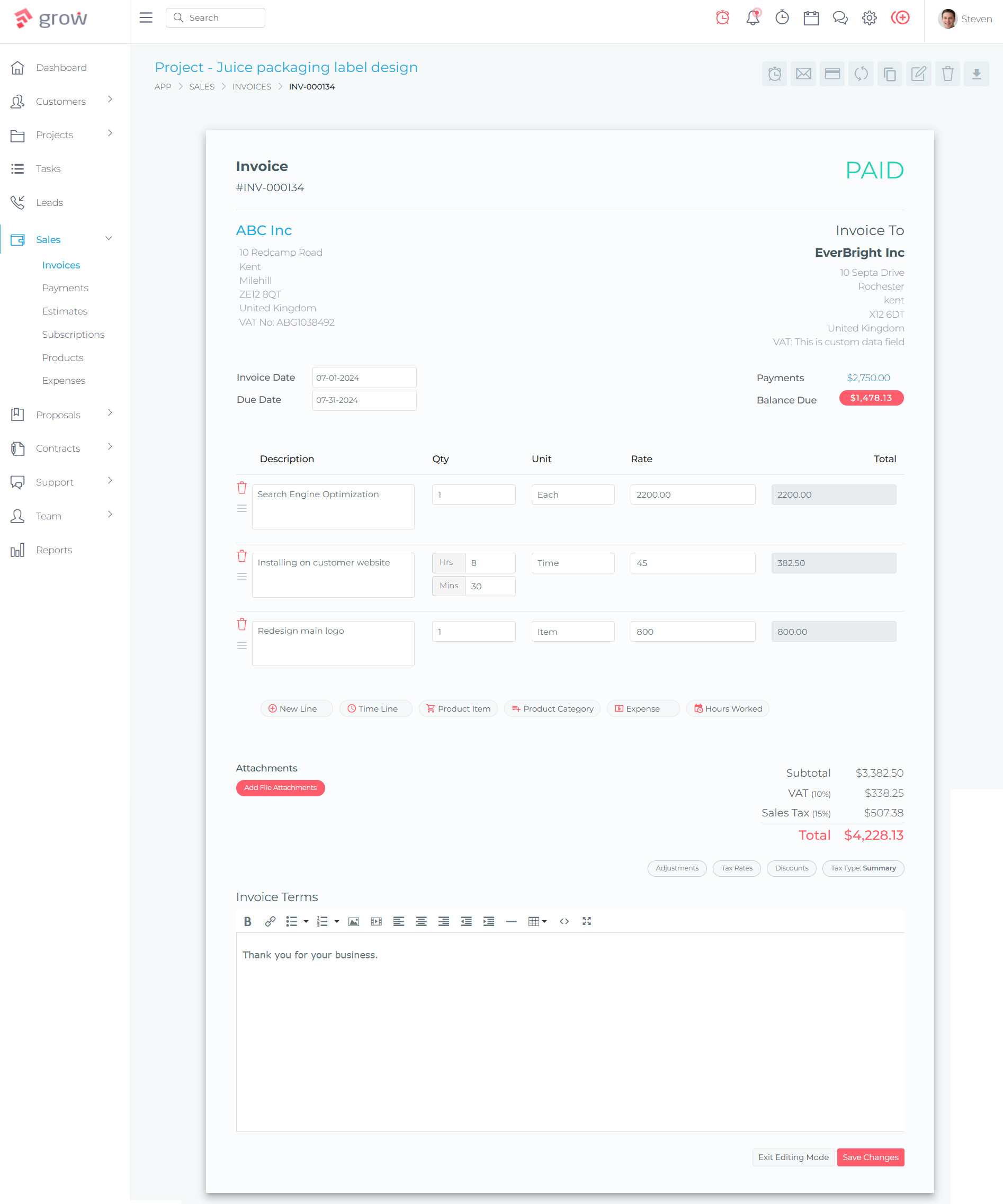
Grow CRM is the strongest self-hosted option for businesses that need recurring billing as part of a broader business management system. Rather than running a standalone invoicing tool, you get a complete platform where your client records, active projects, tracked time, and recurring invoices all live in one place — on your own server, under your complete control.
The platform supports recurring payments natively, with multiple payment gateway integrations giving clients a frictionless way to pay on schedule. Because client data lives in the same system as your invoices, there’s no duplication — when a client’s details change, every future invoice reflects those changes automatically.
What separates Grow CRM from dedicated invoicing tools is the context it provides. Each recurring invoice sits alongside the client’s project history, time logs, contracts, and communications. You can see at a glance which recurring clients are profitable, which have outstanding balances, and which projects are overrunning — all without switching tools.
Key Recurring Billing Capabilities:
- Recurring payment support built into the invoicing system
- Multiple payment gateway integrations: Stripe, PayPal, Mollie, Razorpay, Tap, and Flutterwave
- Client portal where clients can view invoice history and make payments online
- Time tracking that feeds directly into invoices — accurate billing without manual calculations
- Project-based billing — invoice for work completed, milestones reached, or on a recurring schedule
- Expense tracking that can be added to invoices as billable costs
- Full CRM context — see client relationships, active projects, and invoice history together
- Unlimited users — no per-seat fees as your team grows
- 30-language support for billing international clients
- Free installation service — Grow CRM installs the platform for you at no extra cost
- Free lifetime updates — your recurring billing system stays current without upgrade fees
- Laravel-based — modern, secure, and developer-extensible if you need custom workflows
✅ Pros
- One-time payment — no ongoing platform costs eating into subscription revenue
- Full business management: CRM, projects, time tracking, invoicing, contracts in one system
- Complete data ownership — client billing data stays on your server
- Six payment gateway options for maximum client flexibility
- Unlimited users — ideal for growing teams
- Free installation removes the technical barrier to self-hosting
❌ Cons
- Requires a hosting environment (VPS or shared hosting) — additional cost of ~$5–20/month
- Broader feature set means a slightly longer initial setup compared to invoicing-only tools
- Best suited for service businesses — not designed for e-commerce or product-based billing
💰 Pricing
$39 one-time payment. No monthly fees, unlimited users, all features included, free installation service, free lifetime updates.
Invoice Ninja
Dedicated invoicing with strong recurring billing and auto-payment features
Invoice Ninja is one of the most feature-complete dedicated invoicing tools in the self-hosted space. The self-hosted version (available at invoiceninja.org) is free to download and deploy, and it includes a solid recurring invoice system with auto-billing capabilities.
The platform allows you to configure recurring invoice schedules so invoices are created, logged, and sent to clients automatically. Clients can update their payment details to enable auto-billing, removing the need for manual payment collection on each cycle. For businesses with a high volume of recurring invoices and a technical team comfortable managing a server, Invoice Ninja is a capable free option.
The main limitation is scope: Invoice Ninja is built around invoicing, expenses, and basic task management. It does not provide a full CRM, project management with Kanban boards, or time-tracking-to-invoice workflows. If your billing exists within a broader client relationship context, you’ll need separate tools to fill those gaps.
Key Recurring Billing Capabilities:
- Recurring invoice creation with automatic scheduling
- Auto-billing — clients authorize payment and invoices charge automatically
- Payment link creation for recurring and one-off services
- Automated late payment reminders with configurable timing
- Automatic late fees on overdue accounts
- Multiple payment gateways: Stripe, PayPal, GoCardless, Braintree, Authorize.net, Square, Mollie, PayFast
- Multi-currency and multi-language support
- Client portal for invoice viewing and payment
- API access for workflow integration (Pro and above)
✅ Pros
- Self-hosted version is free to download
- Strong dedicated recurring invoice and auto-billing features
- Wide payment gateway support (8+ processors)
- Active development and large user community
❌ Cons
- Invoicing-focused — no full CRM or project management
- Cloud version requires monthly subscription ($14–$18/month)
- Some advanced features (payment links, API) require Pro plan on cloud
- No free installation service — technical setup required
💰 Pricing
Self-hosted: Free (download and host yourself). Cloud: Free plan (5 clients), Pro $14/month, Enterprise $18/month.
Akaunting
Open-source accounting software with recurring billing via app extensions
Akaunting is an open-source accounting platform with a self-hosted standard plan that’s free to download. It covers the fundamentals of business accounting — invoicing, expenses, payments, and reporting — with an app store model where additional features (including recurring billing enhancements) can be added as modules.
The platform supports recurring payment reminders across all plans, and additional recurring billing capabilities can be extended through its app ecosystem. However, the app-based model means that the features you need may require purchasing individual apps on top of the base platform, which can add to the total cost over time.
Akaunting is better suited to businesses that need accounting functionality first — double-entry bookkeeping, bank reconciliation, payroll — with invoicing as a secondary requirement. For service businesses where recurring invoicing is central to operations, its accounting-first approach may feel like a poor fit.
Key Recurring Billing Capabilities:
- Recurring payment reminders (included in all plans)
- Recurring invoice capabilities via add-on apps
- Multi-currency support
- Standard invoicing and expense tracking
- Double-entry accounting (higher plans)
- App marketplace for extended functionality
✅ Pros
- Self-hosted standard plan is free
- Open-source with active community
- Strong accounting and bookkeeping features
- Extensible via app marketplace
❌ Cons
- Recurring billing requires additional apps — potential extra costs
- Cloud plans are expensive ($12–$218/month)
- Accounting-focused — minimal CRM or project management features
- App marketplace model can make total cost unpredictable
💰 Pricing
Self-hosted standard: Free. Cloud plans: $12–$218/month depending on users, companies, and apps required.
InvoicePlane
Free self-hosted invoicing — simple, but limited for recurring billing
InvoicePlane is a free, open-source, self-hosted invoicing application built as a community hobby project. It handles basic invoicing, quotes, and client management adequately for simple needs, and it supports PayPal and Stripe for online payments.
For recurring billing specifically, InvoicePlane has significant limitations. The platform does not include built-in recurring invoice generation, which means businesses with subscription clients would still need to create invoices manually each cycle. For businesses where recurring billing is a core requirement, this is a significant gap that makes InvoicePlane unsuitable as a primary billing platform.
InvoicePlane is worth considering only if your billing needs are minimal and you primarily need a free, no-frills invoicing system for occasional one-off invoices. The developers are explicit that this is a hobby project, not a commercial product with guaranteed reliability or support.
Key Capabilities:
- Basic invoice and quote creation
- Client management (simple contact records)
- PayPal and Stripe payment integration
- Multi-currency support
- PDF invoice generation
- Free and open-source
✅ Pros
- Completely free
- Simple to use for basic invoicing
- Self-hosted with full data control
❌ Cons
- No built-in recurring invoice functionality
- Community-supported only — no professional support
- Described by developers as a hobby project, not commercial software
- Limited payment gateway options
- No CRM, project management, or time tracking
💰 Pricing
Free. Open-source. Community support only.
How Recurring Invoice Automation Works: A Typical Workflow
Understanding what happens inside a recurring billing system helps you configure it correctly and set client expectations. Here is how a typical automated recurring invoice workflow operates in a platform like Grow CRM:
You create the invoice template once — specifying the client, line items, amount, billing frequency, and start date. You also configure the payment gateway you want to use for automated collection.
Define whether the invoice repeats weekly, monthly, quarterly, or annually. Set whether invoices are sent immediately upon generation or at a specific time in the billing cycle.
On the billing date, the system automatically generates and sends the invoice to the client’s email with a link to view it in the client portal. The client can see a complete history of past invoices and their payment status.
The client clicks the payment link and pays via the connected gateway (Stripe, PayPal, Mollie, etc.). Payment is recorded automatically against the invoice — no manual reconciliation needed.
If payment is not received by the due date, the system sends configurable reminder emails on your chosen schedule — one day before, on the due date, and at intervals after. This happens without any manual follow-up from your team.
When the next billing date arrives, the system generates the next invoice automatically. Your client relationship continues uninterrupted, and your revenue arrives predictably without any administrative effort.
Key Features to Look for in Recurring Invoice Software
Flexible Billing Cycles
Your recurring billing needs may not fit a standard monthly schedule. Look for software that supports weekly, bi-weekly, monthly, quarterly, semi-annual, and annual billing cycles — as well as custom intervals for unusual retainer arrangements. The more flexible the cycle options, the better you can match your billing to how each client relationship actually works.
Automatic Payment Collection
The highest-value recurring invoice feature is auto-billing: the ability for a client to authorize payment once, then have their card or account charged automatically on each billing cycle without any additional action from either party. This eliminates the gap between invoice sent and payment received, and it removes the need for reminder emails entirely for clients who opt in.
Payment Failure Handling
Automatic billing will occasionally fail — expired cards, insufficient funds, or bank declines. Your recurring invoice software needs a clear process for handling these failures: automatic retry logic, client notification, and a simple way for clients to update their payment details. Without proper failure handling, failed payments can go unnoticed for multiple billing cycles.
Client Notifications and Reminders
Even well-intentioned clients forget to pay. Configurable payment reminders — sent before and after the due date — dramatically improve payment speed without requiring any manual follow-up from your team. Look for software that lets you customize the reminder schedule and the message content.
Multi-Currency Support
If you serve clients in multiple countries, your billing system needs to handle multiple currencies cleanly. This means displaying invoices in the client’s currency, processing payments in that currency, and converting revenue back to your home currency for reporting. Most quality self-hosted platforms include multi-currency support, but the depth of implementation varies.
Integration with Time Tracking and Project Management
For service businesses, recurring invoices are rarely for a fixed amount in isolation. Many retainer clients also generate ad-hoc charges — additional hours worked, expenses incurred, or out-of-scope tasks. A platform that integrates time tracking and project billing with recurring invoices lets you consolidate these into a single invoice rather than sending multiple separate documents each cycle.
Self-Hosted vs Cloud Recurring Invoice Software: Real Cost Comparison
One of the strongest arguments for self-hosted recurring invoice software is the long-term cost. Cloud invoicing platforms typically charge per user per month — costs that compound as your team grows and as years pass. Self-hosted tools require an upfront investment and ongoing hosting, but the math often favors self-hosted significantly.
| Scenario | Grow CRM (Self-Hosted) | Typical Cloud Invoicing SaaS | Self-Hosted Saving |
|---|---|---|---|
| Year 1 (5 users) | $39 software + ~$120 hosting = $159 | $50/month × 12 = $600 | ~$441 |
| Year 2 (5 users) | ~$120 hosting only | $50/month × 12 = $600 | ~$480 |
| Year 3 (10 users) | ~$120 hosting (unlimited users) | $100/month × 12 = $1,200 | ~$1,080 |
| 3-Year Total | ~$399 | ~$2,400+ | ~$2,000+ |
Beyond subscription costs, cloud invoicing platforms often add transaction fees on top of your payment gateway fees. With self-hosted software, you pay only the payment gateway’s standard processing fee — typically 1.4–2.9% + fixed fee for Stripe or PayPal. There is no additional platform transaction fee sitting on top of that.
Which Recurring Invoice Software Should You Choose?
Choose Grow CRM if:
- You run a service business with recurring clients and also need CRM, project management, or time tracking
- You want a single platform to manage your entire client relationship — from first contact through recurring billing
- You have more than three team members and want to avoid per-user fees
- You value complete data ownership and want your billing data on your own server
- You want a one-time investment rather than an ongoing subscription commitment
- You’re billing international clients and need multiple payment gateway options
Choose Invoice Ninja if:
- You need invoicing and recurring billing only — without broader business management features
- You have a small team comfortable with self-hosting and server management
- You want a free self-hosted invoicing tool with strong recurring and auto-billing capabilities
- Your client volume is relatively low (under 50 active recurring clients)
Choose Akaunting if:
- Accounting is your primary need — double-entry bookkeeping, bank reconciliation, payroll
- You want a free self-hosted accounting foundation and can add invoicing features via apps
- Your recurring billing is secondary to your accounting requirements
Avoid InvoicePlane for recurring billing if:
- Recurring invoice automation is a core requirement — InvoicePlane lacks this natively
- You need professional support — InvoicePlane is community-maintained only
- Your business depends on reliable, production-grade billing software
Our Recommendation for Most Businesses
For service businesses with recurring clients — agencies, consultants, managed service providers, freelancers with retainer arrangements — Grow CRM offers the strongest overall value. The combination of recurring billing, full CRM context, and integrated time tracking in a single self-hosted platform eliminates the tool sprawl that causes billing errors and revenue leakage. At $39 one-time with no per-user fees, it pays for itself within the first month for most businesses moving off a SaaS billing platform.
Frequently Asked Questions
What is self-hosted recurring invoice software?
Self-hosted recurring invoice software is installed on your own server rather than accessed through a cloud provider. It automatically generates and sends invoices on a set schedule — monthly, quarterly, annually — without manual intervention. Because it runs on your infrastructure, you own all the data, pay no platform subscription fees, and maintain complete control over your billing system.
How reliable is automated recurring billing in self-hosted software?
Automated recurring billing in well-maintained self-hosted platforms is highly reliable, operating on scheduled server tasks (cron jobs) that trigger invoice generation and email sending automatically. Reliability depends primarily on your hosting environment’s uptime — a quality VPS with 99.9% uptime means your billing runs as expected. Commercial self-hosted platforms like Grow CRM are production-grade, not hobby projects, and handle billing automation dependably.
What happens if a recurring payment fails?
Payment failure handling depends on your platform and payment gateway. Most quality recurring billing platforms will notify both you and the client when a payment fails, mark the invoice as overdue, and trigger your configured reminder sequence. Some platforms support automatic card retry logic. Clients can update their payment details via the client portal. Setting up clear payment failure notifications is an important configuration step when enabling recurring billing.
Can clients update their payment details themselves?
Yes — platforms with a client portal, including Grow CRM, allow clients to access their billing information, view invoice history, and update payment details without contacting you directly. This self-service capability reduces the administrative overhead of managing payment method changes and ensures billing continues without interruption when clients update cards.
Is self-hosted recurring invoice software difficult to set up?
Setup complexity varies by platform. Grow CRM offers a free installation service — their team installs the platform on your server for you, removing the technical barrier entirely. You need a hosting environment (most standard shared hosting or VPS plans work), but the software installation itself can be handled without technical expertise when the free installation service is used.
How much does self-hosted invoicing cost compared to cloud alternatives?
Self-hosted invoicing has a higher upfront cost (software purchase + hosting setup) but much lower long-term costs. Grow CRM at $39 one-time plus approximately $10/month hosting equates to roughly $159 in year one. A comparable cloud invoicing platform at $50/month costs $600 in the same period. Over three years, the self-hosted saving typically exceeds $2,000 — more if your team grows, since self-hosted platforms like Grow CRM have unlimited users at no extra cost.
Which payment gateways are supported for self-hosted recurring billing?
Payment gateway support varies by platform. Grow CRM supports Stripe, PayPal, Mollie, Razorpay, Tap, and Flutterwave — covering most global markets. Invoice Ninja supports Stripe, PayPal, GoCardless, Braintree, Authorize.net, Square, Mollie, and PayFast. Stripe and PayPal are the most universally available options. For international clients, check which gateway is most commonly used in your client’s region before deciding.
Can I mix recurring invoices with one-off charges on the same client?
Yes. Most business relationships include a recurring base plus occasional additional charges — extra hours, out-of-scope work, reimbursable expenses. Platforms like Grow CRM let you track time and expenses against client projects and include them in invoices alongside recurring charges. This gives clients a clear, consolidated view of what they owe each period without receiving multiple separate invoices.
Do recurring invoices work for clients in different countries and currencies?
Yes — all major self-hosted recurring invoice platforms support multi-currency billing. Grow CRM supports 30 languages in addition to multiple currencies, making it well-suited for businesses with international client bases. You set the invoice currency per client, and payments are collected in that currency through the appropriate payment gateway for the client’s region.
Is Grow CRM suitable for freelancers with only a few recurring clients?
Yes. Grow CRM’s one-time $39 price makes it accessible even for solo freelancers with a handful of recurring retainer clients. Unlike cloud platforms that charge per client or per user, Grow CRM has no recurring fees regardless of how many clients or team members you add. For a freelancer charging even one client $1,000/month on retainer, the platform cost is negligible compared to the billing value it manages.
Final Recommendation: Stop Managing Recurring Billing Manually
If your business has recurring clients — retainers, subscriptions, monthly service agreements — you’re leaving money on the table by billing manually. Missed invoices, slow follow-up, and administrative overhead all reduce the effective revenue from clients you’ve already won.
Self-hosted recurring invoice software solves this permanently without adding a cloud platform fee to your overheads. Grow CRM is our top recommendation for service businesses that want recurring billing integrated with a full client management system. Invoice Ninja is the strongest free option if you need invoicing capabilities only.
Either way, the first automated invoice your system sends while you focus on actual client work will demonstrate exactly why this investment pays for itself.
Explore Grow CRM — $39 One-Time →