

A no-hype breakdown of what you actually get — and what you give up — across free and paid self-hosted invoicing tools
The short answer: free self-hosted invoicing tools work well for solo users with basic needs, but most growing businesses eventually hit their limits. Paid options like Grow CRM ($39 one-time) deliver far more value per dollar than any ongoing SaaS subscription — and include features free tools simply don’t offer.
If you’re evaluating self-hosted invoicing software, you’ve probably noticed an interesting split: a handful of free open-source tools on one side, and premium paid options on the other. The question isn’t which costs less upfront — it’s which actually costs less over time, and which gives you the tools your business genuinely needs.
This guide breaks down the real differences between free and paid self-hosted invoicing software, what each category delivers, where the gaps are, and how to make the right call for your business.
Quick Comparison: Free vs Paid Self-Hosted Invoicing
| Software | Price | Client Limit | CRM Features | Time Tracking | Payment Gateways | Support |
|---|---|---|---|---|---|---|
| Grow CRM | $39 one-time | Unlimited | Full CRM | Yes | 6+ gateways | Paid support |
| Invoice Ninja (Free) | Free | 5 clients | None | Basic | Limited | Community |
| InvoicePlane | Free | Unlimited | None | No | PayPal, Stripe | Community only |
| Crater | Free | Unlimited | None | No | Stripe, PayPal, Razorpay | Community |
| Akaunting (Free Tier) | Free | 1,000 invoices | None (add-on) | No (add-on) | Limited | Community |
The Hidden Cost of “Free” Self-Hosted Invoicing
Free self-hosted invoicing software has real appeal. No licensing fees, full data ownership, and complete control over your installation. But “free” is rarely the full picture — and for businesses with real invoicing workloads, the hidden costs add up fast.
Setup and Configuration Time
Every self-hosted tool requires installation, server configuration, and initial setup. For free tools, this is entirely on you — there’s no installation service, no onboarding guide, and no support line to call when something breaks. If you’re comfortable with PHP, MySQL, and server administration, that’s manageable. If you’re not, the time cost is significant, and so is the risk of misconfiguration.
Ongoing Maintenance
Free open-source projects are updated by volunteers on their own schedule. Security patches may lag. Updates may break customisations. If the primary maintainer steps back from a project — which happens regularly with hobby-driven open-source software — you’re left running unsupported software indefinitely. InvoicePlane explicitly describes itself as developed “in our free time, as a hobby” with no warranty or SLA. That’s honest, but it’s not a foundation for critical business infrastructure.
Missing Features That Cost You Elsewhere
Free invoicing tools are narrowly focused. They handle invoices well. But the moment you need time tracking, client management, project billing, contract management, or proposal generation — you’re adding a second tool, then a third. Each tool has its own learning curve, data silo, and subscription cost. The “free” invoicing tool becomes the anchor for an increasingly expensive and fragmented stack.
Support When Things Go Wrong
With free tools, your support options are community forums and GitHub issue trackers. Response times are unpredictable. If you’re running a business and your invoicing system goes down on a payment deadline, community support is cold comfort. Paid tools offer actual support channels with committed response times.
Free Self-Hosted Invoicing Tools: Honest Review
#1 (Free): Invoice Ninja — Best Free Tier for Solo Users
Invoice Ninja is the most feature-complete free self-hosted invoicing option available. The free self-hosted version offers unlimited invoices and includes a usable set of core features — invoices, quotes, payment gateway integration, and a client portal. It’s well-maintained, has an active community, and the codebase is genuinely modern.
The catch: the free self-hosted version caps you at five clients. For a freelancer with a small, stable client roster, that’s workable. For any business adding clients regularly, you hit the ceiling quickly. Unlocking unlimited clients requires a paid plan, which reintroduces ongoing subscription costs — somewhat defeating the purpose of self-hosting for cost savings.
Invoice Ninja is also purely an invoicing and expense tool. There’s no client relationship management, no project management, no contract or proposal features, and no CRM-level reporting. It does one thing very well, but only one thing.
Pros
- Genuinely free for up to 5 clients (self-hosted)
- Modern interface, actively maintained
- Solid payment gateway support on paid tiers
- Good mobile app
- Recurring invoice automation
Cons
- 5-client cap on free tier — hits quickly
- No CRM, project, or contract features
- Paid plans reintroduce monthly fees
- Technical setup still required
Pricing
Free (up to 5 clients, self-hosted). White-label licence available for a fee. Paid cloud plans start at approximately $10/month for unlimited clients.
#2 (Free): InvoicePlane — Simplest Free Option
InvoicePlane is a lean, no-frills invoicing tool that handles the basics without fuss. There are no client limits, no subscription tiers, and no paid add-ons to navigate. You get quote and invoice creation, client management, payment tracking, and a small set of payment integrations.
It’s honest software. The developers describe it plainly as a hobby project with community-only support and no guarantees. That transparency is refreshing, but it also tells you exactly where the limits are. InvoicePlane hasn’t seen major development activity for some time, and the feature set reflects that. There’s no time tracking, no recurring invoice automation in the traditional sense, and no client portal for self-service payments.
For a freelancer who invoices occasionally and wants something free and permanent on their server, InvoicePlane works. For businesses with regular invoicing workflows, active client rosters, or payment-on-delivery needs, it will leave gaps.
Pros
- Completely free, no limits or tiers
- Simple to understand and use
- EU-compliant e-invoice support (v1.6.2+)
- Unlimited clients
Cons
- Community-only support, no SLA
- Slow development pace
- No time tracking or project billing
- No client portal
- No recurring invoices
Pricing
Completely free and open source. No paid tiers.
#3 (Free): Crater — Best Free Option for Modern Design
Crater is a Laravel-based open-source invoicing application with a clean interface, good mobile apps, and a reasonable feature set for a free tool. It handles invoices, estimates, expense tracking, and recurring payments. The client portal lets customers view and download invoices and track payment history. Payment gateway support is broad for a free tool — Stripe, PayPal, and Razorpay are included.
Crater is genuinely one of the better-looking free invoicing applications, and being Laravel-based makes it familiar territory if you’re already running Laravel applications on your server. The limitation is scope: like InvoicePlane, Crater is a focused invoicing tool. There’s no CRM layer, no project management, no time tracking, and no contract features. It’s a solid core, but it won’t grow with you into a full business management platform.
Pros
- Free and open source
- Modern, clean UI
- Good mobile app (iOS and Android)
- Client portal included
- Broad payment gateway support
- Laravel-based (developer-friendly)
Cons
- No time tracking
- No project management
- No CRM features
- Community support only
- Development pace slower than commercial tools
Pricing
Completely free and open source. No paid tiers.
#4 (Freemium): Akaunting — Free Base, Expensive Add-Ons
Akaunting takes a different approach: the base software is free and open source, but almost every useful feature beyond basic invoicing is a paid add-on from their App Store. Want a CRM? Add-on. Time tracking? Add-on. Project management? Add-on. The free version is genuinely limited to accounting fundamentals — invoices, expenses, and reports — with a single user and a 1,000-invoice cap on the on-premise free tier.
Akaunting’s on-premise premium plans start at $72/year for the Premium tier (10 users, 10,000 invoices) and reach $684/year for the Ultimate tier (unlimited everything). Those prices are competitive compared to cloud SaaS tools, but they’re not the one-time investment that Grow CRM offers, and the add-on structure means the sticker price underrepresents the true cost once you assemble a useful feature set.
Pros
- Free base tier available
- Strong accounting capabilities (double-entry)
- Large app marketplace for extensions
- Multi-company support
- Multi-currency and multilingual
Cons
- Most useful features require paid add-ons
- Annual subscription fees (not one-time)
- No CRM in base tier
- App costs add up quickly
- Free tier limited to 1 user, 1,000 invoices
Pricing
Free on-premise tier available. Premium on-premise: $72/year. Elite: $168/year. Ultimate: $684/year. Apps purchased separately.
Paid Self-Hosted Invoicing: Where the Real Value Lives
Grow CRM — Best Paid Self-Hosted Invoicing Solution
All-in-one self-hosted platform: CRM, invoicing, time tracking, contracts, proposals, and projects — for a single one-time payment
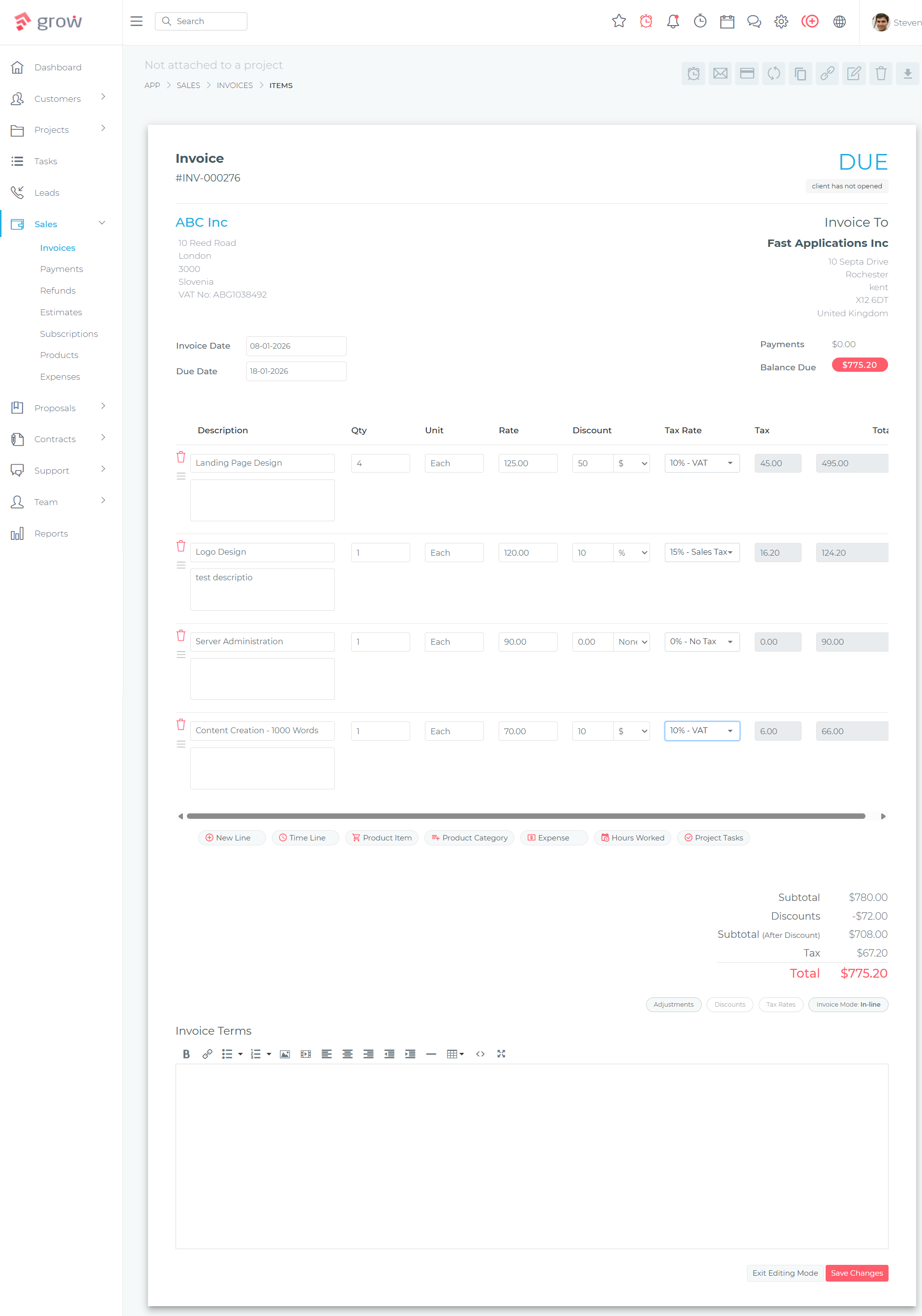
Grow CRM sits in a different category from pure invoicing tools. It’s a complete self-hosted business management platform that includes professional invoicing as one of several tightly integrated modules. The one-time $39 price tag buys you unlimited users, unlimited clients, and a feature set that most businesses would otherwise need three or four separate subscriptions to replicate.
On the invoicing side specifically, Grow CRM covers everything you’d expect from a premium tool: professional invoice templates, recurring invoice automation, online payment collection, multi-currency support, tax configuration, and a client portal where customers can view and pay invoices directly. But what sets it apart from free invoicing tools is the integration depth — invoices connect directly to projects, time tracking, and client records. You can track billable hours against a project, then generate an invoice from those hours in seconds, with all client data already populated.
Payment gateway coverage is genuinely broad: Stripe, PayPal, Mollie, Razorpay, Tap, and Flutterwave are all supported. For businesses with international clients or specific regional payment preferences, this flexibility is significant. Free tools typically support two or three gateways at most.
Key Invoicing Capabilities:
- Professional invoice creation with customisable templates
- Recurring invoice automation for subscription billing
- Online payment collection via 6+ payment gateways
- Invoice generation from tracked billable hours
- Estimates and proposals that convert to invoices
- Client portal for invoice viewing and self-service payment
- Multi-currency support
- Tax configuration and management
- Expense tracking
- Invoice status tracking (sent, viewed, paid, overdue)
- Automated payment reminders
- PDF invoice generation with custom CSS styling
Beyond Invoicing — What Else You Get:
- Full CRM: client management, lead tracking, custom fields
- Project management with Kanban boards and milestones
- Time tracking with billable hour reporting
- Contract creation and management
- Proposal generation with client approval workflow
- Helpdesk and support ticket system
- Team collaboration and task assignment
- 30 languages supported
- API access for custom integrations
- Free installation service on your server
- Free lifetime updates
Pros
- One-time $39 payment — no recurring fees ever
- Unlimited users and clients
- All-in-one: replaces multiple separate tools
- 6+ payment gateways
- Free professional installation service
- Free lifetime software updates
- Time tracking integrates directly with invoicing
- Full data ownership on your own server
Cons
- Requires web hosting (small ongoing cost)
- More features than a pure solo freelancer might need
- Not a dedicated accounting system (no double-entry bookkeeping)
Pricing
$39 one-time payment. Includes all features, unlimited users, free installation, and lifetime updates. No per-user fees, no monthly subscriptions, no transaction fees.
What Free Self-Hosted Tools Are Missing
Looking across the free options, a consistent set of gaps emerges. These aren’t edge cases — they’re features that growing businesses need regularly.
No CRM Integration
Free invoicing tools create and send invoices. What they don’t do is maintain the client relationship context around those invoices. There’s no lead tracking, no client communication history, no contact management at a meaningful depth. If you invoice a client and then want to check your last three conversations, project history, or outstanding proposals, you’re switching to another tool.
No Time Tracking to Invoice Workflow
For consultants, agencies, and service providers who bill by the hour, the gap between logging time and generating an invoice is where errors and revenue leakage happen. Free tools handle invoicing but not time tracking. That means manual transfer of hours into invoices — a process that’s tedious and error-prone. Grow CRM connects time tracking directly to invoice generation, eliminating that gap entirely.
No Contract or Proposal Management
The typical service business workflow runs: proposal → contract → project → invoice. Free invoicing tools handle only the last step. Every step before the invoice requires a separate tool: a dedicated proposal tool, DocuSign or similar for contracts, a project management app. Grow CRM handles all four stages in one system.
No Client Portal for Self-Service Payment
Some free tools include a client portal, but implementations vary. Grow CRM’s client portal is comprehensive: clients can log in to view their projects, invoices, contracts, and proposals, and pay outstanding invoices directly through the portal. This self-service capability reduces payment delays and eliminates the back-and-forth of invoice chasing.
Support When It Matters
Free tools offer community support. Paid tools — including Grow CRM — offer actual support with response commitments. When your invoicing system has an issue on a Friday before a payment deadline, the difference between community forums and a real support ticket matters.
The Real Cost Comparison Over Time
| Scenario | Free Tool (InvoicePlane/Crater) | Invoice Ninja (Paid Cloud) | Grow CRM (Paid Self-Hosted) |
|---|---|---|---|
| Year 1 cost | $0 (+ hosting ~$5-10/mo) | ~$120/year | $39 (+ hosting ~$5-10/mo) |
| Year 3 cost | $0 (+ setup time value) | ~$360 | $39 total (no added cost) |
| Year 5 cost | $0 (maintenance risk grows) | ~$600 | $39 total |
| Tools needed for full workflow | 3-4 separate tools | 2-3 additional tools | 1 platform covers everything |
| Combined tool cost (3 years) | $300-600+ (additional tools) | $500-900+ (additional tools) | $39 flat |
The numbers tell a clear story: a free invoicing tool isn’t free once you account for the additional tools you’ll need to run a complete workflow. Grow CRM’s $39 one-time cost becomes genuinely cheap when measured against the alternative: ongoing subscription stacks for invoicing + CRM + project management + proposals + contracts.
Who Should Use Free vs Paid Self-Hosted Invoicing
Free Makes Sense If:
- You’re a solo freelancer with fewer than 5 regular clients and simple invoicing needs
- You have strong technical skills and can maintain a self-hosted installation independently
- You invoice occasionally rather than regularly
- You don’t bill by the hour and don’t need time-to-invoice workflows
- You already have separate tools for CRM, projects, and contracts
Choose Grow CRM If:
- You invoice more than 5 clients or expect to grow beyond that
- You bill for time and need time tracking integrated with invoicing
- You create proposals and contracts before invoicing
- You want one platform instead of a stack of separate subscriptions
- You want actual support — not just community forums
- You want the security of a paid, actively maintained product
- You care about long-term cost: $39 once beats $120+ per year, every year
Frequently Asked Questions
Is free self-hosted invoicing software good enough for a small business?
Free self-hosted invoicing tools like Crater and InvoicePlane handle core invoicing well for simple needs. However, they lack time tracking, CRM features, project management, and integrated workflows that most growing businesses need. If your invoicing is occasional and simple, free tools work fine. If it’s central to your revenue operations, the limitations will surface quickly.
What’s the real cost of free self-hosted invoicing software?
The software itself is free, but you still pay for web hosting, your own setup and maintenance time, and — most importantly — the additional tools you’ll need to cover features the free invoice tool doesn’t have. Once you factor in a CRM, a project management tool, and a contract platform, the “free” tool is often the cheapest part of an expensive stack.
Does Invoice Ninja have a truly free self-hosted version?
Yes, Invoice Ninja offers a free self-hosted version — but it’s capped at five clients. For many businesses this limit is reached quickly. Unlocking unlimited clients requires a paid plan, which reintroduces subscription costs. For solo freelancers with a small, stable client base, the free tier works well. For businesses adding clients regularly, it’s a temporary solution.
Is Grow CRM really just $39 with no hidden fees?
Yes. Grow CRM is a one-time $39 purchase that includes all features, unlimited users, free installation on your server, and lifetime software updates. There are no per-user fees, no monthly subscription, no transaction fees on payments collected through the platform, and no paid add-ons required to access core features. You will need to pay for your own web hosting separately, which typically costs $5-15 per month.
Can self-hosted invoicing software handle recurring invoices?
Support varies by tool. Invoice Ninja and Grow CRM both offer recurring invoice automation — scheduling invoices to generate and send automatically at defined intervals. InvoicePlane and some other free tools have limited or no recurring invoice support. If recurring billing is core to your business model, verify this capability before committing to any tool.
What payment gateways do self-hosted invoicing tools support?
Free tools typically support Stripe and PayPal, sometimes Razorpay. Grow CRM supports six or more gateways: Stripe, PayPal, Mollie, Razorpay, Tap, and Flutterwave — giving businesses with international clients or regional payment preferences much more flexibility. Akaunting supports additional gateways through paid add-ons.
How difficult is it to self-host invoicing software?
Technical complexity varies. Free tools like InvoicePlane and Crater require manual installation, database configuration, and ongoing maintenance — skills most non-technical business owners don’t have. Grow CRM includes a free professional installation service that handles the setup for you on your existing web hosting. You can be operational within 24 hours without touching the server yourself.
Is Akaunting a good alternative to Grow CRM for self-hosted invoicing?
Akaunting has stronger accounting features than Grow CRM, including double-entry bookkeeping — valuable if you need a full accounting system. However, its on-premise pricing structure means almost every useful feature beyond basic invoicing requires paid add-ons from their App Store. The total cost of a comparable feature set often exceeds Grow CRM’s flat $39. If you need deep accounting, Akaunting is worth evaluating. If you need CRM, projects, time tracking, and invoicing in one place, Grow CRM is more cost-effective.
Final Verdict: What’s Actually Worth Buying
Free self-hosted invoicing tools deliver solid value for simple, narrow use cases. If you’re a solo freelancer who invoices a handful of clients and has the technical confidence to manage a self-hosted installation, InvoicePlane or Crater will serve you without costing a penny.
For everyone else — businesses with growing client lists, hourly billing, proposals, contracts, or project-based work — the limitations of free tools create real workflow gaps that end up costing more to patch than a paid solution would have cost upfront.
Grow CRM’s $39 one-time price sits in a rare sweet spot: cheaper than a single month of most SaaS invoicing tools, yet more capable than any free self-hosted alternative. It includes everything a service business needs — invoicing, CRM, time tracking, project management, contracts, and proposals — in a single self-hosted platform you own permanently. For businesses serious about replacing their tool stack with something sustainable, it’s the easiest recommendation on this list.
Explore Grow CRM — $39 One-Time