

For small teams, Grow CRM is the better choice. It’s significantly easier to install, learn, and use day-to-day — with a $49 one-time payment that covers unlimited users, CRM, project management, invoicing, time tracking, and a helpdesk. SuiteCRM is a powerful open-source platform built for enterprise-grade complexity, but that power comes at the cost of a steep learning curve, complex setup, and a total cost of ownership that rarely stays at “free.”
If you’re a small business owner, agency leader, or team manager evaluating self-hosted CRM options, you’ve likely encountered both. On the surface, SuiteCRM looks like an obvious win — it’s open-source and the software itself is free. But the real question isn’t what the licence costs. It’s what the system costs to run, maintain, and actually get your team to use.
This comparison covers pricing, setup complexity, ease of use, features, and the scenarios where each platform genuinely excels. No fluff — just a clear-eyed look at both tools.
Quick Comparison: Grow CRM vs SuiteCRM
| Feature | Grow CRM | SuiteCRM |
|---|---|---|
| Pricing Model | $49 one-time payment | Free (self-hosted) / £130+/month (cloud) |
| Per-User Fees | None — unlimited users | None (self-hosted) / per-seat (cloud) |
| Setup Complexity | Low — free installation service | High — LAMP stack, manual config |
| Ease of Use | Intuitive, modern interface | Steep learning curve, dated UI |
| CRM Features | Yes — contacts, leads, pipeline | Yes — full enterprise CRM suite |
| Project Management | Yes — built-in | Limited — not a core feature |
| Invoicing | Yes — built-in | Basic quotes only |
| Time Tracking | Yes — built-in | No |
| Helpdesk / Ticketing | Yes — built-in | Yes — case management |
| Mobile App | Mobile-responsive web | No dedicated app — poor mobile web |
| Free Updates | Yes — lifetime | Yes (open source) |
| Free Installation Help | Yes — included | No |
| Technology | Laravel (PHP) | Legacy PHP / Angular (v8) |
| Best For | Small teams that want simplicity | Large orgs with IT staff |
Grow CRM: Overview and Key Features
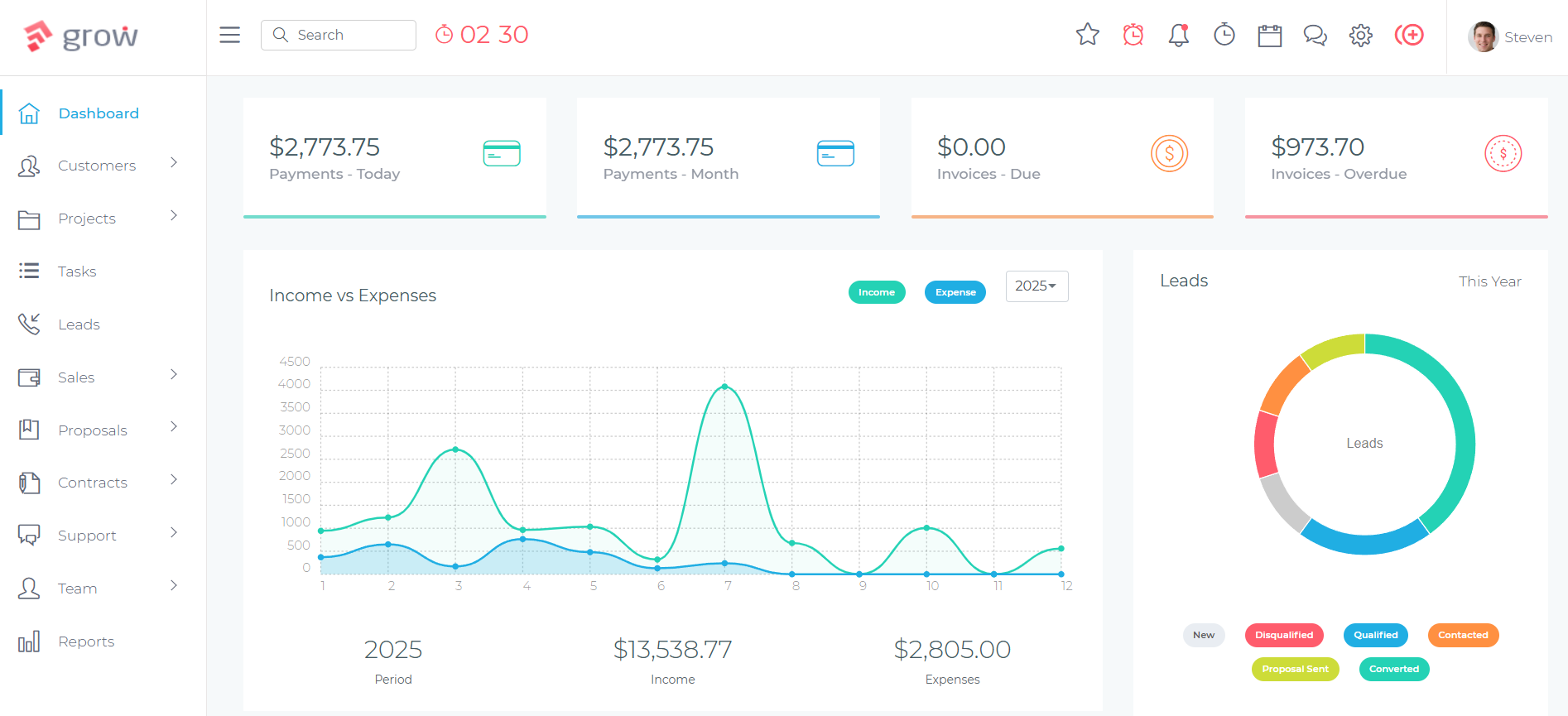
Grow CRM’s clean dashboard gives small teams a unified view of clients, projects, and financials.
Grow CRM is a self-hosted, all-in-one business management platform built on Laravel. It covers every function a service business typically needs — CRM, project management, invoicing, time tracking, estimates, proposals, a helpdesk, and a client portal — under a single $49 one-time licence.
The defining characteristic of Grow CRM is that it was designed for the way small teams actually work. Rather than starting from an enterprise data model and attempting to simplify it, Grow CRM was built around common service business workflows from the ground up. The result is a tool that most users can navigate confidently within their first day.
For teams without a dedicated IT department, Grow CRM also provides a free installation service — meaning you can get a fully functioning self-hosted CRM running on your own server without needing to configure Linux environments, manage PHP dependencies, or troubleshoot database permissions.
Key Features
- CRM core — contact management, lead tracking, client pipeline, and relationship history
- Project management — tasks, milestones, Kanban boards, task dependencies, and team assignments
- Invoicing and estimates — professional invoices, recurring billing, multi-currency, and online payment via Stripe and PayPal
- Time tracking — task-level time logs tied directly to projects and invoicing
- Proposals — create and send client proposals from within the same system
- Helpdesk — support ticket management with client-facing portal
- Client portal — clients can view projects, invoices, and tickets without needing system access
- Workflow automation — automate repetitive tasks and notifications
- Knowledge base — internal or client-facing documentation hub
- Subscriptions — manage recurring client retainers
- 30 languages supported — suitable for international teams
- API access — integrate with third-party tools
- Unlimited users — no per-seat fees, ever
✅ Grow CRM Pros
- $49 one-time payment — no subscriptions, no per-user fees
- Free installation service removes the biggest barrier for non-technical teams
- All key modules included: CRM, PM, invoicing, time tracking, helpdesk
- Modern, clean interface built on Laravel — fast and intuitive
- Free lifetime updates
- Unlimited users on a single licence
- Client portal included — no extra cost
- 30 language support for international teams
❌ Grow CRM Cons
- Requires web hosting (typically $5–$20/month from your own provider)
- Not designed for enterprise-scale organisations with thousands of records
- Smaller third-party review footprint than major SaaS platforms
Pricing
Grow CRM is sold as a one-time licence through CodeCanyon (Envato Market). The standard self-hosted licence is $49, paid once. There are no monthly fees, no renewal charges, and no per-user costs. A SaaS/reseller version is available at $79 one-time for agencies that want to offer CRM as a service to their own clients. Free lifetime updates are included.
SuiteCRM: Overview and Key Features
SuiteCRM is an open-source CRM platform originally forked from SugarCRM in 2013, now maintained by SalesAgility and a global open-source community. It is widely regarded as one of the most feature-complete free CRM systems available — a genuine enterprise-grade tool that rivals Salesforce and Dynamics 365 in breadth of CRM functionality.
The software is available at no licence cost under the AGPL-3.0 licence. You can download, install, and run it on your own server without paying a penny in licensing fees. This makes it a compelling option on paper, particularly for organisations with large user bases where per-seat SaaS pricing becomes prohibitive.
In practice, SuiteCRM is built for organisations with technical resources to match its ambition. It runs on a LAMP stack (Linux, Apache, MySQL/MariaDB, PHP), requires meaningful server-side configuration, and has a learning curve that consistently ranks among the steepest in any CRM category — a fact acknowledged even by SuiteCRM’s own community.
Key Features
- Full CRM suite — accounts, contacts, leads, opportunities, activities, and pipeline management
- Case management — support ticket system for handling customer issues
- Email campaigns — list management, campaign tracking, and reporting
- Quotes and invoices — basic quoting functionality (not a full invoicing system)
- Workflow automation — rule-based process automation
- Custom reports and dashboards — drag-and-drop report builder
- Studio module builder — create custom fields, layouts, and modules without code
- Role-based access control — granular user permissions
- REST API — for custom integrations
- Multi-currency and multi-language — enterprise-suitable internationalisation
✅ SuiteCRM Pros
- No software licence fee — AGPL-3.0 open source
- Enterprise-grade CRM depth — rivals Salesforce on core CRM functionality
- Deep customisation via Studio and developer extensions
- Active open-source community with thousands of contributors
- No user limits on self-hosted installs
- Regular release cadence (now monthly smaller releases)
❌ SuiteCRM Cons
- Complex installation — requires LAMP stack setup and manual configuration
- Steep learning curve — consistently rated as the top complaint by users
- No dedicated mobile app — mobile web experience is poor
- No built-in project management or time tracking
- No native invoicing system — quotes only
- Two active versions (v7 and v8) create upgrade confusion
- Paid add-ons required for common integrations (Google Calendar: £399/yr, Outlook: £60/user/yr)
- Cloud hosting is expensive: from ~£130/month (~$170/month)
- Support contracts for self-hosted start at £1,200/year
- Implementation can cost $5,000–$15,000+ for a typical small business deployment
Pricing
SuiteCRM’s software licence is free (AGPL-3.0). However, the total cost of ownership tells a different story for small teams:
- Self-hosted setup costs: Server/VPS hosting ($10–$100+/month), developer or IT time for installation and configuration
- Official cloud hosting: Starter plan ~£130/month (~$170/month) for up to 10 users
- Paid integrations: Zoom £299/yr, Google Calendar sync £399/yr, Outlook plugin £60/user/yr, appointment scheduler £399–£899
- Support contracts: Silver £1,200/yr, Gold £3,240/yr, Platinum £5,400/yr
- Typical SMB implementation: $5,000–$15,000 when including server, configuration, and consulting costs
Head-to-Head Comparison
Pricing and Total Cost of Ownership
The licence-level comparison is deceptively simple: SuiteCRM costs $0, Grow CRM costs $49. But the true cost comparison looks very different when you factor in what it actually takes to run each system.
| Cost Component | Grow CRM | SuiteCRM (self-hosted) |
|---|---|---|
| Software licence | $49 one-time | $0 |
| Installation service | Free (included) | $500–$2,000+ (IT/developer time) |
| Web hosting (annual) | $120–$240/yr (your VPS) | $120–$1,200/yr (your VPS) |
| Key integrations | Included | £299–£899 each, per year |
| Vendor support | Included | £1,200–£5,400/yr |
| Realistic 3-year total (small team) | ~$409–$769 | $2,500–$15,000+ |
SuiteCRM’s “free” software licence shifts costs to infrastructure, integration, and support — expenses that add up quickly and are often underestimated at the evaluation stage.
Setup and Installation
Grow CRM includes a free installation service. You purchase the licence, provide access to your hosting environment, and the Grow CRM team handles the installation. For most small businesses, this means going from purchase to a working system in a matter of hours, without touching a command line.
SuiteCRM requires manual installation on a LAMP stack (Linux, Apache, MariaDB/MySQL, PHP). This involves provisioning a server, configuring PHP settings, managing file permissions, setting up the database, and then handling ongoing maintenance tasks like “Quick Repair and Rebuild” after configuration changes. The official documentation covers the process, but real-world installation consistently surfaces issues: permission errors, performance problems on shared hosting, and version compatibility challenges between the two currently supported tracks (v7 and v8). Non-technical teams almost always need outside developer help.
Ease of Use and Adoption
This is where the gap between Grow CRM and SuiteCRM is most pronounced for small teams. Ease of use is the number-one predictor of CRM adoption, and adoption failure is the most common reason CRM investments fail entirely.
Grow CRM was built with a clean, modern interface that follows familiar web application patterns. New users can typically navigate core functions — adding contacts, creating projects, sending invoices — on their first day, without formal training.
SuiteCRM’s interface carries the legacy of its SugarCRM origins. Even SuiteCRM 8, which introduced a modernised Angular-based frontend, is widely described in user reviews as “dated,” “clunky,” and harder to navigate than expected. Over 80% of surveyed SuiteCRM users in independent studies flagged the learning curve as a significant challenge. Non-technical team members regularly require formal training or ongoing consultant support to become productive. The absence of a mobile app — replaced by a mobile web view described by users as unreliable and slow — compounds the adoption problem for teams that work outside the office.
Feature Coverage
SuiteCRM has a broader pure CRM feature set than Grow CRM. If deep sales process management, complex lead scoring, territory management, or enterprise marketing automation are central to your operation, SuiteCRM offers more configuration options in those specific areas.
However, for the features most small teams actually use — CRM, project management, invoicing, time tracking, and helpdesk — Grow CRM covers all of them natively, with no add-ons required. SuiteCRM’s invoicing is limited to basic quoting; it has no project management module; and time tracking is not a native feature. For a small team running client projects and billing by time, Grow CRM is more complete out of the box.
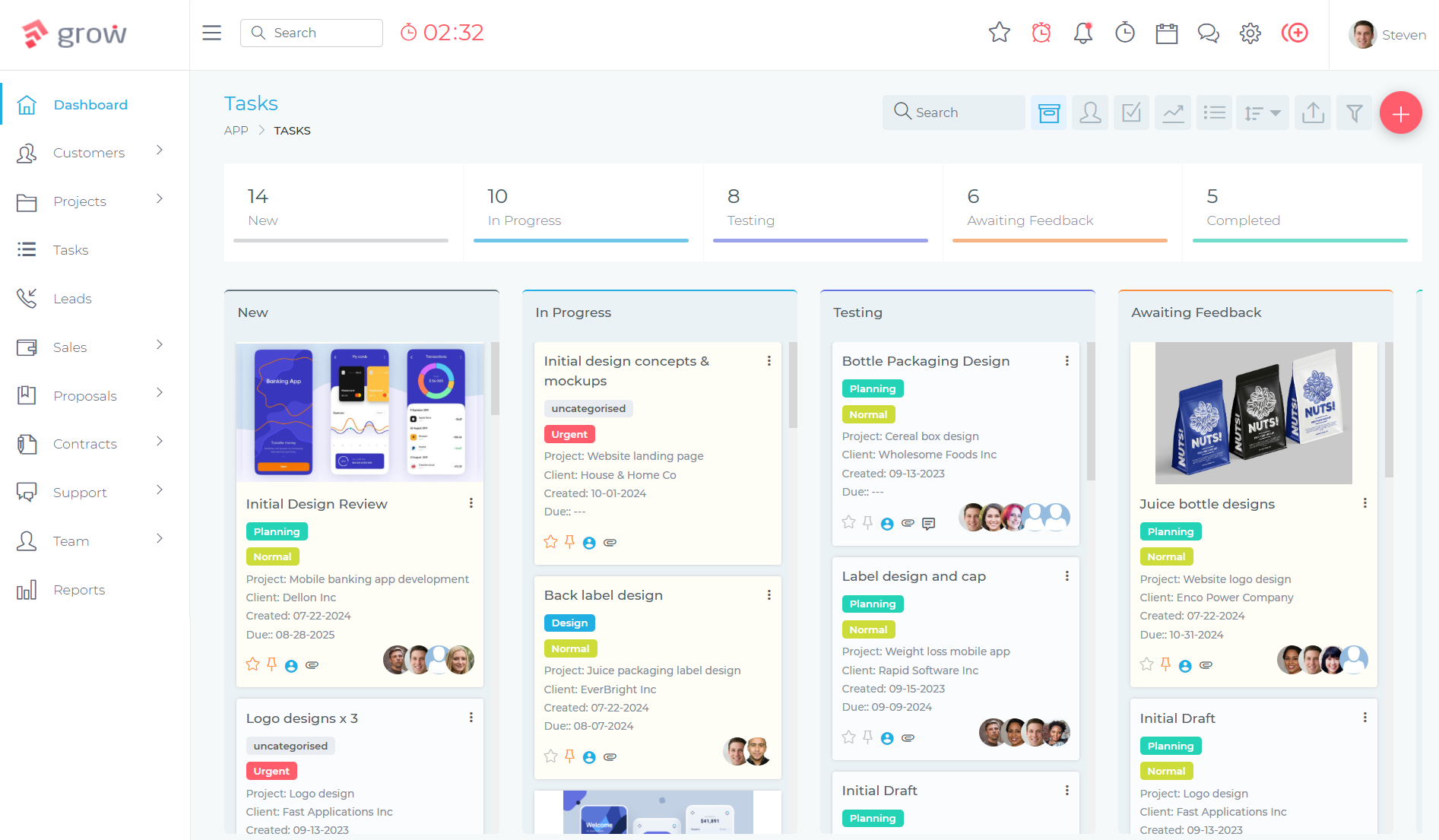
Grow CRM’s built-in project and task management — a feature SuiteCRM doesn’t offer natively.
Maintenance and Ongoing Administration
Grow CRM runs on modern Laravel. Updates are delivered as standard software releases, and the free lifetime updates policy means you receive new features without additional cost. The self-hosted architecture means you control your server, but the operational demands are low relative to SuiteCRM.
SuiteCRM requires more ongoing attention. Running two parallel major versions (7.15.x and 8.9.x) creates decision complexity around which track to maintain. Database optimisation, PHP version management, module compatibility after updates, and the recurring “Quick Repair and Rebuild” process all represent ongoing maintenance overhead that falls on whoever is administering the system — often the same small business owner or office manager trying to get client work done.
Customisation and Flexibility
SuiteCRM is the winner here, and it’s not close. Studio (SuiteCRM’s no-code customisation layer) allows users to create custom modules, fields, and layouts without writing code. For developer teams, the full PHP codebase is available for any modification. If you need a CRM shaped precisely to uncommon workflows, SuiteCRM offers that depth.
Grow CRM offers API access and configuration options, but is not designed to be heavily customised at the code level. For most small businesses, the default feature set covers their needs without customisation — which is the point. But if your operation requires a highly bespoke CRM architecture, SuiteCRM has the capability to accommodate it, provided you have the technical resources.
Which Should You Choose?
Choose Grow CRM If:
- You run a small team (1–50 people) without a dedicated IT function
- You need CRM, project management, invoicing, and time tracking in a single system
- You want to be operational within hours, not weeks
- You’re tired of paying monthly SaaS fees and want a genuine one-time cost
- Your team needs to actually adopt and use the tool — not just own it
- You value a clean, modern interface over enterprise-depth feature lists
- You want your CRM costs to be completely predictable
Choose SuiteCRM If:
- You have in-house IT or developer resources to handle installation, configuration, and maintenance
- Your team size is large enough that per-user SaaS pricing is prohibitive
- You need deep CRM customisation — custom modules, complex workflows, and bespoke data structures
- You’re migrating from Salesforce or SugarCRM and need comparable enterprise CRM depth
- You have strict data sovereignty requirements and want full open-source code control
- You don’t need project management or time tracking as part of the same system
Frequently Asked Questions
Is SuiteCRM really free, or are there hidden costs?
The software licence is free (AGPL-3.0 open source), but running SuiteCRM reliably is not free. You’ll need server hosting, technical resources for installation and ongoing maintenance, and likely paid add-ons for common integrations like Google Calendar sync (£399/yr) or Outlook (£60/user/yr). Vendor support contracts start at £1,200/year. For a small team without IT staff, the real cost of SuiteCRM often exceeds what a one-time Grow CRM licence costs.
Which CRM is easier to set up for a non-technical business owner?
Grow CRM is significantly easier. It includes a free installation service — the Grow CRM team handles the technical setup on your hosting environment, so you don’t need to configure servers or manage PHP settings. SuiteCRM requires manual LAMP stack installation that typically needs developer assistance. Most non-technical teams can be fully operational on Grow CRM within a day; SuiteCRM setup commonly takes days to weeks.
Does SuiteCRM have project management built in?
No. SuiteCRM does not include a built-in project management module. It is a CRM platform focused on sales pipeline, contact management, and case handling. If you need project management alongside your CRM — for managing client deliverables, tracking tasks, or assigning team work — you would need a separate tool. Grow CRM includes full project management natively at no additional cost.
Can SuiteCRM handle invoicing?
SuiteCRM includes basic quoting functionality but is not a full invoicing system. It does not support online payment collection (Stripe/PayPal), recurring billing, or direct invoice-to-payment workflows. Grow CRM includes a complete invoicing module with multi-currency support, recurring invoices, estimates, and integrated payment processing via Stripe and PayPal — all built in at no extra cost.
Which CRM is better for a team of 5–15 people?
For a team of 5–15 people without dedicated IT support, Grow CRM is the better fit. At that team size, the per-user fee savings of SuiteCRM are minimal while the setup and maintenance overhead is substantial. Grow CRM’s $49 one-time licence covers all users with no per-seat costs, and its simpler interface means faster adoption — which is the most critical factor for small team CRM success.
Does Grow CRM have time tracking?
Yes. Grow CRM includes built-in time tracking that links directly to project tasks and invoicing. Team members can log time against specific tasks, and that time can be used to generate client invoices automatically. SuiteCRM does not include native time tracking functionality.
Is SuiteCRM better than Grow CRM for sales teams?
SuiteCRM has deeper native CRM functionality for complex B2B sales processes — territory management, lead scoring, advanced campaign tools, and more granular pipeline customisation. If your primary need is a sophisticated sales CRM for a large team with dedicated CRM administrators, SuiteCRM can deliver more configuration depth. For small sales teams that also need projects, invoicing, and support tickets in the same system, Grow CRM covers more ground more simply.
Can I migrate from SuiteCRM to Grow CRM?
Yes, migration is possible. SuiteCRM allows data export in standard formats (CSV), which can be imported into Grow CRM’s contact and client modules. The migration process involves exporting contacts, leads, and account data from SuiteCRM, mapping fields to Grow CRM’s data structure, and importing. Grow CRM’s free installation service can assist with the setup side of the transition. Complex historical data (custom modules, workflows) would require manual recreation.
Does Grow CRM include a client portal?
Yes. Grow CRM includes a client-facing portal where clients can view their projects, invoices, support tickets, and shared files — without needing a full user account. This is included in the standard $49 licence. SuiteCRM has customer-facing portal capabilities but they are more complex to configure and typically require developer involvement to customise effectively.
Is Grow CRM open source like SuiteCRM?
No. Grow CRM is proprietary software sold through CodeCanyon (Envato Market) under a commercial licence. It is self-hosted — you install it on your own server — but the source code is not open for modification or redistribution. SuiteCRM is fully open source under AGPL-3.0, which means the complete codebase is available for review, modification, and (under licence terms) redistribution. For businesses that require open-source code access as a compliance or customisation requirement, SuiteCRM is the appropriate choice.
Final Verdict
SuiteCRM is genuinely impressive software. Its breadth of CRM functionality, enterprise-grade customisation, and open-source pedigree make it one of the most powerful CRM platforms available at any price. For large organisations with technical teams that need deep process customisation and have no appetite for per-user SaaS fees, it earns its place.
But for small teams — the agencies, consultancies, freelancers, and service businesses that make up the majority of CRM buyers — the equation flips. SuiteCRM’s enterprise strengths become overhead burdens: complex installation, a steep learning curve, no mobile app, missing features like project management and invoicing, and a total cost of ownership that routinely exceeds what a more focused tool would cost.
Grow CRM wins for small teams because it prioritises the right things: a clean interface your team will actually use, all the modules a service business needs in a single system, a free installation service that removes the biggest barrier, and a $49 one-time price that requires no further justification to your finance team.
If you’re a small team choosing a self-hosted CRM, simplicity is not a compromise — it’s the feature. See what Grow CRM includes before you commit to the complexity of an enterprise platform you may not need.
