

The CRM features a service business actually needs are: contact management, a sales pipeline, project or job tracking, invoicing, proposals and contracts, a client portal, and task management. Everything else — predictive AI, territory management, revenue forecasting at enterprise scale, social listening integration, complex approval workflows — is designed for sales teams at large corporations, not for a plumber managing 80 clients, a consultant running a 12-person firm, or a marketing agency handling 30 retainer accounts. Most CRM vendors charge for all of it regardless of whether you use any of it. This guide helps you separate the features that directly improve how you manage clients and deliver work from the ones that inflate your subscription bill without contributing to how your business actually operates.
Why Service Businesses Get CRM Wrong
The CRM industry is dominated by enterprise software companies — Salesforce, HubSpot, Microsoft Dynamics — that built their platforms to serve global sales teams managing thousands of accounts and complex multi-stage approval processes. Their marketing reaches everyone, including the 8-person IT services firm and the 15-person landscaping company trying to get off spreadsheets.
When a service business owner evaluates a CRM by reading feature lists or watching vendor demos, they are almost always looking at a product designed for a fundamentally different type of business. Enterprise CRMs are built around the sales cycle: lead → opportunity → proposal → contract → close. Service businesses need something broader: enquiry → quote → engagement → delivery → invoice → repeat. The revenue model is different, the client relationship is ongoing rather than transactional, and the tools that matter most are different as a result.
The consequence is predictable: service businesses pay for features they never use, struggle with complexity that does not map to their workflows, and either abandon the CRM within six months or downgrade to a simpler tool they should have started with. The right approach is to start from what your business actually needs and evaluate whether a given CRM delivers those specific things — rather than being seduced by the feature count.
The Feature Bloat Problem
Salesforce charges from approximately $25/user/month at entry level and from $165/user/month for its full Sales Cloud Professional tier. HubSpot’s Sales Hub Professional starts at approximately $90/user/month. Both include extensive features that the average service business will never configure, use, or benefit from. A 5-person service business paying $450–$825 per month for a CRM they use at 20% capacity is subsidising enterprise software with no return on the unused 80%. Grow CRM’s one-time $39 payment covers every feature — with no tier paywall between you and full functionality.
Must-Have CRM Features for Service Businesses
These are the features that directly support how a service business acquires clients, delivers work, and gets paid. A CRM without all of these will require you to maintain separate tools to fill the gaps — which defeats the purpose of having a CRM.
1. Contact and Client Management
This is the foundation of any CRM and the first feature to evaluate. Every client, lead, and prospect should live in a single, searchable database with a complete record of your relationship: contact details, communication history, notes from meetings or calls, associated projects, invoices, and documents. For service businesses with ongoing client relationships, this history is operationally critical — not just useful. When a client calls and references a conversation from six months ago, your team needs to find that context immediately, not search through email threads.
What to look for: unlimited contacts at no additional cost, searchable notes and interaction history, tagging and segmentation for client types, the ability to link contacts to companies and vice versa. What to avoid: systems that charge per contact record, or that cap your database at artificial limits tied to pricing tiers.
2. Lead and Sales Pipeline Management
A visual pipeline — showing every active enquiry or proposal at its current stage — is essential for managing new business. For service businesses, the pipeline stages typically reflect the enquiry-to-engagement journey: new enquiry → qualified → proposal sent → proposal accepted → onboarded. Without a clear pipeline view, it is easy to lose track of where each prospect stands and miss the follow-up that converts them to a paying client.
What to look for: a customisable Kanban-style pipeline you can configure to your own stage names, the ability to see pipeline value (not just count) at each stage, and clear ownership of each deal. What to avoid: rigid pipeline templates that cannot be renamed or restructured to match your actual sales process.
3. Project and Job Tracking
Service businesses do not close a deal and move on. They deliver work across days, weeks, or months — and the CRM needs to track that delivery. A project or job tracking module lets you create a project record for each client engagement, assign tasks, set milestones, attach deliverables, and monitor progress. Without this, your CRM tracks relationships up to the point of winning the client and then hands off to a separate project management tool — creating a data split that means your CRM history is always incomplete.
What to look for: linked client and project records, task assignment with due dates, milestone tracking, time logging against projects. What to avoid: CRMs that treat project management as an enterprise add-on at additional cost, or that require a separate subscription to a project tool like Asana or ClickUp to manage delivery.
4. Invoicing and Billing
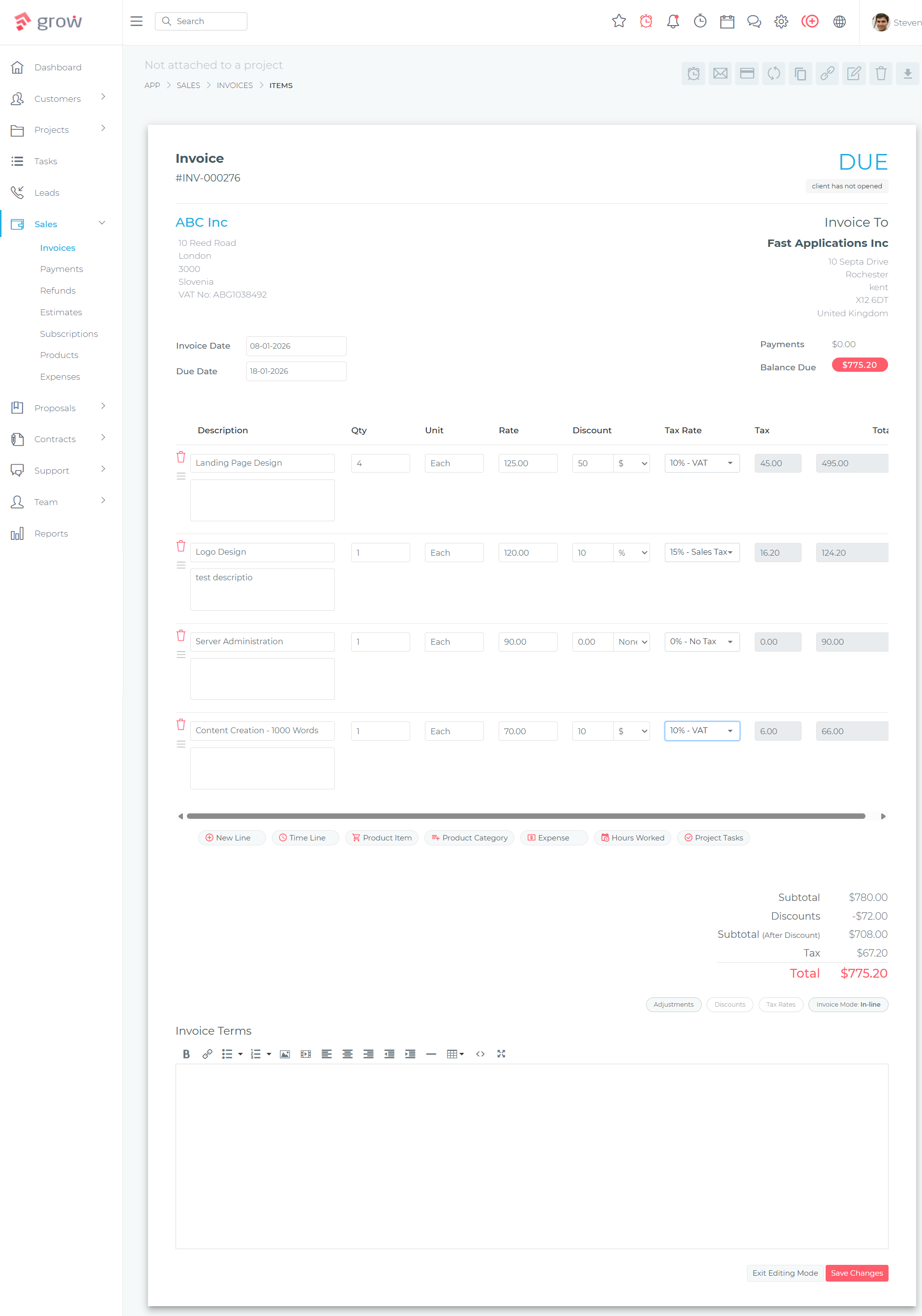
Getting paid is the purpose of delivering service work. A CRM that handles the entire client relationship but requires you to switch to a separate invoicing tool every time you bill a client creates unnecessary friction — and breaks the link between your project records and your financial history. Built-in invoicing lets you generate an invoice directly from a completed project record, send it to the client, track payment status, and see outstanding balances against client accounts, all in one place.
What to look for: the ability to create and send invoices from within the CRM, recurring invoice automation for retainer clients, multiple payment gateway support for online payment, and invoice status tracking (sent, viewed, paid, overdue). What to avoid: CRMs that offer invoicing only as a paid add-on, or that integrate with a third-party billing tool rather than managing invoicing natively.
5. Proposals and Quotes
Before a client becomes a client, you need to send them a professional proposal — outlining the scope of work, pricing, and terms. A CRM with a built-in proposals module lets you create, send, and track proposals without switching to a separate tool. You also know when the client has viewed the proposal (useful for timing your follow-up) and when they have accepted it, at which point the client and project details carry forward into your CRM without re-entry.
What to look for: branded proposal templates, digital acceptance or e-signature, automatic status tracking (sent, viewed, accepted, declined), and a direct link between accepted proposals and project or invoice records. What to avoid: platforms that treat proposals as a separate subscription product or that require a third-party tool like PandaDoc or Better Proposals to fill this gap.
6. Contract Management
For service businesses that formalise client engagements with a service agreement, contract, or statement of work, having contracts managed within the CRM keeps everything in one place. A client record with an attached signed contract, a linked project, and an invoicing history is a complete engagement record. A client record with the contract sitting in DocuSign, the project in Asana, and the invoice in QuickBooks is a fragmented mess that creates delays and increases the risk of missing contract renewals.
What to look for: contract templates with merge fields, digital signature collection, contract status tracking (draft, sent, signed, expired), and storage against the client record. What to avoid: e-signature tools that require a standalone subscription on top of your CRM costs.
7. Client Portal
A client portal is a secure, branded online space where your clients can log in to view their invoices, sign contracts, track project progress, and access shared documents — without needing to email you asking for things. For service businesses managing multiple ongoing client relationships, a self-service portal reduces administrative back-and-forth significantly and presents a more professional image than emailing PDF attachments from a personal inbox.
What to look for: a branded portal accessible via a dedicated URL, the ability to control what each client sees (invoices, projects, documents, or a combination), and secure login for each client. What to avoid: portals that are behind an additional tier paywall or that require a separate subscription to provide basic document sharing.
8. Task Management and Internal Collaboration
Client relationships generate tasks — follow up with this prospect, send the revised proposal, schedule a review call, chase the overdue invoice. A CRM with built-in task management assigns those tasks to team members with due dates, sends reminders, and tracks completion. For small service businesses where everyone wears multiple hats, a shared task list linked to client and project records replaces the sticky notes, calendar reminders, and “did you follow up on X?” messages that currently manage your workload.
What to look for: task creation from within client, project, or lead records, assignable tasks with due dates and reminders, and a team-level task view for managers. What to avoid: treating a CRM’s basic task module as a replacement for a full project management tool — for complex multi-person delivery, you will still need project tracking (covered in point 3).
Nice-to-Have CRM Features (Worth Considering)
These features add genuine value for the right type of service business but are not universally essential. Evaluate them based on whether your specific workflow actually needs them.
Time Tracking
For service businesses that bill by the hour — consultants, lawyers, accountants, IT support providers, designers — a built-in time tracking module that logs hours against client projects and feeds directly into invoicing is genuinely useful. It eliminates the separate time-tracking subscription (Harvest, Toggl, Clockify) and keeps billable hours linked to the project records they belong to. If you bill by project, package, or retainer rather than by the hour, time tracking is a nice-to-have rather than a necessity.
Helpdesk and Support Ticketing
Service businesses that provide ongoing support — IT managed services, software companies with client accounts, property managers handling maintenance requests — benefit from a helpdesk module that captures client support queries as tickets, assigns them to team members, and tracks resolution. If your business relationship with clients ends at delivery (wedding photographer, one-off consultant, event planner), a helpdesk module adds complexity without benefit. If you maintain an ongoing service relationship that generates recurring client requests, it is a meaningful addition.
Reporting and Analytics
Basic reporting — how many leads are in the pipeline, what the current invoice balance is, which projects are overdue — is a must-have and is included in any competent CRM. More advanced analytics — conversion rates by lead source, revenue by client segment, agent performance benchmarking, year-on-year trend analysis — are genuinely useful for growing businesses that have enough data to draw meaningful conclusions. For a 3-person service business managing 40 clients, advanced analytics add marginal value. For a 15-person agency managing 200 clients across multiple service lines, they start to justify themselves.
Recurring Billing Automation
If your service business operates on retainer arrangements — monthly marketing management, ongoing bookkeeping, property management, software subscriptions with support — recurring invoice automation is a significant time saver. Rather than manually creating and sending the same invoice every month, the CRM generates and dispatches it automatically on the set date. This transitions from nice-to-have to essential the moment you have more than five or six recurring clients whose invoices you are generating manually each month.
CRM Features to Skip (And Why They’re Priced In Anyway)
These are the features that vendors highlight in enterprise demos and marketing materials, and that drive pricing tiers upward — but that provide little or no operational benefit to the majority of service businesses.
AI-Powered Predictive Lead Scoring
Predictive lead scoring uses machine learning to rank your leads by likelihood to convert, based on behavioural signals and historical patterns. This is useful for a B2B software company with a database of 50,000 leads and a team of 20 account executives. For a service business with 30–200 active leads at any given time, your own knowledge of the client — the conversation you had, their budget, their timeline — is a better predictor of conversion than an algorithm. You also need significant historical data before predictive scoring produces reliable results, and most small service businesses do not have that data volume. The feature sounds impressive in demos and adds cost to enterprise CRM tiers. It rarely changes how a service business actually manages its pipeline.
Territory Management
Territory management automatically assigns leads to sales reps based on geographic territory boundaries, industry vertical, or account size — a critical feature for a nationwide sales organisation with 200 reps covering different regions. For a local or regional service business where all clients are managed by the same small team, this feature has no application. It is present in mid-market and enterprise CRM tiers and contributes to pricing, but provides zero operational value to a service business.
Complex Multi-Step Approval Workflows
Enterprise CRMs include approval workflow engines that route proposals, contracts, or discount requests through multi-level approval chains — sales rep → manager → director → legal — with digital sign-off at each step. This is designed for corporations where a junior sales rep cannot discount a deal without a manager’s approval. For a service business where the owner, director, or account manager has direct authority over pricing and scope, multi-step approval workflows add bureaucratic overhead without improving how decisions actually get made.
Social Listening and Social CRM Integration
Some enterprise CRMs integrate with social media monitoring tools to track brand mentions, pull in prospect social data, or log social interactions against contact records. For a B2C brand managing thousands of social interactions per day, this has operational value. For a service business whose clients come through referrals, direct enquiries, or targeted outreach — not social media mentions — social CRM integration is a feature that fills a marketing brochure without filling a gap in your operations.
Revenue Intelligence and Forecasting at Scale
Revenue intelligence tools use AI to analyse deal progression, flag at-risk deals, and generate pipeline forecasts for sales leadership. These tools are built for organisations where individual reps manage dozens of deals simultaneously and leadership needs automated signals to know where to focus coaching effort. For a service business where the owner can personally review every active client and lead in under 30 minutes, the value of AI-assisted deal monitoring is minimal. The feature costs significantly at enterprise tiers and is structurally unnecessary for businesses under approximately 50–100 simultaneous active deals.
Why Grow CRM Gets the Balance Right for Service Businesses
Grow CRM is built specifically around the operational reality of service businesses — not enterprise sales teams. Every feature in the platform exists because it addresses a real workflow need: managing client relationships from first enquiry through delivery, billing, and repeat engagement. There are no enterprise features packaged in to justify a higher price tier, no AI-scoring modules you will never configure, and no territory management tools that have no relevance to your business model.
More importantly, every feature in Grow CRM is included in the single $39 one-time payment. There are no tiers. No feature paywalls where invoicing is a Professional feature or the client portal is only available on the Enterprise plan. The full platform — contacts, leads, pipeline, projects, tasks, invoicing, proposals, contracts, client portal, helpdesk, time tracking, recurring billing, reports, instant messaging, and API access — is available from day one, for every user on your team, at no additional cost.
Because Grow CRM is self-hosted, you also own the platform outright. Your client database, project history, contracts, and financial records live on your own infrastructure. There is no subscription to lapse, no vendor price increase to absorb, and no migration required if a SaaS provider changes its pricing or shuts down its service. For service businesses that have built their operations around a CRM, that continuity of access is operationally significant.
What Grow CRM Includes for Service Businesses
- Contact and client management — unlimited contacts, full interaction history, tagging, and segmentation
- Leads pipeline — visual Kanban pipeline, customisable stages, lead assignment, and follow-up tracking
- Projects and tasks — project tracking linked to client records, task assignment, milestones, and Kanban board views
- Invoicing — create and send invoices, recurring billing automation, online payment via Stripe, PayPal, Mollie, Razorpay, and others
- Proposals — branded proposal templates, digital acceptance, and status tracking (sent, viewed, accepted)
- Contracts — contract templates, digital signature collection, and storage against client records
- Client portal — secure, branded portal for clients to access invoices, contracts, projects, and shared documents
- Helpdesk and ticketing — support ticket management for businesses with ongoing client service requirements
- Time tracking — log hours against projects and feed directly into billable invoices
- Reports and analytics — pipeline reports, invoice summaries, project status reporting, and financial overviews
- Instant messaging — internal team messaging built into the platform
- Unlimited users — add your full team at no extra cost per seat
- 30 languages — usable by international teams or businesses serving multilingual clients
- API access — connect to other tools and automate workflows with your existing tech stack
Pricing
$39 one-time payment. Unlimited users. All features included. Free lifetime updates. Free installation service. No monthly fees, no tier upgrades, no feature paywalls.
CRM Feature Matrix: Must-Have vs Nice-to-Have vs Skip
Use this matrix to evaluate any CRM against your service business needs:
| Feature | Verdict | Why It Matters for Service Businesses | In Grow CRM? |
|---|---|---|---|
| Contact and client management | Must-Have | The foundation — stores every client relationship, history, and context | Yes (unlimited) |
| Lead and sales pipeline | Must-Have | Tracks every enquiry from first contact to signed engagement | Yes |
| Project and job tracking | Must-Have | Manages delivery after the client signs — keeps CRM complete beyond the sale | Yes |
| Invoicing and billing | Must-Have | Closes the loop from delivery to payment within one platform | Yes |
| Proposals and quotes | Must-Have | Converts leads to clients professionally, with tracking built in | Yes |
| Contract management | Must-Have | Keeps signed agreements attached to the client record where they belong | Yes |
| Client portal | Must-Have | Reduces admin back-and-forth and improves client experience | Yes |
| Task management | Must-Have | Ensures follow-ups and internal actions are tracked and completed | Yes |
| Time tracking | Nice-to-Have | Essential for hourly billing; less important for fixed-price or retainer work | Yes |
| Helpdesk and ticketing | Nice-to-Have | Valuable for ongoing service relationships; unnecessary for project-based work | Yes |
| Recurring billing automation | Nice-to-Have | Becomes essential the moment you have 5+ recurring retainer clients | Yes |
| Basic reporting | Nice-to-Have | Pipeline and revenue visibility improves decision-making as the business grows | Yes |
| AI predictive lead scoring | Skip | Requires large data volumes to be accurate; adds cost without operational benefit for most service businesses | Not included (by design) |
| Territory management | Skip | Designed for large national sales forces — irrelevant for local or regional service businesses | Not included (by design) |
| Multi-step approval workflows | Skip | Designed for corporate governance structures — adds bureaucracy to small team operations | Not included (by design) |
| Social listening integration | Skip | Relevant for large B2C brands; not applicable to relationship-based service businesses | Not included (by design) |
| Revenue intelligence / AI forecasting | Skip | Adds value at scale (50+ simultaneous deals); overkill and costly for most service businesses | Not included (by design) |
How to Use This When Evaluating a CRM
Before requesting a demo or starting a free trial of any CRM, apply this three-step check:
List the five things that currently fall through the cracks in your business
Not the features you think you need — the actual operational failures. Leads you forgot to follow up. Invoices that went out late. Projects where the scope was never formally agreed. Clients who received inconsistent service because no one knew the full history. Your CRM needs to close those specific gaps, not impress you with a feature count.
Check which features are included at which price tier
Many CRM vendors list features on their marketing pages without clearly indicating which are locked behind higher tiers. Before you evaluate a CRM, ask: does the plan I can actually afford include client portal access, invoicing, and proposals? Or are those features only available at the Professional or Enterprise tier at three times the cost? The feature matrix above tells you what a service business actually needs — verify each one is available at the tier you are budgeting for.
Calculate the true 3-year cost
Take the monthly subscription cost at the tier you need, multiply by 12, then multiply by 3. Add any per-user fees for your current team size. Add any add-on costs (calling, e-signature, advanced reporting). That is your three-year CRM cost — before any price increases. Compare that to Grow CRM’s one-time $39 payment. For most service businesses evaluating mid-market CRM platforms, the difference runs into thousands of pounds or dollars over a three-year horizon.
Frequently Asked Questions
What CRM features do service businesses actually need?
Service businesses need: contact and client management, a sales or enquiry pipeline, project or job tracking, invoicing, proposals and quotes, contract management, a client portal, and task management. These eight features cover the complete client lifecycle from first enquiry through delivery and payment. Everything else — AI lead scoring, territory management, social listening — is enterprise software designed for a different type of business and adds cost without adding operational value for most service firms.
Which CRM features inflate the price without adding real value for service businesses?
The features that inflate CRM pricing without benefiting most service businesses are: AI predictive lead scoring (requires massive data volumes to be useful), territory management (built for national sales forces), multi-step approval workflows (designed for corporate governance structures), social listening integration (relevant for large B2C brands), and enterprise revenue intelligence tools (only genuinely useful at 50+ simultaneous active deals). These features are included in mid-market and enterprise CRM tiers and drive pricing upward regardless of whether you use them.
Does a service business need AI features in a CRM?
Most service businesses do not need AI features in their CRM. AI-powered lead scoring, predictive analytics, and automated email intelligence add value when you have thousands of contacts and dozens of simultaneous deals that are too many to review manually. For a service business managing 30–200 active client relationships, your own knowledge and judgment outperforms an algorithm. The AI features in enterprise CRMs add cost and complexity without improving how most service businesses actually manage their clients and pipelines.
Should a service business CRM include invoicing?
Yes — invoicing should be built into your CRM. When invoicing lives inside the CRM, you can generate an invoice directly from a completed project record, the client’s payment history is stored against their contact record, and you can see outstanding balances across all clients in one view. When invoicing requires a separate tool — QuickBooks, FreshBooks, or a spreadsheet — you lose the connection between the client relationship and the financial history. Grow CRM includes full invoicing with recurring billing automation and online payment as a standard feature.
Do service businesses need a mobile CRM app?
Mobile access to your CRM is useful but the requirement varies by business type. Field service businesses — plumbers, electricians, landscapers, cleaning companies — benefit significantly from mobile access so technicians can update job status, log notes, and check client details from a job site. Office-based service businesses — consultants, accountants, designers, agencies — typically work from desktop most of the time and use mobile access for reviewing information between meetings. Evaluate your team’s actual workflow before treating a native mobile app as a non-negotiable requirement.
What happens if I choose a CRM with too many features?
CRM abandonment is the most common outcome. When a platform is too complex for a team’s actual workflow, adoption drops. Staff work around the system rather than in it — reverting to email, spreadsheets, and manual tracking. The CRM becomes a contact database that nobody fully trusts, and the business pays a subscription for a tool it does not use. Starting with the simplest platform that covers your actual must-haves and adding complexity only when you hit a genuine limitation is consistently more effective than buying the most fully-featured platform and expecting the team to grow into it.
How many integrations does a service business CRM actually need?
Most service businesses need three to five integrations at most: an email client (for logging communications), a payment gateway (for online invoice payment), a calendar tool (for scheduling), and potentially an accounting system (for financial reporting). CRM vendors frequently advertise 500+ integrations as a selling point — but if you are using 5, paying for access to 495 integrations you will never configure is not a feature benefit. Evaluate the specific integrations your business actually needs and verify they are available at the pricing tier you are considering.
Is a self-hosted or cloud CRM better for a service business?
Both work, but self-hosted CRMs offer meaningful advantages for service businesses that handle sensitive client data or want to avoid ongoing subscription costs. A self-hosted CRM like Grow CRM stores all client data on your own server — you control access, backups, and data portability. There is also no subscription to lose access to: your CRM and all its data remain available regardless of whether the vendor changes its pricing or discontinues a plan. Cloud SaaS CRMs are simpler to deploy but create ongoing cost dependency and reliance on the vendor’s infrastructure and pricing decisions.
What is the most affordable CRM for a small service business?
Grow CRM is the most affordable full-featured CRM for small service businesses. At a one-time payment of $39 — covering unlimited users and all features including invoicing, proposals, contracts, client portal, project tracking, and recurring billing — it is the only CRM that eliminates the ongoing subscription cost entirely. Entry-level SaaS CRMs typically start at $15–$69 per user per month, meaning a 5-person team would pay between $900 and $4,140 per year on an ongoing basis for a platform with fewer features than Grow CRM provides.
Final Thoughts
The right CRM for a service business is not the one with the most features — it is the one whose features actually match how your business operates. The eight must-have features covered in this guide (contact management, pipeline, project tracking, invoicing, proposals, contracts, client portal, and task management) address the complete client lifecycle from enquiry to payment. Any CRM you evaluate should include all eight at the pricing tier you plan to use. Features beyond those eight — AI scoring, territory management, approval workflows, social listening — add cost and complexity in exchange for benefits that most service businesses will never realise. Grow CRM includes all eight must-have features, all the nice-to-have additions (time tracking, helpdesk, recurring billing, reporting), and none of the enterprise overhead — for a one-time $39 payment that does not increase as your team grows, your client list expands, or the vendor decides to restructure its pricing tiers.
