

Grow CRM is the best CRM for painting contractors, offering professional estimate creation, quote follow-up tracking, contract management, project scheduling, and client invoicing in a single self-hosted platform — for a one-time $49 payment with no monthly fees. While painting-specific software and field service platforms typically cost $100–$350 per month, Grow CRM gives residential and commercial painting businesses everything they need to manage leads, win more quotes, and build a repeat and referral client base at a fraction of the ongoing cost.
Painting contractors live and die by their estimates and follow-ups. Jobs are won by whoever sends the most professional quote fastest and follows up consistently — yet most painting businesses manage this with phone notes, spreadsheets, or memory. A well-implemented CRM changes that entirely, giving you a system to track every lead, send detailed professional estimates, follow up on pending quotes automatically, coordinate crews, and ask every completed client for a referral or review.
This guide compares the best CRM options for painting contractors — including Grow CRM, Jobber, PaintScout, Estimate Rocket, CompanyCam, and Contractor+ — so you can find the right fit for your business size, workflow, and budget.
What Painting Contractors Need from a CRM
Painting is a high-volume, referral-driven service business where the difference between a thriving operation and a struggling one often comes down to one thing: follow-up. Homeowners and property managers receive multiple quotes — the painter who responds fastest, follows up professionally, and presents the most polished estimate wins the job. A CRM for painting contractors must support the full client journey from first contact to referral generation.
- Lead capture and pipeline management — Organize every incoming enquiry (phone, referral, website, Google) with clear pipeline stages from new lead to won job, so nothing falls through the cracks during busy season
- Detailed estimate creation — Build professional, itemized estimates by surface type, room, square footage, materials, and labour — covering interior, exterior, commercial, and specialty coating work
- Quote tracking and follow-up automation — Know exactly which estimates are pending, when they were sent, and when to follow up — systematic reminders eliminate the “I forgot to call back” problem that costs painting businesses jobs every week
- Contract management and e-signatures — Get agreements signed quickly to secure deposits and lock in job dates before a competitor swoops in
- Crew scheduling and project tracking — Assign jobs to crews, track prep, priming, and finish coat milestones, and manage multiple simultaneous jobs without losing track
- Invoicing with deposit and final payment — Issue deposit invoices when contracts are signed and final invoices on project completion, with professional layouts that match your brand
- Client communication history — Keep a complete record of every client conversation, job specification, colour note, and document so returning clients get seamless, consistent service
- Referral and review follow-up — Systematically request reviews and referrals from satisfied clients to fuel word-of-mouth growth — the most valuable marketing channel in painting
- Mobile access — Access estimates, client details, and job status from the field on any phone or tablet without calling the office
Grow CRM — Best Overall CRM for Painting Contractors
All-in-one self-hosted CRM with estimates, contracts, project tracking, and invoicing — one-time $49 payment, unlimited users
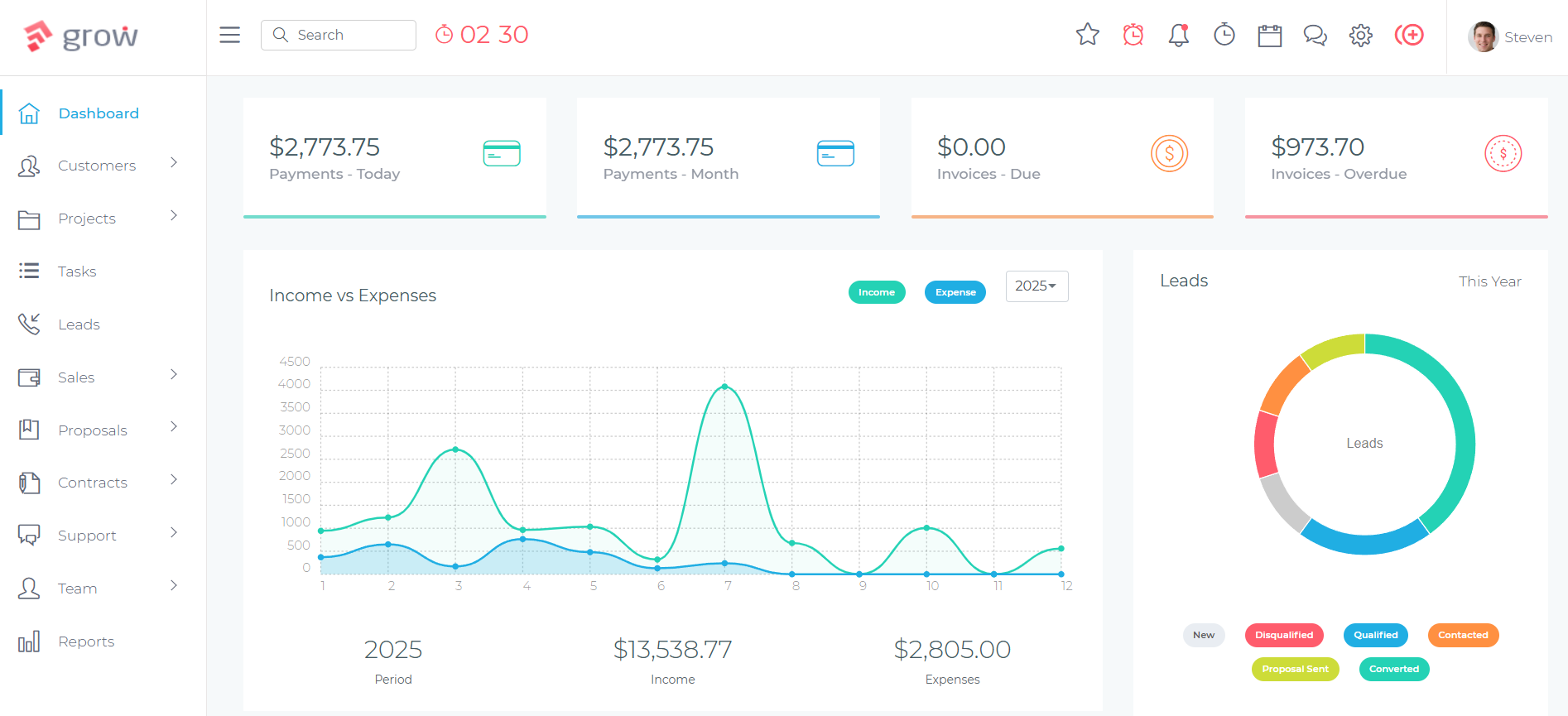
Grow CRM stands out for painting contractors as the most complete and cost-effective business management platform available. Unlike painting-specific tools that charge per user and lock you into narrow workflows, Grow CRM covers every stage of the painting business — from capturing leads and building detailed estimates, to scheduling crews, collecting e-signatures, tracking project milestones, issuing invoices, and following up for referrals — all in a single platform you own outright for a one-time payment.
For painting companies that have outgrown sticky notes and spreadsheets but can’t justify spending $150–$350 per month on field service software, Grow CRM hits the sweet spot: professional tools that reflect how a painting business actually operates, at a cost that makes sense for independent contractors and growing teams alike. The self-hosted model means your client data — estimates, contact history, job specifications, colour notes — lives on your own server. There are no per-user fees, no subscription renewals, and no data held hostage behind an ongoing payment.
Because Grow CRM supports unlimited users, adding estimators, crew supervisors, and admin staff costs nothing extra. A three-person painting company pays the same as a fifteen-person operation. That unlimited user model, combined with the one-time price, is one of the most significant financial advantages Grow CRM holds over every subscription-based alternative in this category.
How Painting Contractors Use Grow CRM
A typical painting job lifecycle in Grow CRM runs as follows: a homeowner enquiry comes in via phone or web form and gets added as a lead. The estimator is assigned a task for the site visit, then builds a detailed estimate in Grow CRM — itemized by room, surface type, prep work required, materials, and labour. The estimate is sent digitally to the client, and Grow CRM tracks whether it has been viewed. A follow-up reminder triggers after a set number of days if no response has been received. When the client accepts, the estimate converts to a contract with digital signature, and a deposit invoice is issued immediately. The job is set up as a project with tasks for prep, priming, painting, and punch list inspection — assigned to the relevant crew with due dates. On completion, the final invoice is issued. A week later, a task reminds the business owner to contact the client for a Google review or referral.
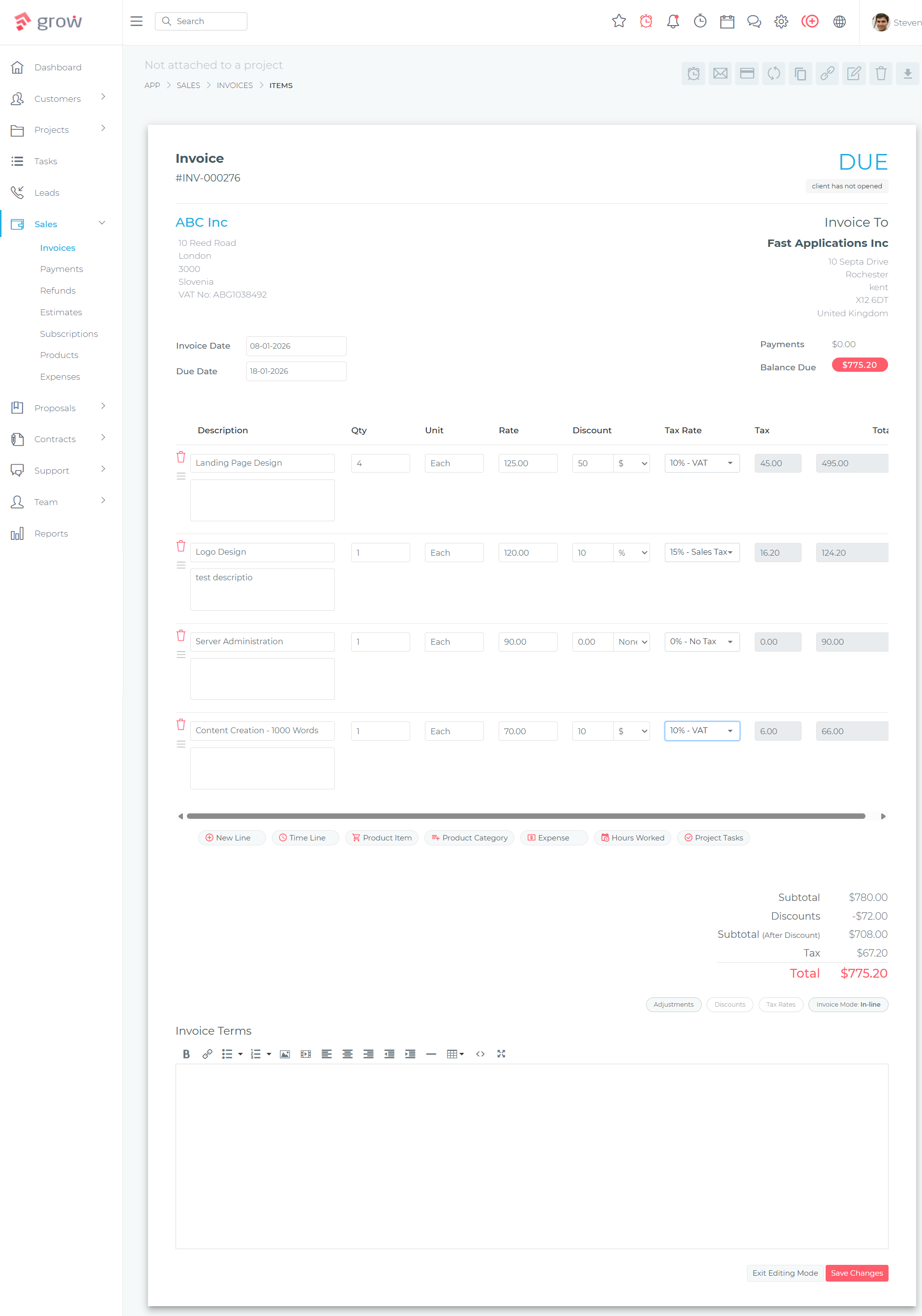
Key Features for Painting Contractors:
- Leads Management — Track every enquiry through your pipeline with pipeline stages, notes, contact history, and scheduled follow-up tasks
- Estimates and Proposals — Build itemized painting quotes with line items for surfaces, prep, materials, and labour; send digitally and track when clients view them
- Contracts and E-Signatures — Generate professional painting agreements and collect digital signatures; convert accepted estimates directly to contracts without re-entering data
- Projects and Tasks — Manage each paint job as a project with tasks for prep, priming, painting, and punch list — assigned to crew members with deadlines and completion tracking
- Invoicing with Deposit and Final — Create deposit invoices on contract signing and final invoices on completion, with professional branding and automated payment reminders
- Client Portal — Give clients a secure portal to view estimates, approve quotes, sign contracts, and download invoices — reducing phone tag and email back-and-forth significantly
- Time Tracking — Log crew hours per job for accurate labour costing and timesheet management across multiple sites
- Calendar — Schedule site visits, paint jobs, and follow-up calls with team-wide calendar visibility to prevent double-booking and crew conflicts
- Helpdesk and Support Tickets — Track punch list items, warranty callbacks, and client follow-up requests as tickets linked to the original job record
- Reports and Analytics — Monitor pipeline conversion rates, revenue by period, outstanding invoices, and job profitability across the business
- Multiple Payment Gateways — Accept deposits and final payments via Stripe, PayPal, Mollie, and other integrated gateways directly from invoices
- Unlimited Users — Add estimators, crew leads, and admin staff at no additional cost as the business grows
✅ Pros
- One-time $49 payment — no monthly fees, ever
- Unlimited users — estimators, crews, and admin at no extra cost
- Complete workflow from lead capture to referral generation in one platform
- Self-hosted — full control over client data and job history
- Client portal eliminates phone tag on estimates and invoices
- Free lifetime updates and free installation service included
❌ Cons
- No native paint-specific estimating with production rates or material quantity calculators
- No built-in scheduling map or crew route optimization
- Requires self-hosted server — not a cloud-hosted SaaS option
💰 Pricing
$49 one-time payment. Unlimited users. Free lifetime updates. Free installation service included.
How Grow CRM Compares to Painting Contractor Software
Painting contractors are served by a mix of general field service platforms, painting-specific estimating tools, and photo documentation apps. Each has a distinct strength — and a distinct price point. Here’s how the leading alternatives compare to Grow CRM.
Jobber
Popular field service management platform for residential home service businesses
Jobber is one of the most widely used field service management platforms for home service businesses, and painting contractors are among its core user segments. The platform excels at scheduling, dispatching, and client communication — particularly for painting companies managing multiple daily jobs or recurring residential clients. Jobber’s client hub lets homeowners approve quotes, view appointment details, and pay invoices through a branded online portal, which reduces administrative back-and-forth significantly during busy seasons.
For painting contractors specifically, Jobber handles the full workflow from quote to payment: build detailed quotes with itemized line items, schedule approved jobs directly from the accepted quote, dispatch crews via the job calendar, and issue invoices on completion. The mobile app gives crew leads access to job details and client information from the field without needing to contact the office. Jobber also includes basic marketing automation — follow-up email sequences and review request campaigns — which suits painting businesses focused on referral and repeat business development.
The main limitation is ongoing cost. Jobber’s pricing starts at $29 per month for one user (Core plan) but scales significantly: the Connect plan covering five users runs $99 per month and the Grow plan covering ten users is $149 per month, with additional users at $29 each. For a painting company with an office admin, two estimators, and three crew leads, Jobber’s monthly cost can easily reach $200–$350 per month — an ongoing expense that compounds significantly over time compared to Grow CRM’s one-time model.
Key Features:
- Quote builder with line items, optional upsells, and client-facing presentation
- Job scheduling calendar with drag-and-drop crew assignment
- Client hub for online quote approval and invoice payment
- Automated follow-up email sequences for pending and unaccepted quotes
- Two-way SMS and email client communication
- Review collection and referral request automation
- Invoicing with Stripe and credit card payment processing
- Mobile app with offline capability for field crews
✅ Pros
- Strong scheduling and dispatch tools for crew-heavy painting operations
- Well-designed mobile app with genuine field usability
- Built-in client communication and review request automation
- Large ecosystem of integrations (QuickBooks, Mailchimp, and more)
❌ Cons
- Monthly subscription costs $99–$387/month depending on team size and plan
- Per-user fees add up fast as the painting team grows beyond five people
- No self-hosted option — all data lives on Jobber’s servers
- Payment processing fees (2.9% + $0.30) add meaningful cost on larger jobs
💰 Pricing
Core: $29/month (1 user). Connect: $99/month (5 users). Grow: $149/month (10 users). Plus: $387/month (15 users). Additional users: $29/month each. Prices based on annual billing.
PaintScout
Painting-specific estimating and sales platform built exclusively for paint contractors
PaintScout is the most painting-specific software on this list — built exclusively for painting contractors with tools that no general CRM offers. Its standout feature is production-rate-based estimating: instead of manually calculating labour hours, painting contractors input surface measurements and PaintScout automatically calculates labour costs using pre-built production rates. This eliminates guesswork from estimating and helps ensure consistent, profitable pricing across every quote, regardless of which estimator builds it.
The platform also shines on the sales side. Interactive proposals let clients view itemized quote details, approve or request changes, and sign digitally — all within a branded proposal experience. PaintScout tracks estimate activity in real time (who viewed it, when, and for how long) and automates follow-up reminders so estimators know exactly when to call back. The result is a faster, more professional quote-to-signature process that reduces the time lost chasing unresponsive prospects.
Where PaintScout gets expensive is its layered pricing model. The Sales plan (core estimating features) starts at $119 per month — but CRM and scheduling capabilities require the Operations add-on at an additional $99 per month. A painting company using both plans runs $218 per month (or $178 per month on annual billing) per account, plus $20 per month per additional team member. For a solo painter or small crew, this is a significant monthly commitment with no one-time alternative.
Key Features:
- Production-rate-based estimating — calculates labour from surface measurements automatically
- Interactive branded proposals with client approval and e-signature
- Real-time estimate tracking — see exactly when clients view proposals
- Automated follow-up reminders for pending and viewed-but-not-signed estimates
- Customer chat integrated within the proposal experience
- Job scheduling and pipeline management (Operations add-on required)
- Integrated payments for collecting deposits and final invoices
- Sales analytics — close rates, revenue pipeline, and estimator performance metrics
✅ Pros
- Production-rate estimating saves significant time for high-volume estimators
- Best-in-class interactive proposals designed specifically for painting presentations
- Real-time proposal tracking drives timely, data-informed follow-up calls
- Built specifically for painters — no generic field service compromise
❌ Cons
- Expensive when both Sales and Operations plans are required ($178–$218/month)
- Full CRM and scheduling functionality requires the paid Operations add-on
- Per-user pricing at $20/month adds up quickly for teams of four or more
💰 Pricing
Sales plan: $119/month (or $99/month billed annually). Operations add-on: $99/month (or $79/month annual). Additional users: $20/month each. 14-day free trial available, no credit card required.
Estimate Rocket
End-to-end estimating and business automation for residential and commercial service contractors
Estimate Rocket is a comprehensive business automation platform for service contractors — and painting contractors represent one of its core user groups. The platform combines estimating, CRM, project management, and invoicing into a single system, positioning itself as a one-stop tool for contractors who want to replace a stack of disconnected apps. For painting companies that generate a high volume of estimates, Estimate Rocket’s customizable templates and professional proposal builder save meaningful time in the quoting process.
The platform stands out for its automated follow-up capabilities: quote status tracking, client email notifications, and built-in follow-up reminders help estimators maintain contact with prospects without manual chasing. Integration with QuickBooks Online makes it a solid choice for painting contractors already using QuickBooks for accounting. The mobile-friendly web interface means estimators can build and send quotes from site visits without returning to the office.
Estimate Rocket’s main drawback for smaller painting operations is its pricing structure. The entry-level Launch plan starts at $139 per month for three full users, and the Accelerate plan (seven users) runs $259 per month. While these plans include professional onboarding and comprehensive support, they represent a significant ongoing commitment for a two- or three-person painting crew. The 30-day free trial and 90-day money-back guarantee make it straightforward to test before committing.
Key Features:
- Customizable estimate templates with painting-specific line item options
- Professional proposal builder with online signing capability
- Automated quote follow-up reminders and client status notifications
- CRM with lead tracking, contact history, and pipeline visibility
- Project management with scheduling, milestones, and task tracking
- Invoicing with online payment processing and client payment links
- QuickBooks Online integration for accounting synchronization
- Mobile-friendly web app accessible from any device in the field
✅ Pros
- All-in-one platform eliminates the need for separate estimating and CRM tools
- Strong QuickBooks integration for contractors already using it for accounting
- 30-day free trial and 90-day money-back guarantee reduce adoption risk
- Professional onboarding and comprehensive support included in all plans
❌ Cons
- Entry price of $139/month is high for solo painters or two-person crews
- Less painting-specific than PaintScout — no production-rate estimating capability
- No self-hosted option — data is stored on Estimate Rocket’s servers
💰 Pricing
Launch: $139/month (3 users). Accelerate: $259/month (7 users). Expand: $359/month (15 users). 30-day free trial with full feature access. 90-day money-back guarantee.
CompanyCam
Visual photo documentation platform for painting and trade contractors
CompanyCam occupies a distinct niche in the painting contractor software landscape: it is not a CRM or estimating tool — it is a visual documentation platform. Painting contractors use CompanyCam to capture location-stamped, time-stamped photos at every stage of a job: pre-job surface conditions, prep work completion, priming, colour application, and final results. Photos are organized by project, instantly accessible to the whole team, and used to build client-facing before-and-after presentations that serve as powerful social proof for future sales and marketing.
The annotation tools — drawing arrows, adding comments, tagging crew members, recording voice notes — make CompanyCam genuinely useful for quality control: a supervisor can review photos from any job site without being physically present and flag issues for correction before the client sees them. AI-powered features assist with generating checklists and project summaries from photo sets. For painting companies that compete on quality and want to build a visual portfolio for marketing and sales presentations, CompanyCam fills a specific gap that general CRMs and estimating tools don’t address.
The key limitation is scope: CompanyCam complements a CRM rather than replacing it. It has no lead management, no estimating, no invoicing, no contracts, and no project scheduling. Painting companies using CompanyCam still need a full CRM for business management, making it an add-on cost. The 3-user minimum for billing ($79 per month at minimum) also creates an unnecessary cost barrier for solo painters who need access for only one or two people.
Key Features:
- Unlimited location- and time-stamped project photos organized by job
- Before-and-after photo presentations for client showcases and social media marketing
- Photo annotation with arrows, comments, tags, and voice notes for quality control
- AI-powered checklists, project reports, and job summaries from photo documentation
- Team photo sharing with crew-wide project visibility from any device
- QR code project access for crew members without needing individual logins
✅ Pros
- Best-in-class visual documentation purpose-built for painting and trade contractors
- Before-and-after showcases are powerful marketing assets for sales and social media
- Remote quality control — supervisors review all job photos without being on-site
❌ Cons
- Not a CRM — no estimating, invoicing, leads management, contracts, or scheduling
- 3-user billing minimum means solo painters pay for unused accounts
- Adds a monthly subscription cost on top of whatever CRM the business already runs
💰 Pricing
From $19/user/month with a 3-user minimum (approximately $79/month for a small team). Annual billing available. Free trial offered.
Contractor+
Free-to-start CRM and business management app for independent and small-crew contractors
Contractor+ is a mobile-first business management app designed for independent contractors and small service teams — including painting contractors just starting to move beyond pen-and-paper or basic spreadsheets. The platform’s standout feature is its free plan: painting contractors can manage clients, create and send estimates and invoices, and collect payments at zero cost. For a solo painter or a two-person crew testing CRM for the first time, Contractor+ offers a genuine zero-commitment entry point into structured business management.
The paid plans expand into CRM capabilities — sales pipeline tracking, lead management, and team collaboration — at relatively modest monthly rates. Job scheduling and crew task assignment make it feasible for small painting operations to coordinate work across multiple simultaneous jobs. The platform also supports QuickBooks sync for accounting, and includes a post-inspection photo feature for documenting job conditions before and after — a capability that reduces the need for a separate CompanyCam subscription for lighter documentation needs.
The trade-off with Contractor+ is depth. While it covers the essentials well — estimates, invoices, clients, basic scheduling — it lacks the sophistication of Jobber, PaintScout, or Estimate Rocket for high-volume painting operations. Advanced CRM and pipeline features require moving to paid plans, and the platform may become limiting as a painting business scales beyond a handful of active jobs at a time.
Key Features:
- Free plan with client management, estimates, invoices, and card payment collection
- Sales pipeline and lead tracking (paid plans)
- Job scheduling and crew task assignment
- Post-inspection photo documentation per job — before and after
- QuickBooks sync for accounting integration
- Mobile-first design accessible from any smartphone without a desktop required
- Mileage and time tracking for reimbursements and accurate billing
✅ Pros
- Free plan available — no credit card required to get started
- Solid entry-level option for solo painters and very small crews
- Photo documentation built in without a separate app subscription
❌ Cons
- Less feature-complete than dedicated painting platforms for high-volume estimating
- Advanced CRM, pipeline, and team features locked behind paid plans
- Growing painting businesses may outgrow the platform and need to migrate
💰 Pricing
Free plan available with core estimate, invoice, and client management features. PRO plan for advanced CRM pipeline. PRO TEAM adds multi-user collaboration from $20/user/month. No credit card required to start.
CRM Comparison for Painting Contractors
| CRM / Software | Pricing | Best For | Estimates | Self-Hosted |
|---|---|---|---|---|
| Grow CRM | $49 one-time | All painting contractors — complete CRM, unlimited users | ✅ Yes | ✅ Yes |
| Jobber | From $29/mo (1 user) | Crew-heavy residential painting businesses | ✅ Yes | ❌ No |
| PaintScout | From $119/mo + add-on | High-volume estimating painting companies | ✅ Production-rate | ❌ No |
| Estimate Rocket | From $139/mo (3 users) | Mid-sized contractors using QuickBooks | ✅ Yes | ❌ No |
| CompanyCam | From ~$79/mo (3-user min) | Photo documentation add-on only | ❌ No | ❌ No |
| Contractor+ | Free / from $20/user/mo | Solo painters and very small crews starting out | ✅ Basic | ❌ No |
Frequently Asked Questions
What is the best CRM for painting contractors?
Grow CRM is the best overall CRM for painting contractors, offering estimate creation, contract management, project tracking, and invoicing for a one-time $49 payment with no monthly fees and unlimited users. For painting-specific estimating with production-rate calculations, PaintScout is the strongest specialized tool. For crew-heavy residential operations prioritizing scheduling and dispatch, Jobber is the leading field service option.
How much does CRM software cost for a painting business?
Painting-specific CRM and field service platforms typically cost $99–$350 per month: Jobber runs $99–$387/month depending on team size, PaintScout starts at $119/month with the Operations add-on bringing the total to $218/month, and Estimate Rocket starts at $139/month for three users. Grow CRM offers the complete CRM workflow for a one-time $49 payment with no recurring fees, covering unlimited users and all features from day one.
What CRM features does a painting contractor actually need?
Painting contractors need lead pipeline management to capture and track enquiries, a professional estimate builder for sending detailed quotes, quote tracking with automated follow-up reminders for pending estimates, digital contract signing to secure deposits, crew scheduling and project task management, and deposit-and-final invoicing with payment collection. Review and referral request automation is also valuable for businesses that grow primarily through word of mouth.
Can I build painting estimates in Grow CRM?
Yes — Grow CRM includes a full estimate and proposal builder where you can create itemized quotes with custom line items for surfaces, prep work, materials, and labour. Estimates are sent digitally to clients, who can review and approve them through the client portal. Accepted estimates convert directly to contracts and trigger deposit invoices without re-entering any data — streamlining the quote-to-deposit process significantly.
How do I track pending painting quotes and follow up consistently?
In Grow CRM, every pending estimate sits in the leads pipeline with its current status and last-contact date. Follow-up tasks with due dates appear in the calendar and notify the responsible estimator. This systematic approach — every quote tracked, every follow-up scheduled automatically — eliminates the manual chasing that causes painting businesses to lose jobs to faster-responding competitors. Speed of follow-up is one of the highest-leverage changes a CRM makes to a painting business’s close rate.
Do painting contractors need industry-specific software, or will a general CRM work?
Most painting contractors are well-served by a general CRM that covers estimates, contracts, project tracking, and invoicing — exactly what Grow CRM provides. Industry-specific tools like PaintScout add production-rate estimating, which benefits high-volume estimators quoting dozens of jobs per week. For smaller painting operations, a capable general CRM is faster to set up, lower in cost, and covers everything needed to run the business professionally.
How can a CRM help painting contractors get more referrals?
A CRM builds a systematic post-job follow-up process. In Grow CRM, a task can be set at job completion to contact the client a week later, request a Google review, and ask for referrals to neighbours or colleagues who might need painting. Painting businesses that run this process consistently — rather than relying on memory — generate significantly more reviews and referrals per completed job than those who don’t follow up deliberately. Referral rate is one of the most measurable outcomes of proper CRM use.
Can I manage multiple painting crews with a CRM?
Yes — Grow CRM supports multi-crew management through its Projects and Tasks module. Each paint job is set up as a project, and tasks (prep, priming, painting, punch list) are assigned to specific crew members or crew leads with deadlines and completion tracking. The calendar provides the office with a complete view of all active jobs and crew assignments. Grow CRM’s unlimited user model means every crew member can be added to the system at no additional cost.
How long does it take to set up a CRM for a painting business?
Most painting contractors can have Grow CRM operational within one to two days. The included free installation service handles the server setup, and initial configuration — adding active clients, setting up estimate line item templates, and creating project task checklists — typically takes two to four hours. Importing existing client data in CSV format accelerates setup when migrating from spreadsheets. The core features most painters use daily have a very manageable learning curve.
What is the difference between a painting CRM and estimating software for painters?
Painting estimating software (like PaintScout) focuses primarily on the quote-creation process — with production-rate calculations, interactive proposals, and estimate analytics. A CRM manages the full client relationship: leads, estimates, contracts, projects, invoicing, and post-job follow-up. Many painting contractors start with a standalone estimating tool and then find they need a CRM for everything that happens before and after the estimate — making an all-in-one platform like Grow CRM a more cost-effective long-term choice.
Final Thoughts
Painting contractors who want to grow their business need more than exceptional paint work — they need a system to capture every lead, follow up on every quote, coordinate every crew, and ask every satisfied client for a referral. Grow CRM delivers that complete workflow at a one-time cost that pays for itself on the first job it helps you close. For painting businesses that want purpose-built estimating with production rates, PaintScout is the premium specialist choice. For crew-heavy operations prioritizing scheduling and dispatch, Jobber is the field service leader. But for the majority of painting contractors — residential, commercial, independent, or growing — Grow CRM provides everything needed to run a professional, organised painting business without a recurring monthly bill.