

Stop losing billable hours. The right CRM tracks your time, manages your clients, and generates invoices — all in one place.
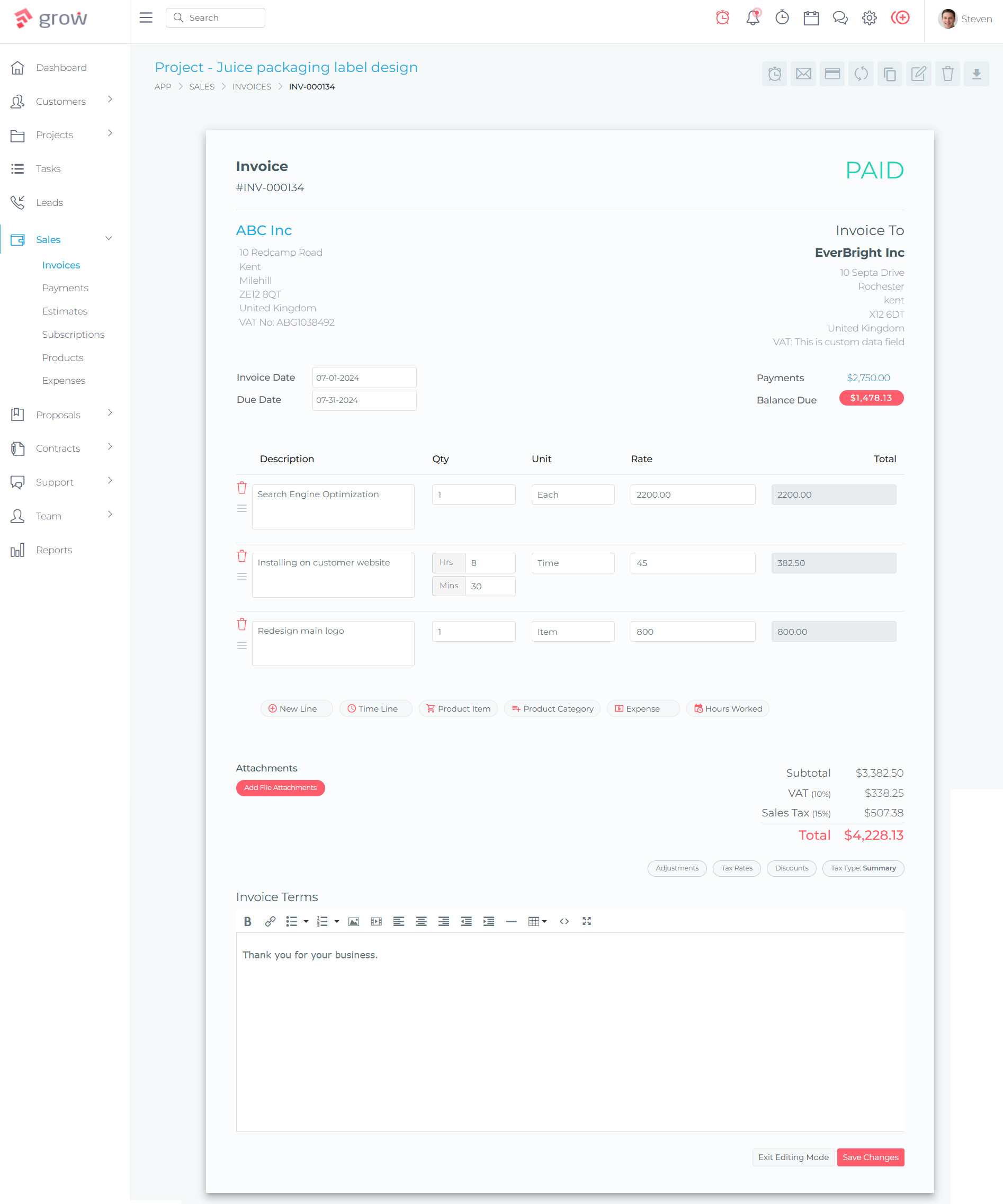
The short answer: Grow CRM is the best time tracking CRM for consultants who bill by the hour. It combines a full CRM, project-level time tracking, automatic invoice generation from logged hours, contract management, and client portals — all for a one-time payment of $39 with no recurring fees and no per-user charges.
If you’re a consultant billing by the hour, you already know the pain: time slips through the cracks, your tracker is one tool, your CRM is another, and your invoicing software is a third. Every week you’re copying data between apps and still worried you’re leaving money on the table.
This guide compares the top CRM platforms with built-in time tracking for consultants — covering features, pricing, and exactly how each handles the time-to-invoice workflow that consultants depend on.
Why Most Consultants Lose Billable Hours Every Month
Research consistently shows that consultants using manual time tracking methods — logging hours at the end of the day or reconstructing them from memory — capture only around 70% of the billable work they actually perform. Those using real-time tracking capture closer to 95%. That gap represents real, recoverable revenue.
The problem gets worse when your time tracker is disconnected from your CRM and invoicing. Data has to be moved between tools manually, which introduces errors, delays billing cycles, and creates situations where clients dispute hours because the context isn’t clear on the invoice.
What Causes Billable Hours to Disappear
- Context switching: Moving between tasks without stopping or starting a timer
- Micro-tasks: Quick emails, short calls, and brief research sessions that never get logged
- End-of-day logging: Recreating what you did from memory hours later, always underestimating
- Tool fragmentation: Separate apps for time tracking, CRM, and invoicing means data falls through the gaps
- Admin overhead: Time spent on non-billable admin reduces bandwidth for billable work
The solution isn’t just better discipline — it’s better software. A CRM with native time tracking and direct invoice generation eliminates the gaps by making it frictionless to log hours in the same platform where you manage the client relationship and generate the invoice.
What to Look for in a CRM with Time Tracking for Consultants
Not all time tracking features in CRM platforms are equal. When evaluating options, consultants need to look for these specific capabilities:
| Feature | Why It Matters for Consultants |
|---|---|
| Start/Stop Timer | Track time in real-time as you work, not from memory later |
| Project-Level Time Tracking | Associate hours with specific client projects for accurate billing |
| Billable vs Non-Billable | Separate work you charge for from internal admin time |
| Time-to-Invoice Workflow | Convert logged hours directly to invoice line items without copy-pasting |
| Timesheet View | Review all logged time across projects before billing |
| Client Context Integration | See the full client relationship alongside time entries |
| Hourly Rate Management | Set different rates per project, task type, or team member |
| Invoice Status Tracking | Know which time entries have been billed and which are outstanding |
Quick Comparison: Top CRM Platforms with Time Tracking for Consultants
| Platform | Pricing | Self-Hosted | Time Tracking | Native Invoicing | CRM Features | Time → Invoice |
|---|---|---|---|---|---|---|
| Grow CRM | $39 one-time | Yes | Yes (task timer + timesheets) | Yes (full) | Full CRM | Direct, 1-click |
| HoneyBook | $29–$109/mo | No | Limited (project-level only) | Yes | Good | Yes |
| Bonsai | $9–$59/user/mo | No | Yes (all plans) | Yes | Good | Yes |
| Dubsado | $335–$525/yr | No | Premier plan only | Yes | Good | Limited |
| Toggl Track | $0–$20/user/mo | No | Excellent (standalone) | No (integration needed) | None | Via QuickBooks only |
The 5 Best CRM Platforms with Time Tracking for Consultants
Grow CRM — Best Overall for Consultants Who Bill by the Hour
Self-hosted · One-time payment · Full CRM + time tracking + invoicing
Grow CRM is a self-hosted, all-in-one platform that gives consultants everything they need to manage client relationships, track time, and get paid — without monthly subscription fees and without stitching together multiple tools.
Unlike cloud-based alternatives where your pricing grows with your team and your data lives on someone else’s server, Grow CRM is installed on your own server. You pay once ($39), own it forever, and have unlimited users from day one. For consultants running solo practices or small firms, this changes the economics entirely.
Time Tracking Features in Grow CRM
- Task-level timer: Start and stop a timer directly on any project task as you work — no switching apps
- Timesheets: View all logged time entries across projects, filterable by date, task, or team member
- Admin timesheet overview: Team leaders can see all team members’ time in one place under the timesheets section
- Billing status tracking: Each time entry shows whether it has been billed to the client or is still outstanding
- Invoice locking: Once a time entry has been invoiced, it locks to prevent double-billing errors
- Batch timesheet entry: Log multiple time records in a single session — useful when reconciling a full day or week of work
- Grouping and filtering: Group time records by task or by team member for different reporting views
- Direct billing to invoices: Convert logged time entries to invoice line items directly from the invoice creation screen
Why This Workflow Works for Consultants
The entire flow — start a timer on a task, complete the work, review timesheets, generate invoice from logged hours — happens inside one platform that also holds your client records, contracts, proposals, and project details. When a client asks why a particular hour was billed, the context is right there. When you need to generate a monthly invoice, all your unbilled time entries are waiting for you.
Beyond Time Tracking: The Full Consultant Toolkit
- CRM: Client records, contact management, lead tracking
- Projects: Kanban boards, tasks, milestones, team collaboration
- Proposals: Professional proposals with conversion tracking
- Contracts: Contract templates, e-signature support
- Invoicing: Professional invoices, payment gateways (Stripe, PayPal, Mollie, Razorpay, Tap, Flutterwave), recurring billing, multi-currency
- Client Portal: Clients can view projects, invoices, and make payments
- Helpdesk: Support ticket management
- API Access: Customize and extend the platform
Grow CRM Pricing
- Regular licence: $39 one-time payment
- Unlimited users: No per-seat charges
- Free installation: Grow CRM installs it for you
- Lifetime updates: All future updates included
- Self-hosted: Your server, your data, your control
Pros
- One-time $39 payment — no monthly fees ever
- Unlimited users — no per-seat costs
- Native time tracking integrated with projects and invoicing
- Direct time-to-invoice workflow in a single platform
- Self-hosted — complete data ownership and privacy
- Free installation service included
- Lifetime updates at no additional cost
- Full CRM, contracts, proposals, client portal all included
Cons
- Requires a web server to self-host (handled by free installation service)
- Less name recognition than cloud alternatives
HoneyBook — Good for Creative Freelancers, Limited Time Tracking
Cloud-based · $29–$109/month · Popular with photographers and designers
HoneyBook is a cloud-based client management platform widely used by photographers, designers, event planners, and creative freelancers. Its interface is polished and its onboarding is smooth, which explains its popularity with solo service providers.
For consultants who bill by the hour, HoneyBook’s time tracking is functional but limited. You can track time at the project level and invoice for those hours, but you don’t get task-level timers or the granular timesheet views that more billing-heavy consultants need. It also carries ongoing monthly subscription costs that compound significantly over time.
Time Tracking in HoneyBook
- Time tracking available from the Starter plan ($29/month annual)
- Project-level time logging — track hours per project
- Manual time entry (no automatic time capture)
- Billable hours can be added to invoices
- No task-level timer functionality
HoneyBook Pricing
- Starter: $29/month (billed annually) — includes time tracking
- Essentials: $49/month (billed annually) — adds automations, scheduler, QuickBooks
- Premium: $109/month (billed annually) — unlimited team members, priority support
Pros
- Clean, beginner-friendly interface
- Good contract and proposal templates
- Time tracking available on all plans
- Payment processing built in
Cons
- Monthly subscription — $29–$109/month ongoing
- Cloud-only — your data is on HoneyBook’s servers
- Limited time tracking (project-level only, no task timers)
- No self-hosted option
- Costs 8–33× more per year than Grow CRM’s one-time fee
Bonsai — Strong Time Tracking but Per-User Pricing Adds Up
Cloud-based · $9–$59/user/month · Built for freelancers and small teams
Bonsai is a well-rounded platform for freelancers that integrates proposals, contracts, time tracking, invoicing, and CRM in a single cloud-based tool. Its time tracking is more capable than HoneyBook’s — billable vs non-billable time splits, timesheets, and team utilization reports are all available.
The main drawback for growing consultancies is the per-user pricing model. A consultant bringing on even a small team of 5 people could pay $145–$295 per month on annual billing, and that cost grows with every hire. For a self-hosted alternative like Grow CRM, the same scenario costs nothing extra.
Time Tracking in Bonsai
- Real-time time tracking available on all plans
- Billable vs non-billable time classification
- Team timesheets and utilization reports (higher plans)
- Timesheet reminders and locking (Elite plan)
- Time entries can be added directly to invoices
Bonsai Pricing
- Basic: $9/user/month (annual) — unlimited time tracking
- Essentials: $19/user/month (annual) — adds billable/non-billable splits
- Premium: $29/user/month (annual) — adds timesheet reminders
- Elite: $49/user/month (annual) — timesheet locking, priority support
Pros
- Strong time tracking with billable/non-billable distinction
- Good freelancer-focused feature set
- Time entries link directly to invoices
- Clean, modern interface
Cons
- Per-user pricing escalates quickly with team growth
- Monthly recurring costs — never own the software
- Cloud-only — no data sovereignty
- Some advanced timesheet features limited to top-tier plans
Dubsado — Good Automation, Time Tracking Only on Higher Plan
Cloud-based · $335–$525/year · Popular with coaches and creatives
Dubsado is a comprehensive client management platform with strong automation capabilities. It’s particularly popular with coaches, consultants, and creative businesses that handle a lot of client intake, contracts, and follow-up communication. The platform’s workflow automation can save meaningful hours on repetitive admin tasks.
The limitation for billing-focused consultants is that time tracking is only available on the Premier plan (the higher tier), and even then it’s a basic implementation. If time-to-invoice accuracy is central to your business, Dubsado’s time tracking may not go deep enough to meet your needs.
Time Tracking in Dubsado
- Time tracking only available on Premier plan ($525/year)
- Timer-based tracking with billable time designation
- Tracked time can be added to invoices
- Not available on the Starter plan ($335/year)
Dubsado Pricing
- Starter: $335/year — no time tracking, 3 users included
- Premier: $525/year — includes time tracking, scheduler, automations
- Additional users: 4–10 users add $25/month; 11–20 users add $45/month
- Additional brands: $10/month per brand
Pros
- Powerful workflow automation
- Good contract and form builder
- Unlimited client projects
- No time-limited free trial (3-client limit instead)
Cons
- Time tracking locked to the more expensive plan
- Annual recurring cost — never own the software
- Cloud-only — data on Dubsado’s servers
- Add-on costs for users and multiple brands
- Weaker project management than dedicated tools
Toggl Track — Best Standalone Time Tracker, But Not a CRM
Cloud-based · $0–$20/user/month · Dedicated time tracking tool only
Toggl Track is one of the most widely used standalone time tracking tools in the world. Its interface is simple, its reports are solid, and its free plan supports up to five users. For consultants who already love Toggl and just need better time tracking, it’s excellent at its specific job.
The problem for consultants who bill by the hour is that Toggl Track has no native CRM and no native invoicing. Getting from tracked time to a paid invoice requires integrating with QuickBooks or exporting data to a separate billing tool. That re-introduces the tool fragmentation problem that causes billable hours to get lost in the first place.
Time Tracking in Toggl Track
- Excellent one-click timer and manual entry
- Project and client tagging
- Billable vs non-billable time flags
- Detailed reporting and utilization dashboards
- No native invoicing — QuickBooks integration only
- No CRM features
Toggl Track Pricing
- Free: Up to 5 users, basic time tracking
- Starter: $10/user/month — billable rates, saved reports
- Premium: $20/user/month — project forecasts, time audits
- Enterprise: Custom pricing
Pros
- Industry-leading time tracking UX
- Free plan for up to 5 users
- Excellent reporting and utilization views
- Works across mobile, desktop, and browser
Cons
- No invoicing — must connect to external billing tool
- No CRM — separate tool needed for client management
- Multi-tool setup re-creates the fragmentation problem
- Per-user monthly costs on paid plans
The Consultant Billing Workflow: How It Should Work
When your time tracking is integrated with your CRM and invoicing, billing becomes a natural part of how you work — not an admin chore you dread at the end of the month. Here’s what the ideal consultant workflow looks like inside a fully integrated platform like Grow CRM:
Cost Comparison: Grow CRM vs Cloud Alternatives Over Time
The economics of a one-time self-hosted payment versus recurring monthly subscriptions look very different over a 3–5 year horizon. Here’s what consultants actually spend:
| Platform | Year 1 | Year 2 | Year 3 | Year 5 | Data Ownership |
|---|---|---|---|---|---|
| Grow CRM (self-hosted) | $39 | $0 | $0 | $39 total | Yours |
| HoneyBook Starter | $348 | $348 | $348 | $1,740 | HoneyBook’s |
| HoneyBook Essentials | $588 | $588 | $588 | $2,940 | HoneyBook’s |
| Bonsai Basic (1 user) | $108 | $108 | $108 | $540 | Bonsai’s |
| Bonsai Premium (3 users) | $1,044 | $1,044 | $1,044 | $5,220 | Bonsai’s |
| Dubsado Premier | $525 | $525 | $525 | $2,625 | Dubsado’s |
| Toggl Track Starter (3 users) | $360 | $360 | $360 | $1,800 | Toggl’s |
Note: Toggl Track pricing above covers time tracking only — consultants would still need a separate CRM and invoicing tool, adding further cost.
Why Self-Hosted Time Tracking Matters for Consultants
For most consultants, client data is sensitive. Contracts, billing rates, project details, and communication records represent the core of the business relationship — and in many cases contain confidential client information.
When that data lives on a cloud provider’s servers, you’re trusting a third party to protect it, keep it accessible, and not change the pricing model on you next year. Self-hosted solutions eliminate that dependency entirely.
Self-Hosted Time Tracking Advantages
- Data sovereignty: Client records, time entries, and invoices live on your server under your control
- No per-user fees: Add team members or subcontractors without the per-seat cost penalty
- No vendor lock-in: You own the software and data — no forced migrations if pricing changes
- GDPR compliance: Simpler to comply when you control where data is stored and processed
- Customization: Modify the platform to fit your exact workflow (Grow CRM is Laravel-based with API access)
- Predictable costs: One payment, known forever — no surprise price increases
Frequently Asked Questions
What is the best CRM with time tracking for consultants who bill by the hour?
Grow CRM is the best CRM with time tracking for consultants who bill by the hour. It combines a full client relationship management system with task-level time tracking, timesheets, and direct time-to-invoice functionality — all in a single self-hosted platform that costs $39 as a one-time payment. For consultants who need an integrated billing workflow without ongoing subscription fees, it’s the most cost-effective and capable option available.
Can I track billable hours directly inside a CRM?
Yes — but only CRMs with native time tracking built in. Grow CRM, HoneyBook, Bonsai, and Dubsado all offer time tracking within the platform. Grow CRM goes furthest, with task-level start/stop timers, full timesheets, and direct billing of logged hours to invoices without any data export. General-purpose CRMs like HubSpot or Salesforce do not include time tracking natively and require third-party integrations.
What’s the difference between a dedicated time tracker and CRM time tracking?
A dedicated time tracker (like Toggl Track or Harvest) specialises in logging and reporting hours but has no CRM or native invoicing. You must connect it to separate billing tools, which creates manual data transfer steps. CRM time tracking integrates hours with client records and invoices inside the same platform, eliminating the handoff points where data gets lost and billable time goes unrecovered. For consultants who need accuracy across the full billing cycle, integrated CRM time tracking is the better choice.
How much billable time do consultants lose without proper time tracking?
Consultants using manual or retrospective time logging — filling in timesheets at the end of the day or week — typically capture only around 70% of their actual billable work. Those using real-time tracking capture closer to 95%. The gap represents lost revenue from micro-tasks, short calls, quick email threads, and context-switching time that never makes it onto an invoice. For a consultant billing $150/hour with 80 billable hours per month, recovering even 10% of lost time adds $1,200 per month in additional recoverable revenue.
Is self-hosted time tracking better for consultants?
For many consultants, yes. Self-hosted time tracking that’s part of a self-hosted CRM gives you complete control over client data and billing records, eliminates per-user monthly costs as your team grows, and removes dependency on third-party vendors who can change pricing, get acquired, or shut down. For consultants handling sensitive client engagements or those subject to data privacy regulations, self-hosting provides a compliance advantage that cloud tools cannot match.
Do I need separate software for time tracking and invoicing as a consultant?
No — and using separate tools is actually one of the main causes of lost billable revenue. When time tracking and invoicing are in different systems, data must be transferred manually between them. Errors creep in, hours get forgotten, and the billing cycle slows down. An integrated platform like Grow CRM handles both in the same system: you track time on project tasks, review your timesheets, and generate invoices directly from logged entries. No export, no copy-paste, no gaps.
What time tracking features matter most for a consultant CRM?
The most important time tracking features for consultants are: (1) a real-time start/stop timer linked to project tasks; (2) timesheet views that show all unbilled time across projects; (3) billable vs non-billable hour classification; (4) direct conversion of time entries to invoice line items; and (5) invoice status tracking that locks billed entries to prevent double-billing. Secondary features include team timesheet visibility, filtering by client or project, and batch entry for reconciling a full day’s work.
How does Grow CRM’s time tracking work?
In Grow CRM, time tracking is linked to project tasks. A timer icon appears on each task you’re assigned to — clicking it starts a timer that runs while you work. When you stop the timer, the entry is recorded in your timesheet with the task, project, client, and duration. Administrators can view all team timesheets in one place. When it’s time to bill, you go to the invoice screen and pull in the unbilled time entries for that client — they populate as line items. Once invoiced, the entries lock so they can’t be billed twice.
What is the most affordable CRM with time tracking for consultants?
Grow CRM is the most affordable CRM with time tracking for consultants at $39 as a one-time lifetime purchase. This includes unlimited users, full time tracking with timesheets, invoicing, project management, CRM, contracts, proposals, client portals, and free installation. Cloud alternatives like HoneyBook, Bonsai, and Dubsado all require ongoing monthly or annual subscription fees that cost significantly more over any multi-year period. For a solo consultant or small firm, Grow CRM’s economics are unmatched.
Can I see which client hours have been billed and which are still outstanding?
Yes — in Grow CRM, every time entry in your timesheet shows its billing status: whether it has been invoiced or is still awaiting billing. Unbilled entries can be pulled into a new invoice at any time. Once an entry is invoiced, it locks to prevent accidental double-billing. This billing status tracking is essential for consultants running multiple client engagements simultaneously, where it’s easy to lose track of which hours have been billed in which billing cycle.
Conclusion: The Right CRM Pays for Itself in Recovered Hours
For consultants who bill by the hour, the choice of time tracking CRM is a direct revenue decision. A fragmented setup — with separate time tracking, CRM, and invoicing tools — guarantees that some billable hours will fall through the cracks every month. The question is only how many.
An integrated platform eliminates those gaps. When your timer, client records, and invoice system all live in the same place, tracking time becomes a natural part of how you work — not a separate admin burden you tackle at the end of the week from memory.
Grow CRM stands out as the best option for consultants because it covers the full workflow — from client relationship to task timer to invoice — without monthly subscription fees, without per-user charges, and with your data hosted on your own server. For a one-time $39 investment, it delivers more integrated billing capability than cloud tools costing hundreds of dollars per year.
For cloud-based alternatives, Bonsai offers the most capable time tracking among the subscription platforms, with genuine billable/non-billable hour management and solid team timesheet features. HoneyBook and Dubsado work for consultants with simpler time tracking needs, and Toggl Track remains the gold standard for standalone time tracking — just don’t expect it to replace your CRM or invoicing software.
If you bill by the hour and want to stop leaving money on the table, the most impactful change you can make is getting your time tracking, client management, and invoicing into a single system.
Sources & References
All links verified at time of publication.
