

The best CRM for nonprofits and NGOs is Grow CRM. It manages the complete constituent relationship lifecycle — from donor prospecting and grant tracking through to program delivery, contract management, invoicing, time tracking, and a self-service client portal — for a one-time payment of $39 with no recurring fees and no per-user charges. Unlike purpose-built nonprofit CRMs such as Bloomerang (from $125/month), NeonCRM (from $99/month), or DonorPerfect (from $89/month), Grow CRM is self-hosted, meaning your donor database, beneficiary records, grant agreements, and operational data remain on infrastructure your organization owns and controls. For charities, foundations, community organizations, and NGOs of any size that want a capable, affordable, all-in-one platform without subscription overhead that erodes program budgets year after year, Grow CRM delivers exactly the tools needed to manage relationships, track grants, coordinate programs, and invoice for services — at a price that respects the financial reality of mission-driven organizations.
What Nonprofits and NGOs Actually Need From a CRM
The operational landscape of a nonprofit is unlike almost any other type of organization. You manage multiple categories of relationships simultaneously — donors who fund the work, beneficiaries or clients who receive the services, volunteers who deliver programs on the ground, grant funders who require accountability and reporting, board members who need governance visibility, and partner organizations who collaborate on delivery. Every one of these relationships requires consistent, structured management. Every interaction needs to be documented. Every commitment made to a funder needs to be tracked against a deadline.
Yet most nonprofits — particularly small and medium-sized organizations — operate with a skeletal administrative team, limited technology budgets, and staff who are often generalists managing several roles simultaneously. The average small nonprofit (annual budget under $1 million) spends roughly $7,595 per year on all IT combined. Every dollar spent on subscription software is a dollar unavailable for program delivery, staffing, or direct services to beneficiaries.
This tension between operational need and financial constraint is where CRM selection matters most. An overpowered, expensive platform generates subscription overhead that erodes program budgets every month — without necessarily delivering the specific functionality a small nonprofit actually needs. An underpowered tool — a generic spreadsheet or a basic contact manager — leaves the organization exposed to the data loss, communication gaps, and missed stewardship opportunities that drive the sector’s notoriously low donor retention rate of approximately 32%.
Nonprofits and NGOs specifically need their CRM to handle:
- Constituent management — a centralized database covering donors, beneficiaries, volunteers, board members, and partner organizations, with relationship tracking and complete interaction history
- Donor relationship management — tracking giving history, communication touchpoints, pledge status, recurring gift schedules, and stewardship activity for every supporter
- Grant and funder tracking — managing funder relationships, application deadlines, award amounts, restricted fund conditions, reporting requirements, and program-level expenditure
- Program and project management — coordinating the delivery of funded programs, assigning tasks to team members and volunteers, tracking milestones, and documenting outcomes
- Contract and agreement management — storing grant agreements, MOUs, volunteer agreements, and service contracts with electronic signature and version control
- Invoicing and financial tracking — billing for fee-for-service programs, managing grant drawdowns, generating receipts, and tracking outstanding payments
- Time tracking — recording staff and volunteer hours by project for grant reporting, cost allocation, and program accountability
- Lead and opportunity pipeline — tracking new donor prospects, grant opportunities, and partnership conversations from first contact through to commitment
- Client or beneficiary portal — giving program participants or donors a self-service channel to access project information, documents, and communications
- Helpdesk and ticketing — managing incoming requests from beneficiaries, volunteers, or the public in a structured, trackable way
- Reporting and dashboards — generating board-ready reports on fundraising performance, program delivery, grant compliance, and organizational health
The Real Cost of Nonprofit CRM Subscriptions
Subscription costs compound in ways that are easy to underestimate when selecting a CRM. Bloomerang’s CRM starts at $125/month — that is $1,500 in the first year alone, and $7,500 over five years before any price increases. NeonCRM starts at $99/month ($1,188/year). DonorPerfect at $89/month ($1,068/year). Add volunteer management modules, event management, API integrations, or premium support, and the annual cost frequently doubles. For a nonprofit spending $7,595/year on all technology combined, a $125–$200+/month CRM subscription represents 20–30% of the entire IT budget — allocated to a single tool. Grow CRM costs $39 once, covers every user in the organization, and includes free updates for life.
Grow CRM: The Best CRM for Nonprofits and NGOs
Grow CRM is a self-hosted, all-in-one business management platform that handles the complete operational lifecycle for nonprofits — constituent relationship management, lead and donor prospecting, program and project delivery, grant agreement management, invoicing and financial tracking, time tracking, helpdesk, and a self-service portal — for a one-time payment of $39 with no subscription and no per-user fees.
For small charities managing a few hundred donors and delivering one or two funded programs, Grow CRM replaces the patchwork of spreadsheets, shared email inboxes, and disconnected tools that most small nonprofits rely on — without the subscription overhead of dedicated nonprofit CRM platforms. For medium-sized NGOs managing multiple grant funders, coordinating volunteers across programs, and billing fee-for-service clients, Grow CRM provides the structured project management, contract handling, and reporting tools needed to operate professionally at scale. For any nonprofit that handles sensitive beneficiary data — health information, social care records, financial hardship disclosures, or immigration status — the self-hosted model means that data stays on your organization’s infrastructure, not on a third-party vendor’s server.
Because Grow CRM is self-hosted, every constituent record, giving history, grant agreement, and program file lives on a server your organization controls. This is not an abstract data governance principle — it is a direct response to the reality that approximately 80% of donors say they would stop giving to an organization if they learned their data had been breached, and 69% of donors worry about data security when sharing information with a new charity. Self-hosting eliminates the vendor-side breach risk entirely by removing your data from third-party infrastructure.
How Nonprofits Use Grow CRM
The Nonprofit Constituent Journey in Grow CRM
Every nonprofit relationship follows a structured arc — whether with a donor, a grant funder, a beneficiary, or a volunteer. A prospect is identified and qualified. An initial relationship is established. A commitment is made (a donation, a grant award, a volunteer agreement). Programs are delivered. Accountability is reported back. Relationships are stewarded to renew and deepen. Grow CRM supports every stage of this journey across all constituent types without requiring a separate tool at any point.
Constituent Prospecting and Lead Management
New donor prospects, grant opportunities, and partnership conversations are captured in Grow CRM’s Leads module. Each lead record stores contact details, source information, qualification notes, and all follow-up activity. The visual pipeline tracks every prospect from initial contact through to committed donor, awarded grant, or signed partnership. For development officers managing a major gifts portfolio, the lead pipeline provides a live view of every prospect in the funnel — with tasks, follow-up deadlines, and relationship notes linked directly to each record. For grant managers tracking a portfolio of foundation prospects and application windows, the pipeline surfaces every opportunity and its current stage simultaneously.
Donor and Constituent Database
Once a prospect converts to an active supporter, they become a contact or client record in Grow CRM. Each constituent profile centralizes all relationship data: contact information, giving history, communication log, documents shared, projects they’re linked to, invoices and receipts, and any outstanding tasks or follow-ups. Custom fields allow nonprofits to track sector-specific data points — donor interests, communication preferences, event attendance, volunteer skills, referral source, or recognition tier. For beneficiary-serving organizations, the same contact structure stores case notes, program participation history, and any support tickets raised through the helpdesk module, creating a complete service record for each person the organization works with.
Grant and Program Management
Active grants are managed as projects in Grow CRM. Each grant project stores the funder relationship, award amount, program objectives, milestones, task assignments, deliverable deadlines, and outcome documentation. Team members are assigned specific tasks within each grant project — creating a clear, trackable record of who is responsible for what, by when. For organizations managing multiple simultaneous grants from different funders, the project dashboard provides a consolidated view of every funded program’s status. Time tracking within each project records the hours spent by staff and volunteers, generating the time allocation data typically required for grant acquittals and funder reports.
Contract and Agreement Management
Grant agreements, MOUs, volunteer agreements, service contracts, and partnership documents are handled through Grow CRM’s Contracts module. Templates are built once and reused — merge fields automatically populate funder names, award amounts, program descriptions, and reporting dates from the client record. Agreements are sent electronically and signed online without requiring the counterparty to create an account or download software. Signed agreements are stored permanently against the relevant contact or project record, timestamped and auditable. For nonprofits that previously managed grant agreements through email threads and shared drives — with the associated version control risk and retrieval difficulty — this represents a significant operational improvement at zero additional cost.
Invoicing, Billing, and Financial Tracking
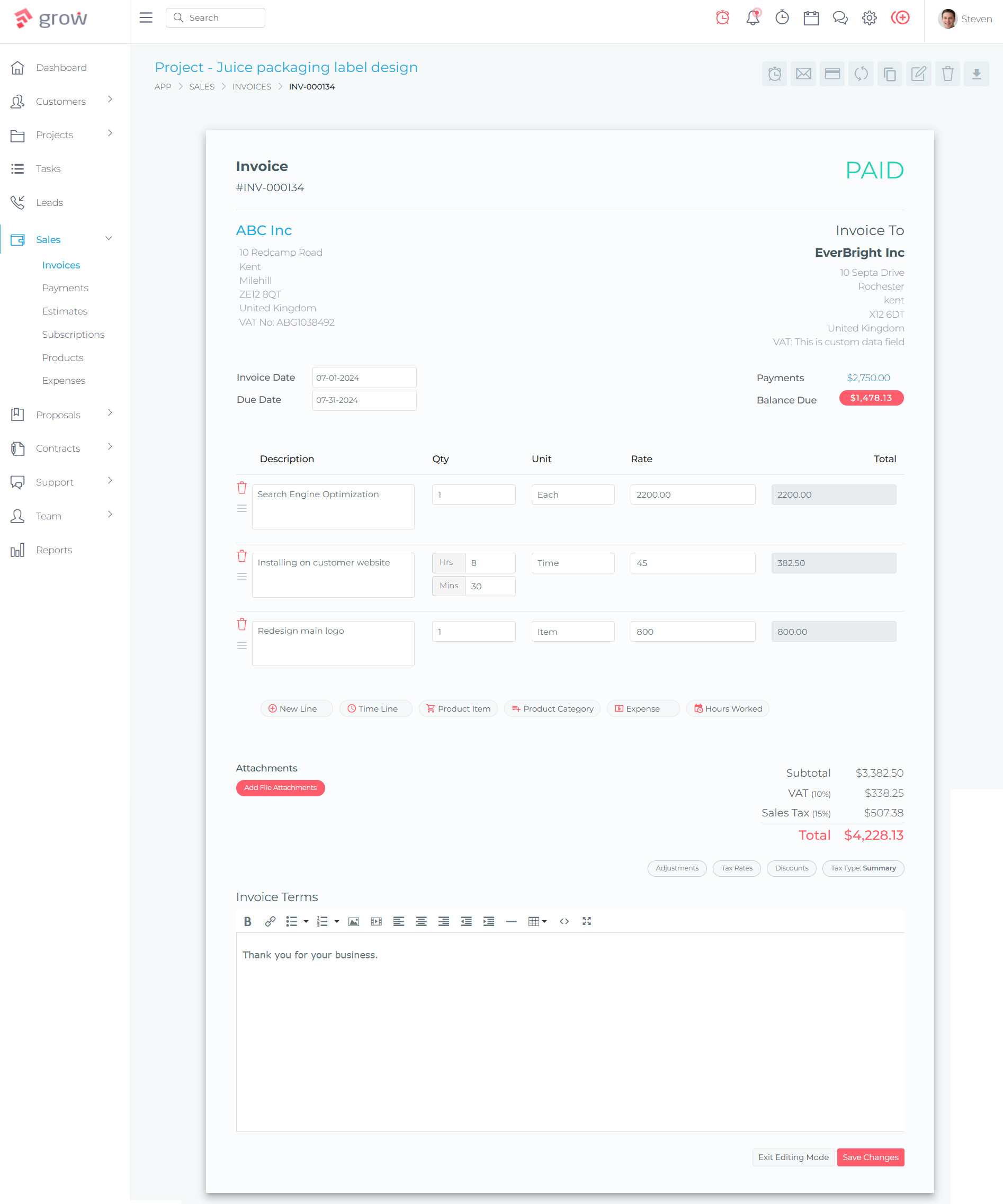
For nonprofits that generate fee-for-service income, bill for training or consulting, manage membership dues, or process grant drawdowns on a scheduled basis, Grow CRM’s invoicing module handles the complete billing workflow. Invoices are created from the client record, tied to the relevant project, and sent directly from the platform. Recurring invoices automate regular billing cycles — monthly membership fees, quarterly program service charges, or annual sponsorship installments — without manual re-creation each cycle. Payment is processed via Stripe or PayPal, with the transaction recorded against the invoice automatically. Overdue reminders are sent automatically on a schedule you define.
Beneficiary Portal and Helpdesk
Grow CRM’s Client Portal gives program participants, donors, or partner organizations a secure, personalized online space to track their engagement with the organization — viewing project progress, accessing shared documents, paying invoices, and communicating directly with program staff. For beneficiary-serving organizations, this replaces the informal email-and-phone communication that makes it difficult to maintain consistent service records. The integrated helpdesk allows beneficiaries or stakeholders to raise support requests that are tracked, assigned, and resolved within a structured ticketing workflow — creating an auditable record of every service interaction that donors, funders, and boards can rely on for accountability purposes.
Grow CRM Features That Matter Most for Nonprofits
| Feature | Nonprofit Application |
|---|---|
| Contacts & Clients | Centralized constituent database for donors, beneficiaries, volunteers, and partners with full relationship history and custom fields |
| Leads Pipeline | Donor prospecting, grant opportunity tracking, and partnership development — with visual pipeline and task-linked follow-ups |
| Projects | Grant and program management — milestones, task assignments, deliverables, progress tracking, and multi-project overview |
| Contracts | Grant agreements, MOUs, volunteer agreements, and service contracts with template-based creation and electronic signature |
| Invoicing | Fee-for-service billing, recurring membership charges, grant drawdowns, and donation receipt generation with automated overdue reminders |
| Time Tracking | Staff and volunteer hour logging by project — essential for grant acquittals, cost allocation reports, and funder accountability |
| Proposals | Grant proposals, service proposals, and partnership decks created and delivered professionally from within the platform |
| Client Portal | Donor and beneficiary self-service access to project updates, documents, invoices, and direct communication with program staff |
| Helpdesk | Structured ticketing for beneficiary support requests, volunteer inquiries, and stakeholder service — with full resolution tracking |
| Automation | Auto-create projects, assign tasks, and generate invoices from contract signatures — reducing manual admin burden on small teams |
Why Self-Hosting Makes Sense for Nonprofits Handling Sensitive Data
Many nonprofits work with people in vulnerable circumstances — health conditions, domestic violence situations, addiction recovery, financial hardship, refugee status, or involvement with social services. Storing this data on a third-party SaaS vendor’s server creates a risk that self-hosting eliminates: a vendor breach exposes your beneficiaries’ sensitive information, potentially causing direct harm to the people your organization exists to protect. Self-hosting with Grow CRM means that data residency, access controls, backup schedules, and retention policies are entirely within your organization’s governance — not delegated to a vendor whose data practices you cannot directly audit or control.
Grow CRM is available at growcrm.io for a one-time payment of $39, including free installation support and free lifetime updates.
Nonprofit CRM Alternatives: How They Compare
The nonprofit CRM market includes several purpose-built platforms designed around donor management and fundraising workflows. Each has genuine strengths — but all operate on subscription models that generate recurring costs that Grow CRM eliminates entirely. The following profiles are based on verified current pricing and published feature documentation.
Little Green Light
Little Green Light is a cloud-based donor management CRM aimed at small to mid-sized nonprofits. It offers a single all-inclusive plan with pricing based on the number of constituent records, starting at $45/month (or $40.50/month billed annually) for up to 2,500 constituents. Unusually, all features are included at every price tier — there are no add-on modules or tiered feature gates. Unlimited users are included at all tiers.
The platform covers constituent profiles with full giving histories, task management, membership tracking, event attendance, pledge tracking, mail merges, appeals management, and integrations with Zapier, QuickBooks Online, Mailchimp, Constant Contact, Stripe, and PayPal. A 30-day free trial is available with no credit card required. The interface is widely regarded as approachable and well-structured for users without a technical background.
Little Green Light is genuinely one of the more affordable purpose-built donor CRMs for small organizations, and the transparent all-inclusive pricing model is commendable. However, at $40.50–$45/month, the annual cost still runs $486–$540/year — which is twelve to fourteen times the total lifetime cost of Grow CRM. Over five years, even the smallest Little Green Light tier costs $2,430–$2,700. The platform also lacks project management depth for program delivery, has no contract management module, and provides email-only support on lower tiers.
- Constituent profiles with full giving and interaction history
- Pledge, gift, in-kind, and recurring gift tracking
- Task and reminder management
- Membership management
- Event and appeal tracking
- Mail merge and batch communication tools
- Integrations with QuickBooks Online, Mailchimp, Stripe, PayPal, Zapier
- 30-day free trial, no credit card required
Pros
- Transparent, all-inclusive pricing — no feature tiers or add-ons
- Unlimited users at all pricing tiers
- 30-day free trial available
- User-friendly interface with strong knowledgebase
- Good integration ecosystem for small nonprofits
Cons
- Monthly subscription model — cost accumulates indefinitely
- No built-in project management for program delivery
- No contract management or electronic signature
- Email-only support (no live chat or phone on lower tiers)
- Interface considered somewhat dated by some users
Bloomerang
Bloomerang is one of the leading cloud-based donor management platforms for small to medium nonprofits, built with a specific focus on donor retention analytics. It offers a suite of modules — CRM, Fundraising, and Volunteer — sold separately or bundled, with pricing based on constituent record count.
The CRM module starts at $125/month and includes 360-degree supporter profiles, predictive giving insights, automated email journeys, major gifts management, grant tracking, and reporting dashboards. The Fundraising module ($40/month add-on) adds online donation forms, peer-to-peer fundraising, text fundraising, and event management. The Volunteer module ($119/month add-on) handles volunteer scheduling, shift management, and background check integration. Bloomerang acquired Kindful in January 2021, and Kindful’s features have since been integrated into the Bloomerang platform — new customers should evaluate Bloomerang directly.
Bloomerang’s retention-analytics focus and ease of use are genuine strengths. New staff can be trained in hours rather than days. The AI content assistant (launched recently) reduces the effort of writing donor communications. However, the subscription model generates significant cumulative cost — a nonprofit using just the CRM module pays $1,500/year, and a full platform bundle including volunteer management reaches $524+/month ($6,288+/year). Over five years, the CRM module alone costs $7,500 before any price increases.
- 360-degree donor profiles with giving history and engagement scoring
- Donor retention analytics and predictive giving insights
- Automated donor journey email sequences
- Major gifts management pipeline
- Grant tracking module
- AI content assistant for donor communications
- Online donation forms, peer-to-peer, and text fundraising (Fundraising add-on)
- Volunteer scheduling and management (Volunteer add-on)
- Unlimited users at all tiers
Pros
- Outstanding ease of use — minimal training required
- Strong donor retention analytics with actionable insights
- Unlimited users across all plans
- AI content assistant reduces communication effort
- Excellent customer support ratings
Cons
- High subscription cost — $125/month for CRM alone
- Volunteer management is a separate $119/month add-on
- Full platform bundle can reach $524+/month
- No self-hosted option — data on vendor’s cloud servers
- Limited customization compared to more flexible platforms
NeonCRM
NeonCRM, from Neon One, is a cloud-based constituent management platform for small to mid-sized nonprofits, religious organizations, and educational institutions. Unlike most competitors, NeonCRM’s pricing tiers are based on the organization’s total annual revenue rather than the number of constituent records — which favors data-heavy organizations with large constituent databases but modest fundraising income.
The Essentials tier ($99/month) covers fundraising and donor management, grant tracking, activity tracking, and three active automation workflows. The Impact tier ($209/month) adds QuickBooks integration, volunteer management, events management, open API access, and 15 active workflows. The Empower tier ($409/month) adds live chat and phone support, radius search, and unlimited workflows. All tiers include unlimited records, users, emails, forms, and reporting.
NeonCRM’s revenue-based pricing can represent genuine value for large-database organizations. The inclusion of grant tracking at the Essentials tier is a meaningful differentiator at that price point. However, the platform’s interface is considered complex for non-technical users, customer support consistency is a noted concern, and the annual cost at any tier ($1,188–$4,908/year) represents a significant ongoing budget commitment for small organizations with constrained IT spending.
- 360-degree constituent profiles with unlimited records
- Fundraising, donation pages, and giving campaigns
- Grant tracking (all tiers)
- Volunteer management (Impact tier and above)
- Events management (Impact tier and above)
- Membership management
- QuickBooks integration (Impact tier and above)
- Open API access (Impact tier and above)
- Revenue-based tier pricing — unlimited records and users at all tiers
Pros
- Revenue-based pricing benefits large-database organizations
- Unlimited records and users at all tiers
- Grant tracking included from the entry tier
- Strong reporting capabilities
- All-in-one at the Impact tier for mid-sized organizations
Cons
- Complex interface — higher learning curve than competitors
- Inconsistent customer support noted in reviews
- Volunteer management not available on entry tier
- Phone support only available on the highest tier ($409/month)
- Annual cost ($1,188–$4,908) is a significant recurring commitment
DonorPerfect
DonorPerfect is one of the longest-established donor management platforms, with over 30 years in the sector. It offers five tiered plans based on constituent record count, from the Lite plan (up to 1,000 records, ~$89–99/month) through to Enterprise (~$799/month). All plans include unlimited users and core fundraising features; more advanced capabilities such as QuickBooks integration, event management, and task management are reserved for higher tiers.
Every DonorPerfect plan includes unlimited online donation forms, automated acknowledgment emails, Constant Contact email integration, and standard reporting. The platform is well-regarded for its comprehensive reporting suite and the depth of its donor management workflows, particularly for organizations tracking planned giving, major donor cultivation, and multi-year pledge campaigns.
DonorPerfect’s pricing is not fully transparent — the official pricing page requires form submission for exact quotes, and third-party sources consistently report the $89–$799/month range across tiers. Implementation and setup can add $500–$5,000 for standard configurations. The platform’s interface is considered functional but somewhat dated compared to newer competitors. For organizations with growing constituent databases and a need for deep fundraising analytics, DonorPerfect is a credible choice — but at a cost that compounds significantly over time.
- Comprehensive donor database with giving histories and relationship tracking
- Unlimited online donation forms (all tiers)
- Constant Contact email integration (all tiers)
- Automated gift acknowledgments and receipts
- Planned giving and major donor pipeline tracking
- QuickBooks integration (Essentials tier and above)
- Events and auction management (Essentials tier and above)
- Unlimited users at all tiers
Pros
- 30+ years of nonprofit sector experience
- Deep fundraising analytics and reporting suite
- Unlimited users across all tiers
- Strong for planned giving and major donor management
- Well-regarded customer support
Cons
- Pricing not publicly transparent — requires quote request
- Interface considered dated compared to newer alternatives
- Implementation and setup costs add $500–$5,000
- Key features (QuickBooks, events) locked to higher tiers
- Annual costs ($1,068–$9,588) represent significant ongoing spend
Salesforce for Nonprofits (NPSP / Nonprofit Cloud)
Salesforce is the world’s largest CRM platform. For nonprofits, it offers two paths: the legacy Nonprofit Success Pack (NPSP) — a suite of managed packages installed on Salesforce Sales Cloud — and the newer Nonprofit Cloud (now marketed as Agentforce Nonprofit), which replaced NPSP as the primary nonprofit offering in March 2023. Importantly, NPSP is no longer receiving new features or enhancements from Salesforce — organizations building on NPSP are building on a platform that is effectively in maintenance mode.
Salesforce’s Power of Us Program provides 10 free Enterprise Edition licenses to qualifying 501(c)(3), educational, and humanitarian organizations. This makes the software itself accessible to eligible organizations — but the implementation cost is the real barrier. A basic, functional Salesforce Nonprofit implementation typically costs $10,000–$50,000 through a certified Salesforce implementation partner, depending on data migration complexity, customization requirements, and integration needs. Most small-to-medium nonprofits spend $15,000–$40,000 on implementation before using a single feature. Additional licenses beyond the free 10 cost $36–$60/user/month at nonprofit pricing.
For large nonprofits with complex, multi-department operations, dedicated technical staff or consultant budgets, and the patience for a multi-month implementation, Salesforce is genuinely the most powerful and flexible option available. For small and medium nonprofits — which represent the majority of the sector — the implementation cost, complexity, and ongoing admin burden makes it an impractical choice regardless of the free license offer.
- Complete Salesforce CRM platform adapted for nonprofits
- Donor management, fundraising, grant management, program management
- Volunteer management and event management
- AI-powered insights (Agentforce)
- Extensive AppExchange ecosystem of 3,000+ add-on applications
- 10 free Enterprise Edition licenses for qualifying nonprofits
- Highly customizable with Salesforce Flow, Apex, and Lightning components
Pros
- Most powerful and flexible nonprofit CRM available
- 10 free licenses for qualifying organizations
- Massive AppExchange ecosystem for any additional need
- Scales to the largest and most complex nonprofit operations
- Trailhead community and training resources
Cons
- Implementation costs $10,000–$50,000 — most pay $15,000–$40,000
- NPSP is no longer receiving new features (effectively sunset)
- Requires dedicated Salesforce Admin or expensive consultants to maintain
- Steep learning curve — low adoption rates without strong change management
- Overkill for small and medium nonprofits; complexity creates risk rather than value
Nonprofit CRM Comparison: Quick Reference
| CRM | Pricing Model | Starting Cost | Annual Cost (min) | Unlimited Users | Self-Hosted | Grant Tracking | Project Management | Contract Management |
|---|---|---|---|---|---|---|---|---|
| Grow CRM | One-time | $39 total | $0 (after purchase) | Yes | Yes | Via Projects | Yes (full) | Yes (full) |
| Little Green Light | Monthly (by constituent) | $40.50/mo | $486/yr | Yes | No | Limited | No | No |
| Bloomerang CRM | Monthly (by constituent) | $125/mo | $1,500/yr | Yes | No | Yes | No | No |
| NeonCRM Essentials | Monthly (by revenue) | $99/mo | $1,188/yr | Yes | No | Yes | No | No |
| DonorPerfect Lite | Monthly (by constituent) | $89–99/mo | $1,068/yr | Yes | No | Limited | No | No |
| Salesforce Nonprofit | Per user (+ implementation) | 10 free + $10K–50K setup | $10K–50K (yr 1) | No | No | Yes | No (add-on) | No (add-on) |
Frequently Asked Questions: CRM for Nonprofits and NGOs
What is a CRM for nonprofits, and why do nonprofits need one?
A CRM (Constituent Relationship Management system) for nonprofits is software that centralizes all information about an organization’s donors, volunteers, beneficiaries, grant funders, and other stakeholders in one place. Unlike a generic business CRM, it is designed around the workflows of mission-driven organizations: tracking donations, managing funder relationships, recording volunteer activity, monitoring grant progress, and generating compliance reports.
Nonprofits need a CRM because the alternative — spreadsheets, disconnected email inboxes, and paper records — leads to data loss, missed stewardship opportunities, and lower donor retention. With the average donor retention rate at approximately 32%, nonprofits cannot afford to lose donors through administrative gaps. A good CRM creates a unified constituent record enabling personalized outreach that retains donors, deepens relationships, and grows the organization’s long-term funding base.
What features should nonprofits look for in a CRM?
At minimum: a centralized constituent database with segmentation and tagging; donation and gift tracking (pledges, recurring gifts, in-kind donations); automated acknowledgment emails and tax receipts; reporting and dashboards for board accountability; and integration with email marketing tools.
Beyond the basics, look for: grant tracking to manage funder relationships and deadlines; volunteer management; event management; workflow automation to reduce manual admin tasks; a client or donor self-service portal; time tracking for program staff and volunteers for grant reporting; and strong data security. Ease of use matters enormously — nonprofit staff often have high turnover and limited technical training, so the learning curve directly affects adoption.
How much should a nonprofit expect to spend on CRM software?
Traditional SaaS nonprofit CRMs run from $40/month (Little Green Light, smallest tier) to $125–$409/month (Bloomerang, NeonCRM) to $1,000+/month for enterprise solutions. Salesforce offers 10 free licenses to qualifying nonprofits, but implementation typically costs $10,000–$50,000.
Self-hosted solutions like Grow CRM offer a different model: a one-time payment of $39 with no monthly fees, no per-user charges, and free lifetime updates. For small nonprofits that average just $7,595/year on all IT, choosing a $39 self-hosted CRM over a $125+/month subscription can free up thousands of dollars per year for direct program delivery.
What is a self-hosted CRM, and is it right for our nonprofit?
A self-hosted CRM is software you install and run on your own web hosting server rather than accessing it through a vendor’s cloud. Your data stays on your server — you control it entirely. No third party can access, sell, or lose it.
Self-hosted CRMs like Grow CRM are ideal for nonprofits that want to eliminate recurring subscription costs; handle sensitive constituent data (health information, financial hardship, immigration status) requiring tight data governance; want vendor independence so platform price hikes or acquisitions don’t disrupt operations. Grow CRM includes free installation support, so no advanced technical skills are required.
Can Grow CRM be used as a donor management system?
Yes. While Grow CRM is not marketed exclusively as a donor management system, its features map directly to nonprofit donor management needs. The Contacts module serves as your constituent database. The Leads Pipeline functions as a donor prospecting tool. Projects track grant-funded programs. Invoices manage donation receipts or fee-for-service billing. The Client Portal gives donors or beneficiaries self-service access. Proposals can be used for grant applications. Contracts manage grant agreements and MOUs. Time tracking logs volunteer hours for grant reporting.
Grow CRM bundles all of this for a one-time $39, whereas purpose-built donor CRMs charge $100–$500/month for comparable or fewer features.
How do nonprofit CRMs handle grant tracking?
Grant tracking in a nonprofit CRM involves managing funder relationships, tracking application deadlines, monitoring award amounts and restricted fund conditions, logging reporting requirements and due dates, and connecting grant funds to specific programs or projects.
In tools like NeonCRM and Bloomerang, grant tracking is a built-in module. In Grow CRM, grant tracking is managed through the Leads pipeline (for prospect funders), the Projects module (for active grants and deliverables), and the Contracts module (for grant award agreements). Custom fields and task automation enable deadline and deliverable tracking. For organizations managing a handful of grants, Grow CRM’s project-based approach works well.
Do nonprofits get discounts on CRM software?
Many vendors offer nonprofit discounts. Salesforce’s Power of Us Program provides 10 free Enterprise licenses to qualifying 501(c)(3) and humanitarian organizations — though implementation still costs $10,000–$50,000. Many vendors (Bloomerang, NeonCRM, DonorPerfect) offer limited discounts for small nonprofits, though these aren’t always publicly advertised. Grow CRM, at $39 for all users forever, is structurally the most affordable option regardless of discounts, since there are no recurring fees to discount.
What are the biggest mistakes nonprofits make when choosing a CRM?
The most common mistakes: (1) Choosing based on features alone without considering total cost of ownership — a “free” Salesforce license can cost $10,000–$50,000 to implement; (2) Selecting a platform too complex for the team’s technical capacity — only 16% of nonprofit fundraising staff report being fully knowledgeable about their CRM; (3) Not planning for data migration, which can take weeks and cost thousands; (4) Paying for features the organization doesn’t use; (5) Ignoring data security — 80% of donors say they would stop giving if their data was breached.
How difficult is it to migrate data to a new nonprofit CRM?
CRM migration is one of the biggest operational challenges nonprofits face. It involves exporting data from your old system, cleaning and deduplicating records, mapping fields, importing, validating, and retraining staff. Mid-range platforms like Bloomerang or NeonCRM typically require 2–6 weeks for migration. Salesforce migrations for mid-sized nonprofits can take months and cost $10,000+.
Moving to Grow CRM is simpler: you control the database directly, data can be imported via CSV/Excel, and the platform is lean enough to get operational quickly. The $39 price point also means the risk of trying it is negligible compared to any subscription alternative.
How can a small nonprofit with a tight budget get the most out of CRM software?
Start by auditing what you actually need — most small nonprofits need constituent tracking, giving history, basic segmentation, automated receipts, and simple reporting. They don’t need enterprise grant management, AI fundraising scores, or complex API integrations on day one.
Consider total cost of ownership: a $45/month tool costs $540/year, or $2,700 over five years. A $39 one-time tool like Grow CRM costs $39 total. For nonprofits with limited IT budgets, choosing Grow CRM preserves that budget for mission delivery. Pair it with a free email marketing tool, free accounting software, and Google Workspace for Nonprofits for a full operational stack at minimal cost.
Conclusion: The Right CRM Choice for Mission-Driven Organizations
Nonprofits and NGOs operate under a fundamental constraint that commercial businesses do not: every dollar spent on overhead is a dollar unavailable for the people and programs the organization exists to serve. CRM software is operationally necessary — but the recurring subscription model of most nonprofit CRM platforms creates a compounding overhead burden that erodes program budgets every month, every year, indefinitely.
Grow CRM resolves this tension directly. For a one-time payment of $39, it delivers a complete constituent relationship management platform — contacts, projects, leads, invoicing, time tracking, contracts, proposals, helpdesk, and a self-service portal — on infrastructure your organization owns and controls. There are no monthly fees that drain the budget. No per-user charges that restrict team access. No vendor lock-in that exposes the organization to future price increases or platform changes. And no cloud-server data residency risk for the sensitive beneficiary and donor data your organization is entrusted to protect.
Purpose-built nonprofit CRMs like Bloomerang, NeonCRM, DonorPerfect, and Little Green Light offer genuine value — but they do so at an ongoing cost that the majority of small and medium nonprofits cannot justify when a capable, affordable, self-hosted alternative exists. Salesforce, for all its power and the generosity of the Power of Us Program, imposes implementation costs that remain out of reach for most of the sector.
For nonprofits and NGOs ready to professionalize their constituent relationship management without sacrificing program budget, Grow CRM is the recommended starting point. Learn more and get started at growcrm.io.
Sources and References
- Funraise — State of the Nonprofit Sector: funraise.org
- Ripple IT — Nonprofit Technology Budgeting: rippleit.com
- NetSuite — Nonprofit Challenges: netsuite.com
- NonProfit PRO — Nonprofit Stats: nonprofitpro.com
- Grow CRM — Official website: growcrm.io
- Grow CRM — Features overview: growcrm.io
- Bloomerang — Pricing: bloomerang.com/pricing
- NeonCRM — Pricing: neonone.com
- DonorPerfect — Pricing Guide: donorperfect.com
- Little Green Light — Pricing: littlegreenlight.com/pricing
- Salesforce Nonprofit — Pricing: salesforce.com/nonprofit/pricing
- Salesforce — Power of Us Program: salesforce.com/company/power-of-us
- VRP Consulting — Salesforce Nonprofit Cost: vrpconsulting.com