

The best CRM for remote teams is Grow CRM. It is browser-accessible from anywhere in the world, supports unlimited users with granular role-based permissions, and charges a one-time fee of $49 — no per-user costs that compound as your distributed team grows. Remote and hybrid work now accounts for over 55% of the workforce in remote-capable roles, meaning client management tools that require local installation or charge per seat are actively working against how modern service businesses operate. Grow CRM runs on your own server, accessible via any browser on any device, with shared client records, project visibility, team messaging, and a client portal that keeps clients informed without generating email traffic.
Why Remote Teams Have Different CRM Requirements
A remote or distributed team faces a client management challenge that office-based businesses do not: when your team members are in different cities, time zones, or countries, the informal visibility that comes from sharing an office disappears. Account managers cannot glance at a colleague’s screen to see what happened on a client call yesterday. Project managers cannot tap someone on the shoulder to check whether an invoice has been sent. The entire client relationship — every conversation, every deliverable, every payment — must be recorded and accessible inside a shared system that everyone on the team can access, regardless of where they are sitting.
This requirement shapes the CRM features that actually matter for distributed teams. A CRM built around a single-user workflow, or one that requires per-seat licensing fees for every new team member, creates friction rather than removing it. The right CRM for a remote team solves the visibility problem — every team member sees the same client record, project status, and communication history, in real time, from wherever they are working.
The Remote Work Visibility Gap
Research consistently shows that 30% of managers report limited visibility into hybrid and remote team activity, and only 46% of leaders feel fully confident measuring remote team productivity. A CRM that creates a single, shared source of truth for all client activity directly addresses this gap — without requiring surveillance tools or mandatory status updates.
What Remote Service Teams Need from a CRM
Remote service businesses need a CRM that solves specific operational problems that office-based businesses can manage through proximity. The core requirements for a distributed team’s CRM are distinct from what a solo operator or a co-located sales team needs.
Browser-Based Access from Any Device or Location
A CRM that requires desktop software installation, a VPN connection, or access to a specific internal server is a liability for remote teams. Every team member — whether they are in London, Lagos, or Los Angeles — needs to open a browser tab and see the same client records, project status, and task assignments as everyone else on the team. Cloud-based and self-hosted web applications both deliver this, as long as the self-hosted option is deployed on a publicly accessible server rather than a local machine.
Granular User Roles and Permissions
Not every team member should see every client record or every invoice. A remote team often includes contractors, part-time staff, and specialist freelancers who need access to specific parts of the platform — the project tasks assigned to them, the client files relevant to their work — without being able to view billing details, internal notes, or records for clients they are not involved with. Role-based permissions allow a project manager to see all active projects while a contractor sees only their assigned tasks. An account manager sees their client portfolio while a billing administrator manages invoices across all accounts.
Shared Client Records Across the Whole Team
In an office, a new account manager can sit with a colleague for thirty minutes and catch up on a client’s history. In a remote team, that history must be inside the CRM: every note from every call, every email thread, every invoice sent, every contract signed, every project milestone delivered. When a team member is on holiday, sick, or unavailable, any other team member should be able to open a client record and immediately understand the state of that relationship without asking anyone for a briefing.
No Per-User Pricing That Punishes Growth
Per-user CRM pricing creates a specific problem for remote teams: the team structure is often more fluid than a traditional office setup. A distributed agency might add a freelance designer for one project, a contract copywriter for a campaign, and a part-time account manager at different points in the year. Under per-user pricing, each addition increases the monthly bill. Teams frequently respond by sharing login credentials — one account between two people — which defeats the purpose of having a CRM entirely. A flat-fee or one-time-payment CRM removes this friction entirely: adding a team member costs nothing.
The Per-User Pricing Problem for Distributed Teams
Per-user CRM pricing is the default model for most mainstream platforms — Salesforce, HubSpot, Pipedrive, and Microsoft Dynamics all charge per seat. For a small, stable team in a single office, this model is manageable. For a distributed team that adds contractors seasonally, expands into new markets, or collaborates with external partners, per-user pricing becomes a structural barrier to how the team actually operates.
The table below shows the three-year total cost of common CRM platforms at different team sizes, compared to Grow CRM’s one-time flat fee. Pricing is based on verified rates at time of writing.
| CRM Platform | Price Per User/Month | 3-Year Cost (3 users) | 3-Year Cost (5 users) | 3-Year Cost (10 users) |
|---|---|---|---|---|
| Salesforce Starter | $25/user/month | $2,700 | $4,500 | $9,000 |
| HubSpot Sales Starter | $20/user/month | $2,160 | $3,600 | $7,200 |
| Pipedrive | From $14/user/month | $1,512 | $2,520 | $5,040 |
| Grow CRM | $49 once (unlimited users) | $49 | $49 | $49 |
The cost advantage compounds with team size. A remote agency with ten people running Salesforce Starter spends $9,000 over three years on licensing alone — before implementation costs, onboarding fees, or add-ons. The same team on Grow CRM spends $49 in total. That difference funds a significant amount of actual business activity: equipment, training, client acquisition, or simply improved margins on existing work.
Grow CRM: Purpose-Built for Distributed Service Teams
Grow CRM is a self-hosted, all-in-one client management platform built on Laravel and available for a one-time purchase of $49 via CodeCanyon. It is designed for service businesses managing clients, projects, and invoicing — and its architecture makes it particularly well-suited to distributed and remote teams.
The platform runs on your own web hosting server and is accessible via any browser, on any device, from any location. There are no restrictions on where team members can access it — a team member in São Paulo logs into the same platform as a colleague in Stockholm, sees the same client records, and picks up where the other left off. The entire Grow CRM feature set is available to every user on the team without licence-based restrictions.
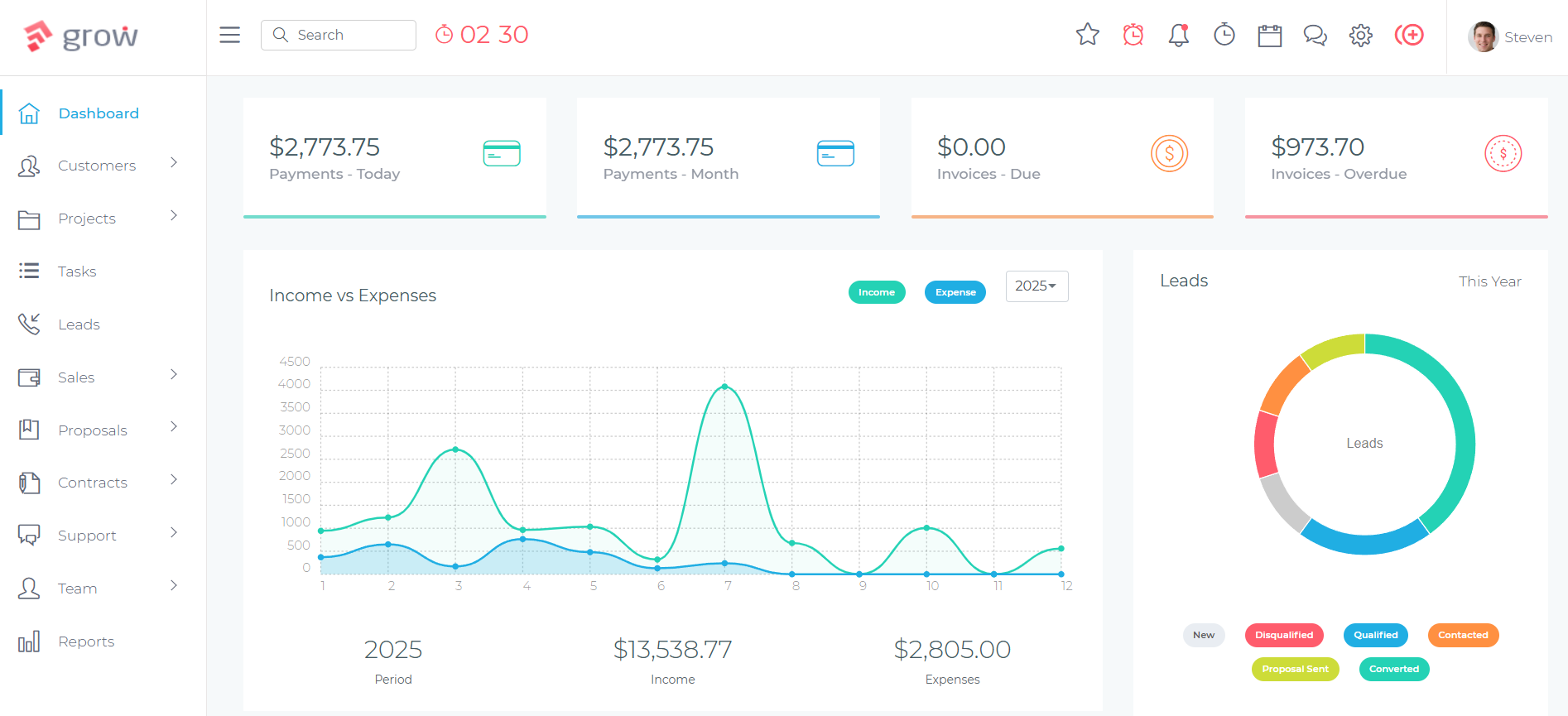
How Grow CRM Solves Remote Team CRM Challenges
User Roles and Permissions for Distributed Access
Grow CRM’s user management system allows administrators to assign specific roles to every team member, controlling exactly what each person can see and do within the platform. An admin can configure role permissions at a granular level — which modules a user can view, which records they can edit, and whether they have access to billing, reporting, or other sensitive areas. This means a remote contractor can be added to the platform to work on their assigned project tasks without gaining visibility into client billing details or other accounts they are not involved with.
For a virtual agency with a mix of full-time account managers, part-time project coordinators, and freelance specialists, this permission structure solves the data access problem that makes many teams hesitant to use a shared CRM in the first place.
Shared Client Records Across Time Zones
Every client record in Grow CRM serves as the single source of truth for that client relationship. Notes from calls, linked projects, invoicing history, signed contracts, submitted proposals, support ticket history, and file attachments all exist in one place. When a project manager in one time zone finishes their day and hands off to an account manager in another, the incoming team member opens the client record and immediately has full context — without needing a handover email or a recorded briefing.
This visibility benefit compounds over time. After several months, a client record in Grow CRM contains the complete relationship history: what was scoped, what was agreed, what was invoiced, what questions came in through the helpdesk, and what the project team delivered. Any new team member — whether they are joining permanently or working on a single project — can be onboarded to a client account in minutes by reading the record rather than sitting through a lengthy briefing.
Built-In Team Messaging
Grow CRM includes built-in instant messaging for team communication. For remote teams, this means client-related conversations can happen inside the same platform where client records, projects, and invoices live — keeping context together rather than fragmenting it across Slack, email, and separate project management tools. A team member can discuss a client issue, reference the relevant invoice, and assign a task in response, all without leaving the platform.
Client Portal for Self-Service Access
One of the friction points that compounds for remote service teams is client communication overhead. When clients need to find an invoice, check a project status, sign a contract, or submit a support request, each of these interactions generates an email to someone on the team — often the wrong person, often at the wrong time. Grow CRM’s client portal gives clients direct, branded, password-protected access to their own records: they can view and download their invoices, track project progress, access signed contracts, and submit support tickets independently. For a remote team operating across time zones, reducing this inbound email volume is a practical operational improvement, not just a nice-to-have feature.
Project Management Visible Across the Team
Grow CRM’s Projects module gives the entire team visibility into active projects, regardless of which team members are assigned to them. Kanban boards show task status at a glance. Milestones track progress against agreed deliverable dates. Files attached to a project are accessible to every authorised team member. When a deadline is approaching on a project managed by someone in a different time zone, the relevant team members can see it in the project view without requiring a status update email.
Time tracking is integrated directly — team members log billable hours against the projects they are working on, and those hours feed directly into invoice generation. For a distributed agency billing clients for time, this removes the manual step of consolidating timesheets from multiple team members before raising an invoice.
Security and Data Control for Distributed Teams
Data security is a heightened concern for remote teams: research shows that 45% of data breaches involve compromised credentials, and distributed workforces create more access points than office-based environments. Grow CRM’s self-hosted architecture gives you direct control over where your data lives and who can access it at the infrastructure level.
Rather than entrusting client data to a third-party SaaS vendor — who stores it on shared infrastructure alongside thousands of other businesses — you choose the hosting environment, configure server-level access controls, and manage your own backups and data retention policies. For businesses serving clients in GDPR-regulated markets, this control over data location and processing simplifies compliance significantly. You are not dependent on a SaaS vendor’s sub-processor agreements or their infrastructure decisions.
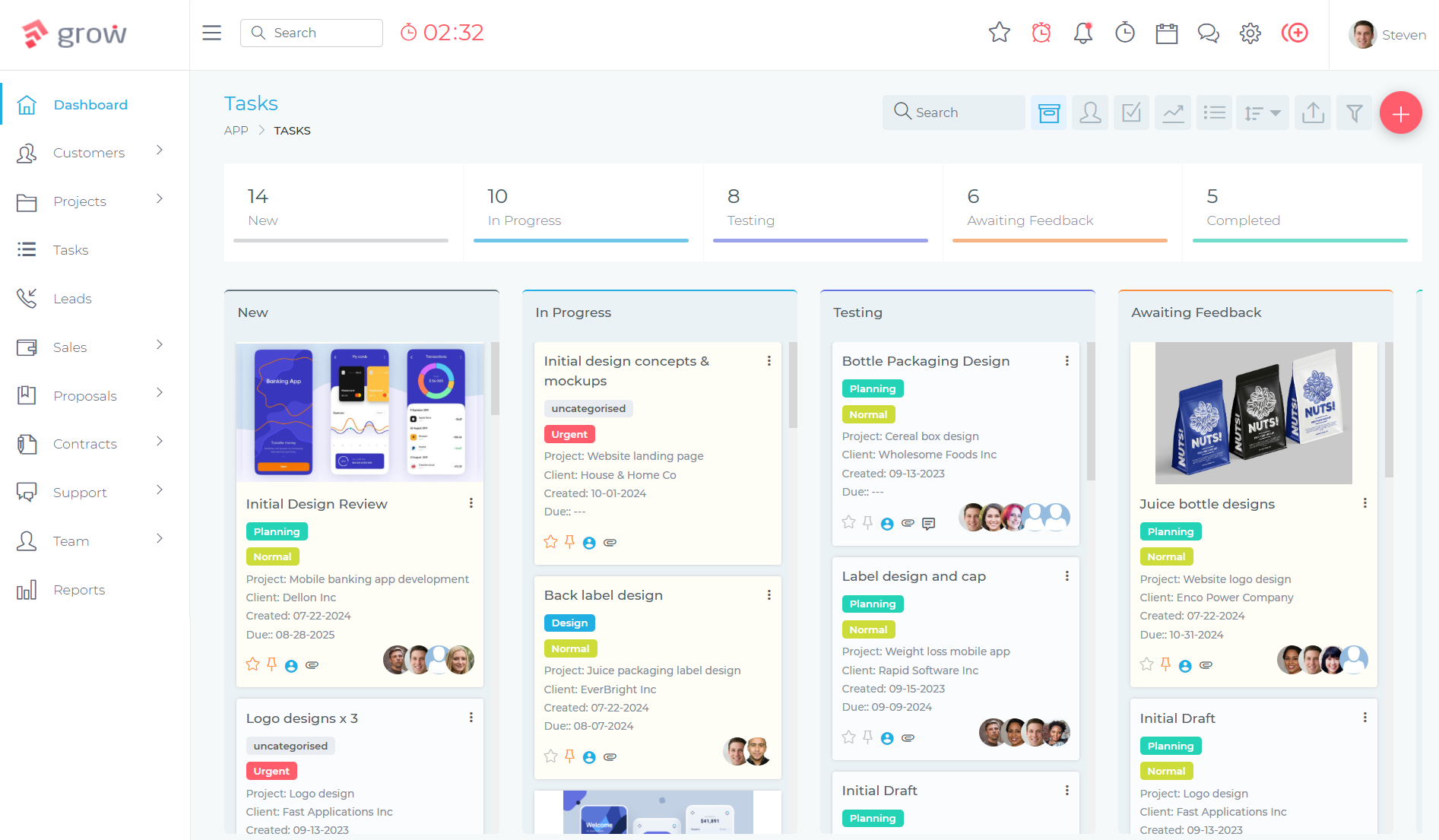
Setting Up Grow CRM for a Remote Team
Deploying Grow CRM for a distributed team involves three practical steps:
- Hosting setup — Grow CRM is installed on a standard web hosting server (shared hosting, VPS, or dedicated). The free installation service handles this setup at no extra charge, removing the technical barrier for non-technical business owners.
- User and role configuration — once installed, add each team member as a user and assign appropriate roles and permissions based on their responsibilities. Admins have full platform access; project staff access their assigned work; contractors see only their tasks.
- Client and project import — import existing client data from spreadsheets or export it from your current CRM. Grow CRM supports data import for clients, projects, and other records, making the transition from an existing tool manageable rather than disruptive.
The total setup time from purchase to a fully operational platform is typically a day or two for a team importing existing data, or a few hours for teams starting fresh. You can explore the live demo before purchasing to see the interface and confirm the fit with your team’s workflow.
CRM Comparison: Which Platforms Work Best for Remote Teams
The table below compares the features that matter most specifically for distributed team environments. This is not an exhaustive feature comparison — it focuses on the remote-work-specific requirements: access model, user pricing, permissions, shared records, and data control.
| Feature | Grow CRM | Salesforce Starter | HubSpot Starter | Pipedrive |
|---|---|---|---|---|
| Pricing model | $49 one-time, unlimited users | $25/user/month | $20/user/month | From $14/user/month |
| Browser-based access | Yes | Yes | Yes | Yes |
| Self-hosted option | Yes (full control) | No (cloud only) | No (cloud only) | No (cloud only) |
| Granular role permissions | Yes (configurable per user) | Yes (complex to configure) | Limited on Starter | Limited on lower tiers |
| Shared client records | Yes | Yes | Yes | Yes |
| Built-in project management | Yes (Kanban, milestones, tasks) | No (add-on required) | No | No |
| Built-in invoicing | Yes | No | Limited | No |
| Client portal | Yes (branded) | No | No | No |
| Team messaging | Yes (built-in) | Via Slack integration | Via Slack integration | No |
| Data ownership | Your server, full control | Salesforce infrastructure | HubSpot infrastructure | Pipedrive infrastructure |
| Time tracking | Yes (billable, per project) | No | No | Via add-on |
| Unlimited users | Yes | No | No | No |
For a remote service team that needs more than just a contact database — project tracking, invoicing, time tracking, team communication, and a client portal — the platforms that charge per user and do not include these modules require additional tool subscriptions on top of the CRM cost. Grow CRM includes all of it in the one-time purchase price. For further reading on which CRM features service businesses actually need, see our detailed guide: CRM Features Your Service Business Actually Needs.
When a SaaS CRM Makes Sense for Remote Teams
Grow CRM is not the right choice for every distributed team. Salesforce remains the stronger option for large enterprise remote sales teams with complex reporting requirements, Salesforce Einstein AI features, and existing Salesforce ecosystem integrations. HubSpot Professional and above has powerful marketing automation features that make it the better choice for remote teams whose work is centred on inbound lead generation and marketing nurture sequences rather than service delivery. Pipedrive is a well-designed pipeline-focused CRM for remote sales teams whose primary activity is moving deals through a funnel, rather than delivering ongoing service projects.
If your remote team is a service business — consulting, creative services, IT support, project delivery, field service — the platform features you most need (project tracking, invoicing, contracts, client portal, time tracking) are built into Grow CRM and absent from most per-user SaaS CRMs at equivalent price points. The combination of a one-time price and an all-in-one feature set makes it the default recommendation for remote service teams evaluating CRM options. For teams that are also managing subcontractors or independent contractors as part of their remote workforce, see our related guide: CRM for Subcontractors and Independent Contractors.
Frequently Asked Questions
What CRM is best for remote teams?
Grow CRM is the best CRM for remote service teams because it is browser-accessible from anywhere, supports unlimited users with granular role permissions, and charges a one-time $49 fee rather than a per-seat monthly subscription. This combination — unlimited users, shared client records, project and invoice management, and full data ownership on your own server — covers what distributed service teams actually need without the recurring cost that compounds with every new team member added.
Does Grow CRM work for fully distributed teams?
Yes. Grow CRM is hosted on a web server and accessed via any browser from any location in the world. There are no region restrictions, VPN requirements, or local installation dependencies. A team member in one country can access the same client records, project tasks, and invoicing tools as a colleague on the other side of the globe, in real time. Role-based permissions control what each user can see and edit without requiring separate accounts or platform instances.
How do I set user permissions in Grow CRM for a remote team?
Grow CRM’s admin settings allow you to create user accounts and assign roles that control access at a module level — which sections of the platform each user can view, create, edit, or delete. An administrator configures these permissions per user, so a contractor might have access only to their assigned project tasks, while an account manager sees all client records in their portfolio, and an admin has full platform access. This makes it straightforward to onboard external collaborators or part-time staff without exposing sensitive billing or client data they should not see.
Is self-hosted CRM secure for remote access?
Yes, provided the hosting environment is properly configured. A self-hosted CRM like Grow CRM runs over HTTPS on a standard web server, with the same security model as any web-based SaaS application. The key security advantage of self-hosting is that you control the server environment, access logs, data backup policies, and security configuration — rather than relying on a third-party vendor’s shared infrastructure. For remote teams, this means you decide which IP ranges can access the admin panel, how authentication is handled, and where data backups are stored.
How does a fully remote team manage shared client records in a CRM?
In Grow CRM, every client record is centralised and shared across the entire authorised team. All notes, project links, invoice history, contracts, and support tickets are stored against a single client profile that any permitted team member can access. When a team member finishes a client call, they add a note immediately. When a project milestone is completed, it is marked in the shared project record. This means any team member — in any time zone — can open a client profile and have full context without requiring a briefing from a colleague.
What is the biggest CRM challenge for remote teams?
The biggest CRM challenge for remote teams is maintaining shared visibility into client activity without the informal communication that office proximity provides. When team members are distributed across time zones, client updates, project progress, and billing status must exist inside a shared system rather than in individual email inboxes or local files. Per-user pricing compounds this challenge by discouraging teams from adding all necessary collaborators to the platform — leading to login sharing or incomplete records that undermine the value of having a CRM at all.
Can Grow CRM handle client management for a remote consulting firm?
Yes. Grow CRM covers the full consulting firm client lifecycle: capturing leads, generating proposals, sending contracts for e-signature, managing project delivery with task assignment and milestone tracking, logging billable hours against client projects, converting time entries into invoices, and giving clients portal access to their records. For a remote consulting firm with multiple consultants in different locations, Grow CRM’s unlimited-user model means every consultant has their own login and access to the clients and projects relevant to their work, without the per-user fees that make most enterprise CRMs expensive at team scale.
Does Grow CRM support multiple time zones for remote teams?
Yes. Grow CRM supports per-user timezone settings, so timestamps on notes, task deadlines, and calendar entries are displayed in each user’s local time zone. This means a task due at 9am for a client in New York appears at the correct local time for a team member managing it from Berlin or Sydney, without manual time zone conversion. The platform also supports 30 languages, making it suitable for multilingual remote teams serving clients in different countries.
How does Grow CRM compare to Salesforce for remote teams?
Grow CRM is better suited to remote service teams of up to 50 people, primarily because of its pricing model and all-in-one feature set. Salesforce charges $25/user/month on the Starter plan — a 10-person remote team pays $2,500 per year on CRM licensing alone, before onboarding fees or add-ons. Grow CRM costs $49 total for the same team. Salesforce has advantages for large enterprise teams requiring advanced forecasting, complex approval workflows, and deep ecosystem integrations, but these features are irrelevant to most service businesses managing clients and projects.
Conclusion
Remote and distributed teams do not need a different kind of CRM — they need the same capabilities as any service business, deployed in a way that actually supports how remote work functions. Browser-based access, shared client records, granular user permissions, and a pricing model that does not penalise team growth are the foundations of a CRM that works for distributed teams.
The per-user pricing models that dominate the mainstream CRM market are structurally misaligned with how remote teams operate. A distributed agency with ten people pays $9,000 over three years in Salesforce licensing, or $7,200 with HubSpot, for a CRM that does not include project management, invoicing, or a client portal. Grow CRM provides all of those capabilities for $49 once, with unlimited users, on a server you control.
For remote service businesses managing clients, projects, and billing across time zones, Grow CRM is the most cost-effective and feature-complete solution available. Take advantage of the free installation service to get up and running without server setup friction, or try the live demo to explore the platform before purchasing.
Sources & Citations
All citation links were verified at time of writing: May 25, 2026.