

Grow CRM is the better choice for most creative professionals. It delivers the same core workflow — proposals, contracts, invoicing, client portal, and project tracking — for a one-time payment of $49 with no monthly fees, no per-user charges, and complete data ownership on your own server. Dubsado is a strong platform with polished automation and scheduling tools, but its annual subscription ($335–$525/year, plus extra user fees after three users) makes it significantly more expensive to run over time. If cost and data ownership matter, Grow CRM wins. If deep conditional workflow automation is your primary need and you prefer a managed cloud service, Dubsado is worth considering.
What Creative Professionals Actually Need from a CRM
Creative professionals — photographers, graphic designers, event planners, life coaches, wedding planners, and virtual assistants — have a specific business workflow that most enterprise CRMs are not designed for. The creative client lifecycle is not a sales funnel; it is a project engagement cycle, and the tools needed to manage it reflect that.
A creative professional’s workflow typically follows this path: an enquiry arrives, a discovery conversation happens, a proposal is sent for approval, a contract is signed, a deposit invoice is raised, work begins, further invoices follow milestone by milestone, the project closes, and the client relationship continues. Dubsado was built specifically for this cycle. Grow CRM covers the same cycle and extends it significantly into project management, helpdesk support, and team collaboration.
The CRM features creative professionals actually use are:
- Proposals — professional, branded documents that present scope and pricing to prospective clients
- Contracts — legally sound agreements that clients sign before work begins
- Invoicing — deposit invoices, milestone invoices, and final invoices tied to specific projects
- Client portal — a branded, password-protected space where clients access invoices, sign documents, and communicate
- Project management — task lists, milestones, and file sharing for each active engagement
- Lead management — capturing and qualifying incoming enquiries before they become paying clients
- Workflow automation — automated follow-ups, reminders, and document triggers that reduce admin without manual effort
- Time tracking — logging billable hours for retainer clients or hourly projects
Both Grow CRM and Dubsado cover most of these needs. The differences come down to depth, pricing model, and where each platform is hosted.
Grow CRM: Self-Hosted All-in-One Platform for Creative Businesses
Grow CRM is a self-hosted, all-in-one business management platform built on Laravel and purchased once via CodeCanyon for a one-time payment of $49. There are no monthly fees, no annual renewal charges, and no per-user costs regardless of how many people use it. Once installed on your web hosting server, it is yours permanently with free lifetime updates included.
For creative professionals, Grow CRM covers the full client engagement workflow — from the first enquiry through to final invoice — in a single platform. Its modules include client management, project management, proposals, contracts, invoicing, time tracking, a helpdesk ticketing system, a client portal, lead capture, reporting, and built-in instant messaging for team communication. You can explore the full feature list in the release notes to see every module in detail.
Self-hosting means your client data — names, emails, contracts, payment histories — lives on your own server, not inside a third-party SaaS platform. For creative professionals who handle sensitive client information or work with clients in GDPR-regulated markets, this distinction matters considerably. You decide where the data is stored, who has access to it, and what happens to it. A SaaS platform holds that data on its own infrastructure, and if that platform raises prices, restricts features, or shuts down, you are dependent on their export tools to recover it.
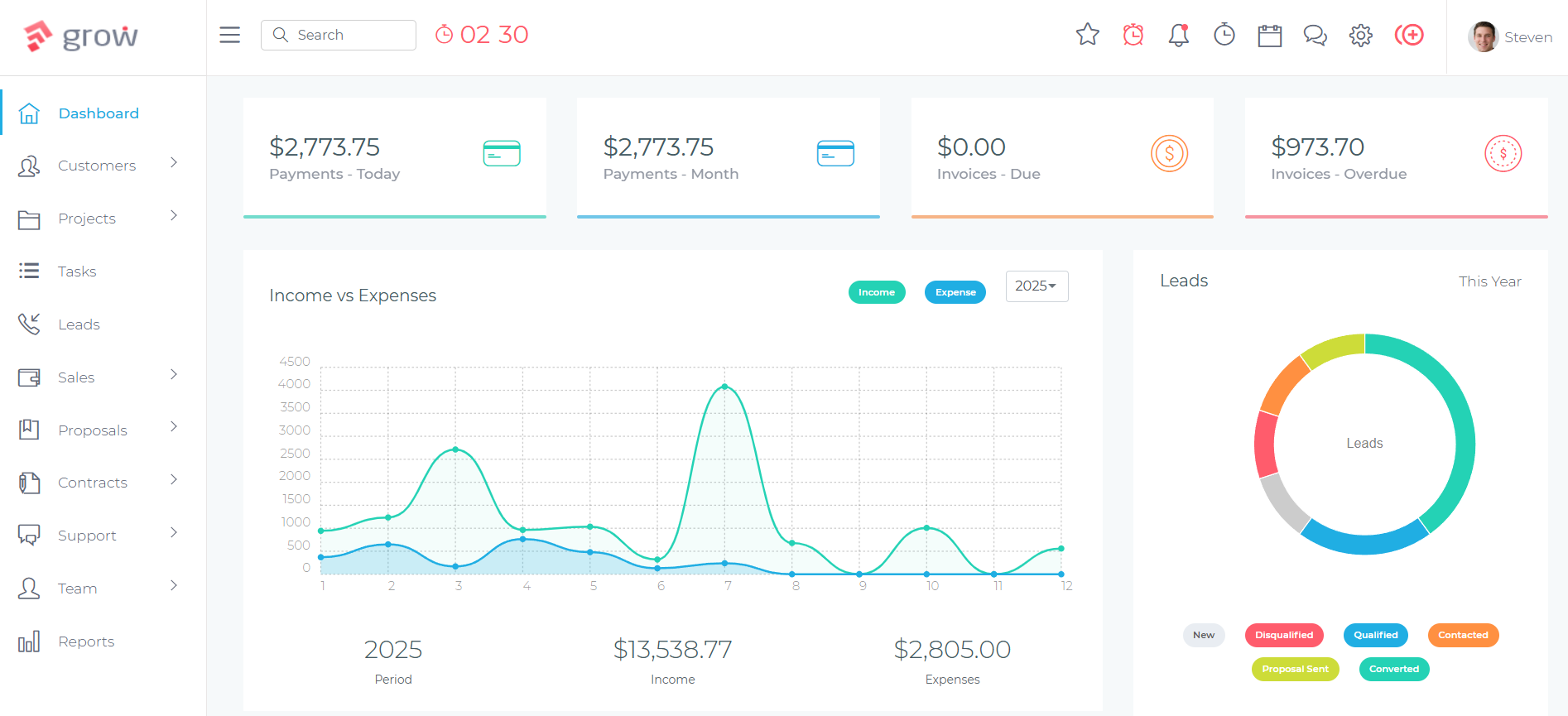
How Creative Professionals Use Grow CRM
The Creative Client Lifecycle in Grow CRM
Enquiry to Lead
New enquiries arrive via Grow CRM’s embedded lead capture forms or are added manually. Each lead record stores contact details, project type, estimated budget, and any notes from the initial conversation. A configurable pipeline moves leads from New Enquiry through to Proposal Sent and Won/Lost.
Proposal
When a lead is ready, a proposal is created from Grow CRM’s Proposals module using a saved template. The proposal outlines scope, deliverables, pricing, and terms. It is sent to the client via a link, where they can review and approve it directly. Approved proposals convert to client records automatically.
Contract
Once a proposal is approved, a contract is generated from a saved template, pre-populated with the client’s details and agreed scope. The client receives a link to review and sign. Signed contracts are stored against the client record permanently and are accessible via the client portal at any time.
Invoice and Payment
Deposit invoices are raised immediately on contract signing. Project invoices follow at milestones or on completion. Clients pay via integrated payment gateways — Stripe, PayPal, Mollie, Razorpay, Flutterwave, or Paystack. Automated reminders handle overdue invoices without manual follow-up.
Project Delivery
The active project lives in Grow CRM’s Projects module. Tasks represent individual deliverables — editing sessions, design rounds, coaching calls, event preparations. Milestones track progress. Files are attached directly to the project. Time tracking logs billable hours against the correct project, feeding directly into invoice generation at the end of the engagement.
Client Portal Access
Clients access a branded, password-protected portal throughout the engagement. They can view their active projects, download invoices and receipts, access signed contracts, and submit support requests — reducing the number of email threads and “can you resend that invoice?” messages your team handles.
Grow CRM Key Advantages for Creative Professionals
- One-time $49 purchase — no monthly fees, no per-user charges, no annual renewals
- Unlimited users — add photographers, second shooters, assistants, admin staff without the per-seat costs that make team growth expensive
- Self-hosted — complete data ownership; your client data stays on your server, not inside a third-party SaaS platform
- Free lifetime updates — every new feature released is included without additional payment
- Free installation service — for those who don’t want to handle server setup, Grow CRM’s free installation service handles the technical setup at no extra cost
- Multi-currency and multilingual — 30 languages and multiple payment gateways make it suitable for creative professionals working with international clients
- API access — connect to external tools or build custom integrations for studio-specific workflows
Dubsado: Purpose-Built CRM for Creative Entrepreneurs
Dubsado is a cloud-based client management platform built specifically for freelancers and creative service providers. It offers proposals, contracts, invoicing, client portals, automated workflows, forms, and scheduling — all designed around the kind of client engagement cycle that photographers, designers, coaches, and event planners actually run. You can learn more at dubsado.com.
Dubsado’s real strength is its workflow automation engine. On the Premier plan, you can build conditional automation sequences that trigger based on client actions — a contract signing automatically generates a deposit invoice, a form submission triggers a welcome email, a payment confirmation kicks off a project creation. For creative businesses with very consistent, repeatable client onboarding processes, this depth of automation saves significant administration time once it is set up.
Dubsado also has strong public proposals — visually polished proposal templates with embedded forms, e-signature, and payment capture in a single document — and a capable smart scheduling tool that manages your availability and lets clients book appointments directly from a branded booking page. These two features are native to Dubsado’s original design and reflect the platform’s creative professional focus.
Dubsado Pricing
Dubsado operates on an annual subscription model with two paid plans:
- Starter Plan: $335/year (approximately $28/month) — includes unlimited clients and projects, invoicing, contracts, forms, client portal, lead capture, and calendar connection; limited to 1 active lead capture form; no workflow automation, no scheduling, no bookkeeping integration
- Premier Plan: $525/year (approximately $44/month) — adds automated workflows, smart scheduling, public proposals, Zapier integration, QuickBooks bookkeeping integration, and unlimited lead capture forms
Beyond the base plan, Dubsado charges additional fees for users beyond the three included in each plan:
- 4–10 users: $25/month extra
- 11–20 users: $45/month extra
- 21–30 users: $60/month extra
There is no free plan — only a 21-day trial on the Premier plan. For a solo creative professional on the Starter plan, the three-year cost is $1,005. For a small team of four on the Premier plan (requiring the extra-user fee), the three-year cost exceeds $2,000.
What Dubsado Does Well
- Workflow automation depth — conditional multi-step automation sequences are Dubsado’s standout capability; no other CRM at this price tier offers the same level of automation control
- Polished public proposals — the proposal experience is visually impressive and designed specifically for creative client presentations
- Smart scheduling — built-in appointment booking with availability management and calendar sync
- Form builder — lead capture forms, questionnaires, and branded intake forms are polished and flexible
- Creative-professional UX — the interface is designed with the creative business workflow in mind, making it familiar to photographers, designers, and coaches from day one
- QuickBooks integration (Premier) — useful for creative businesses that manage bookkeeping separately
Dubsado Limitations
- Annual subscription with no lifetime option — the cost compounds every year regardless of whether new features are delivered
- Extra per-user fees — hiring a second photographer, a design assistant, or an admin support person immediately increases your monthly bill
- Cloud-only — your client data lives on Dubsado’s servers; no self-hosted option exists
- Limited project management depth — task lists and project tracking are basic compared to a dedicated project management module
- No helpdesk or support ticketing — client enquiries and post-project support requests must be managed outside the platform
- Workflow automation is complex to set up — the depth of automation that makes Dubsado powerful also creates a steep learning curve; many users report that their automations break or behave unexpectedly after platform updates
Grow CRM vs Dubsado: Feature-by-Feature Comparison
The table below compares both platforms across the features that matter most to creative professionals. Pricing reflects the current plans at time of writing.
| Feature | Grow CRM | Dubsado Starter | Dubsado Premier | Winner |
|---|---|---|---|---|
| Pricing model | $49 one-time | $335/year | $525/year | Grow CRM |
| User limit | Unlimited | 3 included, extra fees apply | 3 included, extra fees apply | Grow CRM |
| Hosting | Self-hosted (your server) | Cloud (Dubsado servers) | Cloud (Dubsado servers) | Grow CRM (data ownership) |
| Proposals | Yes | Limited | Yes (public proposals) | Dubsado Premier (more polished) |
| Contracts | Yes (e-signature) | Yes | Yes | Tie |
| Invoicing | Yes (recurring, milestone, deposit) | Yes | Yes | Tie |
| Client portal | Yes | Yes | Yes | Tie |
| Workflow automation | Basic scheduling/automation | No | Yes (conditional multi-step) | Dubsado Premier (deeper automation) |
| Smart scheduling | Calendar integration | No | Yes | Dubsado Premier |
| Lead management | Yes (pipeline, web forms) | Yes (1 lead form) | Yes (unlimited) | Grow CRM (full pipeline) |
| Project management | Yes (Kanban, milestones, files) | Basic tasks | Basic tasks | Grow CRM |
| Time tracking | Yes (billable hours, timesheets) | Yes | Yes | Tie |
| Helpdesk / support tickets | Yes | No | No | Grow CRM |
| Instant messaging (team chat) | Yes | No | No | Grow CRM |
| Payment gateways | Stripe, PayPal, Mollie, Razorpay, Flutterwave, Paystack, Tap | Stripe, PayPal, Square | Stripe, PayPal, Square | Grow CRM (more gateways) |
| Bookkeeping integration | No native integration | No | QuickBooks | Dubsado Premier |
| API access | Yes | No | Limited (Zapier only) | Grow CRM |
| Data ownership | Your server, full control | Dubsado servers | Dubsado servers | Grow CRM |
| Lifetime updates | Yes (free) | While subscribed | While subscribed | Grow CRM |
Pricing Comparison: The Long-Term Cost Difference
The pricing gap between Grow CRM and Dubsado is not a minor detail — it is the central reason most cost-conscious creative professionals ultimately choose Grow CRM. A one-time payment of $49 compares directly against an annual subscription that compounds every year for as long as you use the platform.
| Platform | Year 1 | Year 2 | Year 3 | 5-Year Total |
|---|---|---|---|---|
| Grow CRM (1 user or 10 users) | $49 | $0 | $0 | $49 |
| Dubsado Starter (solo) | $335 | $335 | $335 | $1,675 |
| Dubsado Premier (solo) | $525 | $525 | $525 | $2,625 |
| Dubsado Premier (4 users incl. extra user fee) | $825 | $825 | $825 | $4,125 |
Grow CRM pays for itself in approximately six weeks against even the cheapest Dubsado plan. Over five years, the difference between Grow CRM and Dubsado Premier for a solo creative professional exceeds $2,500. For a small team, the gap is larger still.
The Subscription Trap for Creative Businesses
Creative businesses operate on project-based revenue that can fluctuate seasonally. A $44/month CRM subscription becomes a fixed overhead you pay whether you are fully booked or between projects. A $49 one-time payment has no ongoing obligation. When work slows down, your CRM cost does not increase the pressure on your margins.
Who Should Choose Dubsado
Dubsado remains the right choice for creative professionals whose business operations centre on complex, conditional workflow automation. If your client onboarding involves precisely timed automated email sequences, conditional form triggers, and multi-step automation chains that execute without manual intervention, Dubsado Premier’s automation engine is genuinely more capable than Grow CRM’s current offering in this specific area. The platform was designed by and for creative entrepreneurs, and its UX reflects years of refinement around exactly that workflow.
Choose Dubsado if:
- Your entire onboarding and client communication process is heavily automated and you have already invested time in building those workflows
- Smart scheduling (clients booking sessions directly from a branded booking page) is central to how you manage appointments
- You use QuickBooks for bookkeeping and want native two-way sync
- You are a solo operator and the per-user pricing does not affect you
- You actively prefer a managed cloud service over running your own server
Who Should Choose Grow CRM
Grow CRM is the better fit for the majority of creative professionals — particularly those building or growing a team, those who are cost-conscious about subscription overhead, and those who prioritise data ownership. If you need a platform that covers proposals, contracts, invoicing, project tracking, and a client portal without paying an annual subscription fee that climbs as your team grows, Grow CRM delivers all of it for $49 once.
Choose Grow CRM if:
- You want a one-time purchase with no monthly or annual fees
- You have or expect to have a team of more than three people (Dubsado’s extra user fees make this expensive quickly)
- Data ownership matters — you want client contracts, invoices, and records on your own server
- You need deeper project management: Kanban boards, task assignment, milestone tracking, and file management per project
- You want a helpdesk system for post-project client support requests
- You work with international clients and need multiple payment gateways or multilingual support
- You want API access for custom integrations without being restricted to Zapier
For photographers building a two-person studio, designers managing a small team, or event planners who work with assistants and coordinators, Grow CRM’s unlimited-user model eliminates the cost spiral that makes Dubsado increasingly expensive as a business grows. You can try the live demo to explore the full platform before purchasing.
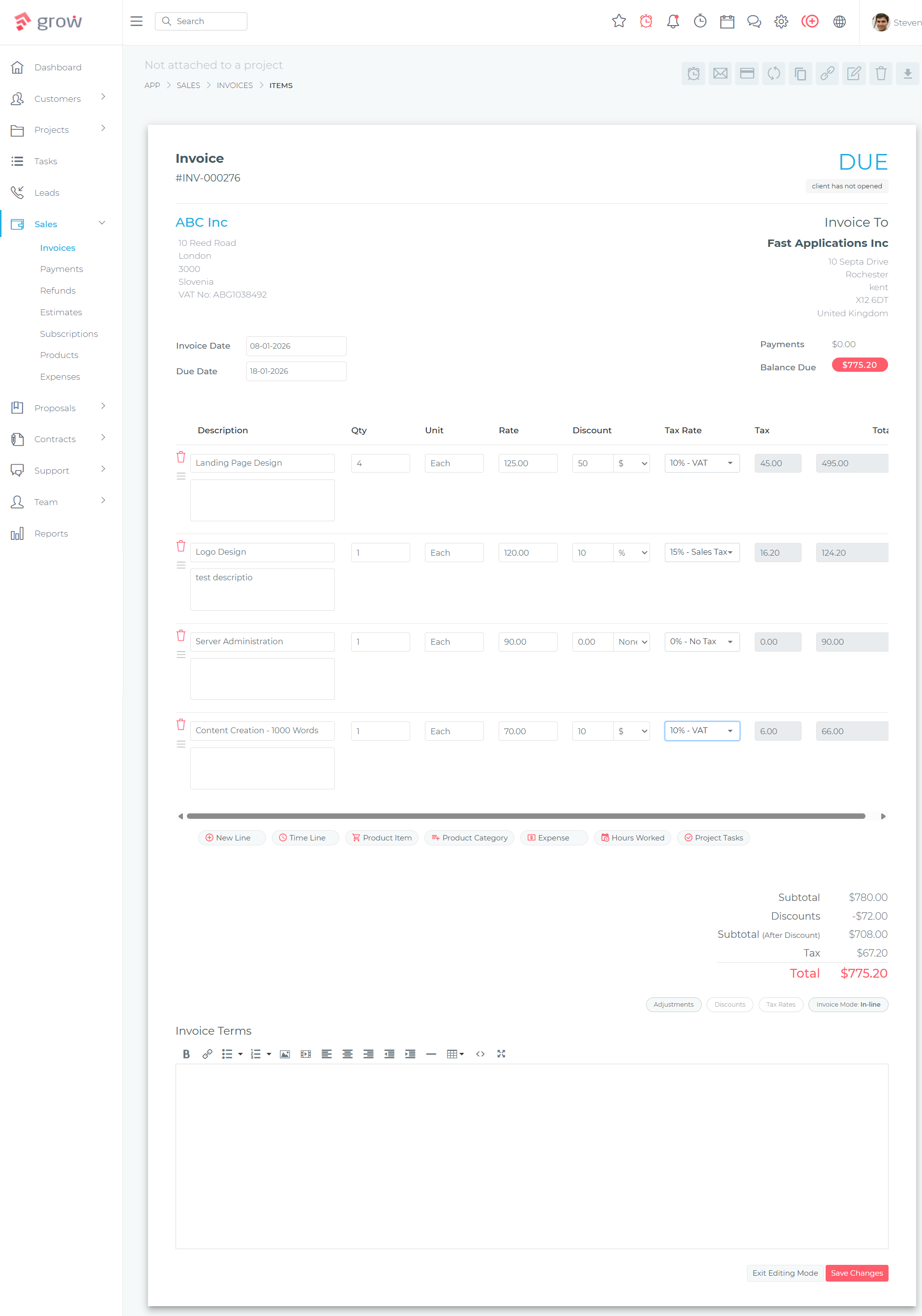
Related Reading
If you are a photographer or videographer evaluating your CRM options, see our detailed guide: Best CRM for Photographers and Videographers. For event planners and wedding coordinators, see: Best CRM for Event Planners.
Frequently Asked Questions
Is Grow CRM better than Dubsado?
Grow CRM is better than Dubsado for most creative professionals because it covers the same core workflow — proposals, contracts, invoicing, and a client portal — for a one-time payment of $49 with no per-user fees and full data ownership. Dubsado is better only if deep conditional workflow automation or smart appointment scheduling is your primary requirement and you are comfortable paying an annual subscription indefinitely.
Can Grow CRM replace Dubsado?
Yes, Grow CRM can replace Dubsado for the core client management workflow: proposals, e-signature contracts, deposit and milestone invoicing, a branded client portal, project tracking, and lead management. The one area where Dubsado Premier maintains an advantage is its conditional multi-step workflow automation engine. If your business relies heavily on complex automated sequences, evaluate both platforms before switching.
What automations does Dubsado have that Grow CRM doesn’t?
Dubsado Premier’s conditional workflow automation allows you to trigger sequences based on client actions — for example, a contract signing automatically generates an invoice and sends a welcome email, or a questionnaire submission starts a multi-step email sequence. Grow CRM supports invoice and proposal scheduling and automated reminders, but does not yet offer the same depth of conditional multi-step automation that Dubsado Premier provides.
Is Grow CRM suitable for photographers and designers?
Yes. Grow CRM handles the complete creative professional workflow: capturing enquiries via lead forms, sending branded proposals, collecting e-signed contracts, issuing deposit and final invoices, tracking project tasks and files, and giving clients access to a branded portal. Photographers, designers, event planners, life coaches, and virtual assistants all use Grow CRM’s workflow for managing client engagements from first contact through to final payment.
What is the difference between Grow CRM and Dubsado pricing?
Grow CRM is a one-time purchase of $49 with no monthly fees, no annual renewal, and no per-user charges regardless of team size. Dubsado charges $335/year for the Starter plan or $525/year for Premier, with extra monthly fees when your team exceeds three users. Over five years, a solo Dubsado Premier subscriber pays $2,625 — compared to $49 total for Grow CRM.
Does Dubsado have a free plan?
No. Dubsado does not offer a permanent free plan. It provides a 21-day free trial on the Premier plan (no credit card required), after which a paid subscription is required to continue using the platform. Grow CRM does not have a free plan either, but its one-time $49 purchase eliminates recurring costs entirely once you have purchased the licence.
Which is better for creative agencies — Grow CRM or Dubsado?
Grow CRM is better for creative agencies because it has no per-user fees. A design agency or photography studio with five team members would pay $525/year plus $25/month in extra user fees on Dubsado Premier — totalling over $800/year. Grow CRM covers the same team for a one-time $49 payment. Grow CRM also has deeper project management, a helpdesk module, and team messaging — features agencies need that Dubsado does not offer.
Does Grow CRM have e-signature for contracts?
Yes. Grow CRM includes a Contracts module where you can create contract templates, send them to clients for review, and collect electronic signatures. Signed contracts are stored against the client record and are accessible via the client portal. This covers the same contract signing workflow as Dubsado, with the addition of the contract being stored on your own self-hosted server rather than inside a cloud platform.
Is Dubsado worth the annual subscription fee?
Dubsado is worth the subscription fee specifically for creative professionals who make heavy use of its conditional workflow automation and smart scheduling features, and who are comfortable running their business on a third-party cloud platform. For the majority of photographers, designers, and coaches whose primary needs are proposals, contracts, invoicing, and a client portal, the feature set does not justify $335–$525 per year when a self-hosted alternative delivers the same core functionality for $49 once.
Conclusion
Both Grow CRM and Dubsado are capable platforms for creative professionals managing client engagements from proposal to final invoice. Dubsado’s conditional automation and polished scheduling features are genuine strengths that reflect its specific focus on the creative professional market. If your workflow depends on complex multi-step automations, Dubsado Premier is worth evaluating seriously.
For the majority of creative professionals — photographers growing a team, designers managing multiple concurrent projects, event planners billing milestone by milestone — Grow CRM delivers the same core workflow at a fraction of the long-term cost. A $49 one-time payment covers proposals, contracts, invoicing, project management, a client portal, time tracking, and a helpdesk, with no subscription ticking in the background and no per-user fees that penalise team growth. The savings over five years are not marginal; for a small team on Dubsado Premier, the difference exceeds $4,000.
Explore the full platform at the Grow CRM feature list, or take advantage of the free installation service to get started on your own hosting with no technical setup required.
Sources & Citations
All citation links were verified at time of writing: May 25, 2026.