

Grow CRM is the best CRM for independent auto repair shops and automotive businesses that need professional customer management, recurring service relationships, and clean parts-and-labour invoicing — without paying hundreds of dollars a month for automotive-specific shop management software. At a one-time cost of $49 with no monthly fees and no per-user charges, it provides the CRM, invoicing, project tracking, client portal, and contract features that keep customers coming back and revenue predictable. Purpose-built platforms such as Tekmetric, AutoLeap, and Shop-Ware offer automotive-specific tools like digital vehicle inspections and MOTOR labor guides, but they start at $179–$199 per month and scale upward quickly. For independent shops whose primary challenge is managing customer relationships and getting invoices paid — not complex diagnostics workflows — Grow CRM delivers more value per dollar than any dedicated automotive platform.
What Auto Repair Shops Actually Need from a CRM
Auto repair shops need a CRM that ties service records to individual vehicles and customers, triggers reminders automatically, and produces line-item invoices for parts and labour — not a generic sales pipeline tool built for enterprise sales teams. The most profitable auto repair businesses are built on repeat customers, and repeat customers come from systematic follow-up, not from hoping they remember to return.
According to research on auto repair CRM strategies, shops that implement systematic service reminders see 15–25% improvements in customer retention compared to shops relying on ad hoc outreach. The features that drive this outcome are straightforward:
- Customer records with vehicle history — a customer who owns three vehicles needs three service histories. The CRM must tie records to specific vehicles, not just contact names.
- Service reminder scheduling — automated follow-ups based on time elapsed since the last visit or approaching service milestones, sent without manual effort from the front desk.
- Declined/deferred service tracking — when a customer declines a recommended repair today, that recommendation should trigger a follow-up in 30–60 days. Most shops let this revenue walk out the door permanently.
- Parts and labour invoicing — line-item invoices showing parts, labour hours, and totals per service, attached to specific customer and vehicle records.
- Recurring billing for service agreements — for shops offering maintenance plans or fleet accounts, recurring invoices eliminate manual monthly billing.
- Client portal access — customers who can view their invoice history, pay online, and see service records are more engaged and more likely to return.
- Professional estimates — for larger jobs, a written estimate the customer can approve before work begins, converting automatically to an invoice on completion.
What most independent auto repair shops do not need — at least initially — are the automotive-specific modules found in dedicated shop management platforms: digital vehicle inspection (DVI) photo capture tools, MOTOR labor guide integrations for flat-rate billing, OEM parts catalog lookups, or technician clock-in boards. These are valuable for high-volume operations, but they add significant monthly cost and complexity that most independent shops are not ready to absorb.
Grow CRM: The Best CRM for Independent Auto Repair Shops
Grow CRM is a self-hosted, all-in-one business management platform purchased once for $49 via CodeCanyon — no monthly fees, no annual renewals, no per-user charges, and no pricing increases when you add staff. It runs on your own web server on the Laravel framework, giving you complete ownership of your customer data. Free lifetime updates are included, and a free installation service removes the technical barrier for shops without in-house IT support.
For auto repair shops, the most relevant Grow CRM modules are:
- Clients — unlimited customer records with custom fields, notes, tags, and activity logs. Custom fields capture vehicle make, model, year, VIN, and mileage per customer.
- Invoices — line-item invoices with parts and labour entries, line-item taxes, PDF generation, and automatic payment reminders. Customers pay via Stripe, PayPal, Mollie, Razorpay, Paystack, or bank transfer.
- Estimates — professional estimates that convert directly to invoices on customer approval, eliminating double entry and ensuring quoted and charged amounts match.
- Projects — track active jobs with tasks, milestones, and file attachments. Each service job gets its own project record tied to the customer.
- Contracts — maintenance plan agreements, fleet service contracts, and warranty documents stored against the customer record and accessible via the client portal.
- Recurring Invoices — automated monthly or annual billing for fleet maintenance accounts, prepaid service packages, or oil change subscription plans.
- Leads — capture and qualify new customer enquiries via web form, with pipeline tracking and conversion to client records.
- Reports — revenue summaries, outstanding invoices, payment histories, and client activity statistics to track shop performance without a separate tool.
You can review the complete Grow CRM feature list or try the live demo to see every module before purchasing.
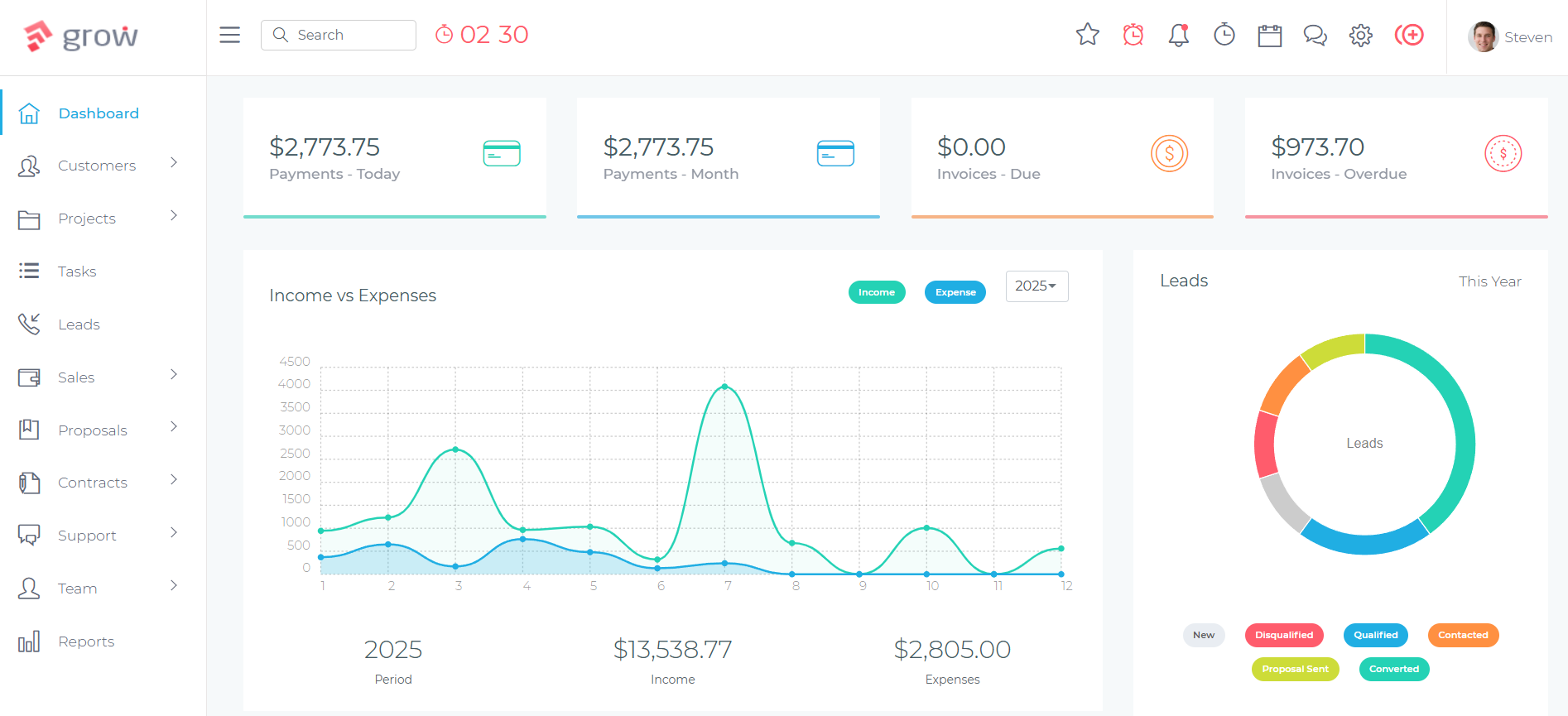
The Auto Repair Customer Lifecycle in Grow CRM
The most common reason auto repair shops lose customers is not price — it is the absence of systematic follow-up. Here is how the complete customer lifecycle operates inside Grow CRM:
New Customer Intake
When a new customer arrives, a client record is created in Grow CRM. Custom fields capture vehicle details: make, model, year, VIN, and current mileage. Tags group fleet accounts, loyalty plan members, or customers by vehicle type for future campaigns and segmented follow-up.
Estimate and Approval
For larger jobs, an estimate is raised from Grow CRM’s Estimates module. Line items list parts, labour hours, and additional costs. The customer receives the estimate via a link and approves it electronically. On approval, the estimate converts to an invoice with one click — no re-entry required.
Active Job Tracking
The service job becomes a project in Grow CRM, tied to the customer record. Tasks represent specific work items — oil change, brake inspection, tyre rotation. Notes and files attach directly to the project. Multiple jobs per customer run simultaneously without confusion across records.
Invoice and Payment
On job completion, the invoice is finalised with all parts and labour line items populated. The customer receives it via email with an online payment link. Automated follow-up reminders handle overdue invoices without staff intervention. Confirmed payments appear in the client’s portal immediately.
Service Reminders and Deferred Work Follow-Up
After the visit, the client record is updated with the service date and any declined recommendations. Scheduled notes or recurring invoice scheduling trigger follow-up contact at the appropriate interval — typically 3, 6, or 12 months depending on service type. Customers who declined recommended work receive a follow-up at the agreed date.
Client Portal Access
Each customer has access to a branded, password-protected portal where they can view invoice history, download receipts, access signed contracts, and submit support requests. Fleet account managers value the portal for reviewing all vehicle service records and invoice status without calling the shop.
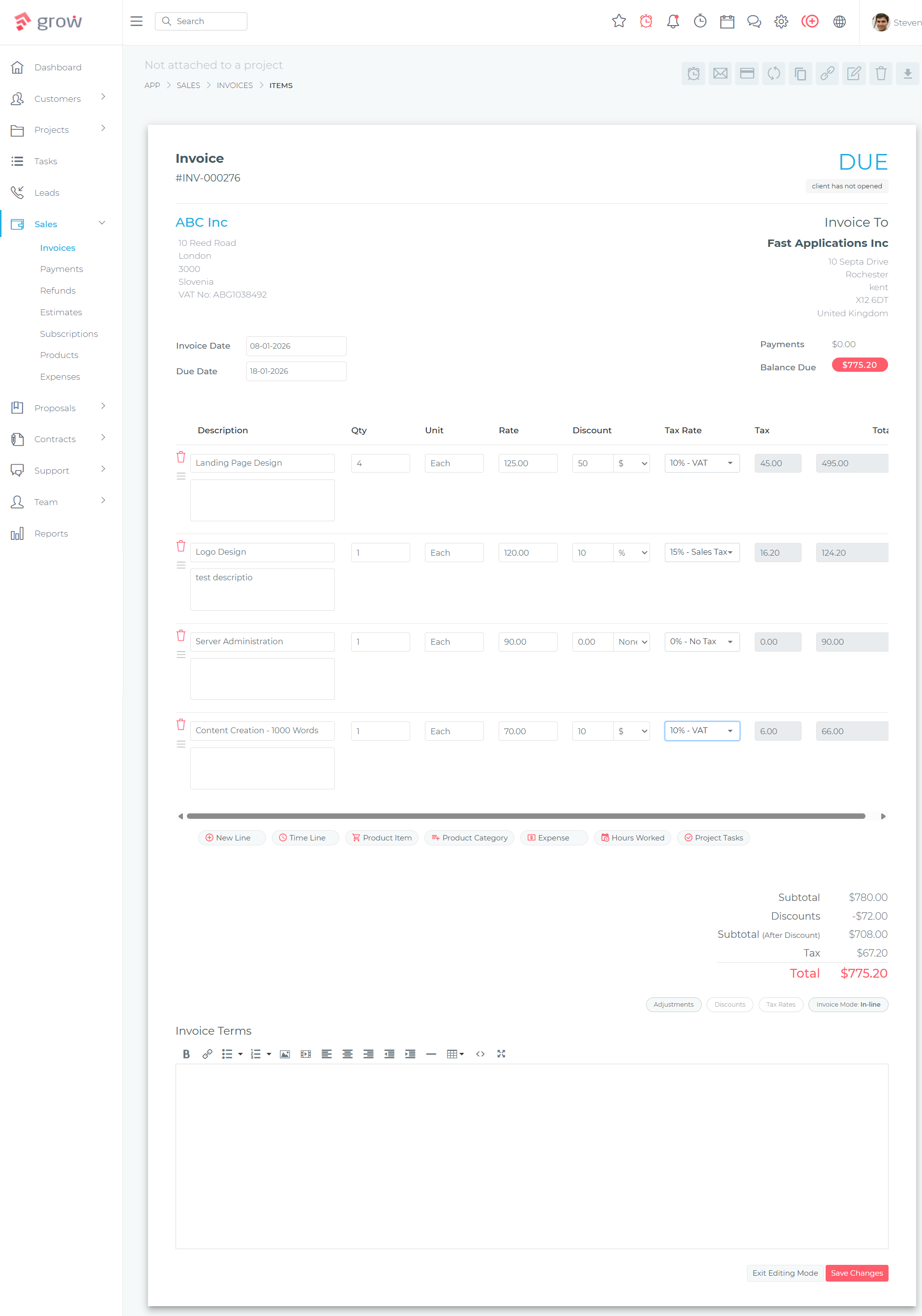
Parts and Labour Invoicing in Grow CRM
Grow CRM’s invoicing module handles the standard parts-and-labour billing structure that auto repair shops require. Each invoice can contain an unlimited number of line items — parts listed at cost or retail price, labour entries with hours and rate, and additional charges such as environmental fees or shop supplies. Line-item taxes apply independently to parts and labour where required by local tax rules.
When a customer queries an invoice, the service advisor can pull up the full line-item history in seconds. Every invoice is stored against the customer record permanently. PDF generation and email delivery mean customers receive professional, clearly itemised bills — a factor that reduces payment disputes and accelerates cash collection compared to handwritten or informal statements.
For shops operating fleet accounts, recurring invoices can be scheduled monthly for standing maintenance contracts. A fleet operator who brings in multiple vehicles monthly gets a consolidated invoice delivered automatically without staff intervention. Grow CRM lets you automate recurring invoices with customisable billing schedules and automatic due date settings per client account.
Fleet Account Management
Fleet managers appreciate Grow CRM’s ability to manage multiple vehicles under a single company record. Each vehicle can be tracked as a separate project with its own service history, notes, and invoices — all visible under the parent company client account. This removes the administrative complexity of managing a fleet account across disconnected invoice stacks and spreadsheets.
Auto Repair Shop Software and CRM Alternatives
Several purpose-built shop management platforms target auto repair businesses. According to an independent review of CRM systems for automotive repair businesses, the most commonly evaluated platforms fall into two categories: general field service tools and purpose-built shop management systems. Each offers automotive-specific features that go beyond what a general CRM provides — but at a significantly higher monthly cost. Here is what each platform offers and where the trade-offs lie.
Shop-Ware
Shop-Ware is a cloud-based shop management system with AI-assisted parts pricing, digital vehicle inspection tools, and two-way customer texting. Pricing starts at $251/month (annual billing) for the Startup plan, rising to $449/month for the Master tier and $899/month for the Ultimate+ plan. A CRM add-on with online scheduling is only included at the Ultimate+ tier or as a $249/month add-on — meaning shops that primarily need CRM functions still pay for the full automotive platform. Shop-Ware is strongest for high-volume established shops that justify the investment in advanced inspection reporting and automated parts pricing.
Tekmetric
Tekmetric is a modern cloud-based shop management platform with transparent per-shop pricing starting at $179/month (annual billing). Its Grow plan at $309/month adds a labour guide and time-clock tracking. The Scale plan at $409/month unlocks two-way texting and real-time technician boards. Tekmetric is highly regarded for its clean interface and responsive support. However, the monthly subscription is a significant ongoing commitment for shops in their first few years of operation.
AutoLeap
AutoLeap positions itself as an all-in-one auto repair shop solution with estimate workflows, customer communication, and digital vehicle inspections. Its Essentials plan starts at $179/month (annual), with the Pro plan at $309/month adding two-way texting and inventory management. The Elite plan at $409/month unlocks advanced inspections and Google Reviews integration. AutoLeap’s CRM and marketing features — automated service reminders, customer segmentation, and follow-up campaigns — are part of a Marketing Suite add-on rather than included in the base plans.
Mitchell1 Manager SE
Mitchell1 Manager SE is the legacy incumbent in auto repair shop management software, built on a hybrid architecture: the core system installs locally on shop computers with cloud-based reporting and remote access available as supplementary features. This desktop-first model limits remote and mobile access compared to fully cloud-based alternatives. Pricing is not publicly disclosed — third-party reseller estimates indicate bundled packages in the $300–$500/month range. Mitchell1 benefits from deep integration with the ProDemand repair information platform and OEM parts catalogs, making it strongest for technically complex repair environments.
Jobber
Jobber is a general field service management platform with plans starting at $29/month for a single user. While one of the more affordable options, Jobber has no vehicle-specific features — no VIN lookup, no labor guide integration, and no digital vehicle inspection capability. For a general home service business, Jobber is excellent value. For an auto repair shop where vehicle history, parts inventory, and technical service data are central to operations, the feature gap is significant. Similar trade-offs apply when comparing general CRM platforms against trade-specific software for contractors.
Feature Comparison: Grow CRM vs Auto Repair Shop Software
Grow CRM is not a replacement for a full shop management platform for established high-volume shops that rely on digital vehicle inspections and OEM labor guides daily. It is the better option for independent shops whose primary challenge is managing customer relationships, tracking service history, and producing professional invoices — without the overhead of a $200–$900 monthly subscription.
| Feature | Grow CRM | Shop-Ware | Tekmetric | AutoLeap | Mitchell1 |
|---|---|---|---|---|---|
| Pricing Model | $49 one-time | $251–$899/mo | $179–$409/mo | $179–$409/mo | ~$300–$500/mo |
| Monthly Fees | None | Yes | Yes | Yes | Yes |
| Self-Hosted / Data Ownership | Yes — your server | Cloud only | Cloud only | Cloud only | Hybrid (local install) |
| Customer Records & History | Full CRM module | Yes | Yes | Yes | Yes |
| Line-Item Invoicing (Parts & Labour) | Yes | Yes | Yes | Yes | Yes |
| Estimate → Invoice Conversion | Yes | Yes | Yes | Yes | Yes |
| Recurring Invoices | Yes | No | No | No | No |
| Client Portal | Yes | No | No | No | No |
| Contracts Module | Yes | No | No | No | No |
| Proposals Module | Yes | No | No | No | No |
| Project / Job Tracking | Full project module | Via repair orders | Via repair orders | Via repair orders | Via repair orders |
| Digital Vehicle Inspections (DVI) | No | Yes (core feature) | Yes | Yes | Yes (mobile) |
| MOTOR / OEM Labor Guide | No | Yes (Pro+) | Yes (Grow+) | No | Yes |
| Two-Way SMS / Texting | No | Yes (Pro+) | Yes (Scale) | Yes (Pro+) | Yes (bundle) |
| Payment Gateways | Stripe, PayPal, Mollie, Razorpay, Paystack, Flutterwave | Shop-Ware Payments | Tekmetric Payments | AIR Payments (+$99/mo) | Varies by setup |
When to Choose a Dedicated Shop Management Platform Instead
If your shop relies daily on digital vehicle inspection photo capture to justify recommended repairs, needs an OEM labor guide to bill flat-rate hours accurately, or requires live two-way SMS authorisations during the repair process, a dedicated platform like Tekmetric or AutoLeap is better suited to your workflow. Grow CRM covers customer management and invoicing; it does not replace a full shop management system for diagnostics-intensive, high-car-count operations.
Frequently Asked Questions: CRM for Auto Repair Shops
What is the best CRM for auto repair shops?
Grow CRM is the best CRM for independent auto repair shops that need professional customer management, line-item invoicing, service history tracking, and recurring billing without monthly software fees. Purpose-built platforms like Tekmetric or AutoLeap are better for shops that specifically require digital vehicle inspections and OEM labor guide integration as core daily operational tools.
Does Grow CRM handle vehicle history per customer?
Yes. Grow CRM’s Clients module supports custom fields where you can record vehicle details — make, model, year, VIN, and mileage — against each customer record. For customers with multiple vehicles, separate project records can be created for each vehicle under the same client account, keeping service histories distinct and easily accessible without mixing records.
How can an auto repair shop send service reminders using Grow CRM?
Service reminders are managed in Grow CRM by scheduling follow-up notes against a client record at a specific future date, or by using the recurring invoice module to generate periodic service prompts. For shops running oil change or maintenance subscription plans, recurring invoices automate outreach at the correct interval without requiring manual scheduling by front desk staff.
Can Grow CRM create line-item invoices for parts and labour?
Yes. Grow CRM’s invoicing module supports unlimited line items, allowing you to list individual parts at their prices and labour entries at an hourly rate separately on the same invoice. Line-item taxes can be applied independently to each line. Invoices are generated as PDFs, emailed directly to customers, and stored permanently against the client record for future reference.
How does Grow CRM handle fleet accounts for auto repair shops?
Fleet accounts are managed in Grow CRM by creating a company client record for the fleet operator, with individual vehicle jobs tracked as separate projects under that company. Recurring invoices handle monthly maintenance billing automatically. The client portal gives fleet managers direct access to all vehicle service records and invoice history without requiring staff to field status calls or resend documents.
What is the difference between Grow CRM and Tekmetric for auto repair?
Tekmetric is a purpose-built shop management platform with digital vehicle inspections, a MOTOR labor guide, repair order workflows, and two-way texting — priced at $179–$409/month. Grow CRM is a general business management platform covering customer records, invoicing, project tracking, contracts, and client portal access for a one-time $49 payment. Tekmetric suits technically complex high-volume operations; Grow CRM suits shops focused on customer relationships and billing efficiency.
Does Grow CRM require technical knowledge to set up?
No. Grow CRM’s free installation service handles the technical setup on your web hosting server within 24–48 hours of purchase. You provide your server credentials and purchase code; the Grow CRM team installs and configures the platform for you. Once live, the platform is managed through a straightforward browser-based interface with no coding knowledge required.
Can Grow CRM replace shop management software like Shop-Ware?
Grow CRM replaces the customer management, invoicing, and relationship components of shop management software. It does not replace the automotive-specific modules in Shop-Ware — digital vehicle inspections, AI parts pricing, MOTOR labor guides, and two-way SMS texting. For shops where customer management and billing are the primary needs, Grow CRM covers the essential workflow at a fraction of the monthly cost of a dedicated platform.
How does Grow CRM work for auto detailing and tyre centre businesses?
Grow CRM works well for auto detailing businesses and tyre centres because their workflows are simpler than mechanical repair shops — customer booking, estimate, invoice, and follow-up. The client portal, recurring invoice module for regular detailing clients, and professional estimate-to-invoice conversion cover the complete service cycle for both business types without the cost of automotive-specific shop management software.
Choosing the Right CRM for Your Auto Repair Business
The right CRM for an auto repair shop depends on where the business is in its growth journey. Independent shops in their first few years — or businesses where the primary challenge is keeping customers returning and invoices paid — benefit most from a simple, affordable platform that does customer management and billing well without committing to $200–$900 per month in shop management software subscriptions.
Grow CRM covers the essential CRM workflow for any service-based automotive business: customer records with vehicle history, line-item invoices for parts and labour, recurring billing for maintenance accounts, fleet management via the client portal, and professional estimates that convert to invoices. All of this runs on your own server for a single $49 payment with no ongoing costs and no per-user charges regardless of how many staff need access.
For shops that have grown to the point where digital vehicle inspections, OEM labor guides, and live two-way SMS with customers are daily operational requirements, platforms like Tekmetric or AutoLeap offer the automotive depth to justify their monthly costs. These platforms are not competing with Grow CRM on price — they serve a different operational profile. If managing customer relationships and billing professionally is your primary challenge, Grow CRM is the stronger choice. You can try the live demo to evaluate the interface before purchasing, or review how the same approach applies to field service businesses managing recurring client relationships.
Sources & Citations
All citation links were verified at time of writing: May 26, 2026.
- Shop-Ware Pricing Plans — shop-ware.com
- Tekmetric Pricing — tekmetric.com
- AutoLeap Pricing — autoleap.com
- Mitchell1 Manager SE — mitchell1.com
- Jobber Pricing — getjobber.com
- CRM Strategies for Auto Repair Shops — autorepairshopsoftware.com
- Top CRM Systems for Automotive Repair — elementdma.com
- Grow CRM Feature Changelog — growcrm.io
- Grow CRM Free Installation Service — growcrm.io
- Grow CRM Frequently Asked Questions — growcrm.io
- Grow CRM on CodeCanyon — codecanyon.net
