

Per-user CRM pricing punishes small businesses for growing. Every time a service business hires a new team member, their CRM subscription automatically costs more — whether the new hire uses the platform heavily or occasionally. At Salesforce and HubSpot mid-tier pricing, a team of 10 pays $1,000 per month or more just for CRM access. Per-user models originated in enterprise sales environments where each seat generates measurable pipeline revenue — a logic that does not apply to most small service businesses. Flat-fee alternatives like Grow CRM, purchased once for $49 with no per-user charges and unlimited team members, eliminate the scaling penalty entirely and give every staff member access without the ongoing cost burden.
How Per-User CRM Pricing Works
Per-user CRM pricing charges a fixed monthly fee for every person who needs access to the system. A five-person business pays five times the per-user rate. A growing business that adds three new hires sees its CRM bill increase automatically — often before those new employees have contributed a single dollar of revenue toward the additional software cost.
The model originated in enterprise software licensing, where CRM seats are associated with individual salespeople generating trackable pipeline and closed revenue. In that context, the per-user cost is justified: each seat is expected to produce multiples of its licence cost in sales. For a service business — a landscaping company, an IT support firm, a design studio, or a trade contractor — the logic breaks down. A technician, project manager, or office administrator accessing the CRM to update client notes or pull an invoice is not generating a measurable return on their licence cost. They simply need access to do their job.
The three mechanisms through which per-user pricing creates problems for small teams are:
- Automatic cost escalation with headcount — every new hire that needs CRM access is an additional line item in the software budget, immediately and permanently
- Feature gating at each tier — the features most businesses actually need (automation, custom reporting, e-signature) are reserved for Professional and Enterprise tiers costing $90–$175 per user per month
- Seat minimums at higher tiers — HubSpot Sales Hub Professional requires a minimum of 5 seats ($500/month floor) regardless of team size; Enterprise requires 10 seats ($1,500/month floor)
The Real Cost of Per-User CRM: What You Pay as Your Team Grows
The following table uses verified pricing from each platform’s official pricing page. Salesforce Sales Cloud Pro Suite and HubSpot Sales Hub Professional are the mid-tier plans on each platform. Pipedrive Growth is the mid-tier equivalent. All subscription figures are billed annually.
| Team Size | Salesforce Pro Suite $100/user/mo (annual) |
HubSpot Professional $100/seat/mo — 5-seat min. |
Pipedrive Growth $39/user/mo (annual) |
Grow CRM $49 one-time payment |
|---|---|---|---|---|
| 3 users | $300/mo $3,600/yr |
$500/mo* $6,000/yr + $1,500 onboarding Y1 |
$117/mo $1,404/yr |
$0/mo ongoing $49 total, ever |
| 5 users | $500/mo $6,000/yr |
$500/mo $6,000/yr + $1,500 onboarding Y1 |
$195/mo $2,340/yr |
$0/mo ongoing $49 total, ever |
| 10 users | $1,000/mo $12,000/yr |
$1,000/mo $12,000/yr + $1,500 onboarding Y1 |
$390/mo $4,680/yr |
$0/mo ongoing $49 total, ever |
| 20 users | $2,000/mo $24,000/yr |
$2,000/mo $24,000/yr + $3,500 onboarding Y1 |
$780/mo $9,360/yr |
$0/mo ongoing $49 total, ever |
| 50 users | $5,000/mo $60,000/yr |
$5,000/mo $60,000/yr + $3,500 onboarding Y1 |
$1,950/mo $23,400/yr |
$0/mo ongoing $49 total, ever |
*HubSpot Professional 5-seat minimum: a 3-person team still pays for 5 seats. Sources: Salesforce pricing, HubSpot pricing, Pipedrive pricing. Verified May 2026.
HubSpot’s Hidden Seat Minimum
According to HubSpot’s own Sales Hub pricing documentation, Sales Hub Professional requires a minimum of 5 seats regardless of actual team size. A 3-person business pays for 5 seats — $500/month. In Year 1, the mandatory $1,500 onboarding fee is added on top. A 3-person team using HubSpot Professional in their first year pays $7,500 before making a single sales call. Enterprise tier requires 10 seats minimum plus $3,500 onboarding — a $21,500 minimum Year 1 commitment.
How Per-User Pricing Causes CRM Under-Adoption
Per-user pricing does not just increase software costs — it actively undermines how teams use their CRM. The predictable behaviours that per-user licensing drives in small businesses are consistently cited in CRM reviews across G2 and Capterra as primary causes of CRM adoption failure. The most damaging patterns are:
Shared Login Credentials
When a service business has five team members but only pays for two or three CRM seats to reduce costs, employees share login credentials. This breaks audit trails, makes it impossible to track who updated a client record, introduces security vulnerabilities, and creates data quality problems that accumulate silently until they cause a client-facing error.
Deliberately Excluding Team Members
A business owner who knows that adding a new hire to the CRM costs an extra $100/month may decide to keep that employee out of the system entirely. The result is a two-tier information structure: some team members work from live CRM data while others operate from informal notes, spreadsheets, or memory. Client information becomes fragmented and inconsistent within weeks of the new hire starting.
Avoiding Necessary Tier Upgrades
The features most businesses actually need — workflow automation, custom reporting, e-signature documents — are typically locked behind higher tiers. A team that needs these features but cannot justify the per-user cost increase works around the limitation manually, defeating the purpose of having a CRM at all. On Salesforce Sales Cloud, advanced sales engagement sequences require the Unlimited tier at $350/user/month. On HubSpot Sales Hub, email sequences are not available until Professional at $100/seat/month. On Pipedrive, Smart Docs e-signature requires the Premium tier at $49/user/month.
Cancellation During Slow Periods
Small service businesses often experience seasonal revenue fluctuations. A shop considering cancelling their CRM subscription during an off-season to reduce costs destroys continuity — historical data, workflows, and configurations built up over months are at risk of fragmentation or loss when subscriptions are interrupted. This concern does not exist with a one-time payment model where the software is owned outright.
Feature Gating: The Per-User Cost Beyond the Seat Count
Beyond raw seat counts, per-user platforms systematically gate their most useful features behind higher tiers. A business that chooses a lower tier to manage per-user costs often finds that the features they actually need are excluded. More significantly, Salesforce, HubSpot, and Pipedrive are CRM-only platforms. Invoicing, project management, time tracking, and a client portal require separate tools — each with their own per-user fees on top.
| Feature | Salesforce | HubSpot | Pipedrive | Grow CRM |
|---|---|---|---|---|
| Email automation / sequences | Unlimited tier ($350/user) | Professional ($100/seat) | Growth ($39/user) | Included ($49 once) |
| Custom reporting | Pro Suite ($100/user) | Professional ($100/seat) | Growth ($39/user) | Included ($49 once) |
| E-signature / contracts | Not included (separate product) | Professional ($100/seat) | Premium ($49/user) | Included ($49 once) |
| Invoicing | Not included | Not included (add-on) | Not included | Included ($49 once) |
| Project management | Not included | Not included | Not included | Included ($49 once) |
| Client portal | Not included | Not included | Not included | Included ($49 once) |
| Time tracking | Not included | Not included | Not included | Included ($49 once) |
| Help desk / support tickets | Separate product (Service Cloud) | Separate product (Service Hub) | Not included | Included ($49 once) |
| Proposals | Not included | Not included | Not included | Included ($49 once) |
The total technology cost for a small team trying to replicate Grow CRM’s full feature set using separate SaaS tools — a CRM, an invoicing tool, a project management platform, a contract signing tool, and a time tracker — routinely reaches $400–$1,500 per month for a 10-person team. That stack also creates data silos, duplicate client records, and integration maintenance overhead that consumes staff time.
Grow CRM: Unlimited Users, All Features, One Payment
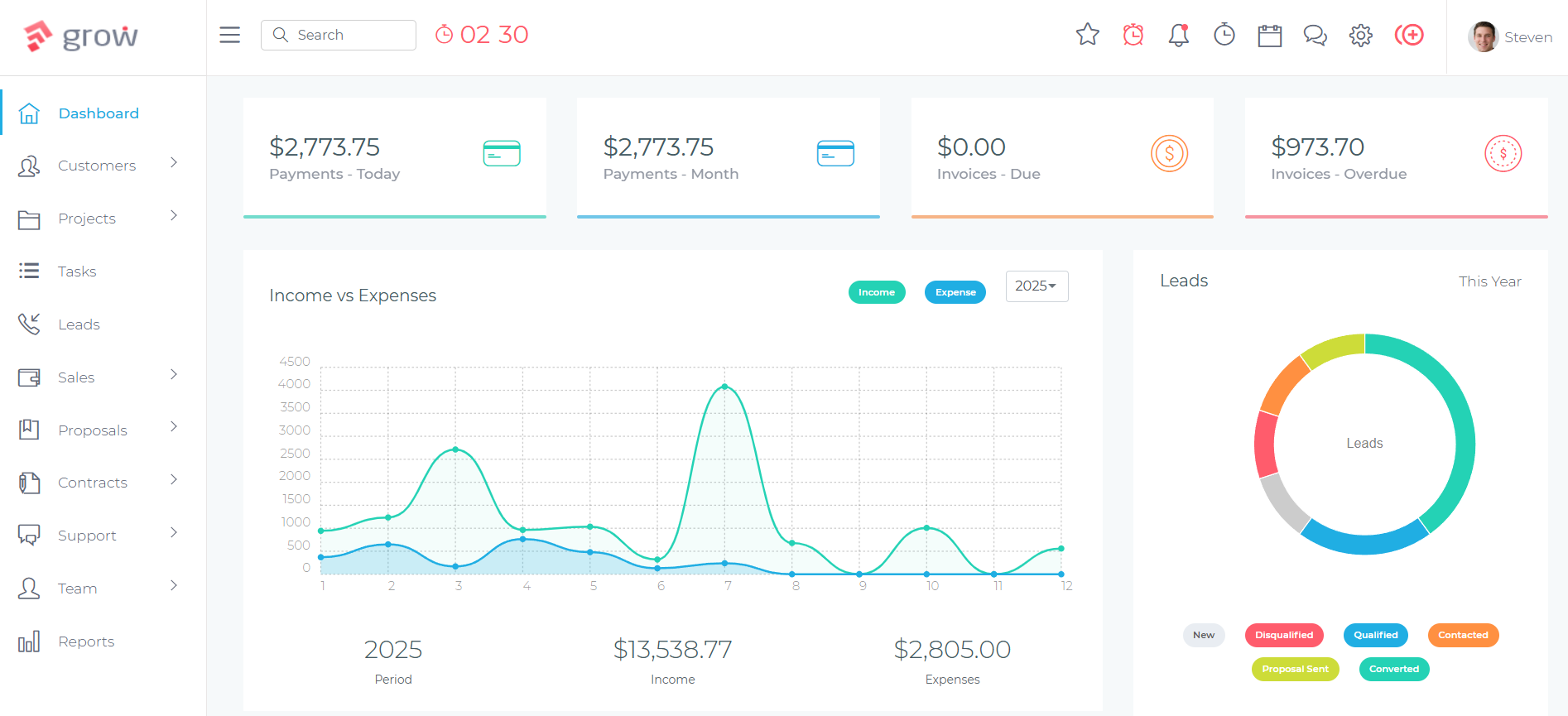
Grow CRM is a self-hosted, all-in-one business management platform available for a one-time purchase of $49 via CodeCanyon. Once installed on your own web hosting server, there are no monthly fees, no per-user charges, and no subscription renewals — ever. The platform runs on the Laravel PHP framework, and free lifetime updates are included with every purchase.
Every Grow CRM feature is included in the single $49 payment. There are no tiers, no add-ons, and no gated modules. The complete feature set includes:
- CRM — unlimited clients, custom fields, activity logs, tags, bulk actions, client import
- Project Management — tasks, milestones, Kanban view, file attachments, project templates, progress tracking
- Invoicing and Estimates — line-item invoices, PDF generation, automated payment reminders, recurring billing
- Proposals — branded proposals with client approval workflow and automatic project creation on acceptance
- Contracts — contract templates with e-signature collection and in-person signing
- Time Tracking — project timers, manual entry, billable hour reports, billed status tracking
- Client Portal — branded, password-protected client access to invoices, projects, and contracts
- Lead Management — web form capture, lead pipeline, conversion to client records
- Help Desk — support ticketing system and knowledge base
- Reports — revenue, invoice, project, timesheet, and client statistics with export functionality
- Instant Messaging — team communication within the platform
- Payment Gateways — Stripe, PayPal, Mollie, Razorpay, Paystack, Flutterwave, Tap, and offline / bank transfer
- 30 languages — localisation for international teams
- API access — for custom integrations
The full feature set is documented in the Grow CRM release notes and changelog. You can also try the live demo to explore every module before purchasing.
What Unlimited Users Means for a Growing Team
For a service business with 5 team members today and plans to reach 15 within two years, the financial difference between per-user and flat-fee pricing compounds sharply. At Salesforce Pro Suite pricing, growing from 5 to 15 users moves the CRM bill from $500/month to $1,500/month — automatically. At Pipedrive Growth pricing, the same growth moves the bill from $195/month to $585/month. With Grow CRM, the bill remains $0/month regardless of whether the team grows from 5 to 50.
Self-hosting also means your client data — contacts, invoices, contracts, project history — lives on your own server. There is no risk of a SaaS platform raising prices, restricting features, or shutting down and leaving you dependent on export tools. The free installation service handles the technical setup on your web hosting, typically within 24–48 hours of purchase, with no coding knowledge required.
When Per-User CRM Pricing Makes Sense
Per-user pricing is not inherently unreasonable — it is misapplied for most small service businesses. The model makes genuine sense when:
- Each CRM user directly generates revenue — a pure sales team where each person manages their own pipeline and the CRM’s value is measured by deals closed per seat
- You need enterprise compliance and security infrastructure — Salesforce Enterprise and Unlimited tiers offer sandbox environments, advanced audit logs, and custom permission hierarchies that are relevant for regulated industries but irrelevant for a 10-person service firm
- You have a deep Salesforce or HubSpot ecosystem dependency — AppExchange integrations and CRM-native marketing workflows only justify the cost when the surrounding infrastructure already runs on those platforms
- You are evaluating tools before committing — using a lower per-user tier to test a platform before investing in migration and setup is a legitimate short-term use of the model
For a service business with a team of 2–50 people whose primary needs are managing client relationships, tracking projects, and sending invoices, none of these conditions apply. The per-user model in this context is a cost structure that scales against the business, not with it. If you have specific questions about how Grow CRM handles licensing and usage, the Grow CRM frequently asked questions covers common queries about the one-time payment model in detail.
Frequently Asked Questions: Per-User CRM Pricing
Why is CRM pricing per user?
Per-user CRM pricing originated in enterprise software sales, where each licence is associated with a salesperson generating measurable pipeline revenue. The model makes sense when every seat directly produces income. For most small service businesses — where multiple team members need CRM access to serve clients rather than close sales — per-user pricing is a misaligned cost structure that scales against the business every time headcount grows.
How much does Salesforce cost for 10 users?
Salesforce Sales Cloud Pro Suite costs $100 per user per month billed annually. For 10 users, that is $1,000 per month or $12,000 per year. The Starter Suite at $25/user/month costs $250/month for 10 users but lacks custom reporting, advanced automation, and full API access. The Enterprise tier at $175/user/month costs $1,750/month for 10 users and requires a locked annual contract.
What CRMs offer unlimited users?
Grow CRM offers unlimited users for a one-time payment of $49 — no monthly fees, no per-user charges, and no stated user limits. Some platforms like Zoho CRM offer unlimited user tiers at fixed monthly prices, but these are still subscription-based with ongoing costs. Grow CRM is one of the few platforms where unlimited users is permanent rather than a subscription tier you continue paying for month after month.
Is per-user CRM pricing worth it for small teams?
Per-user CRM pricing is rarely worth it for small service teams. A 5-person team paying $39–$100/user/month on a mid-tier plan spends $2,340–$6,000 annually just for CRM access — before accounting for the additional tools needed for invoicing, project management, and contracts that per-user platforms exclude. Flat-fee platforms that include all features for unlimited users are almost always more economical for teams under 50 people.
How do businesses avoid per-user CRM fees?
Businesses avoid per-user CRM fees by choosing flat-fee or one-time payment platforms. Grow CRM ($49 one-time) is the most comprehensive option — it includes CRM, project management, invoicing, proposals, contracts, time tracking, and a client portal for unlimited users with no ongoing fees. Self-hosted deployment means you own the software and the data permanently, with no pricing changes dependent on a vendor’s commercial decisions.
Does HubSpot really have a seat minimum on higher plans?
Yes. HubSpot Sales Hub Professional requires a minimum of 5 seats regardless of team size. A 2-person business on Professional still pays for 5 seats — $500/month. Enterprise tier requires a minimum of 10 seats ($1,500/month floor). In Year 1, Professional adds a mandatory $1,500 onboarding fee and Enterprise adds $3,500. These minimums make HubSpot’s mid-tier and enterprise plans significantly more expensive than their per-seat headline rates suggest.
What happens to your CRM data if you stop paying a subscription?
When a subscription CRM is cancelled, access to the platform is typically cut off immediately or within a short grace period. Most platforms allow data export before cancellation, but the quality and completeness of exports varies — relationships between records, activity histories, and file attachments may not export cleanly. With a self-hosted CRM like Grow CRM, the data lives on your own server and remains fully accessible regardless of any commercial relationship with the software vendor.
Is Grow CRM really unlimited users for $49?
Yes. Grow CRM is a self-hosted platform purchased once via CodeCanyon for $49. There are no per-user fees, no seat limits in the licensing, and no monthly charges of any kind. Free lifetime updates are included with the purchase. The platform runs on your own web hosting server, giving you full ownership of the software and all data. The free installation service sets it up on your server at no additional cost.
The Case Against Scaling Your CRM Bill With Your Team
Per-user CRM pricing made sense when CRM software was expensive to develop, host, and maintain. That era is over. The model has persisted because it is extraordinarily profitable for software vendors — not because it serves their customers’ interests. Every new hire a service business makes is, under per-user pricing, an automatic revenue increase for the CRM vendor. That is not a business model aligned with helping small businesses grow.
For a service business with a team of 3–50 people, per-user pricing is a tax on growth. Every new hire, every seasonal addition, every new department that needs CRM access comes with a line item that did not exist before. The businesses that feel this most are exactly those who least want to think about it: growing service teams focused on clients rather than software cost management.
Grow CRM’s one-time $49 payment structure eliminates that dynamic entirely. The full platform — CRM, invoicing, projects, contracts, proposals, time tracking, client portal, and team messaging — is available to every member of your team from day one, with no per-seat costs and no feature-gating. For context on how this plays out in a direct platform comparison, the Grow CRM vs Dubsado comparison illustrates how one-time pricing holds up against subscription alternatives on a feature-by-feature basis.
Sources & Citations
All citation links were verified at time of writing: May 26, 2026.
- Salesforce Sales Cloud Pricing — salesforce.com
- HubSpot Sales Hub Pricing — hubspot.com
- Pipedrive Pricing — pipedrive.com
- HubSpot Sales Hub Pricing Guide — blog.hubspot.com
- CRM Software Reviews — G2
- Grow CRM Feature Changelog — growcrm.io
- Grow CRM Free Installation Service — growcrm.io
- Grow CRM Frequently Asked Questions — growcrm.io
- Grow CRM on CodeCanyon — codecanyon.net
