

Client Portal Features: What Businesses Actually Need from Client-Facing Access
The client portal features that service businesses actually need are invoice viewing and payment, project progress visibility, document access, and basic communication — not complex collaboration platforms built for enterprise teams. Most service businesses do not need a standalone client portal tool at all. They need client-facing access built directly into the same platform their team uses for project management, invoicing, and contracts — which is exactly what Grow CRM provides at a one-time $49 payment, with no monthly subscription required.
Client portals have become one of the most oversold software categories for service businesses. The concept is straightforward and genuinely useful: give clients a dedicated login where they can view their invoices, track project progress, approve proposals, and access shared files — without needing to email you for a status update. The execution, however, ranges from a simple integrated module inside a CRM to a full-featured standalone SaaS platform costing hundreds of dollars per month. For most service businesses, the simpler integrated option delivers everything that matters.
Why Client Portal Access Matters for Service Businesses
Client portal access reduces the volume of status-update emails and calls a service business receives by giving clients direct visibility into their project, invoices, and documents. For service businesses managing 10 or more active clients simultaneously, the time saved from eliminating manual updates is measurable — and the professionalism of offering a branded, self-service client experience improves perceived value.
The practical value of a client portal breaks down into three categories:
Operational Time Savings
Without a portal, clients typically contact you to ask: “Can you resend the invoice?”, “What’s the status of my project?”, “Has the contract been signed?”, or “Where is the file we agreed on?” Each of these queries takes time to respond to — and across 20 clients, these interruptions accumulate into hours per week of low-value admin. A portal answers all of them without any involvement from your team.
Faster Payment Collection
Clients who can access their invoices directly through a portal, see payment due dates clearly, and click a payment link in one session pay faster than clients who receive invoices via email and have to search their inbox to find them. Reducing friction in the payment process has a measurable impact on average days to payment — one of the most important cash flow variables for service businesses.
Professionalism and Client Confidence
Offering clients a branded, organised portal with their complete project and billing history signals a level of operational maturity that builds trust. For service businesses competing against larger agencies or firms, this professionalism is a genuine differentiator that reinforces the value of the engagement.
Must-Have Client Portal Features for Service Businesses
The must-have client portal features for service businesses are invoice access and payment, project status visibility, document and contract access, and proposal or estimate approval. These four capabilities cover the overwhelming majority of what clients actually use a portal for — and any platform that delivers them well is sufficient for most service businesses.
1. Invoice Access and Payment
Clients must be able to view all of their invoices — paid and outstanding — with clear status indicators, due dates, and a direct payment link. This single feature eliminates the most common type of client enquiry. Payment gateway integration (Stripe, PayPal, or similar) should be direct, not redirecting through a separate third-party service.
2. Project Status and Progress Visibility
Clients should be able to see the current status of their project, active milestones, task completion progress, and any pending items requiring their input. This replaces the weekly status update email with a self-service check that clients can perform whenever they want.
3. Document and File Access
Contracts, signed agreements, project briefs, design files, or any other client-specific documents should be accessible from the portal. Clients should be able to download what belongs to them without asking you to re-send it.
4. Proposal and Estimate Approval
For businesses that send proposals or estimates before starting work, the ability for clients to approve these directly from the portal — rather than via a separate email thread — speeds up the approval cycle and creates a clear digital record of acceptance.
5. Secure, Client-Specific Login
Each client sees only their own data. Access must be isolated by account — a client viewing their portal should see nothing about other clients.
Nice-to-Have Features (And What You Can Skip)
Beyond the core five, many standalone client portal tools offer additional features that are genuinely useful in some contexts but unnecessary for most service businesses. Understanding which category each falls into prevents paying for features you will not use.
| Feature | Value for Service Businesses | Verdict |
|---|---|---|
| Invoice access and payment | Eliminates most client billing queries | Must-have |
| Project status visibility | Replaces status update emails | Must-have |
| Document/contract access | Avoids repeated file re-sending | Must-have |
| Proposal/estimate approval | Speeds up project start cycle | Must-have |
| Secure client login | Data isolation is non-negotiable | Must-have |
| Client messaging / chat | Useful for keeping communication structured | Nice to have |
| Subscription management | Useful for businesses with retainer billing | Nice to have |
| White-label / custom domain | Improves brand experience | Nice to have |
| Client-created tasks | Useful in collaborative project models | Nice to have |
| Embedded forms / intakes | Useful for onboarding-heavy workflows | Context-dependent |
| Built-in e-signature | Valuable for contract-first businesses | Context-dependent |
| Advanced analytics / dashboards | Rarely used by clients in practice | Skip unless critical |
| Native mobile app for clients | Web portals work on mobile; app rarely needed | Skip unless critical |
How Grow CRM’s Client Portal Works
Grow CRM’s client portal is a built-in module that gives each client their own secure login to access the data relevant to them — invoices, projects, proposals, estimates, files, and helpdesk tickets — without requiring any additional software, subscription, or integration. It is part of the core platform included in the one-time $49 purchase.
Here is how the portal operates in practice for a service business:
Invoice and Payment Access
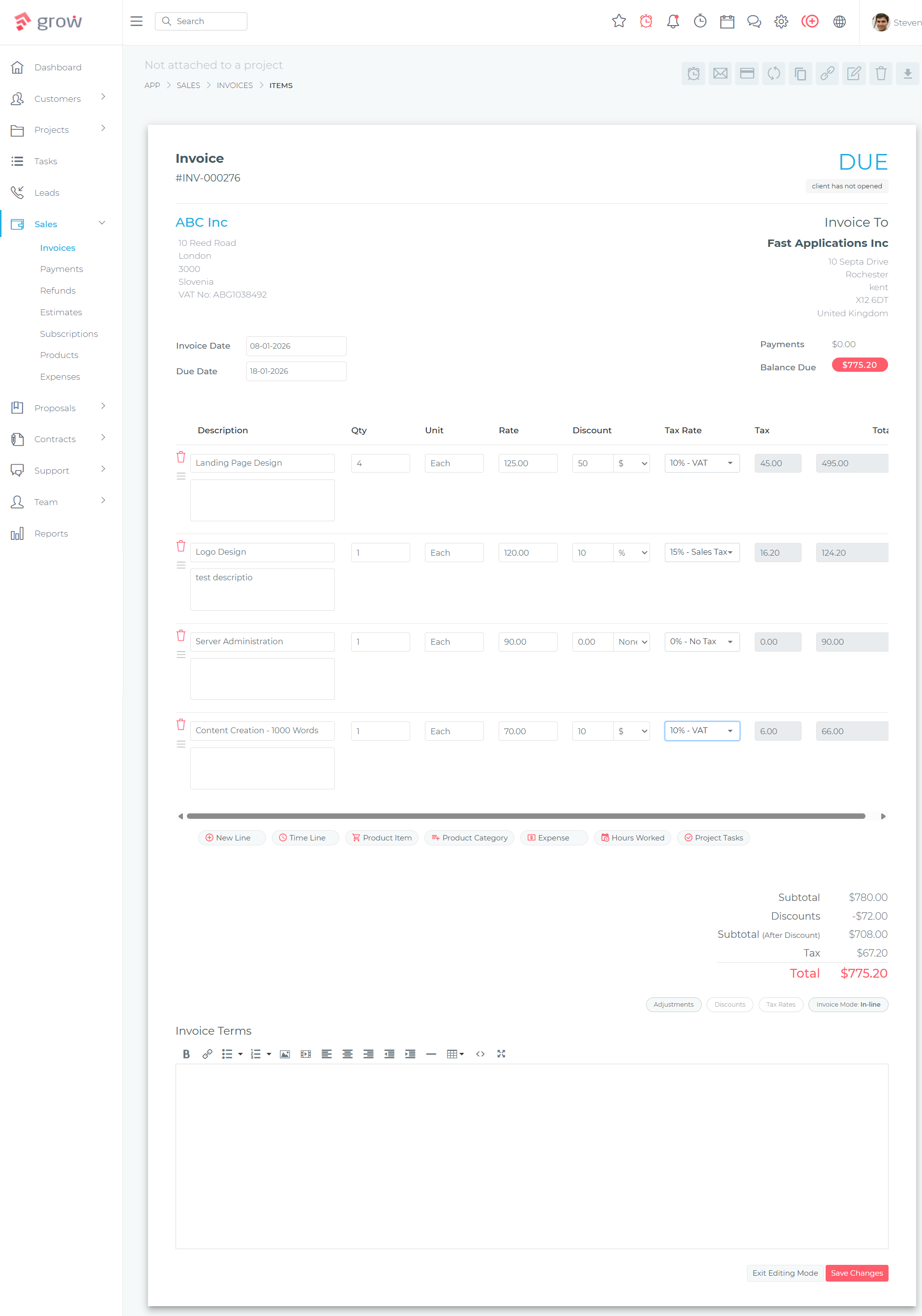
Clients log into their portal and see all of their invoices — current, pending, and historical — with payment status clearly indicated. Outstanding invoices include a direct payment link, allowing clients to pay via Stripe, PayPal, Mollie, Razorpay, or other supported payment gateways without any additional steps. This eliminates the most common client billing query and reduces average payment time.
Project and Task Visibility
Active projects assigned to a client are visible in their portal, showing status, milestones, and task progress. For service businesses running project-based engagements — design firms, consultants, agencies, contractors — this gives clients the transparency they want without requiring you to send manual updates. Clients can also create and manage tasks assigned to them within active projects, supporting collaborative workflows where client input is part of the delivery process.
Proposal and Estimate Approval
When a proposal or estimate is sent to a client, they can review and approve it directly from their portal. This creates a clear digital record of approval that feeds into the contract and project workflow. Combined with sending proposals directly from within the CRM, the full approval cycle stays in one system.
Contract Access and Signing
Contracts sent to clients are available in their portal. Grow CRM supports in-person contract signing as well as digital approval, making the portal the central place where clients access and execute agreements. Signed contracts remain in the client record permanently.
Helpdesk Ticket Submission
Clients can submit support tickets through the portal, which route directly into Grow CRM’s helpdesk module. This keeps service requests structured and trackable rather than buried in email inboxes — a practical improvement for any business providing ongoing client support.
The Case Against Standalone Client Portal Tools
Standalone client portal tools — platforms whose sole purpose is providing client-facing access — create a data synchronisation problem that negates much of their value. When your project management, invoicing, and client communication happen in one system but clients access a separate portal, data must be moved between them — either manually or via integration. Both routes introduce friction, errors, and maintenance overhead that defeat the purpose of having a portal at all.
The cleaner model is a single platform where your team and your clients access the same underlying data through different views. Your team sees the full operational picture; clients see the portion relevant to them. Grow CRM is built this way: the client portal is not a separate product bolted on — it is a client-facing view of the same CRM data your team works with.
This integration principle also applies to the total cost picture. A service business running a separate CRM, a separate invoicing tool, and a separate client portal is paying three subscriptions for three tools that overlap and require manual data coordination. The case for consolidation is clear — and the analysis is laid out in detail in this guide to all-in-one business management software for service companies.
Comparing Standalone Client Portal Tools
Standalone client portal platforms exist for businesses whose primary workflow need is client-facing access rather than full CRM or project management. Understanding their pricing and scope helps clarify when an integrated solution like Grow CRM is the stronger choice.
Copilot (formerly Portal)
Copilot is a client portal platform designed for service businesses and agencies. It provides a white-label branded portal where clients can access documents, invoices, messages, and forms. Pricing starts at $59/month for the Starter plan, rising to $189/month for Professional and $499/month for Advanced. Copilot is a cloud-based SaaS product with no self-hosted option.
Copilot’s strength is its polished, white-label client experience — it is purpose-built to look and feel like a branded client hub rather than an incidental feature. The limitation is that it is a portal only: your team still needs a separate CRM, project management tool, and invoicing system to manage the actual work. The portal presents data from those other tools rather than replacing them.
ManyRequests
ManyRequests is a client portal platform originally built for productised service businesses — agencies selling packaged services at fixed prices. According to ManyRequests pricing, the Core plan starts at $59/month and the Pro plan at $99/month, both with additional per-seat charges. The platform includes design proofing, billing, client messaging, time tracking, and reporting — useful for agencies with high request volumes.
ManyRequests is well-matched to agencies running service packages with defined scopes and repeating client requests. For general service businesses with mixed project types, its structure is less flexible than an integrated CRM-based portal.
SuiteDash
SuiteDash is an all-in-one business management platform that includes a client portal alongside CRM, project management, invoicing, and automation tools. According to SuiteDash’s pricing page, plans range from $19/month (Start) to $49/month (Thrive) to $99/month (Pinnacle). The platform is cloud-based and does not offer self-hosting.
SuiteDash covers similar functional territory to Grow CRM and is a credible option for businesses that prefer SaaS over self-hosted. The ongoing monthly cost is the key distinction: SuiteDash’s Thrive plan at $49/month costs more in a single year than Grow CRM’s entire lifetime licence. Over three years, the difference exceeds $1,700 for the same functionality — without the data ownership and control that self-hosting provides.
Clinked
Clinked is a collaboration and client portal platform targeting professional services firms — accountants, lawyers, consultants — with significant document sharing and compliance requirements. According to Clinked’s pricing page, the Standard plan starts at $239/month for 100 members and the Premium plan is $479/month for 250 members. These price points reflect Clinked’s positioning as an enterprise-grade document management platform rather than a general-purpose service business tool.
Clinked’s compliance features — EU/US data centre choice, audit trails, and virtual data room capabilities — are relevant for highly regulated industries. For most service businesses, the cost and complexity is well beyond what is needed for client invoice access, project visibility, and document sharing.
Comparison: Grow CRM vs Standalone Client Portal Tools
| Platform | Price | Self-hosted | Built-in CRM | Built-in Invoicing | Contract Mgmt | Project Mgmt | Client Portal |
|---|---|---|---|---|---|---|---|
| Grow CRM | $49 one-time | Yes | Yes | Yes | Yes | Yes | Yes |
| Copilot | $59–$499/mo | No | No | Basic | No | No | Yes |
| ManyRequests | $59–$99/mo+ | No | Basic | Yes | No | Limited | Yes |
| SuiteDash | $19–$99/mo | No | Yes | Yes | Limited | Yes | Yes |
| Clinked | $239–$479/mo | No | No | No | No | No | Yes |
What Clients Actually Use a Portal For
Understanding actual client portal usage patterns matters because it determines which features to prioritise — and which to ignore. In practice, the vast majority of client portal interactions fall into just a few categories.
The most common client portal actions for service businesses are:
- Viewing and paying invoices — by far the most frequent action; clients check their billing status and settle outstanding amounts
- Checking project status — clients want to know where things stand without interrupting the team
- Downloading documents — contracts, signed proposals, deliverables, reference files
- Approving estimates or proposals — reviewing and formally accepting work scope
- Submitting a support request — raising a question or issue through a structured channel
Features like real-time chat, advanced analytics, and native mobile apps generate far less usage relative to their development complexity and the cost they add to platforms that offer them. Building a client experience around the five core actions above — and having those actions tied directly to the same data your team uses — is a better investment than paying for a polished standalone portal that duplicates your existing system’s data.
This also connects to broader questions around which tools your business actually needs. The analysis of which CRM features service businesses actually need covers the same principle — prioritise what drives client outcomes, not what looks impressive in a demo.
Client Adoption: Getting Clients to Actually Use the Portal
The most common reason a client portal fails to deliver value is not a technology problem — it is an adoption problem. If clients do not know the portal exists, do not understand how to use it, or are not nudged toward it as the default channel for billing and project queries, they will continue to contact you by email and phone.
The most effective practices for driving client portal adoption:
- Set expectations at onboarding: Introduce the portal during the initial client onboarding call; walk through where they can find invoices, project status, and documents
- Link to it in every invoice email: When sending invoice notifications, include the portal link alongside the payment link so clients build the habit of using it
- Redirect email queries to the portal: When clients email questions that the portal answers, respond with the answer and a pointer to where they can find it next time — most clients will adopt the self-service route after one or two redirects
- Keep the portal current: An outdated portal with stale information erodes trust; ensure project status and documents are kept up to date
Keeping client data accurate and centralised — and understanding how client self-service fits into broader relationship management — is part of a wider case for self-hosted platforms where you control the data that clients access and trust.
Frequently Asked Questions
What features should a client portal have?
A client portal for a service business must have invoice access with payment functionality, project status visibility, document and contract access, and proposal or estimate approval. These four capabilities address the overwhelming majority of client queries and portal usage. Additional features like messaging, subscription management, and white-label branding are useful but not essential for most service businesses.
Does Grow CRM have a client portal?
Yes. Grow CRM includes a built-in client portal that gives each client a secure login to view their invoices, projects, estimates, contracts, and files. Clients can approve proposals, submit helpdesk tickets, and make payments via integrated gateways — all within the same platform your team uses for internal operations. The client portal is included in Grow CRM’s one-time $49 payment with no add-on cost.
What can clients do in Grow CRM’s portal?
Clients with Grow CRM portal access can view and pay invoices, track project status and milestones, review and approve estimates and proposals, access contracts and files, create tasks within their active projects, and submit support helpdesk tickets. Each client sees only the data associated with their own account — no other client’s information is visible.
How do you give clients access to invoices and projects?
In Grow CRM, client portal access is set up at the account level. Each client receives login credentials for their portal where they can view all invoices, projects, and documents associated with their account. There is no separate tool to configure or integrate — the portal is part of the same platform where you create invoices, manage projects, and store contracts.
What is the best client portal software for small businesses?
For small service businesses, the best client portal is one built into the same platform used for CRM, invoicing, and project management — not a standalone tool. Grow CRM’s integrated client portal delivers invoice access, project visibility, proposal approval, and document access at a one-time $49 cost. Standalone alternatives like Copilot, ManyRequests, and SuiteDash charge $19–$499/month and require separate tools for the CRM and invoicing functions.
Do I need a standalone client portal tool or is a built-in portal sufficient?
For most service businesses, a built-in portal is sufficient and structurally superior. Standalone portals create data synchronisation problems between your internal tools and the client-facing view. An integrated portal, like the one in Grow CRM, gives clients a real-time view of the same data your team works with — no synchronisation required, no additional subscription, and no data gap between what you see and what clients see.
Is Grow CRM’s client portal white-labelled?
Grow CRM is self-hosted on your own server, which means the platform runs under your own domain. The client-facing experience reflects your business rather than Grow CRM’s brand. As a self-hosted Laravel application, the portal can be further customised with your branding and domain configuration, giving you full control over the client experience without relying on a vendor’s white-labelling tier.
How does a client portal improve payment collection?
A client portal improves payment collection by reducing the friction between receiving an invoice and paying it. Clients who can log in, view all outstanding invoices, and click a direct payment link in one session pay faster than those who receive invoices by email and have to locate them later. Grow CRM’s portal displays invoices with payment links connected to Stripe, PayPal, and other integrated gateways.
Can clients approve proposals and sign contracts in Grow CRM?
Yes. Clients can review and approve proposals and estimates directly from their Grow CRM portal. Contracts can be signed digitally through the platform or in person — both methods store the signed agreement against the client record. This covers the full proposal-to-signed-contract workflow without requiring a separate e-signature tool like DocuSign or HelloSign.
Conclusion
A client portal is one of the highest-value features a service business can offer — and one of the most over-complicated categories in the software market. Most service businesses need invoice visibility, project status tracking, document access, and proposal approval. They do not need a separate SaaS platform costing hundreds of dollars a month to deliver those four things.
The most efficient model is a client portal built into the same platform your team uses for everything else. Grow CRM delivers exactly this: a fully integrated client portal that covers every must-have feature as part of the core product, at a one-time $49 investment. There is no synchronisation overhead, no additional subscription, and no data gap between what your team sees and what clients access.
Explore the full scope of what is included with the live demo, review the complete feature set on the changelog, or use the free installation service to get your self-hosted platform running without any technical setup required.
Citations & References
All external links verified June 10, 2026