

The best CRM for interior designers manages the full project lifecycle — from initial client consultation through proposal, design approval, procurement billing, and final invoice — in a single connected platform. Grow CRM is the strongest all-in-one option for independent designers and small studios, offering proposals, contracts, project management, client portal access, time tracking, and invoicing for a one-time payment of $49 with no per-user fees. Design-specific platforms like Studio Designer, Mydoma Studio, and Design Manager offer deeper procurement and accounting features but charge $58–$109 per user per month — costs that compound significantly as a studio grows.
What Interior Designers Need from a CRM
Interior designers need a CRM that manages the complete project lifecycle — from initial consultation through design approval, procurement billing, and final invoice — not just basic contact records and invoicing. The core requirements include multi-phase project tracking, proposal management, client portal access, contract signing with e-signature, milestone billing, and time tracking for billable consultation hours across what are often multi-month client engagements.
A typical residential interior design project spans six to eighteen months, passes through four or five distinct phases, and involves dozens of vendor interactions, client approval cycles, and procurement transactions before the final invoice is issued. Software that handles only part of that workflow creates gaps that lead to double data entry, missed follow-ups, and billing errors.
The most common pain points interior design businesses report when managing client relationships with inadequate tools include:
- Revision tracking without a formal system — client feedback arrives by email, text, and in-person notes, and gets lost or misapplied when there is no structured tracking
- Procurement billing complexity — designers purchase furniture, fixtures, and equipment on behalf of clients at trade pricing, then invoice with markups; without an integrated system, this creates reconciliation headaches at project end
- Proposal and contract handoffs — the gap between a signed proposal and a started project is where work frequently falls through the cracks when separate tools are used for each step
- Approval delays on design concepts — waiting for client sign-off on design directions before proceeding requires a clear, trackable approval mechanism rather than email threads
- Milestone invoice timing — billing at the right project stages (deposit on contract, payment at design completion, final on installation) requires visibility into project progress that a standalone invoicing tool cannot provide
- Multiple stakeholders in one project — clients, vendors, subcontractors, and assistants all have different information needs; managing their access and communication separately from the project record creates unnecessary complexity
Interior designers typically manage these workflows across three or four disconnected tools — a proposal app, a project management platform, an invoicing solution, and shared folders for contracts — creating data silos that make it difficult to see the full client picture at any given moment.
How Grow CRM Supports the Interior Design Workflow
Grow CRM covers the complete interior design client lifecycle — lead capture, proposals, contracts, multi-phase project management, client portal access, time tracking, and invoicing — within a single self-hosted platform. Its flat $49 one-time payment includes unlimited users, so studios can onboard junior designers, assistants, and additional partners without triggering additional software costs as the team grows.
Here is how each Grow CRM module maps to interior design practice, with specific reference to the full platform feature set:
Lead Management and Initial Enquiries
New project enquiries arrive through web forms or are entered manually into Grow CRM’s lead management module. Each lead record captures project type (residential, commercial, hospitality), budget range, timeline, and the initial consultation notes from the first meeting. Leads move through a visual pipeline — from first contact through qualified, proposal sent, and contract signed — giving a design studio clear visibility into its pipeline at any point. Custom fields let studios capture design style preferences, referral source, or any other detail relevant to their intake process.
Proposals with Professional Branding
Once a project is qualified, Grow CRM generates a branded design service proposal with itemised scope, phased fees, and payment schedule. Clients review and accept the proposal through the client portal, and an accepted proposal can automatically trigger project creation — eliminating the manual hand-off between winning work and beginning it. For studios managing a high volume of similar engagements, proposal templates save significant setup time. The guide to sending proposals directly from a CRM explains how this workflow connects to project and invoice creation.
Contracts and E-Signature
Grow CRM includes contract templates with e-signature capability, stored directly against the client record. Design service agreements, procurement terms, and installation contracts are sent, signed, and filed within the same platform that holds the project and invoice history. When contracts live outside the CRM — in a separate tool or email thread — the signed copy frequently cannot be linked to the billing and project history that followed. The broader landscape of contract management options for small businesses provides useful context for studios evaluating this workflow in depth.
Multi-Phase Project Management
Each Grow CRM project is structured with phases, tasks, milestones, and checklists — making it straightforward to separate Concept, Schematic Design, Design Development, Procurement, and Installation as distinct stages with their own deadlines and deliverables. The Kanban board view gives a visual overview of active projects and task status, while task assignment ensures that follow-ups, vendor orders, and client approvals are tracked against the right phase and the right team member. Project templates accelerate setup for recurring project types.
Client Portal for Design Approvals
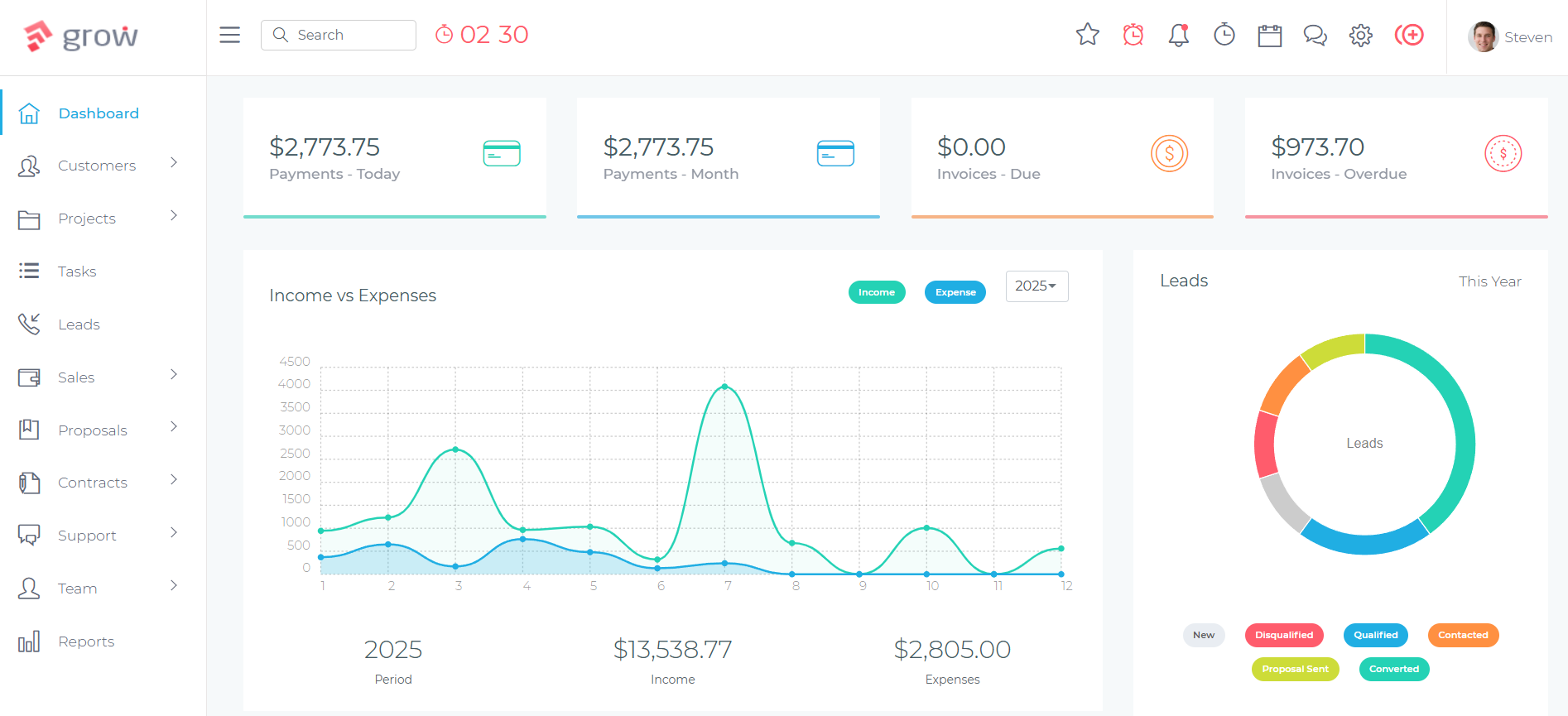
Interior designers spend a significant portion of every project waiting for client approval — on design concepts, furniture selections, change orders, and phase sign-offs — before work can proceed. Grow CRM’s client portal gives clients a secure, branded login where they can view project status, review tasks awaiting their input, and access invoices and contracts without requiring an email chain for each interaction. Formalising the approval process through the portal creates a timestamped record of client decisions that is useful when disputes arise about scope or direction.
Time Tracking for Billable Consultation Hours
For designers billing on a time-and-materials basis — or tracking hours internally for profitability analysis — Grow CRM’s time tracking module records hours against specific projects and tasks. Time entries can be pulled directly onto client invoices, enabling transparent billing for consultation time, revision rounds, and project management without maintaining a separate timesheet tool. This is particularly valuable for designers who charge an hourly consultation rate on top of a design fee, or who want to understand where their time is actually going across their project portfolio.
Milestone and Procurement Invoicing
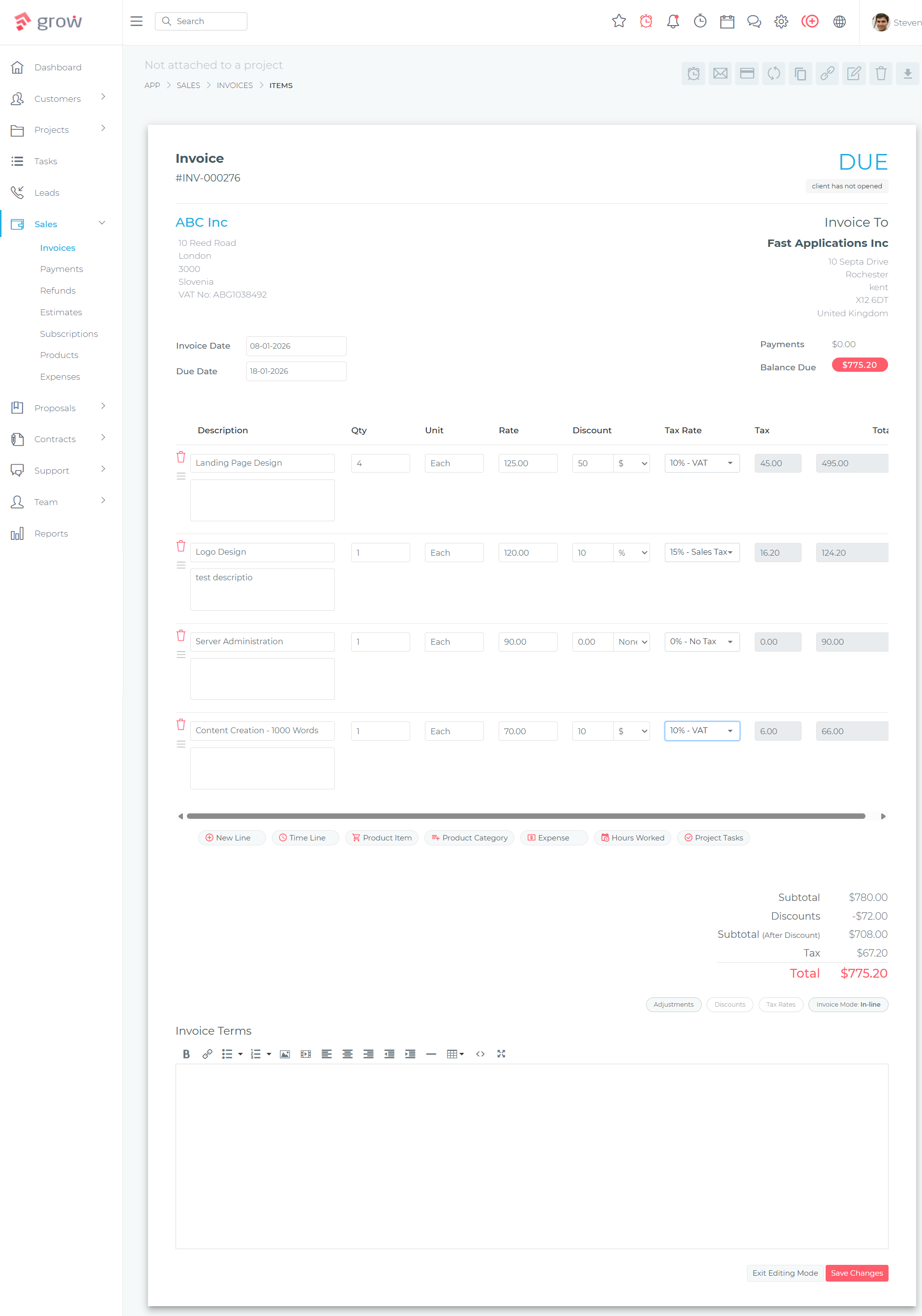
Grow CRM’s invoicing module supports milestone-based billing — allowing studios to send invoices at defined project stages rather than issuing a single invoice at the end of a long engagement. A typical billing structure might include a retainer on contract signing, a design fee payment at concept approval, and a final balance on installation completion. Separate procurement invoices can be structured with clear line items for each product, the quantity, and the client price — making procurement billing transparent and reconcilable without a full accounting system. Stripe, PayPal, Mollie, and other payment gateways are supported for online payment collection.
The Interior Design Project Lifecycle in Grow CRM
Grow CRM’s interconnected modules support every stage of an interior design engagement within a single platform — from the initial enquiry through the final payment — without requiring a separate tool at any step. A proposal accepted in the system automatically creates a project; tasks within that project drive the billing timeline; and all client history, contracts, and invoices remain connected to one client record throughout.
The following workflow illustrates how a residential project moves through Grow CRM from start to finish:
- Enquiry captured — New client enquiry received via web form or manual entry. Project type, estimated budget, timeline, and referral source noted in the lead record. Assigned to a sales stage.
- Initial consultation booked — Follow-up task created and completed. Post-consultation notes recorded. Lead advanced to “Proposal” pipeline stage.
- Design service proposal sent — Branded proposal created with scope of services, phase descriptions, fees, and payment schedule. Client reviews and approves through the portal.
- Design contract issued and signed — Contract generated from template and sent for e-signature. Stored in the client record on return. Project automatically created from the approved proposal.
- Project phases set up — Project opened with phases: Concept, Schematic Design, Design Development, Procurement, and Installation. Tasks and milestones assigned per phase with deadlines.
- Retainer invoice sent — First milestone invoice issued on contract execution. Payment collected online. Invoice linked to the project record.
- Design phases executed and tracked — Tasks completed per phase. Client approval tasks visible in the portal. Time recorded for hourly consultation components. Revision rounds tracked as tasks within the relevant phase.
- Mid-project invoice issued — Second milestone invoice sent on completion of design development or at another defined project stage. Automatically generated from the billing schedule.
- Procurement invoices sent — Separate invoices created for each procurement batch — furniture, lighting, accessories. Itemised line items show each product and client price.
- Installation and final billing — Final tasks completed through the installation phase. Final balance invoiced. Project marked complete. Client record retained for future work and referrals.
This end-to-end workflow — where every stage feeds into the next and all records remain connected — represents the core operational advantage of an integrated platform over a collection of separate tools.
Interior Design CRM Software Compared
Interior design software divides into two broad categories: general-purpose business management platforms that work across industries, and design-specific tools built around procurement, product curation, and design-industry accounting. Grow CRM leads the first category on value and breadth; Studio Designer, Mydoma Studio, Design Manager, and Houzz Pro serve specific segments of the second.
Studio Designer
Studio Designer is built specifically for interior design firms, with its deepest capabilities in procurement management and general ledger accounting — features that go well beyond what most general business platforms provide. The platform integrates AI-powered product catalog tools, StudioPay payment processing, and financial reporting designed for design-industry billing structures. Studio Designer pricing starts at $69 per user per month on annual billing for the Essentials plan and rises to $109 per user per month for the Premier tier. A five-person studio pays $4,140–$6,540 per year at the entry plan, increasing by $828–$1,308 for every additional designer added.
Studio Designer is a strong fit for established interior design firms with significant procurement volume who need accounting software tightly integrated with their project workflow. It is overkill for smaller studios primarily managing client communication, project tracking, and billing without complex procurement accounting requirements.
Mydoma Studio
Mydoma Studio focuses on the client-facing and visual side of interior design — design boards, product sourcing, client collaboration, and branded presentations. Its client portal is designed specifically for sharing design concepts and getting approval on product selections, which is more specialised than the general-purpose portal in Grow CRM. Mydoma Studio pricing is $58 per user per month on annual billing, with a one-time onboarding fee of $300. A three-person studio pays $2,088 per year (plus onboarding), growing by $696 per year for each additional user.
Mydoma Studio excels for designers whose client relationships are heavily centred on visual design presentation and product selection. Studios primarily looking for proposal management, project tracking, and billing will pay for features they may not use, while missing some operational depth available in broader platforms.
Design Manager
Design Manager is a project management and accounting platform for interior design firms, with particular strength in purchasing workflows, time billing, and client payment management. It is optimised for US-based firms with structured procurement processes. Design Manager pricing is $79 per user per month with a 7-day free trial. It does not include a lead management or visual proposal workflow, making it less suited to studios that need to manage the front-end of their client pipeline alongside project delivery and billing.
Houzz Pro
Houzz Pro integrates CRM, project management, proposals, 3D floor plans, mood boards, and financial tools within the Houzz marketplace ecosystem. Its connection to the Houzz product directory, website building tools, and marketing features makes it particularly valuable for designers who generate significant client enquiries through the Houzz platform and want their business tools within that same environment. Houzz Pro offers three tiers — Essential, Custom, and Enterprise — scaled by annual project volume; pricing is not publicly listed and requires a consultation. Studios that do not rely on Houzz for client acquisition pay for marketplace integration they may not use.
Dubsado
Dubsado is a cloud-based client workflow platform widely used by creative professionals — photographers, coaches, event planners, and designers — with strong automation capabilities and a polished client-facing experience. Its conditional workflow automation and form-based onboarding sequences are more sophisticated than Grow CRM’s automation tools. Dubsado pricing is $335 per year for the Starter plan and $525 per year for Premier; additional users beyond three included seats cost $25–$60 per month depending on team size. A full head-to-head breakdown of the two platforms is available in the detailed Dubsado comparison.
Feature Comparison for Interior Design Businesses
The following table compares key capabilities relevant to interior design practice across the five platforms reviewed. Grow CRM’s breadth at a flat one-time price is its primary structural advantage — design studios add staff without triggering additional software costs, and the full platform is available from day one without tiered feature gating.
| Feature | Grow CRM | Studio Designer | Mydoma Studio | Design Manager | Dubsado |
|---|---|---|---|---|---|
| Pricing model | $49 one-time | $69–$109/user/mo | $58/user/mo | $79/user/mo | $335–$525/yr |
| Per-user fees | None — unlimited users | Yes | Yes | Yes | Yes (beyond 3) |
| Self-hosted / data ownership | Yes — your server | No — cloud | No — cloud | No — cloud | No — cloud |
| Proposals | Yes | Yes | Yes | Limited | Yes |
| Contracts with e-signature | Yes | Yes | No | No | Yes |
| Client portal | Yes | Yes | Yes | Yes | Yes |
| Multi-phase project management | Yes | Yes | Yes | Yes | Basic |
| Time tracking | Yes | No | No | Yes | No |
| Milestone invoicing | Yes | Yes | Yes | Yes | Yes |
| Lead management pipeline | Yes | No | No | No | Basic |
| Helpdesk / support tickets | Yes | No | No | No | No |
| Visual design boards / mood boards | No | No | Yes | No | No |
| Full accounting (general ledger) | No | Yes | No | Yes | No |
| Procurement workflow | Via invoicing | Yes — dedicated | Yes — dedicated | Yes — dedicated | No |
| 3D floor plans | No | No | No | No | No |
| Workflow automation | Yes | Limited | Limited | Limited | Yes — advanced |
| API access | Yes | Limited | No | No | No |
Who Should Choose Grow CRM for Their Interior Design Business?
Grow CRM is the strongest fit for interior designers and studios whose primary need is integrated business management — proposals, contracts, project tracking, and billing all connected — rather than design-specific visual tools or specialist procurement accounting. It is particularly well-suited to studios where per-user pricing from design-specific platforms would cost $3,000–$10,000 or more per year for a team of three to ten people.
Specifically, Grow CRM works best for:
- Independent interior designers and sole practitioners who need professional proposals, e-sign contracts, and invoicing at a cost that makes sense for a one-person business
- Small design studios growing their teams — adding junior designers, project managers, or administrative support does not trigger additional software costs
- Designers managing project-based billing with milestone invoices, separate procurement charges, and time-tracked consultation hours across multi-phase engagements
- Studios replacing multiple disconnected tools — combining a proposal tool, a project app, an invoicing platform, and contract folders into one platform to eliminate data fragmentation and manual re-entry
- Designers who prioritise data ownership — all client records, signed contracts, project history, and financial data stored on a server they control, not in a third-party cloud service that can change its terms, pricing, or availability
Creative professionals in adjacent industries — photographers and videographers and wedding planners managing event production — face nearly identical workflow challenges and have found Grow CRM a strong operational fit, which speaks to its usefulness across the broader creative services sector. The same platform is used by auto repair shops and automotive service businesses to manage ongoing customer relationships, multi-service invoicing, and recurring billing — demonstrating how a single flexible platform can serve very different service industry workflows.
When a Design-Specific Platform Is the Better Choice
Grow CRM is not the right tool for every interior design practice. Consider a design-specific platform instead if:
- Your studio relies on visual design boards, product clipper tools, or structured mood board presentations as core client deliverables — Mydoma Studio is purpose-built for that workflow
- Your firm manages significant procurement volume and needs a full general ledger accounting system integrated with procurement workflows and financial reporting — Studio Designer or Design Manager provide that depth
- You generate most of your enquiries through Houzz and want CRM, marketing, website, and project tools within the same Houzz ecosystem — Houzz Pro is the natural fit for that acquisition channel
- Your business relies heavily on conditional automation sequences — multi-step client onboarding workflows and automated follow-up chains — where Dubsado’s automation capabilities are more sophisticated
You can evaluate Grow CRM’s platform against your actual workflow requirements by exploring the live demo before purchasing.
Frequently Asked Questions
What is the best CRM for interior designers?
The best CRM for interior designers depends on studio size and primary workflow needs. Grow CRM is the strongest all-in-one option for independent designers and small studios, covering proposals, contracts, project management, client portal, time tracking, and invoicing for a one-time $49 payment with no per-user fees. Studio Designer, Mydoma Studio, and Design Manager offer deeper design-specific features at $58–$109 per user per month.
Does Grow CRM work for interior design businesses?
Yes. Grow CRM handles the core requirements of interior design business management — proposals, contracts with e-signature, multi-phase project tracking, client portal, time tracking, and milestone invoicing — in a single self-hosted platform. It does not include visual design board tools or dedicated procurement accounting found in platforms like Mydoma Studio or Studio Designer, but covers the full client relationship and billing workflow effectively for most design studios.
How do interior designers handle procurement billing in a CRM?
Interior designers bill clients for furniture, fixtures, and equipment purchased on their behalf — typically at a designer markup applied above trade pricing. In Grow CRM, procurement invoices are created with itemised line items covering each product, quantity, and client price. These invoices are sent through the same system as service fees, paid online, and stored against the client record — keeping all project-related billing in one place without a separate accounting tool.
What features should an interior design CRM include?
An interior design CRM should include: proposal creation with client approval tracking, contract management with e-signature, multi-phase project management, a client-facing portal for project visibility and approvals, time tracking for billable hours, milestone and procurement invoicing, and lead management for tracking enquiries to signed contracts. Platforms that combine all of these remove the data fragmentation that arises from maintaining separate tools for each workflow stage.
How much does CRM software for interior designers cost?
Interior design CRM software ranges from $49 as a one-time payment (Grow CRM, unlimited users) to $58–$109 per user per month for design-specific platforms. A three-person studio on Mydoma Studio pays $2,088 per year; on Studio Designer’s entry plan, the same team pays $2,484 per year. Both figures increase with every additional team member. Grow CRM covers the equivalent client management and billing workflow for a single $49 payment with no annual renewal or per-user charge.
Can a CRM replace separate proposal and invoicing tools for an interior design studio?
Yes — an integrated CRM like Grow CRM combines proposal creation, contract management, project tracking, and invoicing in one platform, eliminating the need for separate tools at each stage. The primary benefit is connected data: a client’s proposal history, signed contracts, project milestones, and invoice records all exist in the same system, making it straightforward to review the full relationship without switching between applications or manually re-entering information from one tool into another.
Does Grow CRM include a client portal for interior design clients?
Yes. Grow CRM’s client portal gives clients a secure login to view their project status, access assigned tasks, review invoices, and interact with the studio without relying on email for every update. Interior design clients can use the portal to track project phases, review tasks awaiting approval, and download signed contracts and invoices — reducing the approval-by-email cycle that creates version confusion and delays in multi-phase design projects.
Is Grow CRM suitable for a solo interior designer?
Yes. Grow CRM is particularly well-suited to solo interior designers and small practices because there are no per-user charges — the $49 one-time payment covers the full platform regardless of team size. A solo designer pays $49 once and retains access indefinitely, compared to $335–$525 per year on Dubsado or $696+ per year on Mydoma Studio. The full feature set is available from day one: proposals, contracts, project management, client portal, and invoicing.
What does Studio Designer offer that Grow CRM doesn’t?
Studio Designer includes a full general ledger accounting system, AI-powered product catalog management, dedicated procurement workflow tools built for design-industry purchasing, and financial reporting depth well beyond what Grow CRM provides. It is better suited to established design firms with substantial procurement volume that need accounting software integrated directly with project and purchasing workflows. Grow CRM covers proposals, contracts, project management, and invoicing effectively but does not replace a full accounting system.
How does Grow CRM handle design revisions and change orders?
Grow CRM tracks design revisions through task management and project phase updates rather than dedicated change order forms. Revision rounds are logged as tasks within the relevant project phase, with time tracking capturing the hours involved in each cycle. Additional work from client-requested changes is added as line items on subsequent invoices. Studios requiring formal change order documentation with client sign-off can manage this through contract amendments stored in the contracts module, linked to the original project record.
